cmux
Open-source Mac and Linux app. Agents run on your computer, on your own server or in the vendor's cloud.
Product websitecmux.com Compare with others Missing or wrong data?
- Desktop app
- Mac and Linux
- Browser
- Not listed
- Phone
- IPhone
- Command line
- Yes
- Agents
- Claude Code, Codex, Cursor Agent, Gemini CLI, OpenCode, Pi, Grok, Aider and Antigravity
- Your subscription
- Works with your own plan
- Agents run
- On your computer, on your own server and in the vendor's cloud
- Laptop closed
- Keeps going
- Isolation
- Worktree and VM
- Parallel agents
- Yes
- Scheduled runs
- Yes
- Coordinator agent
- Not listed
- Built-in issues
- Yes
- Pull requests
- Not listed
- Review screen
- Yes
- Team
- Roles and SSO
- Self-hosting
- Yes
- Licence
- GPL-3.0-or-later
- Price from
- Free
- How it charges
- Free plan, subscription, per seat, per machine or compute and bring your own key
- Paid plans from
- $11–20/month
Receipts
- Checked
- · oldest answer 2026-11-07
- Findings
- 30 published · 23 cross-checked by a second agent · read them all
- Sources
- 26 public pages on 2 sites: github.com, cmux.com
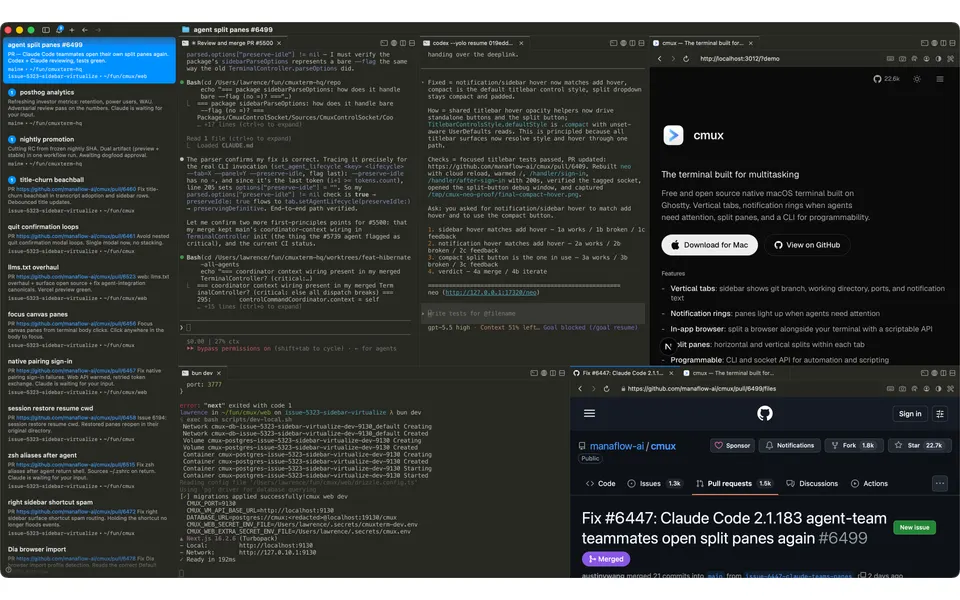
- Screenshot
- github.com, retrieved · first party repository · shows appearance, not capability
- Data
- /products/cmux.json · .md
- Method
- Same rules for all 103 researched ADEs. How we check · Report wrong data
What it does
Where you use it
Mac terminal, iOS TestFlight and Linux Browser nightly are distinct clients.
Source and scope for Where you use itAgents it runs
cmux runs terminal coding agents including Claude Code, Codex, OpenCode, Gemini CLI, Cursor Agent, Aider, Grok and Pi; orchestration belongs to the launched tool. cmux v0.65.2.2 bundles an agy wrapper and installs it into shell integration to run the real Antigravity CLI with cmux hooks and launch metadata.
Source and scope for Agents it runsAccounts and subscriptions
cmux runs agent CLIs unmodified in its terminal, so each agent's own sign-in, including a subscription login, applies. Not tested.
Source and scope for Accounts and subscriptionsWhere agents run
cmux supports local terminals, user-owned SSH hosts and paid early-access persistent Cloud Linux machines. Remote work can continue with the Mac offline.
Source and scope for Where agents runHow work is kept apart
Cloud machines use microVMs as their security boundary, not containers on a shared kernel. The local Worktree Agents recipe opens a workspace rooted in a selected Git worktree; that is file separation rather than sandboxing.
Source and scope for How work is kept apartParallel work
cmux documents parallel CLI sessions in split terminal workspaces.
Source and scope for Parallel workScheduled runs
cmux automation rules match coding-agent and workspace events and execute configured shell/RPC actions without a person starting each one. This is app-local event automation; no calendar scheduler or hosted always-on service is claimed.
Source and scope for Scheduled runsGit and pull requests
The sidebar shows linked GitHub PR metadata.
Source and scope for Git and pull requestsLicence and source
Client code is GPL-3.0-or-later; named server directories use BUSL-1.1.
Source and scope for Licence and sourcePrice
Free macOS app (local agents use your own API keys); paid Cloud VM plans are Plus $15/mo, Pro $50/mo ($480/yr), Max $200/mo ($1,920/yr) and Team $60/user/mo, with Enterprise via sales.
Source and scope for PriceTyped filters
Every value links to its receipt below. Read plan and surface restrictions before using a filter to decide.
| Filter | Value |
|---|---|
| Desktop OS: macOS | Yes cross-checked |
| Desktop OS: Windows | No cross-checked |
| Desktop OS: Linux | Yes cross-checked |
| Web client | Unknown |
| Phone access: Native iOS | Yes cross-checked |
| Phone access: Native Android | Unknown |
| Phone access: Phone browser | Unknown |
| CLI | Yes cross-checked |
| Coding agents: Claude Code | Yes cross-checked |
| Coding agents: Codex | Yes cross-checked |
| Coding agents: Cursor Agent | Yes cross-checked |
| Coding agents: Gemini CLI | Yes cross-checked |
| Coding agents: OpenCode | Yes cross-checked |
| Coding agents: Pi | Yes cross-checked |
| Coding agents: Grok | Yes cross-checked |
| Coding agents: Aider | Yes cross-checked |
| Coding agents: Antigravity | Yes cross-checked |
| Use my subscription | Yes cross-checked |
| Where agents run: On your computer | Yes cross-checked |
| Where agents run: On your own server | Yes cross-checked |
| Where agents run: In the vendor's cloud | Yes cross-checked |
| Workspace isolation: Git worktree | Yes |
| Workspace isolation: Container | No |
| Workspace isolation: VM or microVM | Yes |
| Parallel runs | Yes cross-checked |
| Coordinator | Unknown |
| Native issue tracking | Yes |
| Unattended triggers | Yes |
| Shared prompting | Unknown |
| Team roles | Yes |
| SSO | Yes |
| Pull request workflow | Unknown |
| Review interface | Yes |
| Product license: Apache-2.0 | No. GPL-3.0-or-later cross-checked |
| Product license: MIT | No. GPL-3.0-or-later cross-checked |
| Product license: GPL-3.0 | No. GPL-3.0-or-later cross-checked |
| Product license: GPL-3.0-or-later | Yes. GPL-3.0-or-later cross-checked |
| Product license: AGPL-3.0 | No. GPL-3.0-or-later cross-checked |
| Product license: AGPL-3.0-or-later | No. GPL-3.0-or-later cross-checked |
| Product license: Elastic License 2.0 | No. GPL-3.0-or-later cross-checked |
| Product license: Custom terms | No. GPL-3.0-or-later cross-checked |
| Product license: Proprietary | No. GPL-3.0-or-later cross-checked |
| Self-hosting | Yes cross-checked |
| Telemetry opt-out | Yes cross-checked |
| Free access | Yes cross-checked |
| Starting price: Free | Yes. Free cross-checked |
| Starting price: Up to $20/month | No. Free cross-checked |
| Starting price: $21–40/month | No. Free cross-checked |
| Starting price: $41–100/month | No. Free cross-checked |
| Starting price: Over $100/month | No. Free cross-checked |
| Starting price: Contact for pricing | No. Free cross-checked |
| Pricing model: Free, no paid plan | No cross-checked |
| Pricing model: Free plan | Yes cross-checked |
| Pricing model: Subscription | Yes cross-checked |
| Pricing model: Per seat | Yes cross-checked |
| Pricing model: Usage-based | No |
| Pricing model: Per machine or compute | Yes cross-checked |
| Pricing model: Bring your own key | Yes cross-checked |
| Pricing model: One-time purchase | Unknown |
| Paid plans from: No paid plan | No. $11–20/month |
| Paid plans from: $10 or less/month | No. $11–20/month |
| Paid plans from: $11–20/month | Yes. $11–20/month |
| Paid plans from: $21–40/month | No. $11–20/month |
| Paid plans from: $41–100/month | No. $11–20/month |
| Paid plans from: Over $100/month | No. $11–20/month |
| Paid plans from: Contact sales | No. $11–20/month |
| Lifecycle status: Active | Unknown |
| Lifecycle status: Sunsetting | Unknown |
| Keeps going with laptop closed | Yes cross-checked |
| Open-source license | Yes. GPL-3.0-or-later cross-checked |
| Any desktop app | Yes cross-checked |
| Paid plan up to $20/month | Yes. $11–20/month |
| Paid plan up to $40/month | Yes. $11–20/month |
| Any phone client | Yes cross-checked |
Filter receipts
Desktop OS: macOS: Yes cross-checked
Desktop OS: macOS
Typed value: Yes.
Mac terminal, iOS TestFlight and Linux Browser nightly are distinct clients.
- Desktop os: Mac terminal; Linux x64 Browser nightly.
- Mobile apps: iPhone/iPad TestFlight terminal mirror.
- Cross device continuity: iOS mirrors Mac workspaces over the user network; handoff was not tested.
- The remaining atomic questions and the rubric scenario are unverified. Documentation is not a successful product test.
- The README FAQ says macOS only for now; no Windows build is offered. A Linux browser nightly exists separately.
-
Finding: Mac terminal uses Swift/AppKit and libghostty, CLI/socket automation, attention notifications and scriptable browser panes. cmux ssh connects an existing remote host; Claude Teams supplies provider-owned teammate orchestration.
-
Finding: TestFlight iPhone/iPad client mirrors Mac terminal workspaces over Tailscale or local networking.
-
Finding: Linux x64 Chromium/workspace nightly has .run and .deb downloads. It is a distinct client from the Swift Mac terminal.
Desktop OS: Windows: No cross-checked
Desktop OS: Windows
Typed value: No.
Mac terminal, iOS TestFlight and Linux Browser nightly are distinct clients.
- The remaining atomic questions and the rubric scenario are unverified. Documentation is not a successful product test.
- The README FAQ says macOS only for now; no Windows build is offered. A Linux browser nightly exists separately.
-
Finding: The FAQ says cmux is macOS only for now, as a native Swift and AppKit app; no Windows build is offered.
Desktop OS: Linux: Yes cross-checked
Desktop OS: Linux
Typed value: Yes.
Mac terminal, iOS TestFlight and Linux Browser nightly are distinct clients.
- Desktop os: Mac terminal; Linux x64 Browser nightly.
- Mobile apps: iPhone/iPad TestFlight terminal mirror.
- Cross device continuity: iOS mirrors Mac workspaces over the user network; handoff was not tested.
- The remaining atomic questions and the rubric scenario are unverified. Documentation is not a successful product test.
- The README FAQ says macOS only for now; no Windows build is offered. A Linux browser nightly exists separately.
-
Finding: Mac terminal uses Swift/AppKit and libghostty, CLI/socket automation, attention notifications and scriptable browser panes. cmux ssh connects an existing remote host; Claude Teams supplies provider-owned teammate orchestration.
-
Finding: TestFlight iPhone/iPad client mirrors Mac terminal workspaces over Tailscale or local networking.
-
Finding: Linux x64 Chromium/workspace nightly has .run and .deb downloads. It is a distinct client from the Swift Mac terminal.
Phone access: Native iOS: Yes cross-checked
Phone access: Native iOS
Typed value: Yes.
Mac terminal, iOS TestFlight and Linux Browser nightly are distinct clients.
- Desktop os: Mac terminal; Linux x64 Browser nightly.
- Mobile apps: iPhone/iPad TestFlight terminal mirror.
- Cross device continuity: iOS mirrors Mac workspaces over the user network; handoff was not tested.
- The remaining atomic questions and the rubric scenario are unverified. Documentation is not a successful product test.
- The README FAQ says macOS only for now; no Windows build is offered. A Linux browser nightly exists separately.
-
Finding: Mac terminal uses Swift/AppKit and libghostty, CLI/socket automation, attention notifications and scriptable browser panes. cmux ssh connects an existing remote host; Claude Teams supplies provider-owned teammate orchestration.
-
Finding: TestFlight iPhone/iPad client mirrors Mac terminal workspaces over Tailscale or local networking.
-
Finding: Linux x64 Chromium/workspace nightly has .run and .deb downloads. It is a distinct client from the Swift Mac terminal.
CLI: Yes cross-checked
CLI
Typed value: Yes.
CLI and socket operations automate workspaces, panes and browser actions.
- Cli: cmux command.
- Api: Socket API.
- Operations: Create workspaces, split panes, send input and automate the browser.
- The remaining atomic questions and the rubric scenario are unverified. Documentation is not a successful product test.
-
Finding: Mac terminal uses Swift/AppKit and libghostty, CLI/socket automation, attention notifications and scriptable browser panes. cmux ssh connects an existing remote host; Claude Teams supplies provider-owned teammate orchestration.
Coding agents: Claude Code: Yes cross-checked
Coding agents: Claude Code
Typed value: Yes.
cmux runs terminal coding agents including Claude Code, Codex, OpenCode, Gemini CLI, Cursor Agent, Aider, Grok and Pi; orchestration belongs to the launched tool. cmux v0.65.2.2 bundles an agy wrapper and installs it into shell integration to run the real Antigravity CLI with cmux hooks and launch metadata.
- Harnesses: Terminal coding-agent integrations include Claude Code, Codex, OpenCode, Gemini CLI, Cursor Agent, Aider, Grok, Pi and Antigravity CLI.
- Session integration: Terminal commands and hooks; Claude Teams can open teammate splits.
- The remaining atomic questions and the rubric scenario are unverified. Documentation is not a successful product test.
- Only the named atomic facts are established by documentation. Remaining rubric scenarios and unknown answers were not demonstrated.
- Antigravity runs in terminal panes using the separately installed CLI; orchestration remains the launched agent's responsibility.
-
Finding: Mac terminal uses Swift/AppKit and libghostty, CLI/socket automation, attention notifications and scriptable browser panes. cmux ssh connects an existing remote host; Claude Teams supplies provider-owned teammate orchestration.
Coding agents: Codex: Yes cross-checked
Coding agents: Codex
Typed value: Yes.
cmux runs terminal coding agents including Claude Code, Codex, OpenCode, Gemini CLI, Cursor Agent, Aider, Grok and Pi; orchestration belongs to the launched tool. cmux v0.65.2.2 bundles an agy wrapper and installs it into shell integration to run the real Antigravity CLI with cmux hooks and launch metadata.
- Harnesses: Terminal coding-agent integrations include Claude Code, Codex, OpenCode, Gemini CLI, Cursor Agent, Aider, Grok, Pi and Antigravity CLI.
- Session integration: Terminal commands and hooks; Claude Teams can open teammate splits.
- The remaining atomic questions and the rubric scenario are unverified. Documentation is not a successful product test.
- Only the named atomic facts are established by documentation. Remaining rubric scenarios and unknown answers were not demonstrated.
- Antigravity runs in terminal panes using the separately installed CLI; orchestration remains the launched agent's responsibility.
-
Finding: Mac terminal uses Swift/AppKit and libghostty, CLI/socket automation, attention notifications and scriptable browser panes. cmux ssh connects an existing remote host; Claude Teams supplies provider-owned teammate orchestration.
Coding agents: Cursor Agent: Yes cross-checked
Coding agents: Cursor Agent
Typed value: Yes.
cmux runs terminal coding agents including Claude Code, Codex, OpenCode, Gemini CLI, Cursor Agent, Aider, Grok and Pi; orchestration belongs to the launched tool. cmux v0.65.2.2 bundles an agy wrapper and installs it into shell integration to run the real Antigravity CLI with cmux hooks and launch metadata.
- The remaining atomic questions and the rubric scenario are unverified. Documentation is not a successful product test.
- Only the named atomic facts are established by documentation. Remaining rubric scenarios and unknown answers were not demonstrated.
- Antigravity runs in terminal panes using the separately installed CLI; orchestration remains the launched agent's responsibility.
-
Finding: Session snapshots restore layout, directories, best-effort scrollback and browser history, not arbitrary live process checkpoints. Supported agent IDs enable native resume commands. Export/import uses versioned JSON with untrusted-file command restrictions. Remote tmux or persistent Cloud VMs can stay online while the Mac is offline. The terminal works with Gemini CLI, Aider, Cursor Agent, Grok and Pi in addition to Claude Code, Codex and OpenCode.
Coding agents: Gemini CLI: Yes cross-checked
Coding agents: Gemini CLI
Typed value: Yes.
cmux runs terminal coding agents including Claude Code, Codex, OpenCode, Gemini CLI, Cursor Agent, Aider, Grok and Pi; orchestration belongs to the launched tool. cmux v0.65.2.2 bundles an agy wrapper and installs it into shell integration to run the real Antigravity CLI with cmux hooks and launch metadata.
- The remaining atomic questions and the rubric scenario are unverified. Documentation is not a successful product test.
- Only the named atomic facts are established by documentation. Remaining rubric scenarios and unknown answers were not demonstrated.
- Antigravity runs in terminal panes using the separately installed CLI; orchestration remains the launched agent's responsibility.
-
Finding: Session snapshots restore layout, directories, best-effort scrollback and browser history, not arbitrary live process checkpoints. Supported agent IDs enable native resume commands. Export/import uses versioned JSON with untrusted-file command restrictions. Remote tmux or persistent Cloud VMs can stay online while the Mac is offline. The terminal works with Gemini CLI, Aider, Cursor Agent, Grok and Pi in addition to Claude Code, Codex and OpenCode.
Coding agents: OpenCode: Yes cross-checked
Coding agents: OpenCode
Typed value: Yes.
cmux runs terminal coding agents including Claude Code, Codex, OpenCode, Gemini CLI, Cursor Agent, Aider, Grok and Pi; orchestration belongs to the launched tool. cmux v0.65.2.2 bundles an agy wrapper and installs it into shell integration to run the real Antigravity CLI with cmux hooks and launch metadata.
- Harnesses: Terminal coding-agent integrations include Claude Code, Codex, OpenCode, Gemini CLI, Cursor Agent, Aider, Grok, Pi and Antigravity CLI.
- Session integration: Terminal commands and hooks; Claude Teams can open teammate splits.
- The remaining atomic questions and the rubric scenario are unverified. Documentation is not a successful product test.
- Only the named atomic facts are established by documentation. Remaining rubric scenarios and unknown answers were not demonstrated.
- Antigravity runs in terminal panes using the separately installed CLI; orchestration remains the launched agent's responsibility.
-
Finding: Mac terminal uses Swift/AppKit and libghostty, CLI/socket automation, attention notifications and scriptable browser panes. cmux ssh connects an existing remote host; Claude Teams supplies provider-owned teammate orchestration.
Coding agents: Pi: Yes cross-checked
Coding agents: Pi
Typed value: Yes.
cmux runs terminal coding agents including Claude Code, Codex, OpenCode, Gemini CLI, Cursor Agent, Aider, Grok and Pi; orchestration belongs to the launched tool. cmux v0.65.2.2 bundles an agy wrapper and installs it into shell integration to run the real Antigravity CLI with cmux hooks and launch metadata.
- The remaining atomic questions and the rubric scenario are unverified. Documentation is not a successful product test.
- Only the named atomic facts are established by documentation. Remaining rubric scenarios and unknown answers were not demonstrated.
- Antigravity runs in terminal panes using the separately installed CLI; orchestration remains the launched agent's responsibility.
-
Finding: Session snapshots restore layout, directories, best-effort scrollback and browser history, not arbitrary live process checkpoints. Supported agent IDs enable native resume commands. Export/import uses versioned JSON with untrusted-file command restrictions. Remote tmux or persistent Cloud VMs can stay online while the Mac is offline. The terminal works with Gemini CLI, Aider, Cursor Agent, Grok and Pi in addition to Claude Code, Codex and OpenCode.
Coding agents: Grok: Yes cross-checked
Coding agents: Grok
Typed value: Yes.
cmux runs terminal coding agents including Claude Code, Codex, OpenCode, Gemini CLI, Cursor Agent, Aider, Grok and Pi; orchestration belongs to the launched tool. cmux v0.65.2.2 bundles an agy wrapper and installs it into shell integration to run the real Antigravity CLI with cmux hooks and launch metadata.
- The remaining atomic questions and the rubric scenario are unverified. Documentation is not a successful product test.
- Only the named atomic facts are established by documentation. Remaining rubric scenarios and unknown answers were not demonstrated.
- Antigravity runs in terminal panes using the separately installed CLI; orchestration remains the launched agent's responsibility.
-
Finding: Session snapshots restore layout, directories, best-effort scrollback and browser history, not arbitrary live process checkpoints. Supported agent IDs enable native resume commands. Export/import uses versioned JSON with untrusted-file command restrictions. Remote tmux or persistent Cloud VMs can stay online while the Mac is offline. The terminal works with Gemini CLI, Aider, Cursor Agent, Grok and Pi in addition to Claude Code, Codex and OpenCode.
Coding agents: Aider: Yes cross-checked
Coding agents: Aider
Typed value: Yes.
cmux runs terminal coding agents including Claude Code, Codex, OpenCode, Gemini CLI, Cursor Agent, Aider, Grok and Pi; orchestration belongs to the launched tool. cmux v0.65.2.2 bundles an agy wrapper and installs it into shell integration to run the real Antigravity CLI with cmux hooks and launch metadata.
- The remaining atomic questions and the rubric scenario are unverified. Documentation is not a successful product test.
- Only the named atomic facts are established by documentation. Remaining rubric scenarios and unknown answers were not demonstrated.
- Antigravity runs in terminal panes using the separately installed CLI; orchestration remains the launched agent's responsibility.
-
Finding: Session snapshots restore layout, directories, best-effort scrollback and browser history, not arbitrary live process checkpoints. Supported agent IDs enable native resume commands. Export/import uses versioned JSON with untrusted-file command restrictions. Remote tmux or persistent Cloud VMs can stay online while the Mac is offline. The terminal works with Gemini CLI, Aider, Cursor Agent, Grok and Pi in addition to Claude Code, Codex and OpenCode.
Coding agents: Antigravity: Yes cross-checked
Coding agents: Antigravity
Typed value: Yes.
cmux runs terminal coding agents including Claude Code, Codex, OpenCode, Gemini CLI, Cursor Agent, Aider, Grok and Pi; orchestration belongs to the launched tool. cmux v0.65.2.2 bundles an agy wrapper and installs it into shell integration to run the real Antigravity CLI with cmux hooks and launch metadata.
- Harnesses: Terminal coding-agent integrations include Claude Code, Codex, OpenCode, Gemini CLI, Cursor Agent, Aider, Grok, Pi and Antigravity CLI.
- The remaining atomic questions and the rubric scenario are unverified. Documentation is not a successful product test.
- Only the named atomic facts are established by documentation. Remaining rubric scenarios and unknown answers were not demonstrated.
- Antigravity runs in terminal panes using the separately installed CLI; orchestration remains the launched agent's responsibility.
-
cmux Antigravity support at v0.65.2.2
Finding: cmux v0.65.2.2 bundles an agy wrapper and installs it into shell integration to run the real Antigravity CLI with cmux hooks and launch metadata.
-
cmux Antigravity support at v0.65.2.2
Finding: cmux v0.65.2.2 bundles an agy wrapper and installs it into shell integration to run the real Antigravity CLI with cmux hooks and launch metadata.
-
cmux Antigravity support at v0.65.2.2
Finding: cmux v0.65.2.2 bundles an agy wrapper and installs it into shell integration to run the real Antigravity CLI with cmux hooks and launch metadata.
Use my subscription: Yes cross-checked
Use my subscription
Typed value: Yes.
cmux runs agent CLIs unmodified in its terminal, so each agent's own sign-in, including a subscription login, applies. Not tested.
- Agent subscriptions: Agent CLIs such as Claude Code and Codex run unmodified in cmux terminals, so their native sign-in, including a subscription login, applies. Not tested; plan terms not checked.
- Inferred from cmux running agent CLIs unmodified; subscription sign-in was not tested and provider plan terms were not checked. The pricing page describes local agents as using your own keys.
-
cmux README FAQ, coding agents
Finding: cmux is a terminal, so any agent CLI that runs in a terminal, such as Claude Code, Codex, Gemini CLI or Cursor Agent, runs in it unmodified.
Where agents run: On your computer: Yes cross-checked
Where agents run: On your computer
Typed value: Yes.
cmux supports local terminals, user-owned SSH hosts and paid early-access persistent Cloud Linux machines. Remote work can continue with the Mac offline.
- Local: Local terminal commands.
- Byo remote: cmux ssh user@remote.
- Provisioning: SSH connects an existing machine. Vendor-provisioned cmux Cloud machines are documented separately through cmux vm new; they were not created or tested.
- The remaining atomic questions and the rubric scenario are unverified. Documentation is not a successful product test.
- cmux Cloud machines are documented but were not exercised, and this profile does not yet scope them as a surface.
- cmux Cloud is early access: it requires a paid plan, a signed-in Mac app and Settings > Beta Features > Cloud Machines, and an organization policy can disable it. Free accounts cannot create machines.
- Only the named atomic facts are established by documentation. Remaining rubric scenarios and unknown answers were not demonstrated.
-
Finding: Mac terminal uses Swift/AppKit and libghostty, CLI/socket automation, attention notifications and scriptable browser panes. cmux ssh connects an existing remote host; Claude Teams supplies provider-owned teammate orchestration.
Where agents run: On your own server: Yes cross-checked
Where agents run: On your own server
Typed value: Yes.
cmux supports local terminals, user-owned SSH hosts and paid early-access persistent Cloud Linux machines. Remote work can continue with the Mac offline.
- Local: Local terminal commands.
- Byo remote: cmux ssh user@remote.
- Provisioning: SSH connects an existing machine. Vendor-provisioned cmux Cloud machines are documented separately through cmux vm new; they were not created or tested.
- The remaining atomic questions and the rubric scenario are unverified. Documentation is not a successful product test.
- cmux Cloud machines are documented but were not exercised, and this profile does not yet scope them as a surface.
- cmux Cloud is early access: it requires a paid plan, a signed-in Mac app and Settings > Beta Features > Cloud Machines, and an organization policy can disable it. Free accounts cannot create machines.
- Only the named atomic facts are established by documentation. Remaining rubric scenarios and unknown answers were not demonstrated.
-
Finding: Mac terminal uses Swift/AppKit and libghostty, CLI/socket automation, attention notifications and scriptable browser panes. cmux ssh connects an existing remote host; Claude Teams supplies provider-owned teammate orchestration.
Where agents run: In the vendor's cloud: Yes cross-checked
Where agents run: In the vendor's cloud
Typed value: Yes.
cmux supports local terminals, user-owned SSH hosts and paid early-access persistent Cloud Linux machines. Remote work can continue with the Mac offline.
- Managed cloud: Cloud Linux machines belong to the user/team and run a durable cmux TUI daemon; paid plan and beta setting required.
- Resources: Cloud machine size is selected when creating a machine; files, installed tools and terminals persist.
- Client disconnect: Cloud terminals continue after pane closure, network loss or controlling laptop shutdown.
- Other device continuation: Cloud workspaces can reattach from any signed-in Mac.
- The remaining atomic questions and the rubric scenario are unverified. Documentation is not a successful product test.
- cmux Cloud machines are documented but were not exercised, and this profile does not yet scope them as a surface.
- cmux Cloud is early access: it requires a paid plan, a signed-in Mac app and Settings > Beta Features > Cloud Machines, and an organization policy can disable it. Free accounts cannot create machines.
- Only the named atomic facts are established by documentation. Remaining rubric scenarios and unknown answers were not demonstrated.
-
cmux What a machine is; What you need; Quickstart
Finding: Early-access Cloud provides persistent Linux machines whose terminals keep running after panes close, network loss or laptop shutdown. It requires a paid plan, sign-in and Cloud Machines enabled. Machines preserve files/tools, are accessible from any signed-in Mac, and ship Claude Code, Codex, OpenCode and Pi.
Workspace isolation: Git worktree: Yes
Workspace isolation: Git worktree
Typed value: Yes.
Cloud machines use microVMs as their security boundary, not containers on a shared kernel. The local Worktree Agents recipe opens a workspace rooted in a selected Git worktree; that is file separation rather than sandboxing.
- Worktree: The shipped recipe explicitly uses a chosen Git worktree as the agent workspace.
- Only the named documented or inspected parts are established; other atomic questions retain their recorded gaps.
-
cmux pinned application source
Finding: The built-in Worktree Agents recipe documents a workspace rooted at a selected Git worktree with side-by-side coding-agent terminals. The chosen worktree must exist; this does not claim automatic provisioning or a security sandbox.
Workspace isolation: Container: No
Workspace isolation: Container
Typed value: No.
Cloud machines use microVMs as their security boundary, not containers on a shared kernel. The local Worktree Agents recipe opens a workspace rooted in a selected Git worktree; that is file separation rather than sandboxing.
- Container: The Cloud security documentation explicitly says each machine is a microVM rather than a shared-kernel container.
- Vm: Each cmux Cloud machine is a microVM with its own Linux kernel, not a container on a shared kernel.
- Security boundary: The VM is the documented security boundary; the user and agents have root inside it.
- Only the named documented or inspected parts are established; other atomic questions retain their recorded gaps.
-
cmux Cloud security docs (website source)
Finding: Each cmux Cloud machine is a microVM with its own Linux kernel rather than a container on a shared kernel; the VM is the security boundary.
Workspace isolation: VM or microVM: Yes
Workspace isolation: VM or microVM
Typed value: Yes.
Cloud machines use microVMs as their security boundary, not containers on a shared kernel. The local Worktree Agents recipe opens a workspace rooted in a selected Git worktree; that is file separation rather than sandboxing.
- Container: The Cloud security documentation explicitly says each machine is a microVM rather than a shared-kernel container.
- Vm: Each cmux Cloud machine is a microVM with its own Linux kernel, not a container on a shared kernel.
- Security boundary: The VM is the documented security boundary; the user and agents have root inside it.
- Only the named documented or inspected parts are established; other atomic questions retain their recorded gaps.
-
cmux Cloud security docs (website source)
Finding: Each cmux Cloud machine is a microVM with its own Linux kernel rather than a container on a shared kernel; the VM is the security boundary.
Parallel runs: Yes cross-checked
Parallel runs
Typed value: Yes.
cmux documents parallel CLI sessions in split terminal workspaces.
- Concurrent sessions: Multiple terminal-hosted CLI agents.
- Status visibility: Sidebar metadata and attention rings.
- The remaining atomic questions and the rubric scenario are unverified. Documentation is not a successful product test.
-
Finding: Mac terminal uses Swift/AppKit and libghostty, CLI/socket automation, attention notifications and scriptable browser panes. cmux ssh connects an existing remote host; Claude Teams supplies provider-owned teammate orchestration.
Native issue tracking: Yes
Native issue tracking
Typed value: Yes.
cmux persists per-workspace task checklists. Items have stable identities and pending, in-progress and completed states, and users or agents can mutate them through the sidebar, CLI and control socket. A complete issue backlog is not claimed.
- Create: Users/agents can add checklist items through the sidebar, CLI and socket.
- Edit: The shared workspace todo entrypoints mutate checklist text/state.
- Task session separation: Individual checklist items are persisted task records inside a workspace, distinct from the workspace/session list.
- Metadata: Items contain id, text, state, origin and optional attachments.
- Durable states: Checklist states and UUIDs are encoded into session persistence.
- Only the named documented or inspected parts are established; other atomic questions retain their recorded gaps.
-
cmux pinned application source
Finding: User-visible per-workspace checklist items have stable UUIDs, text and pending/in-progress/completed states. The sidebar, CLI and agent control socket can mutate them, and session persistence stores the checklist. This is a per-workspace task checklist, not a full issue backlog.
Unattended triggers: Yes
Unattended triggers
Typed value: Yes.
cmux automation rules match coding-agent and workspace events and execute configured shell/RPC actions without a person starting each one. This is app-local event automation; no calendar scheduler or hosted always-on service is claimed.
- Events: Rules match agent hook/workspace event-bus signals and can run shell commands or RPC actions.
- Scheduler location: The AutomationEngine runs within the cmux app process.
- Overlaps: The engine caps concurrent firings and chain depth and supports rate-limited rules.
- Only the named documented or inspected parts are established; other atomic questions retain their recorded gaps.
-
cmux pinned application source
Finding: Configured automation rules subscribe to cmux event names such as agent.needs_input and run ordered shell, RPC, notification or outgoing-webhook actions. Rules can act on coding-agent hook events without a human initiating each action; the app process must remain running.
Team roles: Yes
Team roles
Typed value: Yes.
Enterprise documents SSO/SAML. The public team dashboard implementation separately defines admin/member roles, permission grants and membership authorization checks for team management.
- Organization roles: Admin/member roles and named permissions gate team dashboard operations.
- Membership: Access re-reads current team membership and refuses absent members.
- Only the named documented or inspected parts are established; other atomic questions retain their recorded gaps.
-
cmux pinned application source
Finding: The public web team implementation defines admin/member roles and permission grants. Team routes re-read membership, require admin or individual permissions, and restrict member promotion/demotion while retaining a last admin.
SSO: Yes
SSO
Typed value: Yes.
Enterprise documents SSO/SAML. The public team dashboard implementation separately defines admin/member roles, permission grants and membership authorization checks for team management.
- Sso: SSO and SAML sign-in are listed on the Enterprise plan.
- Plan scope: SSO is an Enterprise plan feature.
- Only the named documented or inspected parts are established; other atomic questions retain their recorded gaps.
-
cmux pricing page, Enterprise plan (website source)
Finding: The Enterprise plan lists SSO and SAML sign-in, centralized admin and self-hosted Cloud execution.
Review interface: Yes
Review interface
Typed value: Yes.
cmux exposes browser previews and screenshots and also supplies a typed Git diff viewer for proposed changes, with source/base selection and diff comments.
- Diffs: The CLI and bundled sidecar build an interactive Git diff viewer with comments.
- Only the named documented or inspected parts are established; other atomic questions retain their recorded gaps.
-
cmux pinned application source
Finding: The bundled CLI opens a typed Git diff viewer with selectable source/base, changed files and review/comment handling. The viewer renders proposed changes rather than merely displaying an app preview.
Product license: Apache-2.0: No. GPL-3.0-or-later cross-checked
Product license: Apache-2.0
Typed value: No. GPL-3.0-or-later.
Client code is GPL-3.0-or-later; named server directories use BUSL-1.1.
- Client license: GPL-3.0-or-later except component notices.
- Server license: web and named relay/presence server directories use BUSL-1.1 with a production commercial-license requirement.
- Source visibility: Public repository.
- Source revision: be5e24339c6eabb8e929a7029c4e6f834e257c97
- The remaining atomic questions and the rubric scenario are unverified. Documentation is not a successful product test.
-
Finding: The cited root license governs this repository distribution, subject to component notices.
Product license: MIT: No. GPL-3.0-or-later cross-checked
Product license: MIT
Typed value: No. GPL-3.0-or-later.
Client code is GPL-3.0-or-later; named server directories use BUSL-1.1.
- Client license: GPL-3.0-or-later except component notices.
- Server license: web and named relay/presence server directories use BUSL-1.1 with a production commercial-license requirement.
- Source visibility: Public repository.
- Source revision: be5e24339c6eabb8e929a7029c4e6f834e257c97
- The remaining atomic questions and the rubric scenario are unverified. Documentation is not a successful product test.
-
Finding: The cited root license governs this repository distribution, subject to component notices.
Product license: GPL-3.0: No. GPL-3.0-or-later cross-checked
Product license: GPL-3.0
Typed value: No. GPL-3.0-or-later.
Client code is GPL-3.0-or-later; named server directories use BUSL-1.1.
- Client license: GPL-3.0-or-later except component notices.
- Server license: web and named relay/presence server directories use BUSL-1.1 with a production commercial-license requirement.
- Source visibility: Public repository.
- Source revision: be5e24339c6eabb8e929a7029c4e6f834e257c97
- The remaining atomic questions and the rubric scenario are unverified. Documentation is not a successful product test.
-
Finding: The cited root license governs this repository distribution, subject to component notices.
Product license: GPL-3.0-or-later: Yes. GPL-3.0-or-later cross-checked
Product license: GPL-3.0-or-later
Typed value: Yes. GPL-3.0-or-later.
Client code is GPL-3.0-or-later; named server directories use BUSL-1.1.
- Client license: GPL-3.0-or-later except component notices.
- Server license: web and named relay/presence server directories use BUSL-1.1 with a production commercial-license requirement.
- Source visibility: Public repository.
- Source revision: be5e24339c6eabb8e929a7029c4e6f834e257c97
- The remaining atomic questions and the rubric scenario are unverified. Documentation is not a successful product test.
-
Finding: The cited root license governs this repository distribution, subject to component notices.
Product license: AGPL-3.0: No. GPL-3.0-or-later cross-checked
Product license: AGPL-3.0
Typed value: No. GPL-3.0-or-later.
Client code is GPL-3.0-or-later; named server directories use BUSL-1.1.
- Client license: GPL-3.0-or-later except component notices.
- Server license: web and named relay/presence server directories use BUSL-1.1 with a production commercial-license requirement.
- Source visibility: Public repository.
- Source revision: be5e24339c6eabb8e929a7029c4e6f834e257c97
- The remaining atomic questions and the rubric scenario are unverified. Documentation is not a successful product test.
-
Finding: The cited root license governs this repository distribution, subject to component notices.
Product license: AGPL-3.0-or-later: No. GPL-3.0-or-later cross-checked
Product license: AGPL-3.0-or-later
Typed value: No. GPL-3.0-or-later.
Client code is GPL-3.0-or-later; named server directories use BUSL-1.1.
- Client license: GPL-3.0-or-later except component notices.
- Server license: web and named relay/presence server directories use BUSL-1.1 with a production commercial-license requirement.
- Source visibility: Public repository.
- Source revision: be5e24339c6eabb8e929a7029c4e6f834e257c97
- The remaining atomic questions and the rubric scenario are unverified. Documentation is not a successful product test.
-
Finding: The cited root license governs this repository distribution, subject to component notices.
Product license: Elastic License 2.0: No. GPL-3.0-or-later cross-checked
Product license: Elastic License 2.0
Typed value: No. GPL-3.0-or-later.
Client code is GPL-3.0-or-later; named server directories use BUSL-1.1.
- Client license: GPL-3.0-or-later except component notices.
- Server license: web and named relay/presence server directories use BUSL-1.1 with a production commercial-license requirement.
- Source visibility: Public repository.
- Source revision: be5e24339c6eabb8e929a7029c4e6f834e257c97
- The remaining atomic questions and the rubric scenario are unverified. Documentation is not a successful product test.
-
Finding: The cited root license governs this repository distribution, subject to component notices.
Product license: Custom terms: No. GPL-3.0-or-later cross-checked
Product license: Custom terms
Typed value: No. GPL-3.0-or-later.
Client code is GPL-3.0-or-later; named server directories use BUSL-1.1.
- Client license: GPL-3.0-or-later except component notices.
- Server license: web and named relay/presence server directories use BUSL-1.1 with a production commercial-license requirement.
- Source visibility: Public repository.
- Source revision: be5e24339c6eabb8e929a7029c4e6f834e257c97
- The remaining atomic questions and the rubric scenario are unverified. Documentation is not a successful product test.
-
Finding: The cited root license governs this repository distribution, subject to component notices.
Product license: Proprietary: No. GPL-3.0-or-later cross-checked
Product license: Proprietary
Typed value: No. GPL-3.0-or-later.
Client code is GPL-3.0-or-later; named server directories use BUSL-1.1.
- Client license: GPL-3.0-or-later except component notices.
- Server license: web and named relay/presence server directories use BUSL-1.1 with a production commercial-license requirement.
- Source visibility: Public repository.
- Source revision: be5e24339c6eabb8e929a7029c4e6f834e257c97
- The remaining atomic questions and the rubric scenario are unverified. Documentation is not a successful product test.
-
Finding: The cited root license governs this repository distribution, subject to component notices.
Self-hosting: Yes cross-checked
Self-hosting
Typed value: Yes.
cmux can run locally; session snapshots export/import as JSON, while production server components have separate license terms.
- Self hosting: User-owned SSH execution is documented. Production use of named BUSL server components requires a commercial license.
- The remaining atomic questions and the rubric scenario are unverified. Documentation is not a successful product test.
- The iOS client is a TestFlight beta; the README says its early access is included with cmux Pro.
- Only the named atomic facts are established by documentation. Remaining rubric scenarios and unknown answers were not demonstrated.
-
Finding: Mac terminal uses Swift/AppKit and libghostty, CLI/socket automation, attention notifications and scriptable browser panes. cmux ssh connects an existing remote host; Claude Teams supplies provider-owned teammate orchestration.
Telemetry opt-out: Yes cross-checked
Telemetry opt-out
Typed value: Yes.
cmux documents local snapshot and hook-state files and strips sensitive resume environment keys. A Settings toggle turns off anonymous analytics, crash reporting and the remote feature-flag fetch, and administrators can lock it off with the DisableTelemetry managed policy.
- Telemetry disclosure: The managed-policies docs name PostHog analytics, Sentry crash reporting and a remote feature-flag fetch that carry an anonymous install id.
- Telemetry controls: A Settings toggle (app.sendAnonymousTelemetry) turns off analytics, crash reporting and the remote feature-flag fetch; administrators can lock it off with the DisableTelemetry managed policy.
- Only the named atomic facts are established by documentation. Remaining rubric scenarios and unknown answers were not demonstrated.
-
cmux settings key for anonymous telemetry
Finding: The app exposes a user setting, app.sendAnonymousTelemetry, that controls anonymous telemetry.
-
cmux managed policies docs, DisableTelemetry (website source)
Finding: Turning telemetry off disables PostHog analytics, Sentry crash reporting and the remote feature-flag fetch; the user toggle lives in Settings, App, and an MDM key can lock it off.
Free access: Yes cross-checked
Free access
Typed value: Yes.
The Mac terminal is advertised as free; compute and agent costs are separate.
- Ongoing free: Free Mac terminal application.
- Self host cost: User-funded hosts and agents; no priced workload was run.
- The remaining atomic questions and the rubric scenario are unverified. Documentation is not a successful product test.
-
Finding: Mac terminal uses Swift/AppKit and libghostty, CLI/socket automation, attention notifications and scriptable browser panes. cmux ssh connects an existing remote host; Claude Teams supplies provider-owned teammate orchestration.
Starting price: Free: Yes. Free cross-checked
Starting price: Free
Typed value: Yes. Free.
The Mac terminal is advertised as free; compute and agent costs are separate.
- Ongoing free: Free Mac terminal application.
- Self host cost: User-funded hosts and agents; no priced workload was run.
- The remaining atomic questions and the rubric scenario are unverified. Documentation is not a successful product test.
-
Finding: Mac terminal uses Swift/AppKit and libghostty, CLI/socket automation, attention notifications and scriptable browser panes. cmux ssh connects an existing remote host; Claude Teams supplies provider-owned teammate orchestration.
Starting price: Up to $20/month: No. Free cross-checked
Starting price: Up to $20/month
Typed value: No. Free.
The Mac terminal is advertised as free; compute and agent costs are separate.
- Ongoing free: Free Mac terminal application.
- Self host cost: User-funded hosts and agents; no priced workload was run.
- The remaining atomic questions and the rubric scenario are unverified. Documentation is not a successful product test.
-
Finding: Mac terminal uses Swift/AppKit and libghostty, CLI/socket automation, attention notifications and scriptable browser panes. cmux ssh connects an existing remote host; Claude Teams supplies provider-owned teammate orchestration.
Starting price: $21–40/month: No. Free cross-checked
Starting price: $21–40/month
Typed value: No. Free.
The Mac terminal is advertised as free; compute and agent costs are separate.
- Ongoing free: Free Mac terminal application.
- Self host cost: User-funded hosts and agents; no priced workload was run.
- The remaining atomic questions and the rubric scenario are unverified. Documentation is not a successful product test.
-
Finding: Mac terminal uses Swift/AppKit and libghostty, CLI/socket automation, attention notifications and scriptable browser panes. cmux ssh connects an existing remote host; Claude Teams supplies provider-owned teammate orchestration.
Starting price: $41–100/month: No. Free cross-checked
Starting price: $41–100/month
Typed value: No. Free.
The Mac terminal is advertised as free; compute and agent costs are separate.
- Ongoing free: Free Mac terminal application.
- Self host cost: User-funded hosts and agents; no priced workload was run.
- The remaining atomic questions and the rubric scenario are unverified. Documentation is not a successful product test.
-
Finding: Mac terminal uses Swift/AppKit and libghostty, CLI/socket automation, attention notifications and scriptable browser panes. cmux ssh connects an existing remote host; Claude Teams supplies provider-owned teammate orchestration.
Starting price: Over $100/month: No. Free cross-checked
Starting price: Over $100/month
Typed value: No. Free.
The Mac terminal is advertised as free; compute and agent costs are separate.
- Ongoing free: Free Mac terminal application.
- Self host cost: User-funded hosts and agents; no priced workload was run.
- The remaining atomic questions and the rubric scenario are unverified. Documentation is not a successful product test.
-
Finding: Mac terminal uses Swift/AppKit and libghostty, CLI/socket automation, attention notifications and scriptable browser panes. cmux ssh connects an existing remote host; Claude Teams supplies provider-owned teammate orchestration.
Starting price: Contact for pricing: No. Free cross-checked
Starting price: Contact for pricing
Typed value: No. Free.
The Mac terminal is advertised as free; compute and agent costs are separate.
- Ongoing free: Free Mac terminal application.
- Self host cost: User-funded hosts and agents; no priced workload was run.
- The remaining atomic questions and the rubric scenario are unverified. Documentation is not a successful product test.
-
Finding: Mac terminal uses Swift/AppKit and libghostty, CLI/socket automation, attention notifications and scriptable browser panes. cmux ssh connects an existing remote host; Claude Teams supplies provider-owned teammate orchestration.
Pricing model: Free, no paid plan: No cross-checked
Pricing model: Free, no paid plan
Typed value: No.
Free macOS app (local agents use your own API keys); paid Cloud VM plans are Plus $15/mo, Pro $50/mo ($480/yr), Max $200/mo ($1,920/yr) and Team $60/user/mo, with Enterprise via sales.
- Currency: Prices are shown in US dollars.
- Interval: Monthly billing for all plans; Pro and Max also offer yearly billing ($480/yr, $1,920/yr).
- Seats: Individual plans are flat; Team is $60 per user per month.
- Included usage: Plus: 1 saved VM (2-8 vCPU, 4-16 GiB RAM), no monthly hour cap; Pro/Team: up to 5 VMs sharing 20 vCPU/40 GB per account or paid seat; Max: up to 5 VMs sharing 80 vCPU/160 GB.
- Compute cost: Cloud VM capacity is bundled into paid plan tiers; free accounts get no Cloud VMs.
- First-party pricing pages, terms and licences read 2026-11-10; no purchase, billing or authenticated account test.
-
Finding: Free $0/mo; Plus $15/mo (1 saved Cloud VM); Pro $50/mo or $480/yr; Max $200/mo or $1,920/yr; Team $60/user/mo; Enterprise custom via sales. Paid tiers add Cloud VM capacity, and the terminal plus local agents stay free.
Pricing model: Free plan: Yes cross-checked
Pricing model: Free plan
Typed value: Yes.
Free macOS app (local agents use your own API keys); paid Cloud VM plans are Plus $15/mo, Pro $50/mo ($480/yr), Max $200/mo ($1,920/yr) and Team $60/user/mo, with Enterprise via sales.
- Currency: Prices are shown in US dollars.
- Interval: Monthly billing for all plans; Pro and Max also offer yearly billing ($480/yr, $1,920/yr).
- Seats: Individual plans are flat; Team is $60 per user per month.
- Included usage: Plus: 1 saved VM (2-8 vCPU, 4-16 GiB RAM), no monthly hour cap; Pro/Team: up to 5 VMs sharing 20 vCPU/40 GB per account or paid seat; Max: up to 5 VMs sharing 80 vCPU/160 GB.
- Compute cost: Cloud VM capacity is bundled into paid plan tiers; free accounts get no Cloud VMs.
- First-party pricing pages, terms and licences read 2026-11-10; no purchase, billing or authenticated account test.
-
Finding: Free $0/mo; Plus $15/mo (1 saved Cloud VM); Pro $50/mo or $480/yr; Max $200/mo or $1,920/yr; Team $60/user/mo; Enterprise custom via sales. Paid tiers add Cloud VM capacity, and the terminal plus local agents stay free.
Pricing model: Subscription: Yes cross-checked
Pricing model: Subscription
Typed value: Yes.
Free macOS app (local agents use your own API keys); paid Cloud VM plans are Plus $15/mo, Pro $50/mo ($480/yr), Max $200/mo ($1,920/yr) and Team $60/user/mo, with Enterprise via sales.
- Currency: Prices are shown in US dollars.
- Interval: Monthly billing for all plans; Pro and Max also offer yearly billing ($480/yr, $1,920/yr).
- Seats: Individual plans are flat; Team is $60 per user per month.
- Included usage: Plus: 1 saved VM (2-8 vCPU, 4-16 GiB RAM), no monthly hour cap; Pro/Team: up to 5 VMs sharing 20 vCPU/40 GB per account or paid seat; Max: up to 5 VMs sharing 80 vCPU/160 GB.
- Compute cost: Cloud VM capacity is bundled into paid plan tiers; free accounts get no Cloud VMs.
- First-party pricing pages, terms and licences read 2026-11-10; no purchase, billing or authenticated account test.
-
Finding: Free $0/mo; Plus $15/mo (1 saved Cloud VM); Pro $50/mo or $480/yr; Max $200/mo or $1,920/yr; Team $60/user/mo; Enterprise custom via sales. Paid tiers add Cloud VM capacity, and the terminal plus local agents stay free.
Pricing model: Per seat: Yes cross-checked
Pricing model: Per seat
Typed value: Yes.
Free macOS app (local agents use your own API keys); paid Cloud VM plans are Plus $15/mo, Pro $50/mo ($480/yr), Max $200/mo ($1,920/yr) and Team $60/user/mo, with Enterprise via sales.
- Currency: Prices are shown in US dollars.
- Interval: Monthly billing for all plans; Pro and Max also offer yearly billing ($480/yr, $1,920/yr).
- Seats: Individual plans are flat; Team is $60 per user per month.
- Included usage: Plus: 1 saved VM (2-8 vCPU, 4-16 GiB RAM), no monthly hour cap; Pro/Team: up to 5 VMs sharing 20 vCPU/40 GB per account or paid seat; Max: up to 5 VMs sharing 80 vCPU/160 GB.
- Compute cost: Cloud VM capacity is bundled into paid plan tiers; free accounts get no Cloud VMs.
- First-party pricing pages, terms and licences read 2026-11-10; no purchase, billing or authenticated account test.
-
Finding: Free $0/mo; Plus $15/mo (1 saved Cloud VM); Pro $50/mo or $480/yr; Max $200/mo or $1,920/yr; Team $60/user/mo; Enterprise custom via sales. Paid tiers add Cloud VM capacity, and the terminal plus local agents stay free.
Pricing model: Usage-based: No
Pricing model: Usage-based
Typed value: No.
Free macOS app (local agents use your own API keys); paid Cloud VM plans are Plus $15/mo, Pro $50/mo ($480/yr), Max $200/mo ($1,920/yr) and Team $60/user/mo, with Enterprise via sales.
- Currency: Prices are shown in US dollars.
- Interval: Monthly billing for all plans; Pro and Max also offer yearly billing ($480/yr, $1,920/yr).
- Seats: Individual plans are flat; Team is $60 per user per month.
- Included usage: Plus: 1 saved VM (2-8 vCPU, 4-16 GiB RAM), no monthly hour cap; Pro/Team: up to 5 VMs sharing 20 vCPU/40 GB per account or paid seat; Max: up to 5 VMs sharing 80 vCPU/160 GB.
- Compute cost: Cloud VM capacity is bundled into paid plan tiers; free accounts get no Cloud VMs.
- First-party pricing pages, terms and licences read 2026-11-10; no purchase, billing or authenticated account test.
-
Finding: Free $0/mo; Plus $15/mo (1 saved Cloud VM); Pro $50/mo or $480/yr; Max $200/mo or $1,920/yr; Team $60/user/mo; Enterprise custom via sales. Paid tiers add Cloud VM capacity, and the terminal plus local agents stay free.
Pricing model: Per machine or compute: Yes cross-checked
Pricing model: Per machine or compute
Typed value: Yes.
Free macOS app (local agents use your own API keys); paid Cloud VM plans are Plus $15/mo, Pro $50/mo ($480/yr), Max $200/mo ($1,920/yr) and Team $60/user/mo, with Enterprise via sales.
- Currency: Prices are shown in US dollars.
- Interval: Monthly billing for all plans; Pro and Max also offer yearly billing ($480/yr, $1,920/yr).
- Seats: Individual plans are flat; Team is $60 per user per month.
- Included usage: Plus: 1 saved VM (2-8 vCPU, 4-16 GiB RAM), no monthly hour cap; Pro/Team: up to 5 VMs sharing 20 vCPU/40 GB per account or paid seat; Max: up to 5 VMs sharing 80 vCPU/160 GB.
- Compute cost: Cloud VM capacity is bundled into paid plan tiers; free accounts get no Cloud VMs.
- First-party pricing pages, terms and licences read 2026-11-10; no purchase, billing or authenticated account test.
-
Finding: Free $0/mo; Plus $15/mo (1 saved Cloud VM); Pro $50/mo or $480/yr; Max $200/mo or $1,920/yr; Team $60/user/mo; Enterprise custom via sales. Paid tiers add Cloud VM capacity, and the terminal plus local agents stay free.
Pricing model: Bring your own key: Yes cross-checked
Pricing model: Bring your own key
Typed value: Yes.
Free macOS app (local agents use your own API keys); paid Cloud VM plans are Plus $15/mo, Pro $50/mo ($480/yr), Max $200/mo ($1,920/yr) and Team $60/user/mo, with Enterprise via sales.
- Model cost: Local agents run with the user's own API keys at no cost from cmux; model spend is billed by the provider.
- Compute cost: Cloud VM capacity is bundled into paid plan tiers; free accounts get no Cloud VMs.
- First-party pricing pages, terms and licences read 2026-11-10; no purchase, billing or authenticated account test.
-
Finding: The macOS app is open source and free; local agents run on the user's own API keys at no cost from cmux, and Cloud VMs come only with paid plans.
Paid plans from: No paid plan: No. $11–20/month
Paid plans from: No paid plan
Typed value: No. $11–20/month.
Free macOS app (local agents use your own API keys); paid Cloud VM plans are Plus $15/mo, Pro $50/mo ($480/yr), Max $200/mo ($1,920/yr) and Team $60/user/mo, with Enterprise via sales.
- Currency: Prices are shown in US dollars.
- Interval: Monthly billing for all plans; Pro and Max also offer yearly billing ($480/yr, $1,920/yr).
- Seats: Individual plans are flat; Team is $60 per user per month.
- Included usage: Plus: 1 saved VM (2-8 vCPU, 4-16 GiB RAM), no monthly hour cap; Pro/Team: up to 5 VMs sharing 20 vCPU/40 GB per account or paid seat; Max: up to 5 VMs sharing 80 vCPU/160 GB.
- Compute cost: Cloud VM capacity is bundled into paid plan tiers; free accounts get no Cloud VMs.
- First-party pricing pages, terms and licences read 2026-11-10; no purchase, billing or authenticated account test.
-
Finding: Free $0/mo; Plus $15/mo (1 saved Cloud VM); Pro $50/mo or $480/yr; Max $200/mo or $1,920/yr; Team $60/user/mo; Enterprise custom via sales. Paid tiers add Cloud VM capacity, and the terminal plus local agents stay free.
Paid plans from: $10 or less/month: No. $11–20/month
Paid plans from: $10 or less/month
Typed value: No. $11–20/month.
Free macOS app (local agents use your own API keys); paid Cloud VM plans are Plus $15/mo, Pro $50/mo ($480/yr), Max $200/mo ($1,920/yr) and Team $60/user/mo, with Enterprise via sales.
- Currency: Prices are shown in US dollars.
- Interval: Monthly billing for all plans; Pro and Max also offer yearly billing ($480/yr, $1,920/yr).
- Seats: Individual plans are flat; Team is $60 per user per month.
- Included usage: Plus: 1 saved VM (2-8 vCPU, 4-16 GiB RAM), no monthly hour cap; Pro/Team: up to 5 VMs sharing 20 vCPU/40 GB per account or paid seat; Max: up to 5 VMs sharing 80 vCPU/160 GB.
- Compute cost: Cloud VM capacity is bundled into paid plan tiers; free accounts get no Cloud VMs.
- First-party pricing pages, terms and licences read 2026-11-10; no purchase, billing or authenticated account test.
-
Finding: Free $0/mo; Plus $15/mo (1 saved Cloud VM); Pro $50/mo or $480/yr; Max $200/mo or $1,920/yr; Team $60/user/mo; Enterprise custom via sales. Paid tiers add Cloud VM capacity, and the terminal plus local agents stay free.
Paid plans from: $11–20/month: Yes. $11–20/month
Paid plans from: $11–20/month
Typed value: Yes. $11–20/month.
Free macOS app (local agents use your own API keys); paid Cloud VM plans are Plus $15/mo, Pro $50/mo ($480/yr), Max $200/mo ($1,920/yr) and Team $60/user/mo, with Enterprise via sales.
- Currency: Prices are shown in US dollars.
- Interval: Monthly billing for all plans; Pro and Max also offer yearly billing ($480/yr, $1,920/yr).
- Seats: Individual plans are flat; Team is $60 per user per month.
- Included usage: Plus: 1 saved VM (2-8 vCPU, 4-16 GiB RAM), no monthly hour cap; Pro/Team: up to 5 VMs sharing 20 vCPU/40 GB per account or paid seat; Max: up to 5 VMs sharing 80 vCPU/160 GB.
- Compute cost: Cloud VM capacity is bundled into paid plan tiers; free accounts get no Cloud VMs.
- First-party pricing pages, terms and licences read 2026-11-10; no purchase, billing or authenticated account test.
-
Finding: Free $0/mo; Plus $15/mo (1 saved Cloud VM); Pro $50/mo or $480/yr; Max $200/mo or $1,920/yr; Team $60/user/mo; Enterprise custom via sales. Paid tiers add Cloud VM capacity, and the terminal plus local agents stay free.
Paid plans from: $21–40/month: No. $11–20/month
Paid plans from: $21–40/month
Typed value: No. $11–20/month.
Free macOS app (local agents use your own API keys); paid Cloud VM plans are Plus $15/mo, Pro $50/mo ($480/yr), Max $200/mo ($1,920/yr) and Team $60/user/mo, with Enterprise via sales.
- Currency: Prices are shown in US dollars.
- Interval: Monthly billing for all plans; Pro and Max also offer yearly billing ($480/yr, $1,920/yr).
- Seats: Individual plans are flat; Team is $60 per user per month.
- Included usage: Plus: 1 saved VM (2-8 vCPU, 4-16 GiB RAM), no monthly hour cap; Pro/Team: up to 5 VMs sharing 20 vCPU/40 GB per account or paid seat; Max: up to 5 VMs sharing 80 vCPU/160 GB.
- Compute cost: Cloud VM capacity is bundled into paid plan tiers; free accounts get no Cloud VMs.
- First-party pricing pages, terms and licences read 2026-11-10; no purchase, billing or authenticated account test.
-
Finding: Free $0/mo; Plus $15/mo (1 saved Cloud VM); Pro $50/mo or $480/yr; Max $200/mo or $1,920/yr; Team $60/user/mo; Enterprise custom via sales. Paid tiers add Cloud VM capacity, and the terminal plus local agents stay free.
Paid plans from: $41–100/month: No. $11–20/month
Paid plans from: $41–100/month
Typed value: No. $11–20/month.
Free macOS app (local agents use your own API keys); paid Cloud VM plans are Plus $15/mo, Pro $50/mo ($480/yr), Max $200/mo ($1,920/yr) and Team $60/user/mo, with Enterprise via sales.
- Currency: Prices are shown in US dollars.
- Interval: Monthly billing for all plans; Pro and Max also offer yearly billing ($480/yr, $1,920/yr).
- Seats: Individual plans are flat; Team is $60 per user per month.
- Included usage: Plus: 1 saved VM (2-8 vCPU, 4-16 GiB RAM), no monthly hour cap; Pro/Team: up to 5 VMs sharing 20 vCPU/40 GB per account or paid seat; Max: up to 5 VMs sharing 80 vCPU/160 GB.
- Compute cost: Cloud VM capacity is bundled into paid plan tiers; free accounts get no Cloud VMs.
- First-party pricing pages, terms and licences read 2026-11-10; no purchase, billing or authenticated account test.
-
Finding: Free $0/mo; Plus $15/mo (1 saved Cloud VM); Pro $50/mo or $480/yr; Max $200/mo or $1,920/yr; Team $60/user/mo; Enterprise custom via sales. Paid tiers add Cloud VM capacity, and the terminal plus local agents stay free.
Paid plans from: Over $100/month: No. $11–20/month
Paid plans from: Over $100/month
Typed value: No. $11–20/month.
Free macOS app (local agents use your own API keys); paid Cloud VM plans are Plus $15/mo, Pro $50/mo ($480/yr), Max $200/mo ($1,920/yr) and Team $60/user/mo, with Enterprise via sales.
- Currency: Prices are shown in US dollars.
- Interval: Monthly billing for all plans; Pro and Max also offer yearly billing ($480/yr, $1,920/yr).
- Seats: Individual plans are flat; Team is $60 per user per month.
- Included usage: Plus: 1 saved VM (2-8 vCPU, 4-16 GiB RAM), no monthly hour cap; Pro/Team: up to 5 VMs sharing 20 vCPU/40 GB per account or paid seat; Max: up to 5 VMs sharing 80 vCPU/160 GB.
- Compute cost: Cloud VM capacity is bundled into paid plan tiers; free accounts get no Cloud VMs.
- First-party pricing pages, terms and licences read 2026-11-10; no purchase, billing or authenticated account test.
-
Finding: Free $0/mo; Plus $15/mo (1 saved Cloud VM); Pro $50/mo or $480/yr; Max $200/mo or $1,920/yr; Team $60/user/mo; Enterprise custom via sales. Paid tiers add Cloud VM capacity, and the terminal plus local agents stay free.
Paid plans from: Contact sales: No. $11–20/month
Paid plans from: Contact sales
Typed value: No. $11–20/month.
Free macOS app (local agents use your own API keys); paid Cloud VM plans are Plus $15/mo, Pro $50/mo ($480/yr), Max $200/mo ($1,920/yr) and Team $60/user/mo, with Enterprise via sales.
- Currency: Prices are shown in US dollars.
- Interval: Monthly billing for all plans; Pro and Max also offer yearly billing ($480/yr, $1,920/yr).
- Seats: Individual plans are flat; Team is $60 per user per month.
- Included usage: Plus: 1 saved VM (2-8 vCPU, 4-16 GiB RAM), no monthly hour cap; Pro/Team: up to 5 VMs sharing 20 vCPU/40 GB per account or paid seat; Max: up to 5 VMs sharing 80 vCPU/160 GB.
- Compute cost: Cloud VM capacity is bundled into paid plan tiers; free accounts get no Cloud VMs.
- First-party pricing pages, terms and licences read 2026-11-10; no purchase, billing or authenticated account test.
-
Finding: Free $0/mo; Plus $15/mo (1 saved Cloud VM); Pro $50/mo or $480/yr; Max $200/mo or $1,920/yr; Team $60/user/mo; Enterprise custom via sales. Paid tiers add Cloud VM capacity, and the terminal plus local agents stay free.
Keeps going with laptop closed: Yes cross-checked
Keeps going with laptop closed
Typed value: Yes.
cmux supports local terminals, user-owned SSH hosts and paid early-access persistent Cloud Linux machines. Remote work can continue with the Mac offline.
- Managed cloud: Cloud Linux machines belong to the user/team and run a durable cmux TUI daemon; paid plan and beta setting required.
- Resources: Cloud machine size is selected when creating a machine; files, installed tools and terminals persist.
- Client disconnect: Cloud terminals continue after pane closure, network loss or controlling laptop shutdown.
- Other device continuation: Cloud workspaces can reattach from any signed-in Mac.
- The remaining atomic questions and the rubric scenario are unverified. Documentation is not a successful product test.
- cmux Cloud machines are documented but were not exercised, and this profile does not yet scope them as a surface.
- cmux Cloud is early access: it requires a paid plan, a signed-in Mac app and Settings > Beta Features > Cloud Machines, and an organization policy can disable it. Free accounts cannot create machines.
- Only the named atomic facts are established by documentation. Remaining rubric scenarios and unknown answers were not demonstrated.
-
cmux What a machine is; What you need; Quickstart
Finding: Early-access Cloud provides persistent Linux machines whose terminals keep running after panes close, network loss or laptop shutdown. It requires a paid plan, sign-in and Cloud Machines enabled. Machines preserve files/tools, are accessible from any signed-in Mac, and ship Claude Code, Codex, OpenCode and Pi.
Open-source license: Yes. GPL-3.0-or-later cross-checked
Open-source license
Typed value: Yes. GPL-3.0-or-later.
Client code is GPL-3.0-or-later; named server directories use BUSL-1.1.
- Client license: GPL-3.0-or-later except component notices.
- Server license: web and named relay/presence server directories use BUSL-1.1 with a production commercial-license requirement.
- Source visibility: Public repository.
- Source revision: be5e24339c6eabb8e929a7029c4e6f834e257c97
- The remaining atomic questions and the rubric scenario are unverified. Documentation is not a successful product test.
-
Finding: The cited root license governs this repository distribution, subject to component notices.
Any desktop app: Yes cross-checked
Any desktop app
Typed value: Yes.
Mac terminal, iOS TestFlight and Linux Browser nightly are distinct clients.
- Desktop os: Mac terminal; Linux x64 Browser nightly.
- Mobile apps: iPhone/iPad TestFlight terminal mirror.
- Cross device continuity: iOS mirrors Mac workspaces over the user network; handoff was not tested.
- The remaining atomic questions and the rubric scenario are unverified. Documentation is not a successful product test.
- The README FAQ says macOS only for now; no Windows build is offered. A Linux browser nightly exists separately.
-
Finding: Mac terminal uses Swift/AppKit and libghostty, CLI/socket automation, attention notifications and scriptable browser panes. cmux ssh connects an existing remote host; Claude Teams supplies provider-owned teammate orchestration.
-
Finding: TestFlight iPhone/iPad client mirrors Mac terminal workspaces over Tailscale or local networking.
-
Finding: Linux x64 Chromium/workspace nightly has .run and .deb downloads. It is a distinct client from the Swift Mac terminal.
Paid plan up to $20/month: Yes. $11–20/month
Paid plan up to $20/month
Typed value: Yes. $11–20/month.
Free macOS app (local agents use your own API keys); paid Cloud VM plans are Plus $15/mo, Pro $50/mo ($480/yr), Max $200/mo ($1,920/yr) and Team $60/user/mo, with Enterprise via sales.
- Currency: Prices are shown in US dollars.
- Interval: Monthly billing for all plans; Pro and Max also offer yearly billing ($480/yr, $1,920/yr).
- Seats: Individual plans are flat; Team is $60 per user per month.
- Included usage: Plus: 1 saved VM (2-8 vCPU, 4-16 GiB RAM), no monthly hour cap; Pro/Team: up to 5 VMs sharing 20 vCPU/40 GB per account or paid seat; Max: up to 5 VMs sharing 80 vCPU/160 GB.
- Compute cost: Cloud VM capacity is bundled into paid plan tiers; free accounts get no Cloud VMs.
- First-party pricing pages, terms and licences read 2026-11-10; no purchase, billing or authenticated account test.
-
Finding: Free $0/mo; Plus $15/mo (1 saved Cloud VM); Pro $50/mo or $480/yr; Max $200/mo or $1,920/yr; Team $60/user/mo; Enterprise custom via sales. Paid tiers add Cloud VM capacity, and the terminal plus local agents stay free.
Paid plan up to $40/month: Yes. $11–20/month
Paid plan up to $40/month
Typed value: Yes. $11–20/month.
Free macOS app (local agents use your own API keys); paid Cloud VM plans are Plus $15/mo, Pro $50/mo ($480/yr), Max $200/mo ($1,920/yr) and Team $60/user/mo, with Enterprise via sales.
- Currency: Prices are shown in US dollars.
- Interval: Monthly billing for all plans; Pro and Max also offer yearly billing ($480/yr, $1,920/yr).
- Seats: Individual plans are flat; Team is $60 per user per month.
- Included usage: Plus: 1 saved VM (2-8 vCPU, 4-16 GiB RAM), no monthly hour cap; Pro/Team: up to 5 VMs sharing 20 vCPU/40 GB per account or paid seat; Max: up to 5 VMs sharing 80 vCPU/160 GB.
- Compute cost: Cloud VM capacity is bundled into paid plan tiers; free accounts get no Cloud VMs.
- First-party pricing pages, terms and licences read 2026-11-10; no purchase, billing or authenticated account test.
-
Finding: Free $0/mo; Plus $15/mo (1 saved Cloud VM); Pro $50/mo or $480/yr; Max $200/mo or $1,920/yr; Team $60/user/mo; Enterprise custom via sales. Paid tiers add Cloud VM capacity, and the terminal plus local agents stay free.
Any phone client: Yes cross-checked
Any phone client
Typed value: Yes.
Mac terminal, iOS TestFlight and Linux Browser nightly are distinct clients.
- Desktop os: Mac terminal; Linux x64 Browser nightly.
- Mobile apps: iPhone/iPad TestFlight terminal mirror.
- Cross device continuity: iOS mirrors Mac workspaces over the user network; handoff was not tested.
- The remaining atomic questions and the rubric scenario are unverified. Documentation is not a successful product test.
- The README FAQ says macOS only for now; no Windows build is offered. A Linux browser nightly exists separately.
-
Finding: Mac terminal uses Swift/AppKit and libghostty, CLI/socket automation, attention notifications and scriptable browser panes. cmux ssh connects an existing remote host; Claude Teams supplies provider-owned teammate orchestration.
-
Finding: TestFlight iPhone/iPad client mirrors Mac terminal workspaces over Tailscale or local networking.
-
Finding: Linux x64 Chromium/workspace nightly has .run and .deb downloads. It is a distinct client from the Swift Mac terminal.
All public findings
Findings may summarize a source. They are not presented as verbatim statements.
cmux:ACC-01: Mac terminal, iOS TestFlight and Linux Browser nightly are distinct clients. cross-checked
cmux:ACC-01
Mac terminal, iOS TestFlight and Linux Browser nightly are distinct clients.
- The remaining atomic questions and the rubric scenario are unverified. Documentation is not a successful product test.
- The README FAQ says macOS only for now; no Windows build is offered. A Linux browser nightly exists separately.
-
Finding: Mac terminal uses Swift/AppKit and libghostty, CLI/socket automation, attention notifications and scriptable browser panes. cmux ssh connects an existing remote host; Claude Teams supplies provider-owned teammate orchestration.
-
Finding: TestFlight iPhone/iPad client mirrors Mac terminal workspaces over Tailscale or local networking.
-
Finding: Linux x64 Chromium/workspace nightly has .run and .deb downloads. It is a distinct client from the Swift Mac terminal.
-
Finding: Notification panel, native banners, workspace/pane identity and dismissal commands are documented.
-
Finding: The FAQ says cmux is macOS only for now, as a native Swift and AppKit app; no Windows build is offered.
cmux:ACC-02: cmux runs terminal coding agents including Claude Code, Codex, OpenCode, Gemini CLI, Cursor Agent, Aider, Grok and Pi; orchestration belongs to the launched tool. cmux v0.65.2.2 bundles an agy wrapper and installs it into shell integration to run the real Antigravity CLI with cmux hooks and launch metadata. cross-checked
cmux:ACC-02
cmux runs terminal coding agents including Claude Code, Codex, OpenCode, Gemini CLI, Cursor Agent, Aider, Grok and Pi; orchestration belongs to the launched tool. cmux v0.65.2.2 bundles an agy wrapper and installs it into shell integration to run the real Antigravity CLI with cmux hooks and launch metadata.
- The remaining atomic questions and the rubric scenario are unverified. Documentation is not a successful product test.
- Only the named atomic facts are established by documentation. Remaining rubric scenarios and unknown answers were not demonstrated.
- Antigravity runs in terminal panes using the separately installed CLI; orchestration remains the launched agent's responsibility.
-
Finding: Mac terminal uses Swift/AppKit and libghostty, CLI/socket automation, attention notifications and scriptable browser panes. cmux ssh connects an existing remote host; Claude Teams supplies provider-owned teammate orchestration.
-
Finding: Session snapshots restore layout, directories, best-effort scrollback and browser history, not arbitrary live process checkpoints. Supported agent IDs enable native resume commands. Export/import uses versioned JSON with untrusted-file command restrictions. Remote tmux or persistent Cloud VMs can stay online while the Mac is offline. The terminal works with Gemini CLI, Aider, Cursor Agent, Grok and Pi in addition to Claude Code, Codex and OpenCode.
-
cmux Antigravity support at v0.65.2.2
Finding: cmux v0.65.2.2 bundles an agy wrapper and installs it into shell integration to run the real Antigravity CLI with cmux hooks and launch metadata.
-
cmux Antigravity support at v0.65.2.2
Finding: cmux v0.65.2.2 bundles an agy wrapper and installs it into shell integration to run the real Antigravity CLI with cmux hooks and launch metadata.
-
cmux Antigravity support at v0.65.2.2
Finding: cmux v0.65.2.2 bundles an agy wrapper and installs it into shell integration to run the real Antigravity CLI with cmux hooks and launch metadata.
cmux:ACC-03: cmux runs agent CLIs unmodified in its terminal, so each agent's own sign-in, including a subscription login, applies. Not tested. cross-checked
cmux:ACC-03
cmux runs agent CLIs unmodified in its terminal, so each agent's own sign-in, including a subscription login, applies. Not tested.
- Inferred from cmux running agent CLIs unmodified; subscription sign-in was not tested and provider plan terms were not checked. The pricing page describes local agents as using your own keys.
-
cmux README FAQ, coding agents
Finding: cmux is a terminal, so any agent CLI that runs in a terminal, such as Claude Code, Codex, Gemini CLI or Cursor Agent, runs in it unmodified.
cmux:ACC-04: Mac setup uses DMG or Homebrew and the user supplies agent CLIs. cross-checked
cmux:ACC-04
Mac setup uses DMG or Homebrew and the user supplies agent CLIs.
- The remaining atomic questions and the rubric scenario are unverified. Documentation is not a successful product test.
-
Finding: Mac terminal uses Swift/AppKit and libghostty, CLI/socket automation, attention notifications and scriptable browser panes. cmux ssh connects an existing remote host; Claude Teams supplies provider-owned teammate orchestration.
cmux:ACC-05: CLI and socket operations automate workspaces, panes and browser actions. cross-checked
cmux:ACC-05
CLI and socket operations automate workspaces, panes and browser actions.
- The remaining atomic questions and the rubric scenario are unverified. Documentation is not a successful product test.
-
Finding: Mac terminal uses Swift/AppKit and libghostty, CLI/socket automation, attention notifications and scriptable browser panes. cmux ssh connects an existing remote host; Claude Teams supplies provider-owned teammate orchestration.
cmux:ACC-06: cmux supplies reusable skills for workspace, browser and CLI automation. Harness-specific MCP support is not inferred. cross-checked
cmux:ACC-06
cmux supplies reusable skills for workspace, browser and CLI automation. Harness-specific MCP support is not inferred.
- Only the named atomic facts are established by documentation. Remaining rubric scenarios and unknown answers were not demonstrated.
-
Finding: Session snapshots restore layout, directories, best-effort scrollback and browser history, not arbitrary live process checkpoints. Supported agent IDs enable native resume commands. Export/import uses versioned JSON with untrusted-file command restrictions. Remote tmux or persistent Cloud VMs can stay online while the Mac is offline. The terminal works with Gemini CLI, Aider, Cursor Agent, Grok and Pi in addition to Claude Code, Codex and OpenCode.
cmux:ACC-07: The Mac terminal is implemented with Swift/AppKit and libghostty. cross-checked
cmux:ACC-07
The Mac terminal is implemented with Swift/AppKit and libghostty.
- The remaining atomic questions and the rubric scenario are unverified. Documentation is not a successful product test.
-
Finding: Mac terminal uses Swift/AppKit and libghostty, CLI/socket automation, attention notifications and scriptable browser panes. cmux ssh connects an existing remote host; Claude Teams supplies provider-owned teammate orchestration.
cmux:PLAN-04: cmux documents reusable agent skills. Managed product memory remains unestablished. cross-checked
cmux:PLAN-04
cmux documents reusable agent skills. Managed product memory remains unestablished.
- Only the named atomic facts are established by documentation. Remaining rubric scenarios and unknown answers were not demonstrated.
-
Finding: Session snapshots restore layout, directories, best-effort scrollback and browser history, not arbitrary live process checkpoints. Supported agent IDs enable native resume commands. Export/import uses versioned JSON with untrusted-file command restrictions. Remote tmux or persistent Cloud VMs can stay online while the Mac is offline. The terminal works with Gemini CLI, Aider, Cursor Agent, Grok and Pi in addition to Claude Code, Codex and OpenCode.
cmux:PLAN-06: cmux persists per-workspace task checklists. Items have stable identities and pending, in-progress and completed states, and users or agents can mutate them through the sidebar, CLI and control socket. A complete issue backlog is not claimed.
cmux:PLAN-06
cmux persists per-workspace task checklists. Items have stable identities and pending, in-progress and completed states, and users or agents can mutate them through the sidebar, CLI and control socket. A complete issue backlog is not claimed.
- Only the named documented or inspected parts are established; other atomic questions retain their recorded gaps.
-
cmux pinned application source
Finding: User-visible per-workspace checklist items have stable UUIDs, text and pending/in-progress/completed states. The sidebar, CLI and agent control socket can mutate them, and session persistence stores the checklist. This is a per-workspace task checklist, not a full issue backlog.
cmux:COORD-01: cmux documents parallel CLI sessions in split terminal workspaces. cross-checked
cmux:COORD-01
cmux documents parallel CLI sessions in split terminal workspaces.
- The remaining atomic questions and the rubric scenario are unverified. Documentation is not a successful product test.
-
Finding: Mac terminal uses Swift/AppKit and libghostty, CLI/socket automation, attention notifications and scriptable browser panes. cmux ssh connects an existing remote host; Claude Teams supplies provider-owned teammate orchestration.
cmux:COORD-03: The documented claude-teams command displays Claude-owned team orchestration. The source also contains Chief delegation tools, but Chief is off behind an internal/remote release gate without established ordinary-user enablement. Product-owned coordination therefore remains unestablished as a publicly available capability.
cmux:COORD-03
The documented claude-teams command displays Claude-owned team orchestration. The source also contains Chief delegation tools, but Chief is off behind an internal/remote release gate without established ordinary-user enablement. Product-owned coordination therefore remains unestablished as a publicly available capability.
- Only the named documented or inspected parts are established; other atomic questions retain their recorded gaps.
-
Finding: Mac terminal uses Swift/AppKit and libghostty, CLI/socket automation, attention notifications and scriptable browser panes. cmux ssh connects an existing remote host; Claude Teams supplies provider-owned teammate orchestration.
-
cmux pinned application source
Finding: Chief source supplies a product coordinator prompt and dispatch/read/message tools, but the release flag defaults off for everyone, including development builds, unless internal flags or remote PostHog gating enables it. No first-party ordinary-user enablement instruction was found; chief.enabled alone cannot bypass the availability gate.
cmux:COORD-04: cmux automation rules match coding-agent and workspace events and execute configured shell/RPC actions without a person starting each one. This is app-local event automation; no calendar scheduler or hosted always-on service is claimed.
cmux:COORD-04
cmux automation rules match coding-agent and workspace events and execute configured shell/RPC actions without a person starting each one. This is app-local event automation; no calendar scheduler or hosted always-on service is claimed.
- Only the named documented or inspected parts are established; other atomic questions retain their recorded gaps.
-
cmux pinned application source
Finding: Configured automation rules subscribe to cmux event names such as agent.needs_input and run ordered shell, RPC, notification or outgoing-webhook actions. Rules can act on coding-agent hook events without a human initiating each action; the app process must remain running.
cmux:COORD-05: Notifications identify panes needing attention. cross-checked
cmux:COORD-05
Notifications identify panes needing attention.
- The remaining atomic questions and the rubric scenario are unverified. Documentation is not a successful product test.
-
Finding: Notification panel, native banners, workspace/pane identity and dismissal commands are documented.
cmux:COORD-06: The sidebar exposes per-workspace context; the fleet fixture was not run. cross-checked
cmux:COORD-06
The sidebar exposes per-workspace context; the fleet fixture was not run.
- The remaining atomic questions and the rubric scenario are unverified. Documentation is not a successful product test.
-
Finding: Mac terminal uses Swift/AppKit and libghostty, CLI/socket automation, attention notifications and scriptable browser panes. cmux ssh connects an existing remote host; Claude Teams supplies provider-owned teammate orchestration.
cmux:RUN-01: cmux supports local terminals, user-owned SSH hosts and paid early-access persistent Cloud Linux machines. Remote work can continue with the Mac offline. cross-checked
cmux:RUN-01
cmux supports local terminals, user-owned SSH hosts and paid early-access persistent Cloud Linux machines. Remote work can continue with the Mac offline.
- The remaining atomic questions and the rubric scenario are unverified. Documentation is not a successful product test.
- cmux Cloud machines are documented but were not exercised, and this profile does not yet scope them as a surface.
- cmux Cloud is early access: it requires a paid plan, a signed-in Mac app and Settings > Beta Features > Cloud Machines, and an organization policy can disable it. Free accounts cannot create machines.
- Only the named atomic facts are established by documentation. Remaining rubric scenarios and unknown answers were not demonstrated.
-
Finding: Mac terminal uses Swift/AppKit and libghostty, CLI/socket automation, attention notifications and scriptable browser panes. cmux ssh connects an existing remote host; Claude Teams supplies provider-owned teammate orchestration.
-
Finding: First-party docs describe creating cmux Cloud machines with cmux vm new and listing their workspaces, forwarded ports and terminals in the app. No machine was created in this review.
-
cmux What a machine is; What you need; Quickstart
Finding: Early-access Cloud provides persistent Linux machines whose terminals keep running after panes close, network loss or laptop shutdown. It requires a paid plan, sign-in and Cloud Machines enabled. Machines preserve files/tools, are accessible from any signed-in Mac, and ship Claude Code, Codex, OpenCode and Pi.
cmux:RUN-02: Cloud machines use microVMs as their security boundary, not containers on a shared kernel. The local Worktree Agents recipe opens a workspace rooted in a selected Git worktree; that is file separation rather than sandboxing.
cmux:RUN-02
Cloud machines use microVMs as their security boundary, not containers on a shared kernel. The local Worktree Agents recipe opens a workspace rooted in a selected Git worktree; that is file separation rather than sandboxing.
- Only the named documented or inspected parts are established; other atomic questions retain their recorded gaps.
-
cmux Cloud security docs (website source)
Finding: Each cmux Cloud machine is a microVM with its own Linux kernel rather than a container on a shared kernel; the VM is the security boundary.
-
cmux pricing plans (website source)
Finding: The $0 Free plan lists the macOS app with no Cloud VMs; the Plus plan includes one saved VM and Pro includes cloud agents on up to five Cloud VMs in isolated remote sandboxes.
-
cmux pinned application source
Finding: The built-in Worktree Agents recipe documents a workspace rooted at a selected Git worktree with side-by-side coding-agent terminals. The chosen worktree must exist; this does not claim automatic provisioning or a security sandbox.
cmux:RUN-03: cmux restores app snapshots and native agent session IDs, while arbitrary process checkpointing is explicitly excluded. cross-checked
cmux:RUN-03
cmux restores app snapshots and native agent session IDs, while arbitrary process checkpointing is explicitly excluded.
- Only the named atomic facts are established by documentation. Remaining rubric scenarios and unknown answers were not demonstrated.
-
Finding: Session snapshots restore layout, directories, best-effort scrollback and browser history, not arbitrary live process checkpoints. Supported agent IDs enable native resume commands. Export/import uses versioned JSON with untrusted-file command restrictions. Remote tmux or persistent Cloud VMs can stay online while the Mac is offline. The terminal works with Gemini CLI, Aider, Cursor Agent, Grok and Pi in addition to Claude Code, Codex and OpenCode.
cmux:RUN-04: SSH browser panes use remote-network routing. cross-checked
cmux:RUN-04
SSH browser panes use remote-network routing.
- The remaining atomic questions and the rubric scenario are unverified. Documentation is not a successful product test.
-
Finding: Mac terminal uses Swift/AppKit and libghostty, CLI/socket automation, attention notifications and scriptable browser panes. cmux ssh connects an existing remote host; Claude Teams supplies provider-owned teammate orchestration.
cmux:RUN-06: Workspace metadata shows branch, PR state, ports and latest notification. cross-checked
cmux:RUN-06
Workspace metadata shows branch, PR state, ports and latest notification.
- The remaining atomic questions and the rubric scenario are unverified. Documentation is not a successful product test.
-
Finding: Mac terminal uses Swift/AppKit and libghostty, CLI/socket automation, attention notifications and scriptable browser panes. cmux ssh connects an existing remote host; Claude Teams supplies provider-owned teammate orchestration.
cmux:TEAM-02: Enterprise documents SSO/SAML. The public team dashboard implementation separately defines admin/member roles, permission grants and membership authorization checks for team management.
cmux:TEAM-02
Enterprise documents SSO/SAML. The public team dashboard implementation separately defines admin/member roles, permission grants and membership authorization checks for team management.
- Only the named documented or inspected parts are established; other atomic questions retain their recorded gaps.
-
cmux pricing page, Enterprise plan (website source)
Finding: The Enterprise plan lists SSO and SAML sign-in, centralized admin and self-hosted Cloud execution.
-
cmux pinned application source
Finding: The public web team implementation defines admin/member roles and permission grants. Team routes re-read membership, require admin or individual permissions, and restrict member promotion/demotion while retaining a last admin.
cmux:TEAM-03: cmux restricts automatic execution of imported resume commands. This is resume-command trust, not a general tool-approval system. cross-checked
cmux:TEAM-03
cmux restricts automatic execution of imported resume commands. This is resume-command trust, not a general tool-approval system.
- Only the named atomic facts are established by documentation. Remaining rubric scenarios and unknown answers were not demonstrated.
-
Finding: Session snapshots restore layout, directories, best-effort scrollback and browser history, not arbitrary live process checkpoints. Supported agent IDs enable native resume commands. Export/import uses versioned JSON with untrusted-file command restrictions. Remote tmux or persistent Cloud VMs can stay online while the Mac is offline. The terminal works with Gemini CLI, Aider, Cursor Agent, Grok and Pi in addition to Claude Code, Codex and OpenCode.
cmux:TEAM-05: Attention navigation and embedded browser context are documented. cross-checked
cmux:TEAM-05
Attention navigation and embedded browser context are documented.
- The remaining atomic questions and the rubric scenario are unverified. Documentation is not a successful product test.
-
Finding: Mac terminal uses Swift/AppKit and libghostty, CLI/socket automation, attention notifications and scriptable browser panes. cmux ssh connects an existing remote host; Claude Teams supplies provider-owned teammate orchestration.
cmux:SHIP-01: cmux exposes browser previews and screenshots and also supplies a typed Git diff viewer for proposed changes, with source/base selection and diff comments.
cmux:SHIP-01
cmux exposes browser previews and screenshots and also supplies a typed Git diff viewer for proposed changes, with source/base selection and diff comments.
- Only the named documented or inspected parts are established; other atomic questions retain their recorded gaps.
-
Finding: Mac terminal uses Swift/AppKit and libghostty, CLI/socket automation, attention notifications and scriptable browser panes. cmux ssh connects an existing remote host; Claude Teams supplies provider-owned teammate orchestration.
-
Finding: Session snapshots restore layout, directories, best-effort scrollback and browser history, not arbitrary live process checkpoints. Supported agent IDs enable native resume commands. Export/import uses versioned JSON with untrusted-file command restrictions. Remote tmux or persistent Cloud VMs can stay online while the Mac is offline. The terminal works with Gemini CLI, Aider, Cursor Agent, Grok and Pi in addition to Claude Code, Codex and OpenCode.
-
cmux pinned application source
Finding: The bundled CLI opens a typed Git diff viewer with selectable source/base, changed files and review/comment handling. The viewer renders proposed changes rather than merely displaying an app preview.
cmux:SHIP-03: The sidebar shows linked GitHub PR metadata. cross-checked
cmux:SHIP-03
The sidebar shows linked GitHub PR metadata.
- The remaining atomic questions and the rubric scenario are unverified. Documentation is not a successful product test.
-
Finding: Mac terminal uses Swift/AppKit and libghostty, CLI/socket automation, attention notifications and scriptable browser panes. cmux ssh connects an existing remote host; Claude Teams supplies provider-owned teammate orchestration.
cmux:OWN-01: Client code is GPL-3.0-or-later; named server directories use BUSL-1.1. cross-checked
cmux:OWN-01
Client code is GPL-3.0-or-later; named server directories use BUSL-1.1.
- The remaining atomic questions and the rubric scenario are unverified. Documentation is not a successful product test.
-
Finding: The cited root license governs this repository distribution, subject to component notices.
cmux:OWN-02: cmux can run locally; session snapshots export/import as JSON, while production server components have separate license terms. cross-checked
cmux:OWN-02
cmux can run locally; session snapshots export/import as JSON, while production server components have separate license terms.
- The remaining atomic questions and the rubric scenario are unverified. Documentation is not a successful product test.
- The iOS client is a TestFlight beta; the README says its early access is included with cmux Pro.
- Only the named atomic facts are established by documentation. Remaining rubric scenarios and unknown answers were not demonstrated.
-
Finding: Mac terminal uses Swift/AppKit and libghostty, CLI/socket automation, attention notifications and scriptable browser panes. cmux ssh connects an existing remote host; Claude Teams supplies provider-owned teammate orchestration.
-
Finding: The cited root license governs this repository distribution, subject to component notices.
-
Finding: TestFlight iPhone/iPad client mirrors Mac terminal workspaces over Tailscale or local networking.
-
Finding: Session snapshots restore layout, directories, best-effort scrollback and browser history, not arbitrary live process checkpoints. Supported agent IDs enable native resume commands. Export/import uses versioned JSON with untrusted-file command restrictions. Remote tmux or persistent Cloud VMs can stay online while the Mac is offline. The terminal works with Gemini CLI, Aider, Cursor Agent, Grok and Pi in addition to Claude Code, Codex and OpenCode.
cmux:OWN-03: cmux documents local snapshot and hook-state files and strips sensitive resume environment keys. A Settings toggle turns off anonymous analytics, crash reporting and the remote feature-flag fetch, and administrators can lock it off with the DisableTelemetry managed policy. cross-checked
cmux:OWN-03
cmux documents local snapshot and hook-state files and strips sensitive resume environment keys. A Settings toggle turns off anonymous analytics, crash reporting and the remote feature-flag fetch, and administrators can lock it off with the DisableTelemetry managed policy.
- Only the named atomic facts are established by documentation. Remaining rubric scenarios and unknown answers were not demonstrated.
-
Finding: Session snapshots restore layout, directories, best-effort scrollback and browser history, not arbitrary live process checkpoints. Supported agent IDs enable native resume commands. Export/import uses versioned JSON with untrusted-file command restrictions. Remote tmux or persistent Cloud VMs can stay online while the Mac is offline. The terminal works with Gemini CLI, Aider, Cursor Agent, Grok and Pi in addition to Claude Code, Codex and OpenCode.
-
cmux settings key for anonymous telemetry
Finding: The app exposes a user setting, app.sendAnonymousTelemetry, that controls anonymous telemetry.
-
cmux managed policies docs, DisableTelemetry (website source)
Finding: Turning telemetry off disables PostHog analytics, Sentry crash reporting and the remote feature-flag fetch; the user toggle lives in Settings, App, and an MDM key can lock it off.
cmux:OWN-04: Free macOS app (local agents use your own API keys); paid Cloud VM plans are Plus $15/mo, Pro $50/mo ($480/yr), Max $200/mo ($1,920/yr) and Team $60/user/mo, with Enterprise via sales. cross-checked
cmux:OWN-04
Free macOS app (local agents use your own API keys); paid Cloud VM plans are Plus $15/mo, Pro $50/mo ($480/yr), Max $200/mo ($1,920/yr) and Team $60/user/mo, with Enterprise via sales.
- First-party pricing pages, terms and licences read 2026-11-10; no purchase, billing or authenticated account test.
-
Finding: Free $0/mo; Plus $15/mo (1 saved Cloud VM); Pro $50/mo or $480/yr; Max $200/mo or $1,920/yr; Team $60/user/mo; Enterprise custom via sales. Paid tiers add Cloud VM capacity, and the terminal plus local agents stay free.
-
Finding: The macOS app is open source and free; local agents run on the user's own API keys at no cost from cmux, and Cloud VMs come only with paid plans.
cmux:OWN-06: cmux offers stable and nightly builds, public issue support and early-access Cloud.
cmux:OWN-06
cmux offers stable and nightly builds, public issue support and early-access Cloud.
- Only the named atomic facts are established by documentation. Remaining rubric scenarios and unknown answers were not demonstrated.
-
Finding: Mac terminal uses Swift/AppKit and libghostty, CLI/socket automation, attention notifications and scriptable browser panes. cmux ssh connects an existing remote host; Claude Teams supplies provider-owned teammate orchestration.
-
cmux What a machine is; What you need; Quickstart
Finding: Early-access Cloud provides persistent Linux machines whose terminals keep running after panes close, network loss or laptop shutdown. It requires a paid plan, sign-in and Cloud Machines enabled. Machines preserve files/tools, are accessible from any signed-in Mac, and ship Claude Code, Codex, OpenCode and Pi.
cmux:OWN-08: The Mac terminal is advertised as free; compute and agent costs are separate. cross-checked
cmux:OWN-08
The Mac terminal is advertised as free; compute and agent costs are separate.
- The remaining atomic questions and the rubric scenario are unverified. Documentation is not a successful product test.
-
Finding: Mac terminal uses Swift/AppKit and libghostty, CLI/socket automation, attention notifications and scriptable browser panes. cmux ssh connects an existing remote host; Claude Teams supplies provider-owned teammate orchestration.