Happy
Open-source desktop app for Mac, Windows and Linux. Agents run on your computer or on your own server.
Product websitehappy.engineering Compare with others Missing or wrong data?
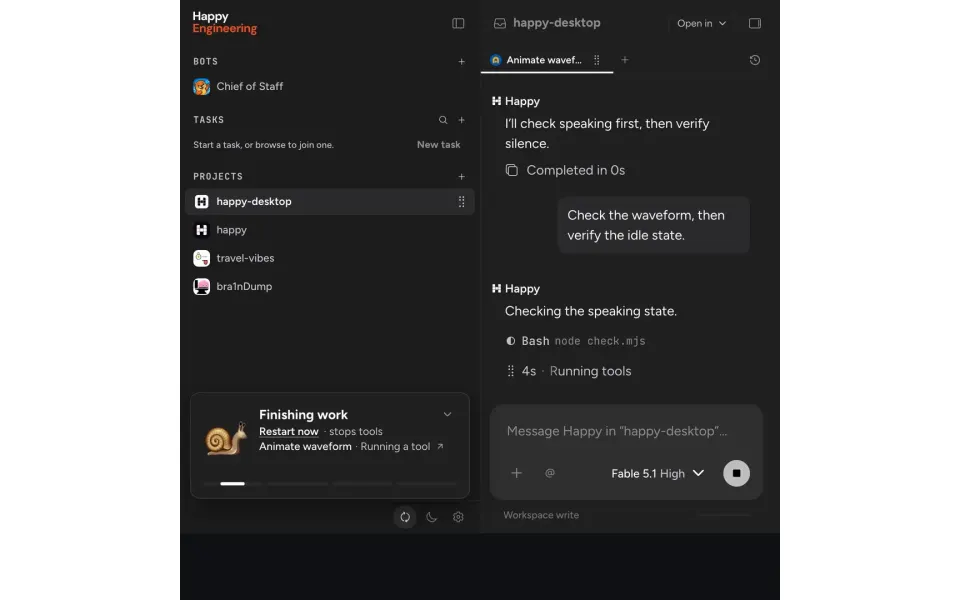
- Desktop app
- Mac, Windows and Linux
- Browser
- Yes
- Phone
- IPhone, Android and phone browser
- Command line
- Yes
- Agents
- Claude Code, Codex, OpenCode and Antigravity
- Your subscription
- Works with your own plan
- Agents run
- On your computer and on your own server
- Laptop closed
- Keeps going
- Isolation
- Worktree and Container
- Parallel agents
- Yes
- Scheduled runs
- Yes
- Coordinator agent
- Yes
- Built-in issues
- Yes
- Pull requests
- No
- Review screen
- Yes
- Team
- Shared sessions, roles and SSO
- Self-hosting
- Yes
- Licence
- MIT
- Price from
- Free
- How it charges
- Free plan, subscription and bring your own key
- Paid plans from
- Not listed
Receipts
- Checked
- · oldest answer 2026-11-08
- Findings
- 39 published · 32 cross-checked by a second agent · read them all
- Sources
- 48 public pages on 2 sites: github.com, happy.engineering
- Screenshot
- happy.engineering, retrieved · first party release · shows appearance, not capability
- Data
- /products/happy.json · .md
- Method
- Same rules for all 103 researched ADEs. How we check · Report wrong data
What it does
Where you use it
Happy provides Desktop for macOS, Windows and Linux; mobile iOS, Android and web; and its original happy CLI wrapping Claude Code or Codex. Desktop uses a separate Happy Agent runtime for multi-model sessions and teams. Paired phone apps continue the same encrypted sessions and allow users to read work and respond away from the desktop. The first-party repository describes the mobile app as available on iOS, Android and web. This establishes the phone web client, not desktop parity.
Source and scope for Where you use itAgents it runs
Happy Agent runs its own loop by default and calls Claude, Codex and Grok models on existing CLI sign-ins. Optional harnesses run Claude Code itself (claude_code) and Codex CLI itself (codex_cli); Gemini runs through Antigravity and OpenCode or other ACP agents through ACP (beta). Grok is a model choice, not a separate harness. Model and effort can change mid-session without discarding the transcript. The original happy CLI wraps Claude Code and Codex directly. Happy Agent v2026.11.4 runs the Antigravity whole-agent harness through antigravity-acp@1.2.0, a community ACP adapter driving the signed-in agy CLI.
Source and scope for Agents it runsAccounts and subscriptions
Happy reuses existing Claude Code, Codex and Grok CLI sign-ins and their subscriptions; Antigravity and ACP agents use their own login. Bedrock API keys or the AWS credential chain are supported.
Source and scope for Accounts and subscriptionsWhere agents run
Happy Agent can run on an always-on user server while Desktop connects over Tailcat and phones connect through an encrypted relay. Closing the controlling laptop does not stop work on that reachable host. Users supply host compute.
Source and scope for Where agents runHow work is kept apart
Parallel workspaces use Git worktrees on branches cut from the remote trunk. File sync and setup commands run per workspace; nongit projects use a plain copy. The documented OS sandbox uses macOS Seatbelt or Linux namespaces and seccomp. Shell writes, network and host sockets are restricted; file tools can still read credential folders, and MCP servers run outside the sandbox. Docker-backed sessions nest that sandbox inside the container. No VM or microVM isolation backend exists in the inspected runtime; local OS sandboxing and Docker are separate options.
Source and scope for How work is kept apartParallel work
Subagents run in the background by default and return completion to the parent. Desktop displays subagents and running tools; tree size is bounded.
Source and scope for Parallel workScheduled runs
Primary sessions can schedule messages to known agent IDs, list or cancel them and survive intervening runtime restarts. Durable waits end early on new input. This establishes scheduled work, not an unrestricted external-event scheduler.
Source and scope for Scheduled runsGit and pull requests
The pinned runtime and clients manage Git workspaces and file changes. They have no built-in PR creation or management path; users can ask a coding agent to use external shell or MCP tools.
Source and scope for Git and pull requestsLicence and source
The mobile app, original CLI and relay repository has the MIT license. Happy Desktop documentation also explicitly describes its app/runtime as MIT. Hosted and provider services remain separate.
Source and scope for Licence and sourcePrice
Happy is free and MIT licensed. Model use is paid through existing subscriptions and user compute. Phone voice has twenty free minutes per thirty days and an optional paid allowance; custom ElevenLabs use is separate.
Source and scope for PriceTyped filters
Every value links to its receipt below. Read plan and surface restrictions before using a filter to decide.
| Filter | Value |
|---|---|
| Desktop OS: macOS | Yes |
| Desktop OS: Windows | Yes |
| Desktop OS: Linux | Yes |
| Web client | Yes |
| Phone access: Native iOS | Yes |
| Phone access: Native Android | Yes |
| Phone access: Phone browser | Yes |
| CLI | Yes |
| Coding agents: Claude Code | Yes cross-checked |
| Coding agents: Codex | Yes cross-checked |
| Coding agents: Cursor Agent | Unknown |
| Coding agents: Gemini CLI | Unknown |
| Coding agents: OpenCode | Yes cross-checked |
| Coding agents: Pi | Unknown |
| Coding agents: Grok | Unknown |
| Coding agents: Aider | Unknown |
| Coding agents: Antigravity | Yes cross-checked |
| Use my subscription | Yes cross-checked |
| Where agents run: On your computer | Yes cross-checked |
| Where agents run: On your own server | Yes cross-checked |
| Where agents run: In the vendor's cloud | No |
| Workspace isolation: Git worktree | Yes |
| Workspace isolation: Container | Yes |
| Workspace isolation: VM or microVM | No |
| Parallel runs | Yes cross-checked |
| Coordinator | Yes cross-checked |
| Native issue tracking | Yes |
| Unattended triggers | Yes cross-checked |
| Shared prompting | Yes cross-checked |
| Team roles | Yes cross-checked |
| SSO | Yes cross-checked |
| Pull request workflow | No |
| Review interface | Yes cross-checked |
| Product license: Apache-2.0 | No. MIT cross-checked |
| Product license: MIT | Yes. MIT cross-checked |
| Product license: GPL-3.0 | No. MIT cross-checked |
| Product license: GPL-3.0-or-later | No. MIT cross-checked |
| Product license: AGPL-3.0 | No. MIT cross-checked |
| Product license: AGPL-3.0-or-later | No. MIT cross-checked |
| Product license: Elastic License 2.0 | No. MIT cross-checked |
| Product license: Custom terms | No. MIT cross-checked |
| Product license: Proprietary | No. MIT cross-checked |
| Self-hosting | Yes cross-checked |
| Telemetry opt-out | Yes cross-checked |
| Free access | Yes cross-checked |
| Starting price: Free | Yes. Free cross-checked |
| Starting price: Up to $20/month | No. Free cross-checked |
| Starting price: $21–40/month | No. Free cross-checked |
| Starting price: $41–100/month | No. Free cross-checked |
| Starting price: Over $100/month | No. Free cross-checked |
| Starting price: Contact for pricing | No. Free cross-checked |
| Pricing model: Free, no paid plan | No |
| Pricing model: Free plan | Yes cross-checked |
| Pricing model: Subscription | Yes |
| Pricing model: Per seat | No |
| Pricing model: Usage-based | No |
| Pricing model: Per machine or compute | No |
| Pricing model: Bring your own key | Yes cross-checked |
| Pricing model: One-time purchase | No |
| Paid plans from: No paid plan | Unknown |
| Paid plans from: $10 or less/month | Unknown |
| Paid plans from: $11–20/month | Unknown |
| Paid plans from: $21–40/month | Unknown |
| Paid plans from: $41–100/month | Unknown |
| Paid plans from: Over $100/month | Unknown |
| Paid plans from: Contact sales | Unknown |
| Lifecycle status: Active | Unknown |
| Lifecycle status: Sunsetting | Unknown |
| Keeps going with laptop closed | Yes cross-checked |
| Open-source license | Yes. MIT cross-checked |
| Any desktop app | Yes |
| Paid plan up to $20/month | Unknown |
| Paid plan up to $40/month | Unknown |
| Any phone client | Yes |
Filter receipts
Desktop OS: macOS: Yes
Desktop OS: macOS
Typed value: Yes.
Happy provides Desktop for macOS, Windows and Linux; mobile iOS, Android and web; and its original happy CLI wrapping Claude Code or Codex. Desktop uses a separate Happy Agent runtime for multi-model sessions and teams. Paired phone apps continue the same encrypted sessions and allow users to read work and respond away from the desktop. The first-party repository describes the mobile app as available on iOS, Android and web. This establishes the phone web client, not desktop parity.
- Desktop os: Happy provides Desktop for macOS, Windows and Linux; mobile iOS, Android and web; and its original happy CLI wrapping Claude Code or Codex. Desktop uses a separate Happy Agent runtime for multi-model sessions and teams.
- Mobile apps: Happy provides Desktop for macOS, Windows and Linux; mobile iOS, Android and web; and its original happy CLI wrapping Claude Code or Codex. Desktop uses a separate Happy Agent runtime for multi-model sessions and teams.
- Browser: Happy provides Desktop for macOS, Windows and Linux; mobile iOS, Android and web; and its original happy CLI wrapping Claude Code or Codex. Desktop uses a separate Happy Agent runtime for multi-model sessions and teams.
- Mobile browser: The first-party repository describes the mobile app as available on iOS, Android and web. This establishes the phone web client, not desktop parity.
- Cli: Happy provides Desktop for macOS, Windows and Linux; mobile iOS, Android and web; and its original happy CLI wrapping Claude Code or Codex. Desktop uses a separate Happy Agent runtime for multi-model sessions and teams.
- Task actions: Paired phone apps continue the same encrypted sessions and allow users to read work and respond away from the desktop.
- Cross device continuity: Paired phone apps continue the same encrypted sessions and allow users to read work and respond away from the desktop.
- The scoped first-party source pass does not establish editor_extensions, notifications. No hands-on scenario was run.
-
Happy: How Happy fits together; Original Happy CLI
Finding: Happy provides Desktop for macOS, Windows and Linux; mobile iOS, Android and web; and its original happy CLI wrapping Claude Code or Codex. Desktop uses a separate Happy Agent runtime for multi-model sessions and teams.
-
Finding: Paired phone apps continue the same encrypted sessions and allow users to read work and respond away from the desktop.
Desktop OS: Windows: Yes
Desktop OS: Windows
Typed value: Yes.
Happy provides Desktop for macOS, Windows and Linux; mobile iOS, Android and web; and its original happy CLI wrapping Claude Code or Codex. Desktop uses a separate Happy Agent runtime for multi-model sessions and teams. Paired phone apps continue the same encrypted sessions and allow users to read work and respond away from the desktop. The first-party repository describes the mobile app as available on iOS, Android and web. This establishes the phone web client, not desktop parity.
- Desktop os: Happy provides Desktop for macOS, Windows and Linux; mobile iOS, Android and web; and its original happy CLI wrapping Claude Code or Codex. Desktop uses a separate Happy Agent runtime for multi-model sessions and teams.
- Mobile apps: Happy provides Desktop for macOS, Windows and Linux; mobile iOS, Android and web; and its original happy CLI wrapping Claude Code or Codex. Desktop uses a separate Happy Agent runtime for multi-model sessions and teams.
- Browser: Happy provides Desktop for macOS, Windows and Linux; mobile iOS, Android and web; and its original happy CLI wrapping Claude Code or Codex. Desktop uses a separate Happy Agent runtime for multi-model sessions and teams.
- Mobile browser: The first-party repository describes the mobile app as available on iOS, Android and web. This establishes the phone web client, not desktop parity.
- Cli: Happy provides Desktop for macOS, Windows and Linux; mobile iOS, Android and web; and its original happy CLI wrapping Claude Code or Codex. Desktop uses a separate Happy Agent runtime for multi-model sessions and teams.
- Task actions: Paired phone apps continue the same encrypted sessions and allow users to read work and respond away from the desktop.
- Cross device continuity: Paired phone apps continue the same encrypted sessions and allow users to read work and respond away from the desktop.
- The scoped first-party source pass does not establish editor_extensions, notifications. No hands-on scenario was run.
-
Happy: How Happy fits together; Original Happy CLI
Finding: Happy provides Desktop for macOS, Windows and Linux; mobile iOS, Android and web; and its original happy CLI wrapping Claude Code or Codex. Desktop uses a separate Happy Agent runtime for multi-model sessions and teams.
-
Finding: Paired phone apps continue the same encrypted sessions and allow users to read work and respond away from the desktop.
Desktop OS: Linux: Yes
Desktop OS: Linux
Typed value: Yes.
Happy provides Desktop for macOS, Windows and Linux; mobile iOS, Android and web; and its original happy CLI wrapping Claude Code or Codex. Desktop uses a separate Happy Agent runtime for multi-model sessions and teams. Paired phone apps continue the same encrypted sessions and allow users to read work and respond away from the desktop. The first-party repository describes the mobile app as available on iOS, Android and web. This establishes the phone web client, not desktop parity.
- Desktop os: Happy provides Desktop for macOS, Windows and Linux; mobile iOS, Android and web; and its original happy CLI wrapping Claude Code or Codex. Desktop uses a separate Happy Agent runtime for multi-model sessions and teams.
- Mobile apps: Happy provides Desktop for macOS, Windows and Linux; mobile iOS, Android and web; and its original happy CLI wrapping Claude Code or Codex. Desktop uses a separate Happy Agent runtime for multi-model sessions and teams.
- Browser: Happy provides Desktop for macOS, Windows and Linux; mobile iOS, Android and web; and its original happy CLI wrapping Claude Code or Codex. Desktop uses a separate Happy Agent runtime for multi-model sessions and teams.
- Mobile browser: The first-party repository describes the mobile app as available on iOS, Android and web. This establishes the phone web client, not desktop parity.
- Cli: Happy provides Desktop for macOS, Windows and Linux; mobile iOS, Android and web; and its original happy CLI wrapping Claude Code or Codex. Desktop uses a separate Happy Agent runtime for multi-model sessions and teams.
- Task actions: Paired phone apps continue the same encrypted sessions and allow users to read work and respond away from the desktop.
- Cross device continuity: Paired phone apps continue the same encrypted sessions and allow users to read work and respond away from the desktop.
- The scoped first-party source pass does not establish editor_extensions, notifications. No hands-on scenario was run.
-
Happy: How Happy fits together; Original Happy CLI
Finding: Happy provides Desktop for macOS, Windows and Linux; mobile iOS, Android and web; and its original happy CLI wrapping Claude Code or Codex. Desktop uses a separate Happy Agent runtime for multi-model sessions and teams.
-
Finding: Paired phone apps continue the same encrypted sessions and allow users to read work and respond away from the desktop.
Web client: Yes
Web client
Typed value: Yes.
Happy provides Desktop for macOS, Windows and Linux; mobile iOS, Android and web; and its original happy CLI wrapping Claude Code or Codex. Desktop uses a separate Happy Agent runtime for multi-model sessions and teams. Paired phone apps continue the same encrypted sessions and allow users to read work and respond away from the desktop. The first-party repository describes the mobile app as available on iOS, Android and web. This establishes the phone web client, not desktop parity.
- Desktop os: Happy provides Desktop for macOS, Windows and Linux; mobile iOS, Android and web; and its original happy CLI wrapping Claude Code or Codex. Desktop uses a separate Happy Agent runtime for multi-model sessions and teams.
- Mobile apps: Happy provides Desktop for macOS, Windows and Linux; mobile iOS, Android and web; and its original happy CLI wrapping Claude Code or Codex. Desktop uses a separate Happy Agent runtime for multi-model sessions and teams.
- Browser: Happy provides Desktop for macOS, Windows and Linux; mobile iOS, Android and web; and its original happy CLI wrapping Claude Code or Codex. Desktop uses a separate Happy Agent runtime for multi-model sessions and teams.
- Mobile browser: The first-party repository describes the mobile app as available on iOS, Android and web. This establishes the phone web client, not desktop parity.
- Cli: Happy provides Desktop for macOS, Windows and Linux; mobile iOS, Android and web; and its original happy CLI wrapping Claude Code or Codex. Desktop uses a separate Happy Agent runtime for multi-model sessions and teams.
- Task actions: Paired phone apps continue the same encrypted sessions and allow users to read work and respond away from the desktop.
- Cross device continuity: Paired phone apps continue the same encrypted sessions and allow users to read work and respond away from the desktop.
- The scoped first-party source pass does not establish editor_extensions, notifications. No hands-on scenario was run.
-
Happy: How Happy fits together; Original Happy CLI
Finding: Happy provides Desktop for macOS, Windows and Linux; mobile iOS, Android and web; and its original happy CLI wrapping Claude Code or Codex. Desktop uses a separate Happy Agent runtime for multi-model sessions and teams.
-
Finding: Paired phone apps continue the same encrypted sessions and allow users to read work and respond away from the desktop.
Phone access: Native iOS: Yes
Phone access: Native iOS
Typed value: Yes.
Happy provides Desktop for macOS, Windows and Linux; mobile iOS, Android and web; and its original happy CLI wrapping Claude Code or Codex. Desktop uses a separate Happy Agent runtime for multi-model sessions and teams. Paired phone apps continue the same encrypted sessions and allow users to read work and respond away from the desktop. The first-party repository describes the mobile app as available on iOS, Android and web. This establishes the phone web client, not desktop parity.
- Desktop os: Happy provides Desktop for macOS, Windows and Linux; mobile iOS, Android and web; and its original happy CLI wrapping Claude Code or Codex. Desktop uses a separate Happy Agent runtime for multi-model sessions and teams.
- Mobile apps: Happy provides Desktop for macOS, Windows and Linux; mobile iOS, Android and web; and its original happy CLI wrapping Claude Code or Codex. Desktop uses a separate Happy Agent runtime for multi-model sessions and teams.
- Browser: Happy provides Desktop for macOS, Windows and Linux; mobile iOS, Android and web; and its original happy CLI wrapping Claude Code or Codex. Desktop uses a separate Happy Agent runtime for multi-model sessions and teams.
- Mobile browser: The first-party repository describes the mobile app as available on iOS, Android and web. This establishes the phone web client, not desktop parity.
- Cli: Happy provides Desktop for macOS, Windows and Linux; mobile iOS, Android and web; and its original happy CLI wrapping Claude Code or Codex. Desktop uses a separate Happy Agent runtime for multi-model sessions and teams.
- Task actions: Paired phone apps continue the same encrypted sessions and allow users to read work and respond away from the desktop.
- Cross device continuity: Paired phone apps continue the same encrypted sessions and allow users to read work and respond away from the desktop.
- The scoped first-party source pass does not establish editor_extensions, notifications. No hands-on scenario was run.
-
Happy: How Happy fits together; Original Happy CLI
Finding: Happy provides Desktop for macOS, Windows and Linux; mobile iOS, Android and web; and its original happy CLI wrapping Claude Code or Codex. Desktop uses a separate Happy Agent runtime for multi-model sessions and teams.
-
Finding: Paired phone apps continue the same encrypted sessions and allow users to read work and respond away from the desktop.
Phone access: Native Android: Yes
Phone access: Native Android
Typed value: Yes.
Happy provides Desktop for macOS, Windows and Linux; mobile iOS, Android and web; and its original happy CLI wrapping Claude Code or Codex. Desktop uses a separate Happy Agent runtime for multi-model sessions and teams. Paired phone apps continue the same encrypted sessions and allow users to read work and respond away from the desktop. The first-party repository describes the mobile app as available on iOS, Android and web. This establishes the phone web client, not desktop parity.
- Desktop os: Happy provides Desktop for macOS, Windows and Linux; mobile iOS, Android and web; and its original happy CLI wrapping Claude Code or Codex. Desktop uses a separate Happy Agent runtime for multi-model sessions and teams.
- Mobile apps: Happy provides Desktop for macOS, Windows and Linux; mobile iOS, Android and web; and its original happy CLI wrapping Claude Code or Codex. Desktop uses a separate Happy Agent runtime for multi-model sessions and teams.
- Browser: Happy provides Desktop for macOS, Windows and Linux; mobile iOS, Android and web; and its original happy CLI wrapping Claude Code or Codex. Desktop uses a separate Happy Agent runtime for multi-model sessions and teams.
- Mobile browser: The first-party repository describes the mobile app as available on iOS, Android and web. This establishes the phone web client, not desktop parity.
- Cli: Happy provides Desktop for macOS, Windows and Linux; mobile iOS, Android and web; and its original happy CLI wrapping Claude Code or Codex. Desktop uses a separate Happy Agent runtime for multi-model sessions and teams.
- Task actions: Paired phone apps continue the same encrypted sessions and allow users to read work and respond away from the desktop.
- Cross device continuity: Paired phone apps continue the same encrypted sessions and allow users to read work and respond away from the desktop.
- The scoped first-party source pass does not establish editor_extensions, notifications. No hands-on scenario was run.
-
Happy: How Happy fits together; Original Happy CLI
Finding: Happy provides Desktop for macOS, Windows and Linux; mobile iOS, Android and web; and its original happy CLI wrapping Claude Code or Codex. Desktop uses a separate Happy Agent runtime for multi-model sessions and teams.
-
Finding: Paired phone apps continue the same encrypted sessions and allow users to read work and respond away from the desktop.
Phone access: Phone browser: Yes
Phone access: Phone browser
Typed value: Yes.
Happy provides Desktop for macOS, Windows and Linux; mobile iOS, Android and web; and its original happy CLI wrapping Claude Code or Codex. Desktop uses a separate Happy Agent runtime for multi-model sessions and teams. Paired phone apps continue the same encrypted sessions and allow users to read work and respond away from the desktop. The first-party repository describes the mobile app as available on iOS, Android and web. This establishes the phone web client, not desktop parity.
- Desktop os: Happy provides Desktop for macOS, Windows and Linux; mobile iOS, Android and web; and its original happy CLI wrapping Claude Code or Codex. Desktop uses a separate Happy Agent runtime for multi-model sessions and teams.
- Mobile apps: Happy provides Desktop for macOS, Windows and Linux; mobile iOS, Android and web; and its original happy CLI wrapping Claude Code or Codex. Desktop uses a separate Happy Agent runtime for multi-model sessions and teams.
- Browser: Happy provides Desktop for macOS, Windows and Linux; mobile iOS, Android and web; and its original happy CLI wrapping Claude Code or Codex. Desktop uses a separate Happy Agent runtime for multi-model sessions and teams.
- Mobile browser: The first-party repository describes the mobile app as available on iOS, Android and web. This establishes the phone web client, not desktop parity.
- Cli: Happy provides Desktop for macOS, Windows and Linux; mobile iOS, Android and web; and its original happy CLI wrapping Claude Code or Codex. Desktop uses a separate Happy Agent runtime for multi-model sessions and teams.
- The scoped first-party source pass does not establish editor_extensions, notifications. No hands-on scenario was run.
-
Happy: How Happy fits together; Original Happy CLI
Finding: Happy provides Desktop for macOS, Windows and Linux; mobile iOS, Android and web; and its original happy CLI wrapping Claude Code or Codex. Desktop uses a separate Happy Agent runtime for multi-model sessions and teams.
CLI: Yes
CLI
Typed value: Yes.
Happy provides Desktop for macOS, Windows and Linux; mobile iOS, Android and web; and its original happy CLI wrapping Claude Code or Codex. Desktop uses a separate Happy Agent runtime for multi-model sessions and teams. Paired phone apps continue the same encrypted sessions and allow users to read work and respond away from the desktop. The first-party repository describes the mobile app as available on iOS, Android and web. This establishes the phone web client, not desktop parity.
- Desktop os: Happy provides Desktop for macOS, Windows and Linux; mobile iOS, Android and web; and its original happy CLI wrapping Claude Code or Codex. Desktop uses a separate Happy Agent runtime for multi-model sessions and teams.
- Mobile apps: Happy provides Desktop for macOS, Windows and Linux; mobile iOS, Android and web; and its original happy CLI wrapping Claude Code or Codex. Desktop uses a separate Happy Agent runtime for multi-model sessions and teams.
- Browser: Happy provides Desktop for macOS, Windows and Linux; mobile iOS, Android and web; and its original happy CLI wrapping Claude Code or Codex. Desktop uses a separate Happy Agent runtime for multi-model sessions and teams.
- Mobile browser: The first-party repository describes the mobile app as available on iOS, Android and web. This establishes the phone web client, not desktop parity.
- Cli: Happy provides Desktop for macOS, Windows and Linux; mobile iOS, Android and web; and its original happy CLI wrapping Claude Code or Codex. Desktop uses a separate Happy Agent runtime for multi-model sessions and teams.
- Task actions: Paired phone apps continue the same encrypted sessions and allow users to read work and respond away from the desktop.
- Cross device continuity: Paired phone apps continue the same encrypted sessions and allow users to read work and respond away from the desktop.
- The scoped first-party source pass does not establish editor_extensions, notifications. No hands-on scenario was run.
-
Happy: How Happy fits together; Original Happy CLI
Finding: Happy provides Desktop for macOS, Windows and Linux; mobile iOS, Android and web; and its original happy CLI wrapping Claude Code or Codex. Desktop uses a separate Happy Agent runtime for multi-model sessions and teams.
-
Finding: Paired phone apps continue the same encrypted sessions and allow users to read work and respond away from the desktop.
Coding agents: Claude Code: Yes cross-checked
Coding agents: Claude Code
Typed value: Yes.
Happy Agent runs its own loop by default and calls Claude, Codex and Grok models on existing CLI sign-ins. Optional harnesses run Claude Code itself (claude_code) and Codex CLI itself (codex_cli); Gemini runs through Antigravity and OpenCode or other ACP agents through ACP (beta). Grok is a model choice, not a separate harness. Model and effort can change mid-session without discarding the transcript. The original happy CLI wraps Claude Code and Codex directly. Happy Agent v2026.11.4 runs the Antigravity whole-agent harness through antigravity-acp@1.2.0, a community ACP adapter driving the signed-in agy CLI.
- Harnesses: Happy's own harness by default; claude_code and codex_cli harness options run Claude Code and Codex CLI themselves; Antigravity and OpenCode or other ACP agents (beta). The original CLI wraps Claude Code and Codex. Happy Agent v2026.11.4 runs the Antigravity whole-agent harness through antigravity-acp@1.2.0, a community ACP adapter driving the signed-in agy CLI.
- Custom adapters: Any Agent Client Protocol agent can be added on its own login (beta).
- Session integration: The claude_code and codex_cli harnesses run those agents' own loops on their accounts inside Happy sessions.
- Mixed harness operation: Subagents pick their own model, and harness options sit alongside Happy's own loop; no mixed-harness run was observed.
- Documentation evidence only. Remaining atomic questions and enforcement under failure have not been established by a bounded workflow test.
- Antigravity is a beta foreign-harness integration using a community ACP adapter and its own login; new sessions are serialized to avoid conversation binding collisions.
-
Happy: How Happy fits together; Original Happy CLI
Finding: Happy provides Desktop for macOS, Windows and Linux; mobile iOS, Android and web; and its original happy CLI wrapping Claude Code or Codex. Desktop uses a separate Happy Agent runtime for multi-model sessions and teams.
-
Happy: Harnesses: Claude Code, Codex CLI, Antigravity, OpenCode, and ACP agents
Finding: Happy's own harness runs the loop by default; the claude_code harness runs Claude Code itself on a claude account and codex_cli does the same for Codex, while Antigravity, OpenCode and other ACP agents sign in themselves. Grok is not listed as a harness.
Coding agents: Codex: Yes cross-checked
Coding agents: Codex
Typed value: Yes.
Happy Agent runs its own loop by default and calls Claude, Codex and Grok models on existing CLI sign-ins. Optional harnesses run Claude Code itself (claude_code) and Codex CLI itself (codex_cli); Gemini runs through Antigravity and OpenCode or other ACP agents through ACP (beta). Grok is a model choice, not a separate harness. Model and effort can change mid-session without discarding the transcript. The original happy CLI wraps Claude Code and Codex directly. Happy Agent v2026.11.4 runs the Antigravity whole-agent harness through antigravity-acp@1.2.0, a community ACP adapter driving the signed-in agy CLI.
- Harnesses: Happy's own harness by default; claude_code and codex_cli harness options run Claude Code and Codex CLI themselves; Antigravity and OpenCode or other ACP agents (beta). The original CLI wraps Claude Code and Codex. Happy Agent v2026.11.4 runs the Antigravity whole-agent harness through antigravity-acp@1.2.0, a community ACP adapter driving the signed-in agy CLI.
- Custom adapters: Any Agent Client Protocol agent can be added on its own login (beta).
- Session integration: The claude_code and codex_cli harnesses run those agents' own loops on their accounts inside Happy sessions.
- Mixed harness operation: Subagents pick their own model, and harness options sit alongside Happy's own loop; no mixed-harness run was observed.
- Documentation evidence only. Remaining atomic questions and enforcement under failure have not been established by a bounded workflow test.
- Antigravity is a beta foreign-harness integration using a community ACP adapter and its own login; new sessions are serialized to avoid conversation binding collisions.
-
Happy: How Happy fits together; Original Happy CLI
Finding: Happy provides Desktop for macOS, Windows and Linux; mobile iOS, Android and web; and its original happy CLI wrapping Claude Code or Codex. Desktop uses a separate Happy Agent runtime for multi-model sessions and teams.
-
Happy: Harnesses: Claude Code, Codex CLI, Antigravity, OpenCode, and ACP agents
Finding: Happy's own harness runs the loop by default; the claude_code harness runs Claude Code itself on a claude account and codex_cli does the same for Codex, while Antigravity, OpenCode and other ACP agents sign in themselves. Grok is not listed as a harness.
Coding agents: OpenCode: Yes cross-checked
Coding agents: OpenCode
Typed value: Yes.
Happy Agent runs its own loop by default and calls Claude, Codex and Grok models on existing CLI sign-ins. Optional harnesses run Claude Code itself (claude_code) and Codex CLI itself (codex_cli); Gemini runs through Antigravity and OpenCode or other ACP agents through ACP (beta). Grok is a model choice, not a separate harness. Model and effort can change mid-session without discarding the transcript. The original happy CLI wraps Claude Code and Codex directly. Happy Agent v2026.11.4 runs the Antigravity whole-agent harness through antigravity-acp@1.2.0, a community ACP adapter driving the signed-in agy CLI.
- Harnesses: Happy's own harness by default; claude_code and codex_cli harness options run Claude Code and Codex CLI themselves; Antigravity and OpenCode or other ACP agents (beta). The original CLI wraps Claude Code and Codex. Happy Agent v2026.11.4 runs the Antigravity whole-agent harness through antigravity-acp@1.2.0, a community ACP adapter driving the signed-in agy CLI.
- Model providers: Claude, Codex and Grok models on existing CLI sign-ins, Gemini through Antigravity, and Bedrock.
- Custom adapters: Any Agent Client Protocol agent can be added on its own login (beta).
- Session integration: The claude_code and codex_cli harnesses run those agents' own loops on their accounts inside Happy sessions.
- Mixed harness operation: Subagents pick their own model, and harness options sit alongside Happy's own loop; no mixed-harness run was observed.
- Documentation evidence only. Remaining atomic questions and enforcement under failure have not been established by a bounded workflow test.
- Antigravity is a beta foreign-harness integration using a community ACP adapter and its own login; new sessions are serialized to avoid conversation binding collisions.
-
Happy: Supported providers; Switch models
Finding: Happy runs Claude, Codex and Grok on the user's existing Claude Code, Codex or Grok CLI sign-ins, Gemini through Antigravity, and OpenCode or other ACP agents on their own login (beta). Model or effort can change mid-session without discarding the transcript.
-
Happy: Harnesses: Claude Code, Codex CLI, Antigravity, OpenCode, and ACP agents
Finding: Happy's own harness runs the loop by default; the claude_code harness runs Claude Code itself on a claude account and codex_cli does the same for Codex, while Antigravity, OpenCode and other ACP agents sign in themselves. Grok is not listed as a harness.
Coding agents: Antigravity: Yes cross-checked
Coding agents: Antigravity
Typed value: Yes.
Happy Agent runs its own loop by default and calls Claude, Codex and Grok models on existing CLI sign-ins. Optional harnesses run Claude Code itself (claude_code) and Codex CLI itself (codex_cli); Gemini runs through Antigravity and OpenCode or other ACP agents through ACP (beta). Grok is a model choice, not a separate harness. Model and effort can change mid-session without discarding the transcript. The original happy CLI wraps Claude Code and Codex directly. Happy Agent v2026.11.4 runs the Antigravity whole-agent harness through antigravity-acp@1.2.0, a community ACP adapter driving the signed-in agy CLI.
- Harnesses: Happy's own harness by default; claude_code and codex_cli harness options run Claude Code and Codex CLI themselves; Antigravity and OpenCode or other ACP agents (beta). The original CLI wraps Claude Code and Codex. Happy Agent v2026.11.4 runs the Antigravity whole-agent harness through antigravity-acp@1.2.0, a community ACP adapter driving the signed-in agy CLI.
- Documentation evidence only. Remaining atomic questions and enforcement under failure have not been established by a bounded workflow test.
- Antigravity is a beta foreign-harness integration using a community ACP adapter and its own login; new sessions are serialized to avoid conversation binding collisions.
-
Happy Antigravity support at v2026.11.4
Finding: Happy Agent v2026.11.4 runs the Antigravity whole-agent harness through antigravity-acp@1.2.0, a community ACP adapter driving the signed-in agy CLI.
Use my subscription: Yes cross-checked
Use my subscription
Typed value: Yes.
Happy reuses existing Claude Code, Codex and Grok CLI sign-ins and their subscriptions; Antigravity and ACP agents use their own login. Bedrock API keys or the AWS credential chain are supported.
- Agent subscriptions: Happy reuses Claude Code, Codex and Grok CLI sign-ins and their subscriptions; Antigravity and ACP use their own login. Bedrock API keys or the AWS credential chain are supported. Happy does not proxy these provider requests.
- Api accounts: Happy reuses Claude Code, Codex and Grok CLI sign-ins and their subscriptions; Antigravity and ACP use their own login. Bedrock API keys or the AWS credential chain are supported. Happy does not proxy these provider requests.
- Account switching: Happy reuses Claude Code, Codex and Grok CLI sign-ins and their subscriptions; Antigravity and ACP use their own login. Bedrock API keys or the AWS credential chain are supported. Happy does not proxy these provider requests.
- Provider restrictions: Happy reuses Claude Code, Codex and Grok CLI sign-ins and their subscriptions; Antigravity and ACP use their own login. Bedrock API keys or the AWS credential chain are supported. Happy does not proxy these provider requests.
- Documentation evidence only. Remaining atomic questions and enforcement under failure have not been established by a bounded workflow test.
-
Happy: Models and Subscriptions
Finding: Happy uses existing Claude Code, Codex and Grok CLI sign-ins, so no Happy plan or pasted key is needed for model access; Antigravity and ACP agents use their own login. Bedrock works with an API key or the AWS credential chain.
Where agents run: On your computer: Yes cross-checked
Where agents run: On your computer
Typed value: Yes.
Happy Agent can run on an always-on user server while Desktop connects over Tailcat and phones connect through an encrypted relay. Closing the controlling laptop does not stop work on that reachable host. Users supply host compute.
- Local: Happy Agent can run on an always-on user server while Desktop connects over Tailcat and phones connect through an encrypted relay. Closing the controlling laptop does not stop work on that reachable host. Users supply host compute.
- Byo remote: Happy Agent can run on an always-on user server while Desktop connects over Tailcat and phones connect through an encrypted relay. Closing the controlling laptop does not stop work on that reachable host. Users supply host compute.
- Self hosted: Happy Agent can run on an always-on user server while Desktop connects over Tailcat and phones connect through an encrypted relay. Closing the controlling laptop does not stop work on that reachable host. Users supply host compute.
- Hybrid: Happy Agent can run on an always-on user server while Desktop connects over Tailcat and phones connect through an encrypted relay. Closing the controlling laptop does not stop work on that reachable host. Users supply host compute.
- Payer: Happy Agent can run on an always-on user server while Desktop connects over Tailcat and phones connect through an encrypted relay. Closing the controlling laptop does not stop work on that reachable host. Users supply host compute.
- Client disconnect: Happy Agent can run on an always-on user server while Desktop connects over Tailcat and phones connect through an encrypted relay. Closing the controlling laptop does not stop work on that reachable host. Users supply host compute.
- Other device continuation: Happy Agent can run on an always-on user server while Desktop connects over Tailcat and phones connect through an encrypted relay. Closing the controlling laptop does not stop work on that reachable host. Users supply host compute.
- Documentation evidence only. Remaining atomic questions and enforcement under failure have not been established by a bounded workflow test.
-
Finding: Happy Agent can run on an always-on user server while Desktop connects over Tailcat and phones connect through an encrypted relay. Closing the controlling laptop does not stop work on that reachable host. Users supply host compute.
Where agents run: On your own server: Yes cross-checked
Where agents run: On your own server
Typed value: Yes.
Happy Agent can run on an always-on user server while Desktop connects over Tailcat and phones connect through an encrypted relay. Closing the controlling laptop does not stop work on that reachable host. Users supply host compute.
- Local: Happy Agent can run on an always-on user server while Desktop connects over Tailcat and phones connect through an encrypted relay. Closing the controlling laptop does not stop work on that reachable host. Users supply host compute.
- Byo remote: Happy Agent can run on an always-on user server while Desktop connects over Tailcat and phones connect through an encrypted relay. Closing the controlling laptop does not stop work on that reachable host. Users supply host compute.
- Self hosted: Happy Agent can run on an always-on user server while Desktop connects over Tailcat and phones connect through an encrypted relay. Closing the controlling laptop does not stop work on that reachable host. Users supply host compute.
- Hybrid: Happy Agent can run on an always-on user server while Desktop connects over Tailcat and phones connect through an encrypted relay. Closing the controlling laptop does not stop work on that reachable host. Users supply host compute.
- Payer: Happy Agent can run on an always-on user server while Desktop connects over Tailcat and phones connect through an encrypted relay. Closing the controlling laptop does not stop work on that reachable host. Users supply host compute.
- Client disconnect: Happy Agent can run on an always-on user server while Desktop connects over Tailcat and phones connect through an encrypted relay. Closing the controlling laptop does not stop work on that reachable host. Users supply host compute.
- Other device continuation: Happy Agent can run on an always-on user server while Desktop connects over Tailcat and phones connect through an encrypted relay. Closing the controlling laptop does not stop work on that reachable host. Users supply host compute.
- Documentation evidence only. Remaining atomic questions and enforcement under failure have not been established by a bounded workflow test.
-
Finding: Happy Agent can run on an always-on user server while Desktop connects over Tailcat and phones connect through an encrypted relay. Closing the controlling laptop does not stop work on that reachable host. Users supply host compute.
Where agents run: In the vendor's cloud: No
Where agents run: In the vendor's cloud
Typed value: No.
Happy Agent can run on an always-on user server while Desktop connects over Tailcat and phones connect through an encrypted relay. Closing the controlling laptop does not stop work on that reachable host. Users supply host compute.
- Local: Happy Agent can run on an always-on user server while Desktop connects over Tailcat and phones connect through an encrypted relay. Closing the controlling laptop does not stop work on that reachable host. Users supply host compute.
- Byo remote: Happy Agent can run on an always-on user server while Desktop connects over Tailcat and phones connect through an encrypted relay. Closing the controlling laptop does not stop work on that reachable host. Users supply host compute.
- Self hosted: Happy Agent can run on an always-on user server while Desktop connects over Tailcat and phones connect through an encrypted relay. Closing the controlling laptop does not stop work on that reachable host. Users supply host compute.
- Hybrid: Happy Agent can run on an always-on user server while Desktop connects over Tailcat and phones connect through an encrypted relay. Closing the controlling laptop does not stop work on that reachable host. Users supply host compute.
- Payer: Happy Agent can run on an always-on user server while Desktop connects over Tailcat and phones connect through an encrypted relay. Closing the controlling laptop does not stop work on that reachable host. Users supply host compute.
- Client disconnect: Happy Agent can run on an always-on user server while Desktop connects over Tailcat and phones connect through an encrypted relay. Closing the controlling laptop does not stop work on that reachable host. Users supply host compute.
- Other device continuation: Happy Agent can run on an always-on user server while Desktop connects over Tailcat and phones connect through an encrypted relay. Closing the controlling laptop does not stop work on that reachable host. Users supply host compute.
- Documentation evidence only. Remaining atomic questions and enforcement under failure have not been established by a bounded workflow test.
-
Finding: Happy Agent can run on an always-on user server while Desktop connects over Tailcat and phones connect through an encrypted relay. Closing the controlling laptop does not stop work on that reachable host. Users supply host compute.
Workspace isolation: Git worktree: Yes
Workspace isolation: Git worktree
Typed value: Yes.
Parallel workspaces use Git worktrees on branches cut from the remote trunk. File sync and setup commands run per workspace; nongit projects use a plain copy. The documented OS sandbox uses macOS Seatbelt or Linux namespaces and seccomp. Shell writes, network and host sockets are restricted; file tools can still read credential folders, and MCP servers run outside the sandbox. Docker-backed sessions nest that sandbox inside the container. No VM or microVM isolation backend exists in the inspected runtime; local OS sandboxing and Docker are separate options.
- Branch: Parallel workspaces use Git worktrees on branches cut from the remote trunk. File sync and setup commands run per workspace; nongit projects use a plain copy.
- Worktree: Parallel workspaces use Git worktrees on branches cut from the remote trunk. File sync and setup commands run per workspace; nongit projects use a plain copy.
- Container: The documented OS sandbox uses macOS Seatbelt or Linux namespaces and seccomp. Shell writes, network and host sockets are restricted; file tools can still read credential folders, and MCP servers run outside the sandbox. Docker-backed sessions nest that sandbox inside the container.
- Os sandbox: The documented OS sandbox uses macOS Seatbelt or Linux namespaces and seccomp. Shell writes, network and host sockets are restricted; file tools can still read credential folders, and MCP servers run outside the sandbox. Docker-backed sessions nest that sandbox inside the container.
- Filesystem: The documented OS sandbox uses macOS Seatbelt or Linux namespaces and seccomp. Shell writes, network and host sockets are restricted; file tools can still read credential folders, and MCP servers run outside the sandbox. Docker-backed sessions nest that sandbox inside the container.
- Network: The documented OS sandbox uses macOS Seatbelt or Linux namespaces and seccomp. Shell writes, network and host sockets are restricted; file tools can still read credential folders, and MCP servers run outside the sandbox. Docker-backed sessions nest that sandbox inside the container.
- Secrets: The documented OS sandbox uses macOS Seatbelt or Linux namespaces and seccomp. Shell writes, network and host sockets are restricted; file tools can still read credential folders, and MCP servers run outside the sandbox. Docker-backed sessions nest that sandbox inside the container.
- Code separation: Parallel workspaces use Git worktrees on branches cut from the remote trunk. File sync and setup commands run per workspace; nongit projects use a plain copy.
- Security boundary: The documented OS sandbox uses macOS Seatbelt or Linux namespaces and seccomp. Shell writes, network and host sockets are restricted; file tools can still read credential folders, and MCP servers run outside the sandbox. Docker-backed sessions nest that sandbox inside the container.
- The scoped first-party source pass does not establish checkout, process. No hands-on scenario was run.
-
Happy: How Happy creates a workspace
Finding: Parallel workspaces use Git worktrees on branches cut from the remote trunk. File sync and setup commands run per workspace; nongit projects use a plain copy.
-
Happy: What the OS sandbox enforces
Finding: The documented OS sandbox uses macOS Seatbelt or Linux namespaces and seccomp. Shell writes, network and host sockets are restricted; file tools can still read credential folders, and MCP servers run outside the sandbox. Docker-backed sessions nest that sandbox inside the container.
Workspace isolation: Container: Yes
Workspace isolation: Container
Typed value: Yes.
Parallel workspaces use Git worktrees on branches cut from the remote trunk. File sync and setup commands run per workspace; nongit projects use a plain copy. The documented OS sandbox uses macOS Seatbelt or Linux namespaces and seccomp. Shell writes, network and host sockets are restricted; file tools can still read credential folders, and MCP servers run outside the sandbox. Docker-backed sessions nest that sandbox inside the container. No VM or microVM isolation backend exists in the inspected runtime; local OS sandboxing and Docker are separate options.
- Branch: Parallel workspaces use Git worktrees on branches cut from the remote trunk. File sync and setup commands run per workspace; nongit projects use a plain copy.
- Worktree: Parallel workspaces use Git worktrees on branches cut from the remote trunk. File sync and setup commands run per workspace; nongit projects use a plain copy.
- Container: The documented OS sandbox uses macOS Seatbelt or Linux namespaces and seccomp. Shell writes, network and host sockets are restricted; file tools can still read credential folders, and MCP servers run outside the sandbox. Docker-backed sessions nest that sandbox inside the container.
- Os sandbox: The documented OS sandbox uses macOS Seatbelt or Linux namespaces and seccomp. Shell writes, network and host sockets are restricted; file tools can still read credential folders, and MCP servers run outside the sandbox. Docker-backed sessions nest that sandbox inside the container.
- Filesystem: The documented OS sandbox uses macOS Seatbelt or Linux namespaces and seccomp. Shell writes, network and host sockets are restricted; file tools can still read credential folders, and MCP servers run outside the sandbox. Docker-backed sessions nest that sandbox inside the container.
- Network: The documented OS sandbox uses macOS Seatbelt or Linux namespaces and seccomp. Shell writes, network and host sockets are restricted; file tools can still read credential folders, and MCP servers run outside the sandbox. Docker-backed sessions nest that sandbox inside the container.
- Secrets: The documented OS sandbox uses macOS Seatbelt or Linux namespaces and seccomp. Shell writes, network and host sockets are restricted; file tools can still read credential folders, and MCP servers run outside the sandbox. Docker-backed sessions nest that sandbox inside the container.
- Code separation: Parallel workspaces use Git worktrees on branches cut from the remote trunk. File sync and setup commands run per workspace; nongit projects use a plain copy.
- Security boundary: The documented OS sandbox uses macOS Seatbelt or Linux namespaces and seccomp. Shell writes, network and host sockets are restricted; file tools can still read credential folders, and MCP servers run outside the sandbox. Docker-backed sessions nest that sandbox inside the container.
- The scoped first-party source pass does not establish checkout, process. No hands-on scenario was run.
-
Happy: How Happy creates a workspace
Finding: Parallel workspaces use Git worktrees on branches cut from the remote trunk. File sync and setup commands run per workspace; nongit projects use a plain copy.
-
Happy: What the OS sandbox enforces
Finding: The documented OS sandbox uses macOS Seatbelt or Linux namespaces and seccomp. Shell writes, network and host sockets are restricted; file tools can still read credential folders, and MCP servers run outside the sandbox. Docker-backed sessions nest that sandbox inside the container.
Workspace isolation: VM or microVM: No
Workspace isolation: VM or microVM
Typed value: No.
Parallel workspaces use Git worktrees on branches cut from the remote trunk. File sync and setup commands run per workspace; nongit projects use a plain copy. The documented OS sandbox uses macOS Seatbelt or Linux namespaces and seccomp. Shell writes, network and host sockets are restricted; file tools can still read credential folders, and MCP servers run outside the sandbox. Docker-backed sessions nest that sandbox inside the container. No VM or microVM isolation backend exists in the inspected runtime; local OS sandboxing and Docker are separate options.
- Vm: No VM or microVM isolation backend exists in the inspected runtime; local OS sandboxing and Docker are separate options.
- The scoped first-party source pass does not establish checkout, process. No hands-on scenario was run.
-
Happy execution configuration at v2026.11.4
Finding: The scoped runtime config and runner implementation provide host process execution and optional Docker image/container execution, with OS sandbox restrictions. No VM or microVM isolation backend is implemented in the inspected release. A user provisioning a host VM is separate.
Parallel runs: Yes cross-checked
Parallel runs
Typed value: Yes.
Subagents run in the background by default and return completion to the parent. Desktop displays subagents and running tools; tree size is bounded.
- Concurrent sessions: Subagents run in the background by default and return completion to the parent. Desktop displays subagents and running tools; tree size is bounded.
- Concurrent tasks: Subagents run in the background by default and return completion to the parent. Desktop displays subagents and running tools; tree size is bounded.
- Quotas: Subagents run in the background by default and return completion to the parent. Desktop displays subagents and running tools; tree size is bounded.
- Status visibility: Subagents run in the background by default and return completion to the parent. Desktop displays subagents and running tools; tree size is bounded.
- Documentation evidence only. Remaining atomic questions and enforcement under failure have not been established by a bounded workflow test.
-
Happy: Subagents; What Happy Desktop shows
Finding: Subagents run in the background by default and return completion to the parent. Desktop displays subagents and running tools; tree size is bounded.
Coordinator: Yes cross-checked
Coordinator
Typed value: Yes.
Agents delegate bounded work, choose each child model and effort, receive background completion notices and send follow-ups to finished children with retained context. Exact IDs route messages across projects or machines.
- Roles: Agents delegate bounded work, choose each child model and effort, receive background completion notices and send follow-ups to finished children with retained context. Exact IDs route messages across projects or machines.
- Model harness effort: Agents delegate bounded work, choose each child model and effort, receive background completion notices and send follow-ups to finished children with retained context. Exact IDs route messages across projects or machines.
- Messages: Agents delegate bounded work, choose each child model and effort, receive background completion notices and send follow-ups to finished children with retained context. Exact IDs route messages across projects or machines.
- Results return: Agents delegate bounded work, choose each child model and effort, receive background completion notices and send follow-ups to finished children with retained context. Exact IDs route messages across projects or machines.
- Cross harness: Agents delegate bounded work, choose each child model and effort, receive background completion notices and send follow-ups to finished children with retained context. Exact IDs route messages across projects or machines.
- Activation: Agents delegate bounded work, choose each child model and effort, receive background completion notices and send follow-ups to finished children with retained context. Exact IDs route messages across projects or machines.
- Retained results: Agents delegate bounded work, choose each child model and effort, receive background completion notices and send follow-ups to finished children with retained context. Exact IDs route messages across projects or machines.
- Followup: Agents delegate bounded work, choose each child model and effort, receive background completion notices and send follow-ups to finished children with retained context. Exact IDs route messages across projects or machines.
- Documentation evidence only. Remaining atomic questions and enforcement under failure have not been established by a bounded workflow test.
-
Happy: Subagents; How agents message each other
Finding: Agents delegate bounded work, choose each child model and effort, receive background completion notices and send follow-ups to finished children with retained context. Exact IDs route messages across projects or machines.
Native issue tracking: Yes
Native issue tracking
Typed value: Yes.
Happy creates persistent task records through its API, agent tool and Desktop UI. Native task operations rename task records. Creating a task without opening text stores an idle draft. The task catalog has a task ID separate from its linked agent and workspace IDs; each task has one root conversation. Task state is persisted as active or archived with restoration and versioned updates. Task archival persists and stops the task agent and descendants. Native unarchive restores an archived task.
- Create: Happy creates persistent task records through its API, agent tool and Desktop UI.
- Edit: Native task operations rename task records.
- Archive: Task archival persists and stops the task agent and descendants.
- Reopen: Native unarchive restores an archived task.
- Idea parking: Creating a task without opening text stores an idle draft.
- Task session separation: The task catalog has a task ID separate from its linked agent and workspace IDs; each task has one root conversation.
- Durable states: Task state is persisted as active or archived with restoration and versioned updates.
- The scoped first-party source pass does not establish discuss, prioritize, label, assign, search, filter, project_epic_views, explicit_dispatch, metadata, external_tracker_requirement. No hands-on scenario was run.
-
Happy task catalog schema at v2026.11.4
Finding: Task records have independent task, agent and workspace IDs, owner and creator fields, versioned active/archived state and timestamps. Creation accepts no opening text, allowing an idle draft before work starts.
-
Happy native task operations at v2026.11.4
Finding: The TasksModule creates distinct task and agent records, supports rename, join, reorder, archive and unarchive, and persists catalog state. The API and Desktop task creation surface expose the task catalog.
Unattended triggers: Yes cross-checked
Unattended triggers
Typed value: Yes.
Primary sessions can schedule messages to known agent IDs, list or cancel them and survive intervening runtime restarts. Durable waits end early on new input. This establishes scheduled work, not an unrestricted external-event scheduler.
- Schedules: Primary sessions can schedule messages to known agent IDs, list or cancel them and survive intervening runtime restarts. Durable waits end early on new input. This establishes scheduled work, not an unrestricted external-event scheduler.
- Scheduler location: Primary sessions can schedule messages to known agent IDs, list or cancel them and survive intervening runtime restarts. Durable waits end early on new input. This establishes scheduled work, not an unrestricted external-event scheduler.
- Client independence: Primary sessions can schedule messages to known agent IDs, list or cancel them and survive intervening runtime restarts. Durable waits end early on new input. This establishes scheduled work, not an unrestricted external-event scheduler.
- Documentation evidence only. Remaining atomic questions and enforcement under failure have not been established by a bounded workflow test.
-
Happy: Durable waits and scheduled messages
Finding: Primary sessions can schedule messages to known agent IDs, list or cancel them and survive intervening runtime restarts. Durable waits end early on new input. This establishes scheduled work, not an unrestricted external-event scheduler.
Shared prompting: Yes cross-checked
Shared prompting
Typed value: Yes.
Team members see the same projects and sessions and can speak to the agent. Changes in speaker include the member name/email; per-member drafts and task ordering stay personal.
- Visibility: Team members see the same projects and sessions and can speak to the agent. Changes in speaker include the member name/email; per-member drafts and task ordering stay personal.
- Coprompting: Team members see the same projects and sessions and can speak to the agent. Changes in speaker include the member name/email; per-member drafts and task ordering stay personal.
- Attribution: Team members see the same projects and sessions and can speak to the agent. Changes in speaker include the member name/email; per-member drafts and task ordering stay personal.
- Permissions: Team members see the same projects and sessions and can speak to the agent. Changes in speaker include the member name/email; per-member drafts and task ordering stay personal.
- Documentation evidence only. Remaining atomic questions and enforcement under failure have not been established by a bounded workflow test.
-
Finding: Team members see the same projects and sessions and can speak to the agent. Changes in speaker include the member name/email; per-member drafts and task ordering stay personal.
Team roles: Yes cross-checked
Team roles
Typed value: Yes.
Team mode verifies per-user WorkOS tokens. The owner alone renames the installation, toggles global skills or archives others tasks; members otherwise have equal access and can select Full access. A remove-member action is explicitly not built yet.
- Organization roles: Team mode verifies per-user WorkOS tokens. The owner alone renames the installation, toggles global skills or archives others tasks; members otherwise have equal access and can select Full access. A remove-member action is explicitly not built yet.
- Membership: Team mode verifies per-user WorkOS tokens. The owner alone renames the installation, toggles global skills or archives others tasks; members otherwise have equal access and can select Full access. A remove-member action is explicitly not built yet.
- Plan scope: Team mode verifies per-user WorkOS tokens. The owner alone renames the installation, toggles global skills or archives others tasks; members otherwise have equal access and can select Full access. A remove-member action is explicitly not built yet.
- Documentation evidence only. Remaining atomic questions and enforcement under failure have not been established by a bounded workflow test.
-
Happy: Owner; Sign-in; Leaving
Finding: Team mode verifies per-user WorkOS tokens. The owner alone renames the installation, toggles global skills or archives others tasks; members otherwise have equal access and can select Full access. A remove-member action is explicitly not built yet.
SSO: Yes cross-checked
SSO
Typed value: Yes.
Team mode verifies per-user WorkOS tokens. The owner alone renames the installation, toggles global skills or archives others tasks; members otherwise have equal access and can select Full access. A remove-member action is explicitly not built yet.
- Sso: Team mode can replace Happy's WorkOS accounts with the organization's own identity provider through an organization-run OAuth authorization server whose JWTs the daemon verifies (Agent v2026.11.4; desktop v0.0.103 discovers sign-in methods). Documented and source-inspected, not tested; the deployer must operate the authorization server.
- Documentation evidence only. Remaining atomic questions and enforcement under failure have not been established by a bounded workflow test.
-
Happy website source: Set up enterprise JWT sign-in
Finding: Recipe for a team-mode Happy Agent whose members sign in through the organization's own identity provider (Okta, Entra ID, Google Workspace, Keycloak or internal SSO) instead of Happy's WorkOS accounts; the daemon verifies JWTs from an organization-owned OAuth authorization server and needs an Agent release with enterprise JWT authentication.
-
Happy Agent TeamJwtConfig at release v2026.11.4
Finding: The released Happy Agent v2026.11.4 parses a [feature.team.jwt] machine configuration with an authorization URL and exactly one of a JWKS URL, public key or secret, used to verify organization-issued team tokens.
-
Happy Desktop server sign-in discovery at release v0.0.103
Finding: The released desktop app v0.0.103 queries a Happy Agent server's v0/authentication endpoint to discover its sign-in methods.
Pull request workflow: No
Pull request workflow
Typed value: No.
The pinned runtime and clients manage Git workspaces and file changes. They have no built-in PR creation or management path; users can ask a coding agent to use external shell or MCP tools.
- Pull requests: The inspected release has no built-in PR create/manage interface. External shell or MCP tools remain possible.
- The scoped first-party source pass does not establish branches, worktrees, commits, comments, ci_response, rebase, conflicts, product_state. No hands-on scenario was run.
-
Happy Git module and bounded PR integration inspection
Finding: The pinned runtime Git module and clients provide file changes, branches and workspaces, but no product-owned pull-request creation or management path was found. PRs can still be operated through an external shell command or MCP service; that is not a built-in Happy PR workflow.
Review interface: Yes cross-checked
Review interface
Typed value: Yes.
The desktop interface has conversations, files, diffs and an attachable terminal; current docs describe changed files beside each conversation. Guided batch review was not established.
- Change understanding: The desktop interface has conversations, files, diffs and an attachable terminal; current docs describe changed files beside each conversation. Guided batch review was not established.
- Evidence navigation: The desktop interface has conversations, files, diffs and an attachable terminal; current docs describe changed files beside each conversation. Guided batch review was not established.
- Documentation evidence only. Remaining atomic questions and enforcement under failure have not been established by a bounded workflow test.
-
Happy: Initial core release; Current interface
Finding: The desktop interface has conversations, files, diffs and an attachable terminal; current docs describe changed files beside each conversation. Guided batch review was not established.
Product license: Apache-2.0: No. MIT cross-checked
Product license: Apache-2.0
Typed value: No. MIT.
The mobile app, original CLI and relay repository has the MIT license. Happy Desktop documentation also explicitly describes its app/runtime as MIT. Hosted and provider services remain separate.
- Client license: The mobile app, original CLI and relay repository has the MIT license. Happy Desktop documentation also explicitly describes its app/runtime as MIT. Hosted and provider services remain separate.
- Server license: The mobile app, original CLI and relay repository has the MIT license. Happy Desktop documentation also explicitly describes its app/runtime as MIT. Hosted and provider services remain separate.
- Source visibility: The mobile app, original CLI and relay repository has the MIT license. Happy Desktop documentation also explicitly describes its app/runtime as MIT. Hosted and provider services remain separate.
- Source revision: The mobile app, original CLI and relay repository has the MIT license. Happy Desktop documentation also explicitly describes its app/runtime as MIT. Hosted and provider services remain separate.
- Documentation evidence only. Remaining atomic questions and enforcement under failure have not been established by a bounded workflow test.
-
Finding: The mobile app, original CLI and relay repository has the MIT license. Happy Desktop documentation also explicitly describes its app/runtime as MIT. Hosted and provider services remain separate.
Product license: MIT: Yes. MIT cross-checked
Product license: MIT
Typed value: Yes. MIT.
The mobile app, original CLI and relay repository has the MIT license. Happy Desktop documentation also explicitly describes its app/runtime as MIT. Hosted and provider services remain separate.
- Client license: The mobile app, original CLI and relay repository has the MIT license. Happy Desktop documentation also explicitly describes its app/runtime as MIT. Hosted and provider services remain separate.
- Server license: The mobile app, original CLI and relay repository has the MIT license. Happy Desktop documentation also explicitly describes its app/runtime as MIT. Hosted and provider services remain separate.
- Source visibility: The mobile app, original CLI and relay repository has the MIT license. Happy Desktop documentation also explicitly describes its app/runtime as MIT. Hosted and provider services remain separate.
- Source revision: The mobile app, original CLI and relay repository has the MIT license. Happy Desktop documentation also explicitly describes its app/runtime as MIT. Hosted and provider services remain separate.
- Documentation evidence only. Remaining atomic questions and enforcement under failure have not been established by a bounded workflow test.
-
Finding: The mobile app, original CLI and relay repository has the MIT license. Happy Desktop documentation also explicitly describes its app/runtime as MIT. Hosted and provider services remain separate.
Product license: GPL-3.0: No. MIT cross-checked
Product license: GPL-3.0
Typed value: No. MIT.
The mobile app, original CLI and relay repository has the MIT license. Happy Desktop documentation also explicitly describes its app/runtime as MIT. Hosted and provider services remain separate.
- Client license: The mobile app, original CLI and relay repository has the MIT license. Happy Desktop documentation also explicitly describes its app/runtime as MIT. Hosted and provider services remain separate.
- Server license: The mobile app, original CLI and relay repository has the MIT license. Happy Desktop documentation also explicitly describes its app/runtime as MIT. Hosted and provider services remain separate.
- Source visibility: The mobile app, original CLI and relay repository has the MIT license. Happy Desktop documentation also explicitly describes its app/runtime as MIT. Hosted and provider services remain separate.
- Source revision: The mobile app, original CLI and relay repository has the MIT license. Happy Desktop documentation also explicitly describes its app/runtime as MIT. Hosted and provider services remain separate.
- Documentation evidence only. Remaining atomic questions and enforcement under failure have not been established by a bounded workflow test.
-
Finding: The mobile app, original CLI and relay repository has the MIT license. Happy Desktop documentation also explicitly describes its app/runtime as MIT. Hosted and provider services remain separate.
Product license: GPL-3.0-or-later: No. MIT cross-checked
Product license: GPL-3.0-or-later
Typed value: No. MIT.
The mobile app, original CLI and relay repository has the MIT license. Happy Desktop documentation also explicitly describes its app/runtime as MIT. Hosted and provider services remain separate.
- Client license: The mobile app, original CLI and relay repository has the MIT license. Happy Desktop documentation also explicitly describes its app/runtime as MIT. Hosted and provider services remain separate.
- Server license: The mobile app, original CLI and relay repository has the MIT license. Happy Desktop documentation also explicitly describes its app/runtime as MIT. Hosted and provider services remain separate.
- Source visibility: The mobile app, original CLI and relay repository has the MIT license. Happy Desktop documentation also explicitly describes its app/runtime as MIT. Hosted and provider services remain separate.
- Source revision: The mobile app, original CLI and relay repository has the MIT license. Happy Desktop documentation also explicitly describes its app/runtime as MIT. Hosted and provider services remain separate.
- Documentation evidence only. Remaining atomic questions and enforcement under failure have not been established by a bounded workflow test.
-
Finding: The mobile app, original CLI and relay repository has the MIT license. Happy Desktop documentation also explicitly describes its app/runtime as MIT. Hosted and provider services remain separate.
Product license: AGPL-3.0: No. MIT cross-checked
Product license: AGPL-3.0
Typed value: No. MIT.
The mobile app, original CLI and relay repository has the MIT license. Happy Desktop documentation also explicitly describes its app/runtime as MIT. Hosted and provider services remain separate.
- Client license: The mobile app, original CLI and relay repository has the MIT license. Happy Desktop documentation also explicitly describes its app/runtime as MIT. Hosted and provider services remain separate.
- Server license: The mobile app, original CLI and relay repository has the MIT license. Happy Desktop documentation also explicitly describes its app/runtime as MIT. Hosted and provider services remain separate.
- Source visibility: The mobile app, original CLI and relay repository has the MIT license. Happy Desktop documentation also explicitly describes its app/runtime as MIT. Hosted and provider services remain separate.
- Source revision: The mobile app, original CLI and relay repository has the MIT license. Happy Desktop documentation also explicitly describes its app/runtime as MIT. Hosted and provider services remain separate.
- Documentation evidence only. Remaining atomic questions and enforcement under failure have not been established by a bounded workflow test.
-
Finding: The mobile app, original CLI and relay repository has the MIT license. Happy Desktop documentation also explicitly describes its app/runtime as MIT. Hosted and provider services remain separate.
Product license: AGPL-3.0-or-later: No. MIT cross-checked
Product license: AGPL-3.0-or-later
Typed value: No. MIT.
The mobile app, original CLI and relay repository has the MIT license. Happy Desktop documentation also explicitly describes its app/runtime as MIT. Hosted and provider services remain separate.
- Client license: The mobile app, original CLI and relay repository has the MIT license. Happy Desktop documentation also explicitly describes its app/runtime as MIT. Hosted and provider services remain separate.
- Server license: The mobile app, original CLI and relay repository has the MIT license. Happy Desktop documentation also explicitly describes its app/runtime as MIT. Hosted and provider services remain separate.
- Source visibility: The mobile app, original CLI and relay repository has the MIT license. Happy Desktop documentation also explicitly describes its app/runtime as MIT. Hosted and provider services remain separate.
- Source revision: The mobile app, original CLI and relay repository has the MIT license. Happy Desktop documentation also explicitly describes its app/runtime as MIT. Hosted and provider services remain separate.
- Documentation evidence only. Remaining atomic questions and enforcement under failure have not been established by a bounded workflow test.
-
Finding: The mobile app, original CLI and relay repository has the MIT license. Happy Desktop documentation also explicitly describes its app/runtime as MIT. Hosted and provider services remain separate.
Product license: Elastic License 2.0: No. MIT cross-checked
Product license: Elastic License 2.0
Typed value: No. MIT.
The mobile app, original CLI and relay repository has the MIT license. Happy Desktop documentation also explicitly describes its app/runtime as MIT. Hosted and provider services remain separate.
- Client license: The mobile app, original CLI and relay repository has the MIT license. Happy Desktop documentation also explicitly describes its app/runtime as MIT. Hosted and provider services remain separate.
- Server license: The mobile app, original CLI and relay repository has the MIT license. Happy Desktop documentation also explicitly describes its app/runtime as MIT. Hosted and provider services remain separate.
- Source visibility: The mobile app, original CLI and relay repository has the MIT license. Happy Desktop documentation also explicitly describes its app/runtime as MIT. Hosted and provider services remain separate.
- Source revision: The mobile app, original CLI and relay repository has the MIT license. Happy Desktop documentation also explicitly describes its app/runtime as MIT. Hosted and provider services remain separate.
- Documentation evidence only. Remaining atomic questions and enforcement under failure have not been established by a bounded workflow test.
-
Finding: The mobile app, original CLI and relay repository has the MIT license. Happy Desktop documentation also explicitly describes its app/runtime as MIT. Hosted and provider services remain separate.
Product license: Custom terms: No. MIT cross-checked
Product license: Custom terms
Typed value: No. MIT.
The mobile app, original CLI and relay repository has the MIT license. Happy Desktop documentation also explicitly describes its app/runtime as MIT. Hosted and provider services remain separate.
- Client license: The mobile app, original CLI and relay repository has the MIT license. Happy Desktop documentation also explicitly describes its app/runtime as MIT. Hosted and provider services remain separate.
- Server license: The mobile app, original CLI and relay repository has the MIT license. Happy Desktop documentation also explicitly describes its app/runtime as MIT. Hosted and provider services remain separate.
- Source visibility: The mobile app, original CLI and relay repository has the MIT license. Happy Desktop documentation also explicitly describes its app/runtime as MIT. Hosted and provider services remain separate.
- Source revision: The mobile app, original CLI and relay repository has the MIT license. Happy Desktop documentation also explicitly describes its app/runtime as MIT. Hosted and provider services remain separate.
- Documentation evidence only. Remaining atomic questions and enforcement under failure have not been established by a bounded workflow test.
-
Finding: The mobile app, original CLI and relay repository has the MIT license. Happy Desktop documentation also explicitly describes its app/runtime as MIT. Hosted and provider services remain separate.
Product license: Proprietary: No. MIT cross-checked
Product license: Proprietary
Typed value: No. MIT.
The mobile app, original CLI and relay repository has the MIT license. Happy Desktop documentation also explicitly describes its app/runtime as MIT. Hosted and provider services remain separate.
- Client license: The mobile app, original CLI and relay repository has the MIT license. Happy Desktop documentation also explicitly describes its app/runtime as MIT. Hosted and provider services remain separate.
- Server license: The mobile app, original CLI and relay repository has the MIT license. Happy Desktop documentation also explicitly describes its app/runtime as MIT. Hosted and provider services remain separate.
- Source visibility: The mobile app, original CLI and relay repository has the MIT license. Happy Desktop documentation also explicitly describes its app/runtime as MIT. Hosted and provider services remain separate.
- Source revision: The mobile app, original CLI and relay repository has the MIT license. Happy Desktop documentation also explicitly describes its app/runtime as MIT. Hosted and provider services remain separate.
- Documentation evidence only. Remaining atomic questions and enforcement under failure have not been established by a bounded workflow test.
-
Finding: The mobile app, original CLI and relay repository has the MIT license. Happy Desktop documentation also explicitly describes its app/runtime as MIT. Hosted and provider services remain separate.
Self-hosting: Yes cross-checked
Self-hosting
Typed value: Yes.
The core Happy Agent runs self-hosted on user machines or servers, with Desktop connecting remotely. Happy Social/WorkOS team sign-in and the mobile relay are distinct service dependencies.
- Self hosting: The core Happy Agent runs self-hosted on user machines or servers, with Desktop connecting remotely. Happy Social/WorkOS team sign-in and the mobile relay are distinct service dependencies.
- Vendor dependencies: The core Happy Agent runs self-hosted on user machines or servers, with Desktop connecting remotely. Happy Social/WorkOS team sign-in and the mobile relay are distinct service dependencies.
- Documentation evidence only. Remaining atomic questions and enforcement under failure have not been established by a bounded workflow test.
-
Happy: How a Happy team server works
Finding: The core Happy Agent runs self-hosted on user machines or servers, with Desktop connecting remotely. Happy Social/WorkOS team sign-in and the mobile relay are distinct service dependencies.
Telemetry opt-out: Yes cross-checked
Telemetry opt-out
Typed value: Yes.
Happy apps send pseudonymous usage events to PostHog, excluding message content, prompts, code and file names, and offer a Settings opt-out that stops them; the desktop app has its own switch. Happy Agent itself sends no analytics.
- Telemetry disclosure: Happy apps send product usage events to PostHog and offer a Settings opt-out that stops analytics events. Happy Agent itself sends no analytics. Provider/model work still follows provider policies.
- Telemetry defaults: Happy apps send product usage events to PostHog and offer a Settings opt-out that stops analytics events. Happy Agent itself sends no analytics. Provider/model work still follows provider policies.
- Telemetry controls: Happy apps send product usage events to PostHog and offer a Settings opt-out that stops analytics events. Happy Agent itself sends no analytics. Provider/model work still follows provider policies.
- Documentation evidence only. Remaining atomic questions and enforcement under failure have not been established by a bounded workflow test.
-
Finding: Happy apps send pseudonymous product usage events to PostHog, excluding message content, prompts, code and file names, and offer a Settings opt-out that stops them; the desktop app has its own switch. Happy Agent itself sends no analytics.
Free access: Yes cross-checked
Free access
Typed value: Yes.
The desktop application and self-hosted runtime are free. Model subscriptions and host compute are separate costs; optional phone voice has its own allowance.
- Ongoing free: The desktop application and self-hosted runtime are free. Model subscriptions and host compute are separate costs; optional phone voice has its own allowance.
- Self host cost: The desktop application and self-hosted runtime are free. Model subscriptions and host compute are separate costs; optional phone voice has its own allowance.
- Free scenarios: The desktop application and self-hosted runtime are free. Model subscriptions and host compute are separate costs; optional phone voice has its own allowance.
- Documentation evidence only. Remaining atomic questions and enforcement under failure have not been established by a bounded workflow test.
-
Finding: The desktop application and self-hosted runtime are free. Model subscriptions and host compute are separate costs; optional phone voice has its own allowance.
Starting price: Free: Yes. Free cross-checked
Starting price: Free
Typed value: Yes. Free.
The desktop application and self-hosted runtime are free. Model subscriptions and host compute are separate costs; optional phone voice has its own allowance.
- Ongoing free: The desktop application and self-hosted runtime are free. Model subscriptions and host compute are separate costs; optional phone voice has its own allowance.
- Self host cost: The desktop application and self-hosted runtime are free. Model subscriptions and host compute are separate costs; optional phone voice has its own allowance.
- Free scenarios: The desktop application and self-hosted runtime are free. Model subscriptions and host compute are separate costs; optional phone voice has its own allowance.
- Documentation evidence only. Remaining atomic questions and enforcement under failure have not been established by a bounded workflow test.
-
Finding: The desktop application and self-hosted runtime are free. Model subscriptions and host compute are separate costs; optional phone voice has its own allowance.
Starting price: Up to $20/month: No. Free cross-checked
Starting price: Up to $20/month
Typed value: No. Free.
The desktop application and self-hosted runtime are free. Model subscriptions and host compute are separate costs; optional phone voice has its own allowance.
- Ongoing free: The desktop application and self-hosted runtime are free. Model subscriptions and host compute are separate costs; optional phone voice has its own allowance.
- Self host cost: The desktop application and self-hosted runtime are free. Model subscriptions and host compute are separate costs; optional phone voice has its own allowance.
- Free scenarios: The desktop application and self-hosted runtime are free. Model subscriptions and host compute are separate costs; optional phone voice has its own allowance.
- Documentation evidence only. Remaining atomic questions and enforcement under failure have not been established by a bounded workflow test.
-
Finding: The desktop application and self-hosted runtime are free. Model subscriptions and host compute are separate costs; optional phone voice has its own allowance.
Starting price: $21–40/month: No. Free cross-checked
Starting price: $21–40/month
Typed value: No. Free.
The desktop application and self-hosted runtime are free. Model subscriptions and host compute are separate costs; optional phone voice has its own allowance.
- Ongoing free: The desktop application and self-hosted runtime are free. Model subscriptions and host compute are separate costs; optional phone voice has its own allowance.
- Self host cost: The desktop application and self-hosted runtime are free. Model subscriptions and host compute are separate costs; optional phone voice has its own allowance.
- Free scenarios: The desktop application and self-hosted runtime are free. Model subscriptions and host compute are separate costs; optional phone voice has its own allowance.
- Documentation evidence only. Remaining atomic questions and enforcement under failure have not been established by a bounded workflow test.
-
Finding: The desktop application and self-hosted runtime are free. Model subscriptions and host compute are separate costs; optional phone voice has its own allowance.
Starting price: $41–100/month: No. Free cross-checked
Starting price: $41–100/month
Typed value: No. Free.
The desktop application and self-hosted runtime are free. Model subscriptions and host compute are separate costs; optional phone voice has its own allowance.
- Ongoing free: The desktop application and self-hosted runtime are free. Model subscriptions and host compute are separate costs; optional phone voice has its own allowance.
- Self host cost: The desktop application and self-hosted runtime are free. Model subscriptions and host compute are separate costs; optional phone voice has its own allowance.
- Free scenarios: The desktop application and self-hosted runtime are free. Model subscriptions and host compute are separate costs; optional phone voice has its own allowance.
- Documentation evidence only. Remaining atomic questions and enforcement under failure have not been established by a bounded workflow test.
-
Finding: The desktop application and self-hosted runtime are free. Model subscriptions and host compute are separate costs; optional phone voice has its own allowance.
Starting price: Over $100/month: No. Free cross-checked
Starting price: Over $100/month
Typed value: No. Free.
The desktop application and self-hosted runtime are free. Model subscriptions and host compute are separate costs; optional phone voice has its own allowance.
- Ongoing free: The desktop application and self-hosted runtime are free. Model subscriptions and host compute are separate costs; optional phone voice has its own allowance.
- Self host cost: The desktop application and self-hosted runtime are free. Model subscriptions and host compute are separate costs; optional phone voice has its own allowance.
- Free scenarios: The desktop application and self-hosted runtime are free. Model subscriptions and host compute are separate costs; optional phone voice has its own allowance.
- Documentation evidence only. Remaining atomic questions and enforcement under failure have not been established by a bounded workflow test.
-
Finding: The desktop application and self-hosted runtime are free. Model subscriptions and host compute are separate costs; optional phone voice has its own allowance.
Starting price: Contact for pricing: No. Free cross-checked
Starting price: Contact for pricing
Typed value: No. Free.
The desktop application and self-hosted runtime are free. Model subscriptions and host compute are separate costs; optional phone voice has its own allowance.
- Ongoing free: The desktop application and self-hosted runtime are free. Model subscriptions and host compute are separate costs; optional phone voice has its own allowance.
- Self host cost: The desktop application and self-hosted runtime are free. Model subscriptions and host compute are separate costs; optional phone voice has its own allowance.
- Free scenarios: The desktop application and self-hosted runtime are free. Model subscriptions and host compute are separate costs; optional phone voice has its own allowance.
- Documentation evidence only. Remaining atomic questions and enforcement under failure have not been established by a bounded workflow test.
-
Finding: The desktop application and self-hosted runtime are free. Model subscriptions and host compute are separate costs; optional phone voice has its own allowance.
Pricing model: Free, no paid plan: No
Pricing model: Free, no paid plan
Typed value: No.
Happy is free and MIT licensed. Model use is paid through existing subscriptions and user compute. Phone voice has twenty free minutes per thirty days and an optional paid allowance; custom ElevenLabs use is separate.
- Included usage: Happy is free and MIT licensed. Model use is paid through existing subscriptions and user compute. Phone voice has twenty free minutes per thirty days and an optional paid allowance; custom ElevenLabs use is separate.
- Model cost: Happy is free and MIT licensed. Model use is paid through existing subscriptions and user compute. Phone voice has twenty free minutes per thirty days and an optional paid allowance; custom ElevenLabs use is separate.
- Compute cost: Happy is free and MIT licensed. Model use is paid through existing subscriptions and user compute. Phone voice has twenty free minutes per thirty days and an optional paid allowance; custom ElevenLabs use is separate.
- Documentation evidence only. Remaining atomic questions and enforcement under failure have not been established by a bounded workflow test.
-
Finding: Happy is free and MIT licensed. Model use is paid through existing subscriptions and user compute. Phone voice has twenty free minutes per thirty days and an optional paid allowance; custom ElevenLabs use is separate.
Pricing model: Free plan: Yes cross-checked
Pricing model: Free plan
Typed value: Yes.
Happy is free and MIT licensed. Model use is paid through existing subscriptions and user compute. Phone voice has twenty free minutes per thirty days and an optional paid allowance; custom ElevenLabs use is separate.
- Included usage: Happy is free and MIT licensed. Model use is paid through existing subscriptions and user compute. Phone voice has twenty free minutes per thirty days and an optional paid allowance; custom ElevenLabs use is separate.
- Model cost: Happy is free and MIT licensed. Model use is paid through existing subscriptions and user compute. Phone voice has twenty free minutes per thirty days and an optional paid allowance; custom ElevenLabs use is separate.
- Compute cost: Happy is free and MIT licensed. Model use is paid through existing subscriptions and user compute. Phone voice has twenty free minutes per thirty days and an optional paid allowance; custom ElevenLabs use is separate.
- Documentation evidence only. Remaining atomic questions and enforcement under failure have not been established by a bounded workflow test.
-
Finding: Happy is free and MIT licensed. Model use is paid through existing subscriptions and user compute. Phone voice has twenty free minutes per thirty days and an optional paid allowance; custom ElevenLabs use is separate.
Pricing model: Subscription: Yes
Pricing model: Subscription
Typed value: Yes.
Happy is free and MIT licensed. Model use is paid through existing subscriptions and user compute. Phone voice has twenty free minutes per thirty days and an optional paid allowance; custom ElevenLabs use is separate.
- Included usage: Happy is free and MIT licensed. Model use is paid through existing subscriptions and user compute. Phone voice has twenty free minutes per thirty days and an optional paid allowance; custom ElevenLabs use is separate.
- Model cost: Happy is free and MIT licensed. Model use is paid through existing subscriptions and user compute. Phone voice has twenty free minutes per thirty days and an optional paid allowance; custom ElevenLabs use is separate.
- Compute cost: Happy is free and MIT licensed. Model use is paid through existing subscriptions and user compute. Phone voice has twenty free minutes per thirty days and an optional paid allowance; custom ElevenLabs use is separate.
- Documentation evidence only. Remaining atomic questions and enforcement under failure have not been established by a bounded workflow test.
-
Finding: Happy is free and MIT licensed. Model use is paid through existing subscriptions and user compute. Phone voice has twenty free minutes per thirty days and an optional paid allowance; custom ElevenLabs use is separate.
Pricing model: Per seat: No
Pricing model: Per seat
Typed value: No.
Happy is free and MIT licensed. Model use is paid through existing subscriptions and user compute. Phone voice has twenty free minutes per thirty days and an optional paid allowance; custom ElevenLabs use is separate.
- Included usage: Happy is free and MIT licensed. Model use is paid through existing subscriptions and user compute. Phone voice has twenty free minutes per thirty days and an optional paid allowance; custom ElevenLabs use is separate.
- Model cost: Happy is free and MIT licensed. Model use is paid through existing subscriptions and user compute. Phone voice has twenty free minutes per thirty days and an optional paid allowance; custom ElevenLabs use is separate.
- Compute cost: Happy is free and MIT licensed. Model use is paid through existing subscriptions and user compute. Phone voice has twenty free minutes per thirty days and an optional paid allowance; custom ElevenLabs use is separate.
- Documentation evidence only. Remaining atomic questions and enforcement under failure have not been established by a bounded workflow test.
-
Finding: Happy is free and MIT licensed. Model use is paid through existing subscriptions and user compute. Phone voice has twenty free minutes per thirty days and an optional paid allowance; custom ElevenLabs use is separate.
Pricing model: Usage-based: No
Pricing model: Usage-based
Typed value: No.
Happy is free and MIT licensed. Model use is paid through existing subscriptions and user compute. Phone voice has twenty free minutes per thirty days and an optional paid allowance; custom ElevenLabs use is separate.
- Included usage: Happy is free and MIT licensed. Model use is paid through existing subscriptions and user compute. Phone voice has twenty free minutes per thirty days and an optional paid allowance; custom ElevenLabs use is separate.
- Model cost: Happy is free and MIT licensed. Model use is paid through existing subscriptions and user compute. Phone voice has twenty free minutes per thirty days and an optional paid allowance; custom ElevenLabs use is separate.
- Compute cost: Happy is free and MIT licensed. Model use is paid through existing subscriptions and user compute. Phone voice has twenty free minutes per thirty days and an optional paid allowance; custom ElevenLabs use is separate.
- Documentation evidence only. Remaining atomic questions and enforcement under failure have not been established by a bounded workflow test.
-
Finding: Happy is free and MIT licensed. Model use is paid through existing subscriptions and user compute. Phone voice has twenty free minutes per thirty days and an optional paid allowance; custom ElevenLabs use is separate.
Pricing model: Per machine or compute: No
Pricing model: Per machine or compute
Typed value: No.
Happy is free and MIT licensed. Model use is paid through existing subscriptions and user compute. Phone voice has twenty free minutes per thirty days and an optional paid allowance; custom ElevenLabs use is separate.
- Included usage: Happy is free and MIT licensed. Model use is paid through existing subscriptions and user compute. Phone voice has twenty free minutes per thirty days and an optional paid allowance; custom ElevenLabs use is separate.
- Model cost: Happy is free and MIT licensed. Model use is paid through existing subscriptions and user compute. Phone voice has twenty free minutes per thirty days and an optional paid allowance; custom ElevenLabs use is separate.
- Compute cost: Happy is free and MIT licensed. Model use is paid through existing subscriptions and user compute. Phone voice has twenty free minutes per thirty days and an optional paid allowance; custom ElevenLabs use is separate.
- Documentation evidence only. Remaining atomic questions and enforcement under failure have not been established by a bounded workflow test.
-
Finding: Happy is free and MIT licensed. Model use is paid through existing subscriptions and user compute. Phone voice has twenty free minutes per thirty days and an optional paid allowance; custom ElevenLabs use is separate.
Pricing model: Bring your own key: Yes cross-checked
Pricing model: Bring your own key
Typed value: Yes.
Happy reuses existing Claude Code, Codex and Grok CLI sign-ins and their subscriptions; Antigravity and ACP agents use their own login. Bedrock API keys or the AWS credential chain are supported.
- Agent subscriptions: Happy reuses Claude Code, Codex and Grok CLI sign-ins and their subscriptions; Antigravity and ACP use their own login. Bedrock API keys or the AWS credential chain are supported. Happy does not proxy these provider requests.
- Api accounts: Happy reuses Claude Code, Codex and Grok CLI sign-ins and their subscriptions; Antigravity and ACP use their own login. Bedrock API keys or the AWS credential chain are supported. Happy does not proxy these provider requests.
- Account switching: Happy reuses Claude Code, Codex and Grok CLI sign-ins and their subscriptions; Antigravity and ACP use their own login. Bedrock API keys or the AWS credential chain are supported. Happy does not proxy these provider requests.
- Provider restrictions: Happy reuses Claude Code, Codex and Grok CLI sign-ins and their subscriptions; Antigravity and ACP use their own login. Bedrock API keys or the AWS credential chain are supported. Happy does not proxy these provider requests.
- Documentation evidence only. Remaining atomic questions and enforcement under failure have not been established by a bounded workflow test.
-
Happy: Models and Subscriptions
Finding: Happy uses existing Claude Code, Codex and Grok CLI sign-ins, so no Happy plan or pasted key is needed for model access; Antigravity and ACP agents use their own login. Bedrock works with an API key or the AWS credential chain.
Pricing model: One-time purchase: No
Pricing model: One-time purchase
Typed value: No.
Happy is free and MIT licensed. Model use is paid through existing subscriptions and user compute. Phone voice has twenty free minutes per thirty days and an optional paid allowance; custom ElevenLabs use is separate.
- Included usage: Happy is free and MIT licensed. Model use is paid through existing subscriptions and user compute. Phone voice has twenty free minutes per thirty days and an optional paid allowance; custom ElevenLabs use is separate.
- Model cost: Happy is free and MIT licensed. Model use is paid through existing subscriptions and user compute. Phone voice has twenty free minutes per thirty days and an optional paid allowance; custom ElevenLabs use is separate.
- Compute cost: Happy is free and MIT licensed. Model use is paid through existing subscriptions and user compute. Phone voice has twenty free minutes per thirty days and an optional paid allowance; custom ElevenLabs use is separate.
- Documentation evidence only. Remaining atomic questions and enforcement under failure have not been established by a bounded workflow test.
-
Finding: Happy is free and MIT licensed. Model use is paid through existing subscriptions and user compute. Phone voice has twenty free minutes per thirty days and an optional paid allowance; custom ElevenLabs use is separate.
Keeps going with laptop closed: Yes cross-checked
Keeps going with laptop closed
Typed value: Yes.
Happy Agent can run on an always-on user server while Desktop connects over Tailcat and phones connect through an encrypted relay. Closing the controlling laptop does not stop work on that reachable host. Users supply host compute.
- Local: Happy Agent can run on an always-on user server while Desktop connects over Tailcat and phones connect through an encrypted relay. Closing the controlling laptop does not stop work on that reachable host. Users supply host compute.
- Byo remote: Happy Agent can run on an always-on user server while Desktop connects over Tailcat and phones connect through an encrypted relay. Closing the controlling laptop does not stop work on that reachable host. Users supply host compute.
- Self hosted: Happy Agent can run on an always-on user server while Desktop connects over Tailcat and phones connect through an encrypted relay. Closing the controlling laptop does not stop work on that reachable host. Users supply host compute.
- Hybrid: Happy Agent can run on an always-on user server while Desktop connects over Tailcat and phones connect through an encrypted relay. Closing the controlling laptop does not stop work on that reachable host. Users supply host compute.
- Payer: Happy Agent can run on an always-on user server while Desktop connects over Tailcat and phones connect through an encrypted relay. Closing the controlling laptop does not stop work on that reachable host. Users supply host compute.
- Client disconnect: Happy Agent can run on an always-on user server while Desktop connects over Tailcat and phones connect through an encrypted relay. Closing the controlling laptop does not stop work on that reachable host. Users supply host compute.
- Other device continuation: Happy Agent can run on an always-on user server while Desktop connects over Tailcat and phones connect through an encrypted relay. Closing the controlling laptop does not stop work on that reachable host. Users supply host compute.
- Documentation evidence only. Remaining atomic questions and enforcement under failure have not been established by a bounded workflow test.
-
Finding: Happy Agent can run on an always-on user server while Desktop connects over Tailcat and phones connect through an encrypted relay. Closing the controlling laptop does not stop work on that reachable host. Users supply host compute.
Open-source license: Yes. MIT cross-checked
Open-source license
Typed value: Yes. MIT.
The mobile app, original CLI and relay repository has the MIT license. Happy Desktop documentation also explicitly describes its app/runtime as MIT. Hosted and provider services remain separate.
- Client license: The mobile app, original CLI and relay repository has the MIT license. Happy Desktop documentation also explicitly describes its app/runtime as MIT. Hosted and provider services remain separate.
- Server license: The mobile app, original CLI and relay repository has the MIT license. Happy Desktop documentation also explicitly describes its app/runtime as MIT. Hosted and provider services remain separate.
- Source visibility: The mobile app, original CLI and relay repository has the MIT license. Happy Desktop documentation also explicitly describes its app/runtime as MIT. Hosted and provider services remain separate.
- Source revision: The mobile app, original CLI and relay repository has the MIT license. Happy Desktop documentation also explicitly describes its app/runtime as MIT. Hosted and provider services remain separate.
- Documentation evidence only. Remaining atomic questions and enforcement under failure have not been established by a bounded workflow test.
-
Finding: The mobile app, original CLI and relay repository has the MIT license. Happy Desktop documentation also explicitly describes its app/runtime as MIT. Hosted and provider services remain separate.
Any desktop app: Yes
Any desktop app
Typed value: Yes.
Happy provides Desktop for macOS, Windows and Linux; mobile iOS, Android and web; and its original happy CLI wrapping Claude Code or Codex. Desktop uses a separate Happy Agent runtime for multi-model sessions and teams. Paired phone apps continue the same encrypted sessions and allow users to read work and respond away from the desktop. The first-party repository describes the mobile app as available on iOS, Android and web. This establishes the phone web client, not desktop parity.
- Desktop os: Happy provides Desktop for macOS, Windows and Linux; mobile iOS, Android and web; and its original happy CLI wrapping Claude Code or Codex. Desktop uses a separate Happy Agent runtime for multi-model sessions and teams.
- Mobile apps: Happy provides Desktop for macOS, Windows and Linux; mobile iOS, Android and web; and its original happy CLI wrapping Claude Code or Codex. Desktop uses a separate Happy Agent runtime for multi-model sessions and teams.
- Browser: Happy provides Desktop for macOS, Windows and Linux; mobile iOS, Android and web; and its original happy CLI wrapping Claude Code or Codex. Desktop uses a separate Happy Agent runtime for multi-model sessions and teams.
- Mobile browser: The first-party repository describes the mobile app as available on iOS, Android and web. This establishes the phone web client, not desktop parity.
- Cli: Happy provides Desktop for macOS, Windows and Linux; mobile iOS, Android and web; and its original happy CLI wrapping Claude Code or Codex. Desktop uses a separate Happy Agent runtime for multi-model sessions and teams.
- Task actions: Paired phone apps continue the same encrypted sessions and allow users to read work and respond away from the desktop.
- Cross device continuity: Paired phone apps continue the same encrypted sessions and allow users to read work and respond away from the desktop.
- The scoped first-party source pass does not establish editor_extensions, notifications. No hands-on scenario was run.
-
Happy: How Happy fits together; Original Happy CLI
Finding: Happy provides Desktop for macOS, Windows and Linux; mobile iOS, Android and web; and its original happy CLI wrapping Claude Code or Codex. Desktop uses a separate Happy Agent runtime for multi-model sessions and teams.
-
Finding: Paired phone apps continue the same encrypted sessions and allow users to read work and respond away from the desktop.
Any phone client: Yes
Any phone client
Typed value: Yes.
Happy provides Desktop for macOS, Windows and Linux; mobile iOS, Android and web; and its original happy CLI wrapping Claude Code or Codex. Desktop uses a separate Happy Agent runtime for multi-model sessions and teams. Paired phone apps continue the same encrypted sessions and allow users to read work and respond away from the desktop. The first-party repository describes the mobile app as available on iOS, Android and web. This establishes the phone web client, not desktop parity.
- Desktop os: Happy provides Desktop for macOS, Windows and Linux; mobile iOS, Android and web; and its original happy CLI wrapping Claude Code or Codex. Desktop uses a separate Happy Agent runtime for multi-model sessions and teams.
- Mobile apps: Happy provides Desktop for macOS, Windows and Linux; mobile iOS, Android and web; and its original happy CLI wrapping Claude Code or Codex. Desktop uses a separate Happy Agent runtime for multi-model sessions and teams.
- Browser: Happy provides Desktop for macOS, Windows and Linux; mobile iOS, Android and web; and its original happy CLI wrapping Claude Code or Codex. Desktop uses a separate Happy Agent runtime for multi-model sessions and teams.
- Mobile browser: The first-party repository describes the mobile app as available on iOS, Android and web. This establishes the phone web client, not desktop parity.
- Cli: Happy provides Desktop for macOS, Windows and Linux; mobile iOS, Android and web; and its original happy CLI wrapping Claude Code or Codex. Desktop uses a separate Happy Agent runtime for multi-model sessions and teams.
- Task actions: Paired phone apps continue the same encrypted sessions and allow users to read work and respond away from the desktop.
- Cross device continuity: Paired phone apps continue the same encrypted sessions and allow users to read work and respond away from the desktop.
- The scoped first-party source pass does not establish editor_extensions, notifications. No hands-on scenario was run.
-
Happy: How Happy fits together; Original Happy CLI
Finding: Happy provides Desktop for macOS, Windows and Linux; mobile iOS, Android and web; and its original happy CLI wrapping Claude Code or Codex. Desktop uses a separate Happy Agent runtime for multi-model sessions and teams.
-
Finding: Paired phone apps continue the same encrypted sessions and allow users to read work and respond away from the desktop.
All public findings
Findings may summarize a source. They are not presented as verbatim statements.
happy:ACC-01: Happy provides Desktop for macOS, Windows and Linux; mobile iOS, Android and web; and its original happy CLI wrapping Claude Code or Codex. Desktop uses a separate Happy Agent runtime for multi-model sessions and teams. Paired phone apps continue the same encrypted sessions and allow users to read work and respond away from the desktop. The first-party repository describes the mobile app as available on iOS, Android and web. This establishes the phone web client, not desktop parity.
happy:ACC-01
Happy provides Desktop for macOS, Windows and Linux; mobile iOS, Android and web; and its original happy CLI wrapping Claude Code or Codex. Desktop uses a separate Happy Agent runtime for multi-model sessions and teams. Paired phone apps continue the same encrypted sessions and allow users to read work and respond away from the desktop. The first-party repository describes the mobile app as available on iOS, Android and web. This establishes the phone web client, not desktop parity.
- The scoped first-party source pass does not establish editor_extensions, notifications. No hands-on scenario was run.
-
Happy: How Happy fits together; Original Happy CLI
Finding: Happy provides Desktop for macOS, Windows and Linux; mobile iOS, Android and web; and its original happy CLI wrapping Claude Code or Codex. Desktop uses a separate Happy Agent runtime for multi-model sessions and teams.
-
Finding: Paired phone apps continue the same encrypted sessions and allow users to read work and respond away from the desktop.
happy:ACC-02: Happy Agent runs its own loop by default and calls Claude, Codex and Grok models on existing CLI sign-ins. Optional harnesses run Claude Code itself (claude_code) and Codex CLI itself (codex_cli); Gemini runs through Antigravity and OpenCode or other ACP agents through ACP (beta). Grok is a model choice, not a separate harness. Model and effort can change mid-session without discarding the transcript. The original happy CLI wraps Claude Code and Codex directly. Happy Agent v2026.11.4 runs the Antigravity whole-agent harness through antigravity-acp@1.2.0, a community ACP adapter driving the signed-in agy CLI. cross-checked
happy:ACC-02
Happy Agent runs its own loop by default and calls Claude, Codex and Grok models on existing CLI sign-ins. Optional harnesses run Claude Code itself (claude_code) and Codex CLI itself (codex_cli); Gemini runs through Antigravity and OpenCode or other ACP agents through ACP (beta). Grok is a model choice, not a separate harness. Model and effort can change mid-session without discarding the transcript. The original happy CLI wraps Claude Code and Codex directly. Happy Agent v2026.11.4 runs the Antigravity whole-agent harness through antigravity-acp@1.2.0, a community ACP adapter driving the signed-in agy CLI.
- Documentation evidence only. Remaining atomic questions and enforcement under failure have not been established by a bounded workflow test.
- Antigravity is a beta foreign-harness integration using a community ACP adapter and its own login; new sessions are serialized to avoid conversation binding collisions.
-
Happy: How Happy fits together; Original Happy CLI
Finding: Happy provides Desktop for macOS, Windows and Linux; mobile iOS, Android and web; and its original happy CLI wrapping Claude Code or Codex. Desktop uses a separate Happy Agent runtime for multi-model sessions and teams.
-
Happy: Supported providers; Switch models
Finding: Happy runs Claude, Codex and Grok on the user's existing Claude Code, Codex or Grok CLI sign-ins, Gemini through Antigravity, and OpenCode or other ACP agents on their own login (beta). Model or effort can change mid-session without discarding the transcript.
-
Happy: Harnesses: Claude Code, Codex CLI, Antigravity, OpenCode, and ACP agents
Finding: Happy's own harness runs the loop by default; the claude_code harness runs Claude Code itself on a claude account and codex_cli does the same for Codex, while Antigravity, OpenCode and other ACP agents sign in themselves. Grok is not listed as a harness.
-
Happy Antigravity support at v2026.11.4
Finding: Happy Agent v2026.11.4 runs the Antigravity whole-agent harness through antigravity-acp@1.2.0, a community ACP adapter driving the signed-in agy CLI.
happy:ACC-03: Happy reuses existing Claude Code, Codex and Grok CLI sign-ins and their subscriptions; Antigravity and ACP agents use their own login. Bedrock API keys or the AWS credential chain are supported. cross-checked
happy:ACC-03
Happy reuses existing Claude Code, Codex and Grok CLI sign-ins and their subscriptions; Antigravity and ACP agents use their own login. Bedrock API keys or the AWS credential chain are supported.
- Documentation evidence only. Remaining atomic questions and enforcement under failure have not been established by a bounded workflow test.
-
Happy: Models and Subscriptions
Finding: Happy uses existing Claude Code, Codex and Grok CLI sign-ins, so no Happy plan or pasted key is needed for model access; Antigravity and ACP agents use their own login. Bedrock works with an API key or the AWS credential chain.
happy:ACC-04: Importing registers an existing folder without moving, copying or initializing Git. A project without Git uses a plain folder copy when a workspace is needed. cross-checked
happy:ACC-04
Importing registers an existing folder without moving, copying or initializing Git. A project without Git uses a plain folder copy when a workspace is needed.
- Documentation evidence only. Remaining atomic questions and enforcement under failure have not been established by a bounded workflow test.
-
Finding: Importing registers an existing folder without moving, copying or initializing Git. A project without Git uses a plain folder copy when a workspace is needed.
happy:ACC-05: Happy Agent exposes a token-authenticated REST API for sessions, streaming events and control on user infrastructure. The original happy CLI is a separate product-owned terminal entry point. cross-checked
happy:ACC-05
Happy Agent exposes a token-authenticated REST API for sessions, streaming events and control on user infrastructure. The original happy CLI is a separate product-owned terminal entry point.
- Documentation evidence only. Remaining atomic questions and enforcement under failure have not been established by a bounded workflow test.
-
Finding: Happy Agent exposes a token-authenticated REST API for sessions, streaming events and control on user infrastructure. The original happy CLI is a separate product-owned terminal entry point.
happy:ACC-06: Skills are SKILL.md files and MCP servers are mcp.toml entries; agents can write both. MCP tools need Auto or Full access, every Auto call is reviewed, and MCP servers run outside the OS sandbox.
happy:ACC-06
Skills are SKILL.md files and MCP servers are mcp.toml entries; agents can write both. MCP tools need Auto or Full access, every Auto call is reviewed, and MCP servers run outside the OS sandbox.
- Documentation evidence only. Remaining atomic questions and enforcement under failure have not been established by a bounded workflow test.
-
Finding: Skills are SKILL.md files and MCP servers are mcp.toml entries, shared by every model; an agent can write both. MCP tools need Auto or Full access and every Auto call is reviewed. MCP servers from Codex or Claude Code configuration are not imported.
-
Happy: What the OS sandbox enforces
Finding: The documented OS sandbox uses macOS Seatbelt or Linux namespaces and seccomp. Shell writes, network and host sockets are restricted; file tools can still read credential folders, and MCP servers run outside the sandbox. Docker-backed sessions nest that sandbox inside the container.
happy:PLAN-01: The built-in Chief of Staff handles setup and task creation through ordinary conversation, including projects, remote hosts and teams. Persistent standalone issue metadata is not established. cross-checked
happy:PLAN-01
The built-in Chief of Staff handles setup and task creation through ordinary conversation, including projects, remote hosts and teams. Persistent standalone issue metadata is not established.
- Documentation evidence only. Remaining atomic questions and enforcement under failure have not been established by a bounded workflow test.
-
Finding: The built-in Chief of Staff handles setup and task creation through ordinary conversation, including projects, remote hosts and teams. Persistent standalone issue metadata is not established.
happy:PLAN-03: Subagent trees are capped at depth three and at most five agents including finished children. Sessions have exact agent IDs for messaging and retained follow-up. This is session hierarchy, not verified issue dependency enforcement. cross-checked
happy:PLAN-03
Subagent trees are capped at depth three and at most five agents including finished children. Sessions have exact agent IDs for messaging and retained follow-up. This is session hierarchy, not verified issue dependency enforcement.
- Documentation evidence only. Remaining atomic questions and enforcement under failure have not been established by a bounded workflow test.
-
Finding: Subagent trees are capped at depth three and at most five agents including finished children. Sessions have exact agent IDs for messaging and retained follow-up. This is session hierarchy, not verified issue dependency enforcement.
happy:PLAN-04: AGENTS.md files in the project tree are read by each agent and reread when they change; global AGENTS.md applies across projects. cross-checked
happy:PLAN-04
AGENTS.md files in the project tree are read by each agent and reread when they change; global AGENTS.md applies across projects.
- Documentation evidence only. Remaining atomic questions and enforcement under failure have not been established by a bounded workflow test.
-
Finding: AGENTS.md files in the project tree are read by each agent and reread when they change; global AGENTS.md applies across projects.
happy:PLAN-06: Happy creates persistent task records through its API, agent tool and Desktop UI. Native task operations rename task records. Creating a task without opening text stores an idle draft. The task catalog has a task ID separate from its linked agent and workspace IDs; each task has one root conversation. Task state is persisted as active or archived with restoration and versioned updates. Task archival persists and stops the task agent and descendants. Native unarchive restores an archived task.
happy:PLAN-06
Happy creates persistent task records through its API, agent tool and Desktop UI. Native task operations rename task records. Creating a task without opening text stores an idle draft. The task catalog has a task ID separate from its linked agent and workspace IDs; each task has one root conversation. Task state is persisted as active or archived with restoration and versioned updates. Task archival persists and stops the task agent and descendants. Native unarchive restores an archived task.
- The scoped first-party source pass does not establish discuss, prioritize, label, assign, search, filter, project_epic_views, explicit_dispatch, metadata, external_tracker_requirement. No hands-on scenario was run.
-
Happy task catalog schema at v2026.11.4
Finding: Task records have independent task, agent and workspace IDs, owner and creator fields, versioned active/archived state and timestamps. Creation accepts no opening text, allowing an idle draft before work starts.
-
Happy native task operations at v2026.11.4
Finding: The TasksModule creates distinct task and agent records, supports rename, join, reorder, archive and unarchive, and persists catalog state. The API and Desktop task creation surface expose the task catalog.
happy:COORD-01: Subagents run in the background by default and return completion to the parent. Desktop displays subagents and running tools; tree size is bounded. cross-checked
happy:COORD-01
Subagents run in the background by default and return completion to the parent. Desktop displays subagents and running tools; tree size is bounded.
- Documentation evidence only. Remaining atomic questions and enforcement under failure have not been established by a bounded workflow test.
-
Happy: Subagents; What Happy Desktop shows
Finding: Subagents run in the background by default and return completion to the parent. Desktop displays subagents and running tools; tree size is bounded.
happy:COORD-02: Bots and their subtasks may create a full conversation in a new workspace, with the creator as coordinator. Only the creating session may archive that workspace. cross-checked
happy:COORD-02
Bots and their subtasks may create a full conversation in a new workspace, with the creator as coordinator. Only the creating session may archive that workspace.
- Documentation evidence only. Remaining atomic questions and enforcement under failure have not been established by a bounded workflow test.
-
Happy: How agents work in another workspace
Finding: Bots and their subtasks may create a full conversation in a new workspace, with the creator as coordinator. Only the creating session may archive that workspace.
happy:COORD-03: Agents delegate bounded work, choose each child model and effort, receive background completion notices and send follow-ups to finished children with retained context. Exact IDs route messages across projects or machines. cross-checked
happy:COORD-03
Agents delegate bounded work, choose each child model and effort, receive background completion notices and send follow-ups to finished children with retained context. Exact IDs route messages across projects or machines.
- Documentation evidence only. Remaining atomic questions and enforcement under failure have not been established by a bounded workflow test.
-
Happy: Subagents; How agents message each other
Finding: Agents delegate bounded work, choose each child model and effort, receive background completion notices and send follow-ups to finished children with retained context. Exact IDs route messages across projects or machines.
happy:COORD-04: Primary sessions can schedule messages to known agent IDs, list or cancel them and survive intervening runtime restarts. Durable waits end early on new input. This establishes scheduled work, not an unrestricted external-event scheduler. cross-checked
happy:COORD-04
Primary sessions can schedule messages to known agent IDs, list or cancel them and survive intervening runtime restarts. Durable waits end early on new input. This establishes scheduled work, not an unrestricted external-event scheduler.
- Documentation evidence only. Remaining atomic questions and enforcement under failure have not been established by a bounded workflow test.
-
Happy: Durable waits and scheduled messages
Finding: Primary sessions can schedule messages to known agent IDs, list or cancel them and survive intervening runtime restarts. Durable waits end early on new input. This establishes scheduled work, not an unrestricted external-event scheduler.
happy:COORD-05: Agent questions remain in the conversation and experimental Inbox; answering on one device closes the shared state. Away presence instructs agents to continue with notes instead of waiting indefinitely. cross-checked
happy:COORD-05
Agent questions remain in the conversation and experimental Inbox; answering on one device closes the shared state. Away presence instructs agents to continue with notes instead of waiting indefinitely.
- Documentation evidence only. Remaining atomic questions and enforcement under failure have not been established by a bounded workflow test.
-
Finding: Agent questions remain in the conversation and experimental Inbox; answering on one device closes the shared state. Away presence instructs agents to continue with notes instead of waiting indefinitely.
happy:COORD-06: Per-session UI shows phase, tools, background processes, subagents, waiting state, whole-tree token usage and changed files. Fleet navigation has not been measured. cross-checked
happy:COORD-06
Per-session UI shows phase, tools, background processes, subagents, waiting state, whole-tree token usage and changed files. Fleet navigation has not been measured.
- Documentation evidence only. Remaining atomic questions and enforcement under failure have not been established by a bounded workflow test.
-
Happy: What Happy Desktop shows
Finding: Per-session UI shows phase, tools, background processes, subagents, waiting state, whole-tree token usage and changed files. Fleet navigation has not been measured.
happy:COORD-07: The built-in Chief of Staff configures accounts, imports projects, pairs phones, deploys remote agents and creates teams through conversation. cross-checked
happy:COORD-07
The built-in Chief of Staff configures accounts, imports projects, pairs phones, deploys remote agents and creates teams through conversation.
- Documentation evidence only. Remaining atomic questions and enforcement under failure have not been established by a bounded workflow test.
-
Finding: The built-in Chief of Staff configures accounts, imports projects, pairs phones, deploys remote agents and creates teams through conversation.
happy:RUN-01: Happy Agent can run on an always-on user server while Desktop connects over Tailcat and phones connect through an encrypted relay. Closing the controlling laptop does not stop work on that reachable host. Users supply host compute. cross-checked
happy:RUN-01
Happy Agent can run on an always-on user server while Desktop connects over Tailcat and phones connect through an encrypted relay. Closing the controlling laptop does not stop work on that reachable host. Users supply host compute.
- Documentation evidence only. Remaining atomic questions and enforcement under failure have not been established by a bounded workflow test.
-
Finding: Happy Agent can run on an always-on user server while Desktop connects over Tailcat and phones connect through an encrypted relay. Closing the controlling laptop does not stop work on that reachable host. Users supply host compute.
happy:RUN-02: Parallel workspaces use Git worktrees on branches cut from the remote trunk. File sync and setup commands run per workspace; nongit projects use a plain copy. The documented OS sandbox uses macOS Seatbelt or Linux namespaces and seccomp. Shell writes, network and host sockets are restricted; file tools can still read credential folders, and MCP servers run outside the sandbox. Docker-backed sessions nest that sandbox inside the container. No VM or microVM isolation backend exists in the inspected runtime; local OS sandboxing and Docker are separate options.
happy:RUN-02
Parallel workspaces use Git worktrees on branches cut from the remote trunk. File sync and setup commands run per workspace; nongit projects use a plain copy. The documented OS sandbox uses macOS Seatbelt or Linux namespaces and seccomp. Shell writes, network and host sockets are restricted; file tools can still read credential folders, and MCP servers run outside the sandbox. Docker-backed sessions nest that sandbox inside the container. No VM or microVM isolation backend exists in the inspected runtime; local OS sandboxing and Docker are separate options.
- The scoped first-party source pass does not establish checkout, process. No hands-on scenario was run.
-
Happy: How Happy creates a workspace
Finding: Parallel workspaces use Git worktrees on branches cut from the remote trunk. File sync and setup commands run per workspace; nongit projects use a plain copy.
-
Happy: What the OS sandbox enforces
Finding: The documented OS sandbox uses macOS Seatbelt or Linux namespaces and seccomp. Shell writes, network and host sockets are restricted; file tools can still read credential folders, and MCP servers run outside the sandbox. Docker-backed sessions nest that sandbox inside the container.
-
Happy execution configuration at v2026.11.4
Finding: The scoped runtime config and runner implementation provide host process execution and optional Docker image/container execution, with OS sandbox restrictions. No VM or microVM isolation backend is implemented in the inspected release. A user provisioning a host VM is separate.
happy:RUN-03: Conversations and child sessions persist across window closure and runtime restart; finished children accept follow-ups with their full context. This is a documentation claim, not a crash test. cross-checked
happy:RUN-03
Conversations and child sessions persist across window closure and runtime restart; finished children accept follow-ups with their full context. This is a documentation claim, not a crash test.
- Documentation evidence only. Remaining atomic questions and enforcement under failure have not been established by a bounded workflow test.
-
Finding: Conversations and child sessions persist across window closure and runtime restart; finished children accept follow-ups with their full context. This is a documentation claim, not a crash test.
happy:RUN-04: New workspaces copy configured sync files and run setup_commands. They start with a cold build cache. A failed setup command logs a warning while checkout and file sync determine readiness. cross-checked
happy:RUN-04
New workspaces copy configured sync files and run setup_commands. They start with a cold build cache. A failed setup command logs a warning while checkout and file sync determine readiness.
- Documentation evidence only. Remaining atomic questions and enforcement under failure have not been established by a bounded workflow test.
-
Happy: How Happy creates a workspace
Finding: New workspaces copy configured sync files and run setup_commands. They start with a cold build cache. A failed setup command logs a warning while checkout and file sync determine readiness.
happy:RUN-05: Smart provider pools can rotate same-provider accounts after authentication or quota-exhaustion errors. Provider quotas are polled about every fifteen minutes and are observations rather than billing records. cross-checked
happy:RUN-05
Smart provider pools can rotate same-provider accounts after authentication or quota-exhaustion errors. Provider quotas are polled about every fifteen minutes and are observations rather than billing records.
- Documentation evidence only. Remaining atomic questions and enforcement under failure have not been established by a bounded workflow test.
-
Happy: Use several accounts; Provider usage and quotas
Finding: Smart provider pools can rotate same-provider accounts after authentication or quota-exhaustion errors. Provider quotas are polled about every fifteen minutes and are observations rather than billing records.
happy:RUN-06: Session status includes active tools, background work, subagents, waiting state, tokens and changed files. Deliberate failure and approval consistency after reconnect remain untested. cross-checked
happy:RUN-06
Session status includes active tools, background work, subagents, waiting state, tokens and changed files. Deliberate failure and approval consistency after reconnect remain untested.
- Documentation evidence only. Remaining atomic questions and enforcement under failure have not been established by a bounded workflow test.
-
Happy: What Happy Desktop shows
Finding: Session status includes active tools, background work, subagents, waiting state, tokens and changed files. Deliberate failure and approval consistency after reconnect remain untested.
happy:RUN-07: Provider quotas are polled about every fifteen minutes and shown in the app; they are observations, not billing records.
happy:RUN-07
Provider quotas are polled about every fifteen minutes and shown in the app; they are observations, not billing records.
- Documentation evidence only. Remaining atomic questions and enforcement under failure have not been established by a bounded workflow test.
-
Happy: Provider usage and quotas
Finding: Provider quotas are polled about every fifteen minutes and shown in the app; they are observations, not billing records.
happy:TEAM-01: Team members see the same projects and sessions and can speak to the agent. Changes in speaker include the member name/email; per-member drafts and task ordering stay personal. cross-checked
happy:TEAM-01
Team members see the same projects and sessions and can speak to the agent. Changes in speaker include the member name/email; per-member drafts and task ordering stay personal.
- Documentation evidence only. Remaining atomic questions and enforcement under failure have not been established by a bounded workflow test.
-
Finding: Team members see the same projects and sessions and can speak to the agent. Changes in speaker include the member name/email; per-member drafts and task ordering stay personal.
happy:TEAM-02: Team mode verifies per-user WorkOS tokens. The owner alone renames the installation, toggles global skills or archives others tasks; members otherwise have equal access and can select Full access. A remove-member action is explicitly not built yet. cross-checked
happy:TEAM-02
Team mode verifies per-user WorkOS tokens. The owner alone renames the installation, toggles global skills or archives others tasks; members otherwise have equal access and can select Full access. A remove-member action is explicitly not built yet.
- Documentation evidence only. Remaining atomic questions and enforcement under failure have not been established by a bounded workflow test.
-
Happy: Owner; Sign-in; Leaving
Finding: Team mode verifies per-user WorkOS tokens. The owner alone renames the installation, toggles global skills or archives others tasks; members otherwise have equal access and can select Full access. A remove-member action is explicitly not built yet.
-
Happy website source: Set up enterprise JWT sign-in
Finding: Recipe for a team-mode Happy Agent whose members sign in through the organization's own identity provider (Okta, Entra ID, Google Workspace, Keycloak or internal SSO) instead of Happy's WorkOS accounts; the daemon verifies JWTs from an organization-owned OAuth authorization server and needs an Agent release with enterprise JWT authentication.
-
Happy Agent TeamJwtConfig at release v2026.11.4
Finding: The released Happy Agent v2026.11.4 parses a [feature.team.jwt] machine configuration with an authorization URL and exactly one of a JWKS URL, public key or secret, used to verify organization-issued team tokens.
-
Happy Desktop server sign-in discovery at release v0.0.103
Finding: The released desktop app v0.0.103 queries a Happy Agent server's v0/authentication endpoint to discover its sign-in methods.
happy:TEAM-03: Read only, Workspace write, Auto and Full access share a permission model. Auto sends boundary-crossing actions to a separate read-only reviewer and grants only that execution if allowed. Reads and workspace edits are not reviewed. cross-checked
happy:TEAM-03
Read only, Workspace write, Auto and Full access share a permission model. Auto sends boundary-crossing actions to a separate read-only reviewer and grants only that execution if allowed. Reads and workspace edits are not reviewed.
- Documentation evidence only. Remaining atomic questions and enforcement under failure have not been established by a bounded workflow test.
-
Happy: Four permission modes; Auto review
Finding: Read only, Workspace write, Auto and Full access share a permission model. Auto sends boundary-crossing actions to a separate read-only reviewer and grants only that execution if allowed. Reads and workspace edits are not reviewed.
happy:TEAM-04: Session transcripts retain provider-specific opaque data; compaction creates a visible message describing replaced content. No immutable audit retention guarantee was verified. cross-checked
happy:TEAM-04
Session transcripts retain provider-specific opaque data; compaction creates a visible message describing replaced content. No immutable audit retention guarantee was verified.
- Documentation evidence only. Remaining atomic questions and enforcement under failure have not been established by a bounded workflow test.
-
Happy: Switch models; How compaction works
Finding: Session transcripts retain provider-specific opaque data; compaction creates a visible message describing replaced content. No immutable audit retention guarantee was verified.
happy:TEAM-05: The desktop interface has conversations, files, diffs and an attachable terminal; current docs describe changed files beside each conversation. Guided batch review was not established. cross-checked
happy:TEAM-05
The desktop interface has conversations, files, diffs and an attachable terminal; current docs describe changed files beside each conversation. Guided batch review was not established.
- Documentation evidence only. Remaining atomic questions and enforcement under failure have not been established by a bounded workflow test.
-
Happy: Initial core release; Current interface
Finding: The desktop interface has conversations, files, diffs and an attachable terminal; current docs describe changed files beside each conversation. Guided batch review was not established.
happy:TEAM-06: Named teammates operate on shared sessions and projects on the same team server. This is not a verified transfer preserving every permission and runtime detail after owner disconnect. cross-checked
happy:TEAM-06
Named teammates operate on shared sessions and projects on the same team server. This is not a verified transfer preserving every permission and runtime detail after owner disconnect.
- Documentation evidence only. Remaining atomic questions and enforcement under failure have not been established by a bounded workflow test.
-
Finding: Named teammates operate on shared sessions and projects on the same team server. This is not a verified transfer preserving every permission and runtime detail after owner disconnect.
happy:SHIP-01: Happy Desktop shows files and diffs with conversations, and its documentation includes a recipe for a live, shared HTML artifact. No exact-revision cross-task gallery test was run.
happy:SHIP-01
Happy Desktop shows files and diffs with conversations, and its documentation includes a recipe for a live, shared HTML artifact. No exact-revision cross-task gallery test was run.
- Documentation evidence only. Remaining atomic questions and enforcement under failure have not been established by a bounded workflow test.
-
Happy: Initial core release; Current interface
Finding: The desktop interface has conversations, files, diffs and an attachable terminal; current docs describe changed files beside each conversation. Guided batch review was not established.
-
Finding: The Chief of Staff documentation links a recipe for building a live, shared HTML artifact. No exact-revision cross-task gallery test was run.
happy:SHIP-03: The pinned runtime and clients manage Git workspaces and file changes. They have no built-in PR creation or management path; users can ask a coding agent to use external shell or MCP tools.
happy:SHIP-03
The pinned runtime and clients manage Git workspaces and file changes. They have no built-in PR creation or management path; users can ask a coding agent to use external shell or MCP tools.
- The scoped first-party source pass does not establish branches, worktrees, commits, comments, ci_response, rebase, conflicts, product_state. No hands-on scenario was run.
-
Happy Git module and bounded PR integration inspection
Finding: The pinned runtime Git module and clients provide file changes, branches and workspaces, but no product-owned pull-request creation or management path was found. PRs can still be operated through an external shell command or MCP service; that is not a built-in Happy PR workflow.
happy:OWN-01: The mobile app, original CLI and relay repository has the MIT license. Happy Desktop documentation also explicitly describes its app/runtime as MIT. Hosted and provider services remain separate. cross-checked
happy:OWN-01
The mobile app, original CLI and relay repository has the MIT license. Happy Desktop documentation also explicitly describes its app/runtime as MIT. Hosted and provider services remain separate.
- Documentation evidence only. Remaining atomic questions and enforcement under failure have not been established by a bounded workflow test.
-
Finding: The mobile app, original CLI and relay repository has the MIT license. Happy Desktop documentation also explicitly describes its app/runtime as MIT. Hosted and provider services remain separate.
happy:OWN-02: The core Happy Agent runs self-hosted on user machines or servers, with Desktop connecting remotely. Happy Social/WorkOS team sign-in and the mobile relay are distinct service dependencies. cross-checked
happy:OWN-02
The core Happy Agent runs self-hosted on user machines or servers, with Desktop connecting remotely. Happy Social/WorkOS team sign-in and the mobile relay are distinct service dependencies.
- Documentation evidence only. Remaining atomic questions and enforcement under failure have not been established by a bounded workflow test.
-
Happy: How a Happy team server works
Finding: The core Happy Agent runs self-hosted on user machines or servers, with Desktop connecting remotely. Happy Social/WorkOS team sign-in and the mobile relay are distinct service dependencies.
happy:OWN-03: Happy apps send pseudonymous usage events to PostHog, excluding message content, prompts, code and file names, and offer a Settings opt-out that stops them; the desktop app has its own switch. Happy Agent itself sends no analytics. cross-checked
happy:OWN-03
Happy apps send pseudonymous usage events to PostHog, excluding message content, prompts, code and file names, and offer a Settings opt-out that stops them; the desktop app has its own switch. Happy Agent itself sends no analytics.
- Documentation evidence only. Remaining atomic questions and enforcement under failure have not been established by a bounded workflow test.
-
Finding: Happy apps send pseudonymous product usage events to PostHog, excluding message content, prompts, code and file names, and offer a Settings opt-out that stops them; the desktop app has its own switch. Happy Agent itself sends no analytics.
happy:OWN-04: Happy is free and MIT licensed. Model use is paid through existing subscriptions and user compute. Phone voice has twenty free minutes per thirty days and an optional paid allowance; custom ElevenLabs use is separate. cross-checked
happy:OWN-04
Happy is free and MIT licensed. Model use is paid through existing subscriptions and user compute. Phone voice has twenty free minutes per thirty days and an optional paid allowance; custom ElevenLabs use is separate.
- Documentation evidence only. Remaining atomic questions and enforcement under failure have not been established by a bounded workflow test.
-
Finding: Happy is free and MIT licensed. Model use is paid through existing subscriptions and user compute. Phone voice has twenty free minutes per thirty days and an optional paid allowance; custom ElevenLabs use is separate.
happy:OWN-06: Happy Agent v0.4.108 adds GPT-6.1 Terra and stop-state persistence; Desktop v0.0.102 has opt-in beta Stem cells. Current release activity does not imply all experimental UI is enabled by default. cross-checked
happy:OWN-06
Happy Agent v0.4.108 adds GPT-6.1 Terra and stop-state persistence; Desktop v0.0.102 has opt-in beta Stem cells. Current release activity does not imply all experimental UI is enabled by default.
- Documentation evidence only. Remaining atomic questions and enforcement under failure have not been established by a bounded workflow test.
-
Finding: Happy Agent v0.4.108 adds GPT-6.1 Terra and stop-state persistence; Desktop v0.0.102 has opt-in beta Stem cells. Current release activity does not imply all experimental UI is enabled by default.
happy:OWN-08: The desktop application and self-hosted runtime are free. Model subscriptions and host compute are separate costs; optional phone voice has its own allowance. cross-checked
happy:OWN-08
The desktop application and self-hosted runtime are free. Model subscriptions and host compute are separate costs; optional phone voice has its own allowance.
- Documentation evidence only. Remaining atomic questions and enforcement under failure have not been established by a bounded workflow test.
-
Finding: The desktop application and self-hosted runtime are free. Model subscriptions and host compute are separate costs; optional phone voice has its own allowance.
happy:OWN-09: The core ADE has no software subscription charge; coding-model subscriptions, host resources and optional voice are separately scoped. No standardized task-scenario total was invented. cross-checked
happy:OWN-09
The core ADE has no software subscription charge; coding-model subscriptions, host resources and optional voice are separately scoped. No standardized task-scenario total was invented.
- Documentation evidence only. Remaining atomic questions and enforcement under failure have not been established by a bounded workflow test.
-
Finding: The core ADE has no software subscription charge; coding-model subscriptions, host resources and optional voice are separately scoped. No standardized task-scenario total was invented.