Novadeck
Open-source desktop app for Mac, Windows and Linux. Agents run on your computer or on your own server.
GitHub repository for Novadecknovadeck-org/novadeckHomepage of Novadecknovadeck.dev Compare with others Missing or wrong data?
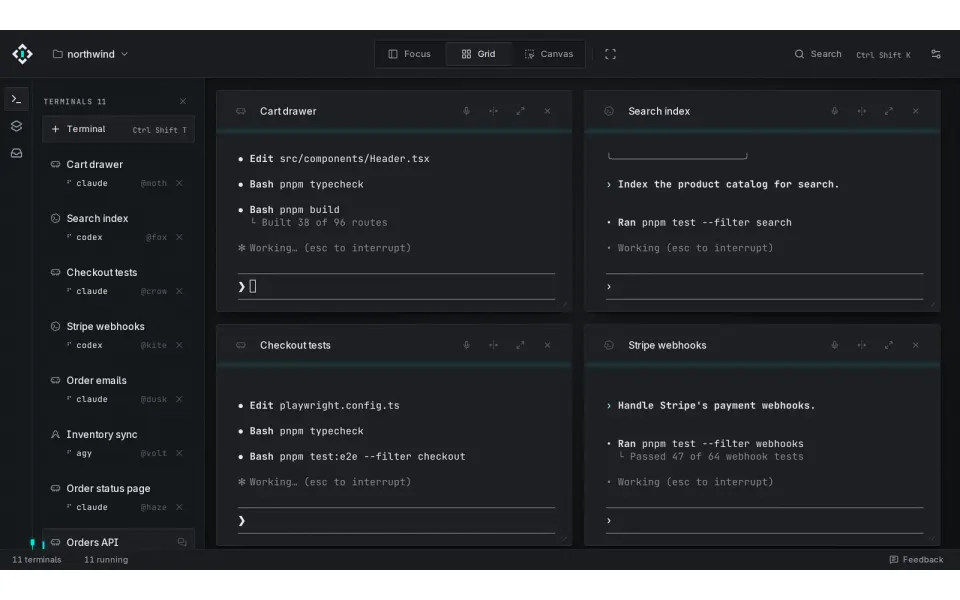
- Desktop app
- Mac, Windows and Linux
- Browser
- Not listed
- Phone
- No
- Command line
- Not listed
- Agents
- Claude Code, Codex, OpenCode, Pi and Antigravity
- Your subscription
- Works with your own plan
- Agents run
- On your computer and on your own server
- Laptop closed
- Keeps going
- Isolation
- Worktree
- Parallel agents
- Yes
- Scheduled runs
- No
- Coordinator agent
- Yes
- Built-in issues
- No
- Pull requests
- Not listed
- Review screen
- Not listed
- Team
- No
- Self-hosting
- Yes
- Telemetry
- On by default, off only by config, env var or flag
- Licence
- GPL-3.0-or-later
- Price from
- Free
- How it charges
- No paid plan
- Paid plans from
- No paid plan
Receipts
- Checked
- Findings
- 48 published · 39 cross-checked by a second agent · read them all
- Sources
- 47 public pages on 3 sites: github.com, novadeck.dev, api.github.com
- GitHub stars
- 60 on · api.github.com · repository attention, not users or capability
- Screenshot
- github.com, retrieved · first party repository · shows appearance, not capability
- Data
- /products/novadeck.json · .md
- Method
- Same rules for all 269 researched ADEs. How we check · Report wrong data
What it does
Where you use it
Desktop app for macOS, Windows and Linux plus a standalone runner a UI can reach over WebSocket; no mobile app, mobile site, editor extension or end-user CLI for driving agents.
Source and scope for Where you use itAgents it runs
Runs the person's own Claude Code, Codex, Antigravity, opencode and pi CLIs; each terminal can run a different harness and they can share a team.
Source and scope for Agents it runsAccounts and subscriptions
Uses the accounts already signed in to each CLI; Novadeck has no account, credits or provider routing, except a hosted onboarding tour that runs on Novadeck's OpenRouter account.
Source and scope for Accounts and subscriptionsWhere agents run
Runs locally in the desktop app, or as a standalone runner on the person's own server; no vendor cloud.
Source and scope for Where agents runHow work is kept apart
Optional experimental git worktrees per agent; no container, VM or OS sandbox from Novadeck beyond the harness's own.
Source and scope for How work is kept apartParallel work
Many agent terminals run at once across projects and sessions with per-terminal status.
Source and scope for Parallel workScheduled runs
No schedules or event triggers; agents can only wake themselves on their own timers.
Source and scope for Scheduled runsGit and pull requests
Experimental agent worktrees and branches, PR status lookup on GitHub, GitLab and Azure DevOps, and a gate on agent pushes and PR merges; commits and PRs are made by agents with their own git and gh.
Source and scope for Git and pull requestsLicence and source
Whole product is GPL-3.0-or-later on GitHub; no hosted service apart from the onboarding tour and update server.
Source and scope for Licence and sourceData and telemetry
No telemetry ID or data upload except counted update checks, optional anonymous feedback and uninstall answers, and the onboarding tour; transcripts are local, masked and encrypted. The installed desktop app sends its counted update checks by default until launched with NOVADECK_UPDATES=off.
Source and scope for Data and telemetryPrice
Free with no paid plan; agent usage is billed by each harness vendor.
Source and scope for PriceTyped filters
Every value links to its receipt below. Read plan and surface restrictions before using a filter to decide.
| Filter | Value |
|---|---|
| Desktop OS: macOS | Yes cross-checked |
| Desktop OS: Windows | Yes cross-checked |
| Desktop OS: Linux | Yes cross-checked |
| Web client | Unknown |
| Phone access: Native iOS | No cross-checked |
| Phone access: Native Android | No cross-checked |
| Phone access: Phone browser | No cross-checked |
| CLI | Unknown |
| Coding agents: Claude Code | Yes cross-checked |
| Coding agents: Codex | Yes cross-checked |
| Coding agents: Cursor Agent | Unknown |
| Coding agents: Gemini CLI | Unknown |
| Coding agents: OpenCode | Yes cross-checked |
| Coding agents: Pi | Yes cross-checked |
| Coding agents: Grok | Unknown |
| Coding agents: Aider | Unknown |
| Coding agents: Antigravity | Yes cross-checked |
| Use my subscription | Yes cross-checked |
| Where agents run: On your computer | Yes |
| Where agents run: On your own server | Yes |
| Where agents run: In the vendor's cloud | No |
| Workspace isolation: Git worktree | Yes cross-checked |
| Workspace isolation: Container | No cross-checked |
| Workspace isolation: VM or microVM | No cross-checked |
| Parallel runs | Yes cross-checked |
| Coordinator | Yes cross-checked |
| Native issue tracking | No cross-checked |
| Unattended triggers | No cross-checked |
| Shared prompting | No cross-checked |
| Team roles | No cross-checked |
| SSO | No cross-checked |
| Pull request workflow | Unknown |
| Review interface | Unknown |
| Product license: Apache-2.0 | No. GPL-3.0-or-later |
| Product license: MIT | No. GPL-3.0-or-later |
| Product license: GPL-3.0 | No. GPL-3.0-or-later |
| Product license: GPL-3.0-or-later | Yes. GPL-3.0-or-later |
| Product license: AGPL-3.0 | No. GPL-3.0-or-later |
| Product license: AGPL-3.0-or-later | No. GPL-3.0-or-later |
| Product license: Elastic License 2.0 | No. GPL-3.0-or-later |
| Product license: Custom terms | No. GPL-3.0-or-later |
| Product license: Proprietary | No. GPL-3.0-or-later |
| Self-hosting | Yes cross-checked |
| Telemetry default: No telemetry | No. On by default |
| Telemetry default: Off until you opt in | No. On by default |
| Telemetry default: On by default | Yes. On by default |
| Telemetry off switch: In the app | No. Config, env var or flag only |
| Telemetry off switch: Config, env var or flag only | Yes. Config, env var or flag only |
| Telemetry off switch: No off switch | No. Config, env var or flag only |
| Free access | Yes cross-checked |
| Starting price: Free | Yes. Free cross-checked |
| Starting price: Up to $20/month | No. Free cross-checked |
| Starting price: $21–40/month | No. Free cross-checked |
| Starting price: $41–100/month | No. Free cross-checked |
| Starting price: Over $100/month | No. Free cross-checked |
| Starting price: Contact for pricing | No. Free cross-checked |
| Pricing model: Free, no paid plan | Yes cross-checked |
| Pricing model: Free plan | Unknown |
| Pricing model: Subscription | Unknown |
| Pricing model: Per seat | Unknown |
| Pricing model: Usage-based | Unknown |
| Pricing model: Per machine or compute | Unknown |
| Pricing model: Bring your own key | Unknown |
| Pricing model: One-time purchase | Unknown |
| Paid plans from: No paid plan | Yes. No paid plan cross-checked |
| Paid plans from: $10 or less/month | No. No paid plan cross-checked |
| Paid plans from: $11–20/month | No. No paid plan cross-checked |
| Paid plans from: $21–40/month | No. No paid plan cross-checked |
| Paid plans from: $41–100/month | No. No paid plan cross-checked |
| Paid plans from: Over $100/month | No. No paid plan cross-checked |
| Paid plans from: Contact sales | No. No paid plan cross-checked |
| Lifecycle status: Active | Unknown |
| Lifecycle status: Sunsetting | Unknown |
| Keeps going with laptop closed | Yes |
| Open-source license | Yes. GPL-3.0-or-later |
| Any desktop app | Yes cross-checked |
| Paid plan up to $20/month | No. No paid plan cross-checked |
| Paid plan up to $40/month | No. No paid plan cross-checked |
| No telemetry by default | No. On by default |
| Telemetry off in the app | No. Config, env var or flag only |
| Any phone client | No cross-checked |
Filter receipts
Desktop OS: macOS: Yes cross-checked
Desktop OS: macOS
Typed value: Yes.
Desktop app for macOS, Windows and Linux plus a standalone runner a UI can reach over WebSocket; no mobile app, mobile site, editor extension or end-user CLI for driving agents.
- Desktop os: macOS universal dmg, Windows x64 per-user installer and ZIP, Linux x86_64 AppImage; minimum OS versions are not stated.
- Cli: A novadeck launcher command and the runner CLI (pnpm --filter @novadeck/runner start) exist; there is no CLI for starting or steering agents.
- No mobile, editor or agent-control CLI client; the browser build is a demo and development target.
-
Finding: macOS universal dmg/install script, Windows x64 per-user installer and ZIP, Linux x86_64 AppImage; optional AppArmor profile for the Electron sandbox; uninstall keeps projects unless unticked; installed builds auto-update and never restart by themselves.
-
Finding: Desktop terminal for Claude Code, Codex, Antigravity on existing subscriptions; operatingSystem macOS, Windows, Linux; isAccessibleForFree true; offer price 0 USD; GPL-3.0.
Desktop OS: Windows: Yes cross-checked
Desktop OS: Windows
Typed value: Yes.
Desktop app for macOS, Windows and Linux plus a standalone runner a UI can reach over WebSocket; no mobile app, mobile site, editor extension or end-user CLI for driving agents.
- Desktop os: macOS universal dmg, Windows x64 per-user installer and ZIP, Linux x86_64 AppImage; minimum OS versions are not stated.
- Cli: A novadeck launcher command and the runner CLI (pnpm --filter @novadeck/runner start) exist; there is no CLI for starting or steering agents.
- No mobile, editor or agent-control CLI client; the browser build is a demo and development target.
-
Finding: macOS universal dmg/install script, Windows x64 per-user installer and ZIP, Linux x86_64 AppImage; optional AppArmor profile for the Electron sandbox; uninstall keeps projects unless unticked; installed builds auto-update and never restart by themselves.
-
Finding: Desktop terminal for Claude Code, Codex, Antigravity on existing subscriptions; operatingSystem macOS, Windows, Linux; isAccessibleForFree true; offer price 0 USD; GPL-3.0.
Desktop OS: Linux: Yes cross-checked
Desktop OS: Linux
Typed value: Yes.
Desktop app for macOS, Windows and Linux plus a standalone runner a UI can reach over WebSocket; no mobile app, mobile site, editor extension or end-user CLI for driving agents.
- Desktop os: macOS universal dmg, Windows x64 per-user installer and ZIP, Linux x86_64 AppImage; minimum OS versions are not stated.
- Cli: A novadeck launcher command and the runner CLI (pnpm --filter @novadeck/runner start) exist; there is no CLI for starting or steering agents.
- No mobile, editor or agent-control CLI client; the browser build is a demo and development target.
-
Finding: macOS universal dmg/install script, Windows x64 per-user installer and ZIP, Linux x86_64 AppImage; optional AppArmor profile for the Electron sandbox; uninstall keeps projects unless unticked; installed builds auto-update and never restart by themselves.
-
Finding: Desktop terminal for Claude Code, Codex, Antigravity on existing subscriptions; operatingSystem macOS, Windows, Linux; isAccessibleForFree true; offer price 0 USD; GPL-3.0.
Phone access: Native iOS: No cross-checked
Phone access: Native iOS
Typed value: No.
Desktop app for macOS, Windows and Linux plus a standalone runner a UI can reach over WebSocket; no mobile app, mobile site, editor extension or end-user CLI for driving agents.
- Mobile apps: No mobile app in the repository; the download page tells phone visitors it is a desktop app.
- Mobile browser: No mobile web client; the download page redirects phone visitors to a computer.
- Editor extensions: No editor extension package in apps/ or libraries/.
- No mobile, editor or agent-control CLI client; the browser build is a demo and development target.
-
Finding: Costs nothing and asks for nothing; on a phone the page says Novadeck is a desktop app and offers to send the link to a computer.
-
Finding: No mobile app or editor extension; apps/try is a browser demo and the browser build is a development target.
Phone access: Native Android: No cross-checked
Phone access: Native Android
Typed value: No.
Desktop app for macOS, Windows and Linux plus a standalone runner a UI can reach over WebSocket; no mobile app, mobile site, editor extension or end-user CLI for driving agents.
- Mobile apps: No mobile app in the repository; the download page tells phone visitors it is a desktop app.
- Mobile browser: No mobile web client; the download page redirects phone visitors to a computer.
- Editor extensions: No editor extension package in apps/ or libraries/.
- No mobile, editor or agent-control CLI client; the browser build is a demo and development target.
-
Finding: Costs nothing and asks for nothing; on a phone the page says Novadeck is a desktop app and offers to send the link to a computer.
-
Finding: No mobile app or editor extension; apps/try is a browser demo and the browser build is a development target.
Phone access: Phone browser: No cross-checked
Phone access: Phone browser
Typed value: No.
Desktop app for macOS, Windows and Linux plus a standalone runner a UI can reach over WebSocket; no mobile app, mobile site, editor extension or end-user CLI for driving agents.
- Mobile apps: No mobile app in the repository; the download page tells phone visitors it is a desktop app.
- Mobile browser: No mobile web client; the download page redirects phone visitors to a computer.
- Editor extensions: No editor extension package in apps/ or libraries/.
- No mobile, editor or agent-control CLI client; the browser build is a demo and development target.
-
Finding: Costs nothing and asks for nothing; on a phone the page says Novadeck is a desktop app and offers to send the link to a computer.
-
Finding: No mobile app or editor extension; apps/try is a browser demo and the browser build is a development target.
Coding agents: Claude Code: Yes cross-checked
Coding agents: Claude Code
Typed value: Yes.
Runs the person's own Claude Code, Codex, Antigravity, opencode and pi CLIs; each terminal can run a different harness and they can share a team.
- Harnesses: Claude Code, Codex, Antigravity (agy), opencode and pi are connected harnesses with shims and plugins.
- Model providers: Novadeck does not choose models; providers are whatever each harness supports.
- Custom adapters: Any other CLI runs as a plain terminal; harness adapters are code modules under harnesses/, not a user-configurable adapter.
- Mixed harness operation: Agents of different harnesses message each other and can be in one team.
- Model choice stays inside each harness; no generic adapter for other CLIs beyond plain terminals.
-
Finding: Desktop terminal for Claude Code, Codex, Antigravity, opencode and pi; one Inbox for agent questions; free and open source with no account; runs the CLIs the person already has with their own accounts; macOS, Windows and Linux installers.
-
Finding: Per-harness coverage of hooks, resume, messaging and status for Claude Code, Codex, Antigravity, opencode and pi.
Coding agents: Codex: Yes cross-checked
Coding agents: Codex
Typed value: Yes.
Runs the person's own Claude Code, Codex, Antigravity, opencode and pi CLIs; each terminal can run a different harness and they can share a team.
- Harnesses: Claude Code, Codex, Antigravity (agy), opencode and pi are connected harnesses with shims and plugins.
- Model providers: Novadeck does not choose models; providers are whatever each harness supports.
- Custom adapters: Any other CLI runs as a plain terminal; harness adapters are code modules under harnesses/, not a user-configurable adapter.
- Mixed harness operation: Agents of different harnesses message each other and can be in one team.
- Model choice stays inside each harness; no generic adapter for other CLIs beyond plain terminals.
-
Finding: Desktop terminal for Claude Code, Codex, Antigravity, opencode and pi; one Inbox for agent questions; free and open source with no account; runs the CLIs the person already has with their own accounts; macOS, Windows and Linux installers.
-
Finding: Per-harness coverage of hooks, resume, messaging and status for Claude Code, Codex, Antigravity, opencode and pi.
Coding agents: OpenCode: Yes cross-checked
Coding agents: OpenCode
Typed value: Yes.
Runs the person's own Claude Code, Codex, Antigravity, opencode and pi CLIs; each terminal can run a different harness and they can share a team.
- Harnesses: Claude Code, Codex, Antigravity (agy), opencode and pi are connected harnesses with shims and plugins.
- Model providers: Novadeck does not choose models; providers are whatever each harness supports.
- Custom adapters: Any other CLI runs as a plain terminal; harness adapters are code modules under harnesses/, not a user-configurable adapter.
- Mixed harness operation: Agents of different harnesses message each other and can be in one team.
- Model choice stays inside each harness; no generic adapter for other CLIs beyond plain terminals.
-
Finding: Desktop terminal for Claude Code, Codex, Antigravity, opencode and pi; one Inbox for agent questions; free and open source with no account; runs the CLIs the person already has with their own accounts; macOS, Windows and Linux installers.
-
Finding: Per-harness coverage of hooks, resume, messaging and status for Claude Code, Codex, Antigravity, opencode and pi.
Coding agents: Pi: Yes cross-checked
Coding agents: Pi
Typed value: Yes.
Runs the person's own Claude Code, Codex, Antigravity, opencode and pi CLIs; each terminal can run a different harness and they can share a team.
- Harnesses: Claude Code, Codex, Antigravity (agy), opencode and pi are connected harnesses with shims and plugins.
- Model providers: Novadeck does not choose models; providers are whatever each harness supports.
- Custom adapters: Any other CLI runs as a plain terminal; harness adapters are code modules under harnesses/, not a user-configurable adapter.
- Mixed harness operation: Agents of different harnesses message each other and can be in one team.
- Model choice stays inside each harness; no generic adapter for other CLIs beyond plain terminals.
-
Finding: Desktop terminal for Claude Code, Codex, Antigravity, opencode and pi; one Inbox for agent questions; free and open source with no account; runs the CLIs the person already has with their own accounts; macOS, Windows and Linux installers.
-
Finding: Per-harness coverage of hooks, resume, messaging and status for Claude Code, Codex, Antigravity, opencode and pi.
Coding agents: Antigravity: Yes cross-checked
Coding agents: Antigravity
Typed value: Yes.
Runs the person's own Claude Code, Codex, Antigravity, opencode and pi CLIs; each terminal can run a different harness and they can share a team.
- Harnesses: Claude Code, Codex, Antigravity (agy), opencode and pi are connected harnesses with shims and plugins.
- Model providers: Novadeck does not choose models; providers are whatever each harness supports.
- Custom adapters: Any other CLI runs as a plain terminal; harness adapters are code modules under harnesses/, not a user-configurable adapter.
- Mixed harness operation: Agents of different harnesses message each other and can be in one team.
- Model choice stays inside each harness; no generic adapter for other CLIs beyond plain terminals.
-
Finding: Desktop terminal for Claude Code, Codex, Antigravity, opencode and pi; one Inbox for agent questions; free and open source with no account; runs the CLIs the person already has with their own accounts; macOS, Windows and Linux installers.
-
Finding: Per-harness coverage of hooks, resume, messaging and status for Claude Code, Codex, Antigravity, opencode and pi.
Use my subscription: Yes cross-checked
Use my subscription
Typed value: Yes.
Uses the accounts already signed in to each CLI; Novadeck has no account, credits or provider routing, except a hosted onboarding tour that runs on Novadeck's OpenRouter account.
- Agent subscriptions: Runs the CLIs with the person's own config and accounts, so Claude or ChatGPT subscriptions apply.
- Api accounts: API-key logins configured in each CLI work unchanged.
- Local models: Local models are possible only through a harness that supports them (for example opencode or pi); Novadeck adds none for agents.
- Account switching: No account management; accounts are the CLIs' own.
- Vendor account requirement: No Novadeck account is required.
- No account switching or local-model wiring of its own.
-
Finding: Desktop terminal for Claude Code, Codex, Antigravity, opencode and pi; one Inbox for agent questions; free and open source with no account; runs the CLIs the person already has with their own accounts; macOS, Windows and Linux installers.
-
Finding: Desktop terminal for Claude Code, Codex, Antigravity on existing subscriptions; operatingSystem macOS, Windows, Linux; isAccessibleForFree true; offer price 0 USD; GPL-3.0.
Where agents run: On your computer: Yes
Where agents run: On your computer
Typed value: Yes.
Runs locally in the desktop app, or as a standalone runner on the person's own server; no vendor cloud.
- Local: Desktop app runs the runner on the machine.
- Payer: The person pays for their own machine and agent accounts.
- No managed cloud; remote use needs the person to host the runner.
-
Finding: Desktop terminal for Claude Code, Codex, Antigravity, opencode and pi; one Inbox for agent questions; free and open source with no account; runs the CLIs the person already has with their own accounts; macOS, Windows and Linux installers.
Where agents run: On your own server: Yes
Where agents run: On your own server
Typed value: Yes.
Runs locally in the desktop app, or as a standalone runner on the person's own server; no vendor cloud.
- Byo remote: Standalone runner on a VPS behind a TLS proxy.
- Self hosted: Runner under systemd or Docker.
- Managed cloud: No hosted runtime or public multi-user hosting layer.
- Hybrid: No mixed local and vendor-cloud mode.
- Provisioning: Manual: the person installs and configures the runner.
- Payer: The person pays for their own machine and agent accounts.
- Resources: Whatever the person's machine provides.
- Region: Where the person hosts it.
- Client disconnect: A standalone runner keeps terminals while clients disconnect.
- No managed cloud; remote use needs the person to host the runner.
-
Backend API: Running a standalone runner
Finding: Standalone runner keeps workspace.sqlite and transcripts in a data folder, can run under systemd or Docker on a VPS behind a TLS reverse proxy; there is no TLS, login page or public multi-user hosting layer.
Where agents run: In the vendor's cloud: No
Where agents run: In the vendor's cloud
Typed value: No.
Runs locally in the desktop app, or as a standalone runner on the person's own server; no vendor cloud.
- Byo remote: Standalone runner on a VPS behind a TLS proxy.
- Self hosted: Runner under systemd or Docker.
- Managed cloud: No hosted runtime or public multi-user hosting layer.
- Hybrid: No mixed local and vendor-cloud mode.
- Provisioning: Manual: the person installs and configures the runner.
- Payer: The person pays for their own machine and agent accounts.
- Resources: Whatever the person's machine provides.
- Region: Where the person hosts it.
- Client disconnect: A standalone runner keeps terminals while clients disconnect.
- No managed cloud; remote use needs the person to host the runner.
-
Backend API: Running a standalone runner
Finding: Standalone runner keeps workspace.sqlite and transcripts in a data folder, can run under systemd or Docker on a VPS behind a TLS reverse proxy; there is no TLS, login page or public multi-user hosting layer.
Workspace isolation: Git worktree: Yes cross-checked
Workspace isolation: Git worktree
Typed value: Yes.
Optional experimental git worktrees per agent; no container, VM or OS sandbox from Novadeck beyond the harness's own.
- Branch: open_worktree creates or adopts a branch.
- Worktree: Experimental agent worktrees under ~/.novadeck/worktrees, off by default.
- Code separation: Worktrees separate branches when enabled.
- Agent worktrees are experimental and off by default; no process or network isolation of its own.
-
Finding: Experimental agent worktrees (Preferences, Experimental, off by default): open_worktree, take_worktree, close_worktree, give_worktree create and track git worktrees under ~/.novadeck/worktrees with owner terminal, branch and base recorded; the Worktrees panel measures each against its home branch.
-
Finding: Runner runs git worktree add to create an agent worktree for a branch.
Workspace isolation: Container: No cross-checked
Workspace isolation: Container
Typed value: No.
Optional experimental git worktrees per agent; no container, VM or OS sandbox from Novadeck beyond the harness's own.
- Container: No container runtime for agents.
- Vm: No VM runtime.
- Network: No network controls.
- Agent worktrees are experimental and off by default; no process or network isolation of its own.
-
Bounded search: container or VM isolation
Finding: Only two hits, both shell-command display helpers; no container or VM runtime for agents. Docker appears only as a way to host the standalone runner.
Workspace isolation: VM or microVM: No cross-checked
Workspace isolation: VM or microVM
Typed value: No.
Optional experimental git worktrees per agent; no container, VM or OS sandbox from Novadeck beyond the harness's own.
- Container: No container runtime for agents.
- Vm: No VM runtime.
- Network: No network controls.
- Agent worktrees are experimental and off by default; no process or network isolation of its own.
-
Bounded search: container or VM isolation
Finding: Only two hits, both shell-command display helpers; no container or VM runtime for agents. Docker appears only as a way to host the standalone runner.
Parallel runs: Yes cross-checked
Parallel runs
Typed value: Yes.
Many agent terminals run at once across projects and sessions with per-terminal status.
- Concurrent sessions: Any number of terminals per project; Canvas shows all at once.
- Concurrent tasks: Each terminal runs its own agent on its own work.
- Observed concurrency: Docs show eleven terminals; no stated maximum.
- No fixed quota published; agent-opened terminals are rate-limited.
-
Finding: Welcome dialog installs a small plugin into each ticked agent; Focus, Grid and Canvas views; Inbox for permissions, plans and questions with toasts and system notifications; agents message each other by handle and lead teammates; terminals reopen after restart and closed ones stay in History.
Coordinator: Yes cross-checked
Coordinator
Typed value: Yes.
Agents message each other by handle and lead teammates of any connected harness; messages and leads are visible in Messages panes and wires.
- Messages: send(to, text) with queued, held and refused answers.
- Results return: Teammates reply by message and post done reports.
- Cross harness: Claude Code, Codex, Antigravity, opencode and pi share teams.
- Activation: A doorbell wakes an idle agent when a message arrives.
- Followup: Lead and person can message a teammate again.
- Invocation: MCP tools open_agent, lead and release.
- Delegation is agent-driven through MCP tools; no orchestration UI beyond views.
-
Finding: Desktop terminal for Claude Code, Codex, Antigravity, opencode and pi; one Inbox for agent questions; free and open source with no account; runs the CLIs the person already has with their own accounts; macOS, Windows and Linux installers.
-
Agent messaging: Agent interface
Finding: Inside Novadeck terminals agents get MCP tools send, show, look, open_terminal, open_agent, close_terminal, lead and release, plus worktree tools when enabled; send answers queued, held or refused and never claims delivery.
Native issue tracking: No cross-checked
Native issue tracking
Typed value: No.
No issue tracker or backlog.
- Create: No native issues, backlog or labels.
- Edit: No native issues, backlog or labels.
- Discuss: No native issues, backlog or labels.
- Prioritize: No native issues, backlog or labels.
- Label: No native issues, backlog or labels.
- Assign: No native issues, backlog or labels.
- Search: No native issues, backlog or labels.
- Filter: No native issues, backlog or labels.
- Archive: No native issues, backlog or labels.
- Reopen: No native issues, backlog or labels.
- Project epic views: No native issues, backlog or labels.
- Idea parking: No native issues, backlog or labels.
- Explicit dispatch: No native issues, backlog or labels.
- Task session separation: No native issues, backlog or labels.
- Metadata: No native issues, backlog or labels.
- Durable states: No native issues, backlog or labels.
- External tracker requirement: No tracker is required or integrated.
-
Bounded search: issue tracker and planning
Finding: No issue store, backlog, Linear or Jira integration; units of work are terminals, sessions, projects and worktrees.
Unattended triggers: No cross-checked
Unattended triggers
Typed value: No.
No schedules or event triggers; agents can only wake themselves on their own timers.
- Schedules: No user schedules, events or recurring tasks in the pinned source.
- Events: No user schedules, events or recurring tasks in the pinned source.
- Recurring tasks: No user schedules, events or recurring tasks in the pinned source.
- Completion conditions: No user schedules, events or recurring tasks in the pinned source.
- Scheduler location: No user schedules, events or recurring tasks in the pinned source.
- Overlaps: No user schedules, events or recurring tasks in the pinned source.
- Retries: No user schedules, events or recurring tasks in the pinned source.
- Client independence: No user schedules, events or recurring tasks in the pinned source.
-
Bounded search: schedules and triggers
Finding: Hits are internal polling and agent self wake-ups; no user-facing schedules, recurring tasks or event triggers.
Shared prompting: No cross-checked
Shared prompting
Typed value: No.
Single-user app; no shared sessions, comments or presence.
- Visibility: No multi-user features; the runner has one owner with device credentials.
- Discussion: No multi-user features; the runner has one owner with device credentials.
- Comments: No multi-user features; the runner has one owner with device credentials.
- Presence: No multi-user features; the runner has one owner with device credentials.
- Coprompting: No multi-user features; the runner has one owner with device credentials.
- Ordering: No multi-user features; the runner has one owner with device credentials.
- Conflicts: No multi-user features; the runner has one owner with device credentials.
- Attribution: No multi-user features; the runner has one owner with device credentials.
- Permissions: No multi-user features; the runner has one owner with device credentials.
- Plan restrictions: No multi-user features; the runner has one owner with device credentials.
- Owner online: No multi-user features; the runner has one owner with device credentials.
-
Backend API: Serving a runner and Devices
Finding: Runner serves token-authenticated WebSockets at /api/rpc; owner token NOVADECK_TOKEN plus per-device credentials the owner mints and revokes; a device has the same shell access as the owner.
-
Finding: Only a test fixture string and demo data match; no SSO, organisations or roles. Access is the runner owner token plus device credentials.
Team roles: No cross-checked
Team roles
Typed value: No.
No roles; a runner has one owner and owner-minted device credentials.
- Organization roles: No organisation, project or task roles, SSO or provisioning.
- Project roles: No organisation, project or task roles, SSO or provisioning.
- Task roles: No organisation, project or task roles, SSO or provisioning.
- Sso: No organisation, project or task roles, SSO or provisioning.
- Provisioning: No organisation, project or task roles, SSO or provisioning.
- Plan scope: No organisation, project or task roles, SSO or provisioning.
- Devices have the owner's full shell access.
-
Finding: Only a test fixture string and demo data match; no SSO, organisations or roles. Access is the runner owner token plus device credentials.
SSO: No cross-checked
SSO
Typed value: No.
No roles; a runner has one owner and owner-minted device credentials.
- Organization roles: No organisation, project or task roles, SSO or provisioning.
- Project roles: No organisation, project or task roles, SSO or provisioning.
- Task roles: No organisation, project or task roles, SSO or provisioning.
- Sso: No organisation, project or task roles, SSO or provisioning.
- Provisioning: No organisation, project or task roles, SSO or provisioning.
- Plan scope: No organisation, project or task roles, SSO or provisioning.
- Devices have the owner's full shell access.
-
Finding: Only a test fixture string and demo data match; no SSO, organisations or roles. Access is the runner owner token plus device credentials.
Product license: Apache-2.0: No. GPL-3.0-or-later
Product license: Apache-2.0
Typed value: No. GPL-3.0-or-later.
Whole product is GPL-3.0-or-later on GitHub; no hosted service apart from the onboarding tour and update server.
- Client license: GPL-3.0-or-later.
- Server license: Runner is in the same GPL repository.
- Source visibility: Public repository.
-
Finding: Desktop terminal for Claude Code, Codex, Antigravity, opencode and pi; one Inbox for agent questions; free and open source with no account; runs the CLIs the person already has with their own accounts; macOS, Windows and Linux installers.
-
Finding: GNU GPL version 3; README states GPL-3.0-or-later with contributions under a CLA.
Product license: MIT: No. GPL-3.0-or-later
Product license: MIT
Typed value: No. GPL-3.0-or-later.
Whole product is GPL-3.0-or-later on GitHub; no hosted service apart from the onboarding tour and update server.
- Client license: GPL-3.0-or-later.
- Server license: Runner is in the same GPL repository.
- Source visibility: Public repository.
-
Finding: Desktop terminal for Claude Code, Codex, Antigravity, opencode and pi; one Inbox for agent questions; free and open source with no account; runs the CLIs the person already has with their own accounts; macOS, Windows and Linux installers.
-
Finding: GNU GPL version 3; README states GPL-3.0-or-later with contributions under a CLA.
Product license: GPL-3.0: No. GPL-3.0-or-later
Product license: GPL-3.0
Typed value: No. GPL-3.0-or-later.
Whole product is GPL-3.0-or-later on GitHub; no hosted service apart from the onboarding tour and update server.
- Client license: GPL-3.0-or-later.
- Server license: Runner is in the same GPL repository.
- Source visibility: Public repository.
-
Finding: Desktop terminal for Claude Code, Codex, Antigravity, opencode and pi; one Inbox for agent questions; free and open source with no account; runs the CLIs the person already has with their own accounts; macOS, Windows and Linux installers.
-
Finding: GNU GPL version 3; README states GPL-3.0-or-later with contributions under a CLA.
Product license: GPL-3.0-or-later: Yes. GPL-3.0-or-later
Product license: GPL-3.0-or-later
Typed value: Yes. GPL-3.0-or-later.
Whole product is GPL-3.0-or-later on GitHub; no hosted service apart from the onboarding tour and update server.
- Client license: GPL-3.0-or-later.
- Server license: Runner is in the same GPL repository.
- Source visibility: Public repository.
-
Finding: Desktop terminal for Claude Code, Codex, Antigravity, opencode and pi; one Inbox for agent questions; free and open source with no account; runs the CLIs the person already has with their own accounts; macOS, Windows and Linux installers.
-
Finding: GNU GPL version 3; README states GPL-3.0-or-later with contributions under a CLA.
Product license: AGPL-3.0: No. GPL-3.0-or-later
Product license: AGPL-3.0
Typed value: No. GPL-3.0-or-later.
Whole product is GPL-3.0-or-later on GitHub; no hosted service apart from the onboarding tour and update server.
- Client license: GPL-3.0-or-later.
- Server license: Runner is in the same GPL repository.
- Source visibility: Public repository.
-
Finding: Desktop terminal for Claude Code, Codex, Antigravity, opencode and pi; one Inbox for agent questions; free and open source with no account; runs the CLIs the person already has with their own accounts; macOS, Windows and Linux installers.
-
Finding: GNU GPL version 3; README states GPL-3.0-or-later with contributions under a CLA.
Product license: AGPL-3.0-or-later: No. GPL-3.0-or-later
Product license: AGPL-3.0-or-later
Typed value: No. GPL-3.0-or-later.
Whole product is GPL-3.0-or-later on GitHub; no hosted service apart from the onboarding tour and update server.
- Client license: GPL-3.0-or-later.
- Server license: Runner is in the same GPL repository.
- Source visibility: Public repository.
-
Finding: Desktop terminal for Claude Code, Codex, Antigravity, opencode and pi; one Inbox for agent questions; free and open source with no account; runs the CLIs the person already has with their own accounts; macOS, Windows and Linux installers.
-
Finding: GNU GPL version 3; README states GPL-3.0-or-later with contributions under a CLA.
Product license: Elastic License 2.0: No. GPL-3.0-or-later
Product license: Elastic License 2.0
Typed value: No. GPL-3.0-or-later.
Whole product is GPL-3.0-or-later on GitHub; no hosted service apart from the onboarding tour and update server.
- Client license: GPL-3.0-or-later.
- Server license: Runner is in the same GPL repository.
- Source visibility: Public repository.
-
Finding: Desktop terminal for Claude Code, Codex, Antigravity, opencode and pi; one Inbox for agent questions; free and open source with no account; runs the CLIs the person already has with their own accounts; macOS, Windows and Linux installers.
-
Finding: GNU GPL version 3; README states GPL-3.0-or-later with contributions under a CLA.
Product license: Custom terms: No. GPL-3.0-or-later
Product license: Custom terms
Typed value: No. GPL-3.0-or-later.
Whole product is GPL-3.0-or-later on GitHub; no hosted service apart from the onboarding tour and update server.
- Client license: GPL-3.0-or-later.
- Server license: Runner is in the same GPL repository.
- Source visibility: Public repository.
-
Finding: Desktop terminal for Claude Code, Codex, Antigravity, opencode and pi; one Inbox for agent questions; free and open source with no account; runs the CLIs the person already has with their own accounts; macOS, Windows and Linux installers.
-
Finding: GNU GPL version 3; README states GPL-3.0-or-later with contributions under a CLA.
Product license: Proprietary: No. GPL-3.0-or-later
Product license: Proprietary
Typed value: No. GPL-3.0-or-later.
Whole product is GPL-3.0-or-later on GitHub; no hosted service apart from the onboarding tour and update server.
- Client license: GPL-3.0-or-later.
- Server license: Runner is in the same GPL repository.
- Source visibility: Public repository.
-
Finding: Desktop terminal for Claude Code, Codex, Antigravity, opencode and pi; one Inbox for agent questions; free and open source with no account; runs the CLIs the person already has with their own accounts; macOS, Windows and Linux installers.
-
Finding: GNU GPL version 3; README states GPL-3.0-or-later with contributions under a CLA.
Self-hosting: Yes cross-checked
Self-hosting
Typed value: Yes.
Everything runs on the person's machines; data lives in a local data folder; no export tool.
- Self hosting: Desktop or standalone runner.
- Export: No export feature; data is in workspace.sqlite.
- Import: No import feature.
- Formats: SQLite database plus files in the data folder.
- No export or import feature.
-
Backend API: Running a standalone runner
Finding: Standalone runner keeps workspace.sqlite and transcripts in a data folder, can run under systemd or Docker on a VPS behind a TLS reverse proxy; there is no TLS, login page or public multi-user hosting layer.
Telemetry default: No telemetry: No. On by default
Telemetry default: No telemetry
Typed value: No. On by default.
No telemetry ID or data upload except counted update checks, optional anonymous feedback and uninstall answers, and the onboarding tour; transcripts are local, masked and encrypted. The installed desktop app sends its counted update checks by default until launched with NOVADECK_UPDATES=off.
- Code data: Code and terminals are not sent, except agent traffic during the tour.
- Prompts: Prompts go only to each harness's provider; tour prompts go via OpenRouter.
- Logs: Logs stay local.
- Retention: Feedback notes and uninstall goodbye answers kept 12 months; nightly AI feedback themes at most two months; tour ticket rows 90 days.
- Deletion: Feedback notes and goodbye answers cannot be deleted on request because they are anonymous; local data deleted at uninstall when unticked.
- Training: Each night an AI model sorts the last month of feedback notes into themes through OpenRouter, only to providers that do not train; goodbye answers are not sent to it; the tour asks zero retention.
- Residency: Local data; novadeck.dev services run on Cloudflare, and US processors may handle requests outside the EU.
- Subprocessors: Cloudflare, GitHub, OpenRouter, Microsoft Azure and Hugging Face named; SAP CLA Assistant only for contributors.
- Telemetry disclosure: Privacy page lists update-check fields and counts.
- Telemetry default: On by default in the installed desktop app. The README badge says no telemetry and no update check sends a per-install ID, but packaged builds check novadeck.dev 10 seconds after launch and then hourly with their version and build, and the website counts each check; the privacy page says it counts copies open each hour by channel and system and launches each day by version, build and country. Crash dumps stay local. Local, pull request and development builds make no checks.
- Telemetry controls: NOVADECK_UPDATES=off turns update checks off for a launch; there is no Preferences switch, and feedback notes send only on Send.
- Telemetry off switch location: Config only: launching the desktop app with the NOVADECK_UPDATES=off environment variable turns off its update checks, and with them the counted requests, for that launch. Preferences has no update-check or telemetry switch; its Experimental switch only picks the release channel.
- Consent prompt: Feedback notes send only on Send and uninstall goodbye answers only on a click; the tour asks for a ticket. The goodbye page is described on the privacy page but absent from pinned 8dd943a.
- Provider separation: Agents talk to their own providers directly.
- Update checks are on in installed builds; only the NOVADECK_UPDATES=off environment variable turns them off, and Preferences has no switch for them.
-
Novadeck desktop update checks at commit 8dd943a
Finding: Packaged builds with a real version check novadeck.dev for updates 10 seconds after launch and then hourly, adding the check reason, version and installed or portable build so the website can count active copies. A launch with NOVADECK_UPDATES=off makes no checks. Native crash dumps are kept locally and never uploaded.
-
Novadeck auto-update design: what a check sends and how the website counts it
Finding: Update checks read novadeck.dev, which counts each request to know how many copies are open and launched, then answers with the release file from GitHub. A check adds only its reason, version and build, and the per-install staging ID is patched out; the requested file name still reveals the system. Windows, macOS and Linux AppImage builds check; local, pull request and development builds do not.
-
Novadeck privacy (last changed 25 November 2026)
Finding: The app sends no code, terminals, chats or logs except during the onboarding tour. Update checks send reason, version and build with no ID; the site keeps only the country and counts copies open each hour by channel and system and launches each day by version, build and country. Feedback notes are sent only on Send; the uninstaller opens a goodbye page whose answers are kept only when clicked. Both are anonymous, kept 12 months and cannot be deleted on request. Each night an AI model sorts the last month of notes into themes through OpenRouter, only to providers that do not train; themes are kept at most two months. Tour ticket rows are deleted after 90 days. Cloudflare, GitHub, OpenRouter, Microsoft Azure and Hugging Face are named; requests may be handled outside the EU.
Telemetry default: Off until you opt in: No. On by default
Telemetry default: Off until you opt in
Typed value: No. On by default.
No telemetry ID or data upload except counted update checks, optional anonymous feedback and uninstall answers, and the onboarding tour; transcripts are local, masked and encrypted. The installed desktop app sends its counted update checks by default until launched with NOVADECK_UPDATES=off.
- Code data: Code and terminals are not sent, except agent traffic during the tour.
- Prompts: Prompts go only to each harness's provider; tour prompts go via OpenRouter.
- Logs: Logs stay local.
- Retention: Feedback notes and uninstall goodbye answers kept 12 months; nightly AI feedback themes at most two months; tour ticket rows 90 days.
- Deletion: Feedback notes and goodbye answers cannot be deleted on request because they are anonymous; local data deleted at uninstall when unticked.
- Training: Each night an AI model sorts the last month of feedback notes into themes through OpenRouter, only to providers that do not train; goodbye answers are not sent to it; the tour asks zero retention.
- Residency: Local data; novadeck.dev services run on Cloudflare, and US processors may handle requests outside the EU.
- Subprocessors: Cloudflare, GitHub, OpenRouter, Microsoft Azure and Hugging Face named; SAP CLA Assistant only for contributors.
- Telemetry disclosure: Privacy page lists update-check fields and counts.
- Telemetry default: On by default in the installed desktop app. The README badge says no telemetry and no update check sends a per-install ID, but packaged builds check novadeck.dev 10 seconds after launch and then hourly with their version and build, and the website counts each check; the privacy page says it counts copies open each hour by channel and system and launches each day by version, build and country. Crash dumps stay local. Local, pull request and development builds make no checks.
- Telemetry controls: NOVADECK_UPDATES=off turns update checks off for a launch; there is no Preferences switch, and feedback notes send only on Send.
- Telemetry off switch location: Config only: launching the desktop app with the NOVADECK_UPDATES=off environment variable turns off its update checks, and with them the counted requests, for that launch. Preferences has no update-check or telemetry switch; its Experimental switch only picks the release channel.
- Consent prompt: Feedback notes send only on Send and uninstall goodbye answers only on a click; the tour asks for a ticket. The goodbye page is described on the privacy page but absent from pinned 8dd943a.
- Provider separation: Agents talk to their own providers directly.
- Update checks are on in installed builds; only the NOVADECK_UPDATES=off environment variable turns them off, and Preferences has no switch for them.
-
Novadeck desktop update checks at commit 8dd943a
Finding: Packaged builds with a real version check novadeck.dev for updates 10 seconds after launch and then hourly, adding the check reason, version and installed or portable build so the website can count active copies. A launch with NOVADECK_UPDATES=off makes no checks. Native crash dumps are kept locally and never uploaded.
-
Novadeck auto-update design: what a check sends and how the website counts it
Finding: Update checks read novadeck.dev, which counts each request to know how many copies are open and launched, then answers with the release file from GitHub. A check adds only its reason, version and build, and the per-install staging ID is patched out; the requested file name still reveals the system. Windows, macOS and Linux AppImage builds check; local, pull request and development builds do not.
-
Novadeck privacy (last changed 25 November 2026)
Finding: The app sends no code, terminals, chats or logs except during the onboarding tour. Update checks send reason, version and build with no ID; the site keeps only the country and counts copies open each hour by channel and system and launches each day by version, build and country. Feedback notes are sent only on Send; the uninstaller opens a goodbye page whose answers are kept only when clicked. Both are anonymous, kept 12 months and cannot be deleted on request. Each night an AI model sorts the last month of notes into themes through OpenRouter, only to providers that do not train; themes are kept at most two months. Tour ticket rows are deleted after 90 days. Cloudflare, GitHub, OpenRouter, Microsoft Azure and Hugging Face are named; requests may be handled outside the EU.
Telemetry default: On by default: Yes. On by default
Telemetry default: On by default
Typed value: Yes. On by default.
No telemetry ID or data upload except counted update checks, optional anonymous feedback and uninstall answers, and the onboarding tour; transcripts are local, masked and encrypted. The installed desktop app sends its counted update checks by default until launched with NOVADECK_UPDATES=off.
- Code data: Code and terminals are not sent, except agent traffic during the tour.
- Prompts: Prompts go only to each harness's provider; tour prompts go via OpenRouter.
- Logs: Logs stay local.
- Retention: Feedback notes and uninstall goodbye answers kept 12 months; nightly AI feedback themes at most two months; tour ticket rows 90 days.
- Deletion: Feedback notes and goodbye answers cannot be deleted on request because they are anonymous; local data deleted at uninstall when unticked.
- Training: Each night an AI model sorts the last month of feedback notes into themes through OpenRouter, only to providers that do not train; goodbye answers are not sent to it; the tour asks zero retention.
- Residency: Local data; novadeck.dev services run on Cloudflare, and US processors may handle requests outside the EU.
- Subprocessors: Cloudflare, GitHub, OpenRouter, Microsoft Azure and Hugging Face named; SAP CLA Assistant only for contributors.
- Telemetry disclosure: Privacy page lists update-check fields and counts.
- Telemetry default: On by default in the installed desktop app. The README badge says no telemetry and no update check sends a per-install ID, but packaged builds check novadeck.dev 10 seconds after launch and then hourly with their version and build, and the website counts each check; the privacy page says it counts copies open each hour by channel and system and launches each day by version, build and country. Crash dumps stay local. Local, pull request and development builds make no checks.
- Telemetry controls: NOVADECK_UPDATES=off turns update checks off for a launch; there is no Preferences switch, and feedback notes send only on Send.
- Telemetry off switch location: Config only: launching the desktop app with the NOVADECK_UPDATES=off environment variable turns off its update checks, and with them the counted requests, for that launch. Preferences has no update-check or telemetry switch; its Experimental switch only picks the release channel.
- Consent prompt: Feedback notes send only on Send and uninstall goodbye answers only on a click; the tour asks for a ticket. The goodbye page is described on the privacy page but absent from pinned 8dd943a.
- Provider separation: Agents talk to their own providers directly.
- Update checks are on in installed builds; only the NOVADECK_UPDATES=off environment variable turns them off, and Preferences has no switch for them.
-
Novadeck desktop update checks at commit 8dd943a
Finding: Packaged builds with a real version check novadeck.dev for updates 10 seconds after launch and then hourly, adding the check reason, version and installed or portable build so the website can count active copies. A launch with NOVADECK_UPDATES=off makes no checks. Native crash dumps are kept locally and never uploaded.
-
Novadeck auto-update design: what a check sends and how the website counts it
Finding: Update checks read novadeck.dev, which counts each request to know how many copies are open and launched, then answers with the release file from GitHub. A check adds only its reason, version and build, and the per-install staging ID is patched out; the requested file name still reveals the system. Windows, macOS and Linux AppImage builds check; local, pull request and development builds do not.
-
Novadeck privacy (last changed 25 November 2026)
Finding: The app sends no code, terminals, chats or logs except during the onboarding tour. Update checks send reason, version and build with no ID; the site keeps only the country and counts copies open each hour by channel and system and launches each day by version, build and country. Feedback notes are sent only on Send; the uninstaller opens a goodbye page whose answers are kept only when clicked. Both are anonymous, kept 12 months and cannot be deleted on request. Each night an AI model sorts the last month of notes into themes through OpenRouter, only to providers that do not train; themes are kept at most two months. Tour ticket rows are deleted after 90 days. Cloudflare, GitHub, OpenRouter, Microsoft Azure and Hugging Face are named; requests may be handled outside the EU.
Telemetry off switch: In the app: No. Config, env var or flag only
Telemetry off switch: In the app
Typed value: No. Config, env var or flag only.
No telemetry ID or data upload except counted update checks, optional anonymous feedback and uninstall answers, and the onboarding tour; transcripts are local, masked and encrypted. The installed desktop app sends its counted update checks by default until launched with NOVADECK_UPDATES=off.
- Telemetry default: On by default in the installed desktop app. The README badge says no telemetry and no update check sends a per-install ID, but packaged builds check novadeck.dev 10 seconds after launch and then hourly with their version and build, and the website counts each check; the privacy page says it counts copies open each hour by channel and system and launches each day by version, build and country. Crash dumps stay local. Local, pull request and development builds make no checks.
- Telemetry controls: NOVADECK_UPDATES=off turns update checks off for a launch; there is no Preferences switch, and feedback notes send only on Send.
- Telemetry off switch location: Config only: launching the desktop app with the NOVADECK_UPDATES=off environment variable turns off its update checks, and with them the counted requests, for that launch. Preferences has no update-check or telemetry switch; its Experimental switch only picks the release channel.
- Update checks are on in installed builds; only the NOVADECK_UPDATES=off environment variable turns them off, and Preferences has no switch for them.
-
Finding: Setting NOVADECK_UPDATES=off turns update checks off for a launch; the Preferences Updates section has only the Experimental channel switch, no update-check switch.
-
Novadeck desktop update checks at commit 8dd943a
Finding: Packaged builds with a real version check novadeck.dev for updates 10 seconds after launch and then hourly, adding the check reason, version and installed or portable build so the website can count active copies. A launch with NOVADECK_UPDATES=off makes no checks. Native crash dumps are kept locally and never uploaded.
Telemetry off switch: Config, env var or flag only: Yes. Config, env var or flag only
Telemetry off switch: Config, env var or flag only
Typed value: Yes. Config, env var or flag only.
No telemetry ID or data upload except counted update checks, optional anonymous feedback and uninstall answers, and the onboarding tour; transcripts are local, masked and encrypted. The installed desktop app sends its counted update checks by default until launched with NOVADECK_UPDATES=off.
- Telemetry default: On by default in the installed desktop app. The README badge says no telemetry and no update check sends a per-install ID, but packaged builds check novadeck.dev 10 seconds after launch and then hourly with their version and build, and the website counts each check; the privacy page says it counts copies open each hour by channel and system and launches each day by version, build and country. Crash dumps stay local. Local, pull request and development builds make no checks.
- Telemetry controls: NOVADECK_UPDATES=off turns update checks off for a launch; there is no Preferences switch, and feedback notes send only on Send.
- Telemetry off switch location: Config only: launching the desktop app with the NOVADECK_UPDATES=off environment variable turns off its update checks, and with them the counted requests, for that launch. Preferences has no update-check or telemetry switch; its Experimental switch only picks the release channel.
- Update checks are on in installed builds; only the NOVADECK_UPDATES=off environment variable turns them off, and Preferences has no switch for them.
-
Finding: Setting NOVADECK_UPDATES=off turns update checks off for a launch; the Preferences Updates section has only the Experimental channel switch, no update-check switch.
-
Novadeck desktop update checks at commit 8dd943a
Finding: Packaged builds with a real version check novadeck.dev for updates 10 seconds after launch and then hourly, adding the check reason, version and installed or portable build so the website can count active copies. A launch with NOVADECK_UPDATES=off makes no checks. Native crash dumps are kept locally and never uploaded.
Telemetry off switch: No off switch: No. Config, env var or flag only
Telemetry off switch: No off switch
Typed value: No. Config, env var or flag only.
No telemetry ID or data upload except counted update checks, optional anonymous feedback and uninstall answers, and the onboarding tour; transcripts are local, masked and encrypted. The installed desktop app sends its counted update checks by default until launched with NOVADECK_UPDATES=off.
- Telemetry default: On by default in the installed desktop app. The README badge says no telemetry and no update check sends a per-install ID, but packaged builds check novadeck.dev 10 seconds after launch and then hourly with their version and build, and the website counts each check; the privacy page says it counts copies open each hour by channel and system and launches each day by version, build and country. Crash dumps stay local. Local, pull request and development builds make no checks.
- Telemetry controls: NOVADECK_UPDATES=off turns update checks off for a launch; there is no Preferences switch, and feedback notes send only on Send.
- Telemetry off switch location: Config only: launching the desktop app with the NOVADECK_UPDATES=off environment variable turns off its update checks, and with them the counted requests, for that launch. Preferences has no update-check or telemetry switch; its Experimental switch only picks the release channel.
- Update checks are on in installed builds; only the NOVADECK_UPDATES=off environment variable turns them off, and Preferences has no switch for them.
-
Finding: Setting NOVADECK_UPDATES=off turns update checks off for a launch; the Preferences Updates section has only the Experimental channel switch, no update-check switch.
-
Novadeck desktop update checks at commit 8dd943a
Finding: Packaged builds with a real version check novadeck.dev for updates 10 seconds after launch and then hourly, adding the check reason, version and installed or portable build so the website can count active copies. A launch with NOVADECK_UPDATES=off makes no checks. Native crash dumps are kept locally and never uploaded.
Free access: Yes cross-checked
Free access
Typed value: Yes.
Entirely free and self-run; a browser demo and onboarding tour let people try it without their own agent account.
- Ongoing free: Free and open source.
- Paid only: Nothing is paid-only.
- Free scenarios: All features free.
- Card required: No card or account.
- Paid evaluation: Not applicable because the product is free.
- Tour usage is capped per ticket.
-
Finding: Desktop terminal for Claude Code, Codex, Antigravity on existing subscriptions; operatingSystem macOS, Windows, Linux; isAccessibleForFree true; offer price 0 USD; GPL-3.0.
-
Finding: Costs nothing and asks for nothing; on a phone the page says Novadeck is a desktop app and offers to send the link to a computer.
Starting price: Free: Yes. Free cross-checked
Starting price: Free
Typed value: Yes. Free.
Free with no paid plan; agent usage is billed by each harness vendor.
- Currency: Offer price 0 USD.
- Interval: No paid plan, so this pricing part does not exist.
- Seats: No paid plan, so this pricing part does not exist.
- Seat minimum: No paid plan, so this pricing part does not exist.
- Workspace fees: No paid plan, so this pricing part does not exist.
- Included usage: No paid plan, so this pricing part does not exist.
- Credits: No paid plan, so this pricing part does not exist.
- Trial: No paid plan, so this pricing part does not exist.
- Overages: No paid plan, so this pricing part does not exist.
- Taxes: No paid plan, so this pricing part does not exist.
- Plan parts such as seats, overages and taxes do not exist because nothing is sold.
-
Finding: Desktop terminal for Claude Code, Codex, Antigravity on existing subscriptions; operatingSystem macOS, Windows, Linux; isAccessibleForFree true; offer price 0 USD; GPL-3.0.
Starting price: Up to $20/month: No. Free cross-checked
Starting price: Up to $20/month
Typed value: No. Free.
Free with no paid plan; agent usage is billed by each harness vendor.
- Currency: Offer price 0 USD.
- Interval: No paid plan, so this pricing part does not exist.
- Seats: No paid plan, so this pricing part does not exist.
- Seat minimum: No paid plan, so this pricing part does not exist.
- Workspace fees: No paid plan, so this pricing part does not exist.
- Included usage: No paid plan, so this pricing part does not exist.
- Credits: No paid plan, so this pricing part does not exist.
- Trial: No paid plan, so this pricing part does not exist.
- Overages: No paid plan, so this pricing part does not exist.
- Taxes: No paid plan, so this pricing part does not exist.
- Plan parts such as seats, overages and taxes do not exist because nothing is sold.
-
Finding: Desktop terminal for Claude Code, Codex, Antigravity on existing subscriptions; operatingSystem macOS, Windows, Linux; isAccessibleForFree true; offer price 0 USD; GPL-3.0.
Starting price: $21–40/month: No. Free cross-checked
Starting price: $21–40/month
Typed value: No. Free.
Free with no paid plan; agent usage is billed by each harness vendor.
- Currency: Offer price 0 USD.
- Interval: No paid plan, so this pricing part does not exist.
- Seats: No paid plan, so this pricing part does not exist.
- Seat minimum: No paid plan, so this pricing part does not exist.
- Workspace fees: No paid plan, so this pricing part does not exist.
- Included usage: No paid plan, so this pricing part does not exist.
- Credits: No paid plan, so this pricing part does not exist.
- Trial: No paid plan, so this pricing part does not exist.
- Overages: No paid plan, so this pricing part does not exist.
- Taxes: No paid plan, so this pricing part does not exist.
- Plan parts such as seats, overages and taxes do not exist because nothing is sold.
-
Finding: Desktop terminal for Claude Code, Codex, Antigravity on existing subscriptions; operatingSystem macOS, Windows, Linux; isAccessibleForFree true; offer price 0 USD; GPL-3.0.
Starting price: $41–100/month: No. Free cross-checked
Starting price: $41–100/month
Typed value: No. Free.
Free with no paid plan; agent usage is billed by each harness vendor.
- Currency: Offer price 0 USD.
- Interval: No paid plan, so this pricing part does not exist.
- Seats: No paid plan, so this pricing part does not exist.
- Seat minimum: No paid plan, so this pricing part does not exist.
- Workspace fees: No paid plan, so this pricing part does not exist.
- Included usage: No paid plan, so this pricing part does not exist.
- Credits: No paid plan, so this pricing part does not exist.
- Trial: No paid plan, so this pricing part does not exist.
- Overages: No paid plan, so this pricing part does not exist.
- Taxes: No paid plan, so this pricing part does not exist.
- Plan parts such as seats, overages and taxes do not exist because nothing is sold.
-
Finding: Desktop terminal for Claude Code, Codex, Antigravity on existing subscriptions; operatingSystem macOS, Windows, Linux; isAccessibleForFree true; offer price 0 USD; GPL-3.0.
Starting price: Over $100/month: No. Free cross-checked
Starting price: Over $100/month
Typed value: No. Free.
Free with no paid plan; agent usage is billed by each harness vendor.
- Currency: Offer price 0 USD.
- Interval: No paid plan, so this pricing part does not exist.
- Seats: No paid plan, so this pricing part does not exist.
- Seat minimum: No paid plan, so this pricing part does not exist.
- Workspace fees: No paid plan, so this pricing part does not exist.
- Included usage: No paid plan, so this pricing part does not exist.
- Credits: No paid plan, so this pricing part does not exist.
- Trial: No paid plan, so this pricing part does not exist.
- Overages: No paid plan, so this pricing part does not exist.
- Taxes: No paid plan, so this pricing part does not exist.
- Plan parts such as seats, overages and taxes do not exist because nothing is sold.
-
Finding: Desktop terminal for Claude Code, Codex, Antigravity on existing subscriptions; operatingSystem macOS, Windows, Linux; isAccessibleForFree true; offer price 0 USD; GPL-3.0.
Starting price: Contact for pricing: No. Free cross-checked
Starting price: Contact for pricing
Typed value: No. Free.
Free with no paid plan; agent usage is billed by each harness vendor.
- Currency: Offer price 0 USD.
- Interval: No paid plan, so this pricing part does not exist.
- Seats: No paid plan, so this pricing part does not exist.
- Seat minimum: No paid plan, so this pricing part does not exist.
- Workspace fees: No paid plan, so this pricing part does not exist.
- Included usage: No paid plan, so this pricing part does not exist.
- Credits: No paid plan, so this pricing part does not exist.
- Trial: No paid plan, so this pricing part does not exist.
- Overages: No paid plan, so this pricing part does not exist.
- Taxes: No paid plan, so this pricing part does not exist.
- Plan parts such as seats, overages and taxes do not exist because nothing is sold.
-
Finding: Desktop terminal for Claude Code, Codex, Antigravity on existing subscriptions; operatingSystem macOS, Windows, Linux; isAccessibleForFree true; offer price 0 USD; GPL-3.0.
Pricing model: Free, no paid plan: Yes cross-checked
Pricing model: Free, no paid plan
Typed value: Yes.
Free with no paid plan; agent usage is billed by each harness vendor.
- Currency: Offer price 0 USD.
- Interval: No paid plan, so this pricing part does not exist.
- Seats: No paid plan, so this pricing part does not exist.
- Seat minimum: No paid plan, so this pricing part does not exist.
- Workspace fees: No paid plan, so this pricing part does not exist.
- Included usage: No paid plan, so this pricing part does not exist.
- Credits: No paid plan, so this pricing part does not exist.
- Trial: No paid plan, so this pricing part does not exist.
- Overages: No paid plan, so this pricing part does not exist.
- Taxes: No paid plan, so this pricing part does not exist.
- Plan parts such as seats, overages and taxes do not exist because nothing is sold.
-
Finding: Desktop terminal for Claude Code, Codex, Antigravity on existing subscriptions; operatingSystem macOS, Windows, Linux; isAccessibleForFree true; offer price 0 USD; GPL-3.0.
-
Finding: Costs nothing and asks for nothing; on a phone the page says Novadeck is a desktop app and offers to send the link to a computer.
Paid plans from: No paid plan: Yes. No paid plan cross-checked
Paid plans from: No paid plan
Typed value: Yes. No paid plan.
Free with no paid plan; agent usage is billed by each harness vendor.
- Currency: Offer price 0 USD.
- Interval: No paid plan, so this pricing part does not exist.
- Seats: No paid plan, so this pricing part does not exist.
- Seat minimum: No paid plan, so this pricing part does not exist.
- Workspace fees: No paid plan, so this pricing part does not exist.
- Included usage: No paid plan, so this pricing part does not exist.
- Credits: No paid plan, so this pricing part does not exist.
- Trial: No paid plan, so this pricing part does not exist.
- Overages: No paid plan, so this pricing part does not exist.
- Taxes: No paid plan, so this pricing part does not exist.
- Plan parts such as seats, overages and taxes do not exist because nothing is sold.
-
Finding: Desktop terminal for Claude Code, Codex, Antigravity on existing subscriptions; operatingSystem macOS, Windows, Linux; isAccessibleForFree true; offer price 0 USD; GPL-3.0.
-
Finding: Costs nothing and asks for nothing; on a phone the page says Novadeck is a desktop app and offers to send the link to a computer.
Paid plans from: $10 or less/month: No. No paid plan cross-checked
Paid plans from: $10 or less/month
Typed value: No. No paid plan.
Free with no paid plan; agent usage is billed by each harness vendor.
- Currency: Offer price 0 USD.
- Interval: No paid plan, so this pricing part does not exist.
- Seats: No paid plan, so this pricing part does not exist.
- Seat minimum: No paid plan, so this pricing part does not exist.
- Workspace fees: No paid plan, so this pricing part does not exist.
- Included usage: No paid plan, so this pricing part does not exist.
- Credits: No paid plan, so this pricing part does not exist.
- Trial: No paid plan, so this pricing part does not exist.
- Overages: No paid plan, so this pricing part does not exist.
- Taxes: No paid plan, so this pricing part does not exist.
- Plan parts such as seats, overages and taxes do not exist because nothing is sold.
-
Finding: Desktop terminal for Claude Code, Codex, Antigravity on existing subscriptions; operatingSystem macOS, Windows, Linux; isAccessibleForFree true; offer price 0 USD; GPL-3.0.
-
Finding: Costs nothing and asks for nothing; on a phone the page says Novadeck is a desktop app and offers to send the link to a computer.
Paid plans from: $11–20/month: No. No paid plan cross-checked
Paid plans from: $11–20/month
Typed value: No. No paid plan.
Free with no paid plan; agent usage is billed by each harness vendor.
- Currency: Offer price 0 USD.
- Interval: No paid plan, so this pricing part does not exist.
- Seats: No paid plan, so this pricing part does not exist.
- Seat minimum: No paid plan, so this pricing part does not exist.
- Workspace fees: No paid plan, so this pricing part does not exist.
- Included usage: No paid plan, so this pricing part does not exist.
- Credits: No paid plan, so this pricing part does not exist.
- Trial: No paid plan, so this pricing part does not exist.
- Overages: No paid plan, so this pricing part does not exist.
- Taxes: No paid plan, so this pricing part does not exist.
- Plan parts such as seats, overages and taxes do not exist because nothing is sold.
-
Finding: Desktop terminal for Claude Code, Codex, Antigravity on existing subscriptions; operatingSystem macOS, Windows, Linux; isAccessibleForFree true; offer price 0 USD; GPL-3.0.
-
Finding: Costs nothing and asks for nothing; on a phone the page says Novadeck is a desktop app and offers to send the link to a computer.
Paid plans from: $21–40/month: No. No paid plan cross-checked
Paid plans from: $21–40/month
Typed value: No. No paid plan.
Free with no paid plan; agent usage is billed by each harness vendor.
- Currency: Offer price 0 USD.
- Interval: No paid plan, so this pricing part does not exist.
- Seats: No paid plan, so this pricing part does not exist.
- Seat minimum: No paid plan, so this pricing part does not exist.
- Workspace fees: No paid plan, so this pricing part does not exist.
- Included usage: No paid plan, so this pricing part does not exist.
- Credits: No paid plan, so this pricing part does not exist.
- Trial: No paid plan, so this pricing part does not exist.
- Overages: No paid plan, so this pricing part does not exist.
- Taxes: No paid plan, so this pricing part does not exist.
- Plan parts such as seats, overages and taxes do not exist because nothing is sold.
-
Finding: Desktop terminal for Claude Code, Codex, Antigravity on existing subscriptions; operatingSystem macOS, Windows, Linux; isAccessibleForFree true; offer price 0 USD; GPL-3.0.
-
Finding: Costs nothing and asks for nothing; on a phone the page says Novadeck is a desktop app and offers to send the link to a computer.
Paid plans from: $41–100/month: No. No paid plan cross-checked
Paid plans from: $41–100/month
Typed value: No. No paid plan.
Free with no paid plan; agent usage is billed by each harness vendor.
- Currency: Offer price 0 USD.
- Interval: No paid plan, so this pricing part does not exist.
- Seats: No paid plan, so this pricing part does not exist.
- Seat minimum: No paid plan, so this pricing part does not exist.
- Workspace fees: No paid plan, so this pricing part does not exist.
- Included usage: No paid plan, so this pricing part does not exist.
- Credits: No paid plan, so this pricing part does not exist.
- Trial: No paid plan, so this pricing part does not exist.
- Overages: No paid plan, so this pricing part does not exist.
- Taxes: No paid plan, so this pricing part does not exist.
- Plan parts such as seats, overages and taxes do not exist because nothing is sold.
-
Finding: Desktop terminal for Claude Code, Codex, Antigravity on existing subscriptions; operatingSystem macOS, Windows, Linux; isAccessibleForFree true; offer price 0 USD; GPL-3.0.
-
Finding: Costs nothing and asks for nothing; on a phone the page says Novadeck is a desktop app and offers to send the link to a computer.
Paid plans from: Over $100/month: No. No paid plan cross-checked
Paid plans from: Over $100/month
Typed value: No. No paid plan.
Free with no paid plan; agent usage is billed by each harness vendor.
- Currency: Offer price 0 USD.
- Interval: No paid plan, so this pricing part does not exist.
- Seats: No paid plan, so this pricing part does not exist.
- Seat minimum: No paid plan, so this pricing part does not exist.
- Workspace fees: No paid plan, so this pricing part does not exist.
- Included usage: No paid plan, so this pricing part does not exist.
- Credits: No paid plan, so this pricing part does not exist.
- Trial: No paid plan, so this pricing part does not exist.
- Overages: No paid plan, so this pricing part does not exist.
- Taxes: No paid plan, so this pricing part does not exist.
- Plan parts such as seats, overages and taxes do not exist because nothing is sold.
-
Finding: Desktop terminal for Claude Code, Codex, Antigravity on existing subscriptions; operatingSystem macOS, Windows, Linux; isAccessibleForFree true; offer price 0 USD; GPL-3.0.
-
Finding: Costs nothing and asks for nothing; on a phone the page says Novadeck is a desktop app and offers to send the link to a computer.
Paid plans from: Contact sales: No. No paid plan cross-checked
Paid plans from: Contact sales
Typed value: No. No paid plan.
Free with no paid plan; agent usage is billed by each harness vendor.
- Currency: Offer price 0 USD.
- Interval: No paid plan, so this pricing part does not exist.
- Seats: No paid plan, so this pricing part does not exist.
- Seat minimum: No paid plan, so this pricing part does not exist.
- Workspace fees: No paid plan, so this pricing part does not exist.
- Included usage: No paid plan, so this pricing part does not exist.
- Credits: No paid plan, so this pricing part does not exist.
- Trial: No paid plan, so this pricing part does not exist.
- Overages: No paid plan, so this pricing part does not exist.
- Taxes: No paid plan, so this pricing part does not exist.
- Plan parts such as seats, overages and taxes do not exist because nothing is sold.
-
Finding: Desktop terminal for Claude Code, Codex, Antigravity on existing subscriptions; operatingSystem macOS, Windows, Linux; isAccessibleForFree true; offer price 0 USD; GPL-3.0.
-
Finding: Costs nothing and asks for nothing; on a phone the page says Novadeck is a desktop app and offers to send the link to a computer.
Keeps going with laptop closed: Yes
Keeps going with laptop closed
Typed value: Yes.
Runs locally in the desktop app, or as a standalone runner on the person's own server; no vendor cloud.
- Byo remote: Standalone runner on a VPS behind a TLS proxy.
- Self hosted: Runner under systemd or Docker.
- Managed cloud: No hosted runtime or public multi-user hosting layer.
- Hybrid: No mixed local and vendor-cloud mode.
- Provisioning: Manual: the person installs and configures the runner.
- Payer: The person pays for their own machine and agent accounts.
- Resources: Whatever the person's machine provides.
- Region: Where the person hosts it.
- Client disconnect: A standalone runner keeps terminals while clients disconnect.
- No managed cloud; remote use needs the person to host the runner.
-
Backend API: Running a standalone runner
Finding: Standalone runner keeps workspace.sqlite and transcripts in a data folder, can run under systemd or Docker on a VPS behind a TLS reverse proxy; there is no TLS, login page or public multi-user hosting layer.
Open-source license: Yes. GPL-3.0-or-later
Open-source license
Typed value: Yes. GPL-3.0-or-later.
Whole product is GPL-3.0-or-later on GitHub; no hosted service apart from the onboarding tour and update server.
- Client license: GPL-3.0-or-later.
- Server license: Runner is in the same GPL repository.
- Source visibility: Public repository.
-
Finding: Desktop terminal for Claude Code, Codex, Antigravity, opencode and pi; one Inbox for agent questions; free and open source with no account; runs the CLIs the person already has with their own accounts; macOS, Windows and Linux installers.
-
Finding: GNU GPL version 3; README states GPL-3.0-or-later with contributions under a CLA.
Any desktop app: Yes cross-checked
Any desktop app
Typed value: Yes.
Desktop app for macOS, Windows and Linux plus a standalone runner a UI can reach over WebSocket; no mobile app, mobile site, editor extension or end-user CLI for driving agents.
- Desktop os: macOS universal dmg, Windows x64 per-user installer and ZIP, Linux x86_64 AppImage; minimum OS versions are not stated.
- Cli: A novadeck launcher command and the runner CLI (pnpm --filter @novadeck/runner start) exist; there is no CLI for starting or steering agents.
- No mobile, editor or agent-control CLI client; the browser build is a demo and development target.
-
Finding: macOS universal dmg/install script, Windows x64 per-user installer and ZIP, Linux x86_64 AppImage; optional AppArmor profile for the Electron sandbox; uninstall keeps projects unless unticked; installed builds auto-update and never restart by themselves.
-
Finding: Desktop terminal for Claude Code, Codex, Antigravity on existing subscriptions; operatingSystem macOS, Windows, Linux; isAccessibleForFree true; offer price 0 USD; GPL-3.0.
Paid plan up to $20/month: No. No paid plan cross-checked
Paid plan up to $20/month
Typed value: No. No paid plan.
Free with no paid plan; agent usage is billed by each harness vendor.
- Currency: Offer price 0 USD.
- Interval: No paid plan, so this pricing part does not exist.
- Seats: No paid plan, so this pricing part does not exist.
- Seat minimum: No paid plan, so this pricing part does not exist.
- Workspace fees: No paid plan, so this pricing part does not exist.
- Included usage: No paid plan, so this pricing part does not exist.
- Credits: No paid plan, so this pricing part does not exist.
- Trial: No paid plan, so this pricing part does not exist.
- Overages: No paid plan, so this pricing part does not exist.
- Taxes: No paid plan, so this pricing part does not exist.
- Plan parts such as seats, overages and taxes do not exist because nothing is sold.
-
Finding: Desktop terminal for Claude Code, Codex, Antigravity on existing subscriptions; operatingSystem macOS, Windows, Linux; isAccessibleForFree true; offer price 0 USD; GPL-3.0.
-
Finding: Costs nothing and asks for nothing; on a phone the page says Novadeck is a desktop app and offers to send the link to a computer.
Paid plan up to $40/month: No. No paid plan cross-checked
Paid plan up to $40/month
Typed value: No. No paid plan.
Free with no paid plan; agent usage is billed by each harness vendor.
- Currency: Offer price 0 USD.
- Interval: No paid plan, so this pricing part does not exist.
- Seats: No paid plan, so this pricing part does not exist.
- Seat minimum: No paid plan, so this pricing part does not exist.
- Workspace fees: No paid plan, so this pricing part does not exist.
- Included usage: No paid plan, so this pricing part does not exist.
- Credits: No paid plan, so this pricing part does not exist.
- Trial: No paid plan, so this pricing part does not exist.
- Overages: No paid plan, so this pricing part does not exist.
- Taxes: No paid plan, so this pricing part does not exist.
- Plan parts such as seats, overages and taxes do not exist because nothing is sold.
-
Finding: Desktop terminal for Claude Code, Codex, Antigravity on existing subscriptions; operatingSystem macOS, Windows, Linux; isAccessibleForFree true; offer price 0 USD; GPL-3.0.
-
Finding: Costs nothing and asks for nothing; on a phone the page says Novadeck is a desktop app and offers to send the link to a computer.
No telemetry by default: No. On by default
No telemetry by default
Typed value: No. On by default.
No telemetry ID or data upload except counted update checks, optional anonymous feedback and uninstall answers, and the onboarding tour; transcripts are local, masked and encrypted. The installed desktop app sends its counted update checks by default until launched with NOVADECK_UPDATES=off.
- Code data: Code and terminals are not sent, except agent traffic during the tour.
- Prompts: Prompts go only to each harness's provider; tour prompts go via OpenRouter.
- Logs: Logs stay local.
- Retention: Feedback notes and uninstall goodbye answers kept 12 months; nightly AI feedback themes at most two months; tour ticket rows 90 days.
- Deletion: Feedback notes and goodbye answers cannot be deleted on request because they are anonymous; local data deleted at uninstall when unticked.
- Training: Each night an AI model sorts the last month of feedback notes into themes through OpenRouter, only to providers that do not train; goodbye answers are not sent to it; the tour asks zero retention.
- Residency: Local data; novadeck.dev services run on Cloudflare, and US processors may handle requests outside the EU.
- Subprocessors: Cloudflare, GitHub, OpenRouter, Microsoft Azure and Hugging Face named; SAP CLA Assistant only for contributors.
- Telemetry disclosure: Privacy page lists update-check fields and counts.
- Telemetry default: On by default in the installed desktop app. The README badge says no telemetry and no update check sends a per-install ID, but packaged builds check novadeck.dev 10 seconds after launch and then hourly with their version and build, and the website counts each check; the privacy page says it counts copies open each hour by channel and system and launches each day by version, build and country. Crash dumps stay local. Local, pull request and development builds make no checks.
- Telemetry controls: NOVADECK_UPDATES=off turns update checks off for a launch; there is no Preferences switch, and feedback notes send only on Send.
- Telemetry off switch location: Config only: launching the desktop app with the NOVADECK_UPDATES=off environment variable turns off its update checks, and with them the counted requests, for that launch. Preferences has no update-check or telemetry switch; its Experimental switch only picks the release channel.
- Consent prompt: Feedback notes send only on Send and uninstall goodbye answers only on a click; the tour asks for a ticket. The goodbye page is described on the privacy page but absent from pinned 8dd943a.
- Provider separation: Agents talk to their own providers directly.
- Update checks are on in installed builds; only the NOVADECK_UPDATES=off environment variable turns them off, and Preferences has no switch for them.
-
Novadeck desktop update checks at commit 8dd943a
Finding: Packaged builds with a real version check novadeck.dev for updates 10 seconds after launch and then hourly, adding the check reason, version and installed or portable build so the website can count active copies. A launch with NOVADECK_UPDATES=off makes no checks. Native crash dumps are kept locally and never uploaded.
-
Novadeck auto-update design: what a check sends and how the website counts it
Finding: Update checks read novadeck.dev, which counts each request to know how many copies are open and launched, then answers with the release file from GitHub. A check adds only its reason, version and build, and the per-install staging ID is patched out; the requested file name still reveals the system. Windows, macOS and Linux AppImage builds check; local, pull request and development builds do not.
-
Novadeck privacy (last changed 25 November 2026)
Finding: The app sends no code, terminals, chats or logs except during the onboarding tour. Update checks send reason, version and build with no ID; the site keeps only the country and counts copies open each hour by channel and system and launches each day by version, build and country. Feedback notes are sent only on Send; the uninstaller opens a goodbye page whose answers are kept only when clicked. Both are anonymous, kept 12 months and cannot be deleted on request. Each night an AI model sorts the last month of notes into themes through OpenRouter, only to providers that do not train; themes are kept at most two months. Tour ticket rows are deleted after 90 days. Cloudflare, GitHub, OpenRouter, Microsoft Azure and Hugging Face are named; requests may be handled outside the EU.
Telemetry off in the app: No. Config, env var or flag only
Telemetry off in the app
Typed value: No. Config, env var or flag only.
No telemetry ID or data upload except counted update checks, optional anonymous feedback and uninstall answers, and the onboarding tour; transcripts are local, masked and encrypted. The installed desktop app sends its counted update checks by default until launched with NOVADECK_UPDATES=off.
- Telemetry default: On by default in the installed desktop app. The README badge says no telemetry and no update check sends a per-install ID, but packaged builds check novadeck.dev 10 seconds after launch and then hourly with their version and build, and the website counts each check; the privacy page says it counts copies open each hour by channel and system and launches each day by version, build and country. Crash dumps stay local. Local, pull request and development builds make no checks.
- Telemetry controls: NOVADECK_UPDATES=off turns update checks off for a launch; there is no Preferences switch, and feedback notes send only on Send.
- Telemetry off switch location: Config only: launching the desktop app with the NOVADECK_UPDATES=off environment variable turns off its update checks, and with them the counted requests, for that launch. Preferences has no update-check or telemetry switch; its Experimental switch only picks the release channel.
- Update checks are on in installed builds; only the NOVADECK_UPDATES=off environment variable turns them off, and Preferences has no switch for them.
-
Finding: Setting NOVADECK_UPDATES=off turns update checks off for a launch; the Preferences Updates section has only the Experimental channel switch, no update-check switch.
-
Novadeck desktop update checks at commit 8dd943a
Finding: Packaged builds with a real version check novadeck.dev for updates 10 seconds after launch and then hourly, adding the check reason, version and installed or portable build so the website can count active copies. A launch with NOVADECK_UPDATES=off makes no checks. Native crash dumps are kept locally and never uploaded.
Any phone client: No cross-checked
Any phone client
Typed value: No.
Desktop app for macOS, Windows and Linux plus a standalone runner a UI can reach over WebSocket; no mobile app, mobile site, editor extension or end-user CLI for driving agents.
- Mobile apps: No mobile app in the repository; the download page tells phone visitors it is a desktop app.
- Mobile browser: No mobile web client; the download page redirects phone visitors to a computer.
- Editor extensions: No editor extension package in apps/ or libraries/.
- No mobile, editor or agent-control CLI client; the browser build is a demo and development target.
-
Finding: Costs nothing and asks for nothing; on a phone the page says Novadeck is a desktop app and offers to send the link to a computer.
-
Finding: No mobile app or editor extension; apps/try is a browser demo and the browser build is a development target.
All public findings
Findings may summarize a source. They are not presented as verbatim statements.
novadeck:ACC-01: Desktop app for macOS, Windows and Linux plus a standalone runner a UI can reach over WebSocket; no mobile app, mobile site, editor extension or end-user CLI for driving agents. cross-checked
novadeck:ACC-01
Desktop app for macOS, Windows and Linux plus a standalone runner a UI can reach over WebSocket; no mobile app, mobile site, editor extension or end-user CLI for driving agents.
- No mobile, editor or agent-control CLI client; the browser build is a demo and development target.
-
Finding: Desktop terminal for Claude Code, Codex, Antigravity, opencode and pi; one Inbox for agent questions; free and open source with no account; runs the CLIs the person already has with their own accounts; macOS, Windows and Linux installers.
-
Finding: Welcome dialog installs a small plugin into each ticked agent; Focus, Grid and Canvas views; Inbox for permissions, plans and questions with toasts and system notifications; agents message each other by handle and lead teammates; terminals reopen after restart and closed ones stay in History.
-
Finding: macOS universal dmg/install script, Windows x64 per-user installer and ZIP, Linux x86_64 AppImage; optional AppArmor profile for the Electron sandbox; uninstall keeps projects unless unticked; installed builds auto-update and never restart by themselves.
-
Novadeck reference: Working in Novadeck
Finding: Project switcher shows per-project agent state (working, paused at usage limit, waiting); Inbox lists Unblock, Question, Trouble and Update rows that stay as gray history; desktop system notifications per agent finish or error; projects can be pinned, reordered and removed; sessions group terminals; browser build shows no notifications.
-
Novadeck reference: Restoring terminals
Finding: After reboot each terminal reopens in its folder and connected agents resume their sessions; connecting installs a Novadeck plugin (hooks and MCP) into each harness; transcripts are masked for secrets and encrypted with an OS keychain key; Claude Code is allowed only Novadeck MCP tools by flag, other permissions stay the harness own.
-
Backend API: Running a standalone runner
Finding: Standalone runner keeps workspace.sqlite and transcripts in a data folder, can run under systemd or Docker on a VPS behind a TLS reverse proxy; there is no TLS, login page or public multi-user hosting layer.
-
Backend API: Serving a runner and Devices
Finding: Runner serves token-authenticated WebSockets at /api/rpc; owner token NOVADECK_TOKEN plus per-device credentials the owner mints and revokes; a device has the same shell access as the owner.
-
Finding: Desktop terminal for Claude Code, Codex, Antigravity on existing subscriptions; operatingSystem macOS, Windows, Linux; isAccessibleForFree true; offer price 0 USD; GPL-3.0.
-
Finding: Costs nothing and asks for nothing; on a phone the page says Novadeck is a desktop app and offers to send the link to a computer.
-
Finding: No mobile app or editor extension; apps/try is a browser demo and the browser build is a development target.
novadeck:ACC-02: Runs the person's own Claude Code, Codex, Antigravity, opencode and pi CLIs; each terminal can run a different harness and they can share a team. cross-checked
novadeck:ACC-02
Runs the person's own Claude Code, Codex, Antigravity, opencode and pi CLIs; each terminal can run a different harness and they can share a team.
- Model choice stays inside each harness; no generic adapter for other CLIs beyond plain terminals.
-
Finding: Desktop terminal for Claude Code, Codex, Antigravity, opencode and pi; one Inbox for agent questions; free and open source with no account; runs the CLIs the person already has with their own accounts; macOS, Windows and Linux installers.
-
Finding: Welcome dialog installs a small plugin into each ticked agent; Focus, Grid and Canvas views; Inbox for permissions, plans and questions with toasts and system notifications; agents message each other by handle and lead teammates; terminals reopen after restart and closed ones stay in History.
-
Novadeck reference: Restoring terminals
Finding: After reboot each terminal reopens in its folder and connected agents resume their sessions; connecting installs a Novadeck plugin (hooks and MCP) into each harness; transcripts are masked for secrets and encrypted with an OS keychain key; Claude Code is allowed only Novadeck MCP tools by flag, other permissions stay the harness own.
-
Agent messaging: Agent interface
Finding: Inside Novadeck terminals agents get MCP tools send, show, look, open_terminal, open_agent, close_terminal, lead and release, plus worktree tools when enabled; send answers queued, held or refused and never claims delivery.
-
Harness adapters: Shims and the worktrees folder
Finding: Each connected harness gets a shim; Claude Code receives the worktrees folder through its settings and Codex as writable roots, under the person own permission mode or sandbox; Novadeck writes nothing to harness config.
-
Finding: Per-harness coverage of hooks, resume, messaging and status for Claude Code, Codex, Antigravity, opencode and pi.
novadeck:ACC-03: Uses the accounts already signed in to each CLI; Novadeck has no account, credits or provider routing, except a hosted onboarding tour that runs on Novadeck's OpenRouter account. cross-checked
novadeck:ACC-03
Uses the accounts already signed in to each CLI; Novadeck has no account, credits or provider routing, except a hosted onboarding tour that runs on Novadeck's OpenRouter account.
- No account switching or local-model wiring of its own.
-
Finding: Desktop terminal for Claude Code, Codex, Antigravity, opencode and pi; one Inbox for agent questions; free and open source with no account; runs the CLIs the person already has with their own accounts; macOS, Windows and Linux installers.
-
Finding: Per-harness coverage of hooks, resume, messaging and status for Claude Code, Codex, Antigravity, opencode and pi.
-
Finding: Desktop terminal for Claude Code, Codex, Antigravity on existing subscriptions; operatingSystem macOS, Windows, Linux; isAccessibleForFree true; offer price 0 USD; GPL-3.0.
-
Finding: Costs nothing and asks for nothing; on a phone the page says Novadeck is a desktop app and offers to send the link to a computer.
-
Finding: No account or telemetry ID; the app sends no code, terminals, chats or logs except during the onboarding tour, which runs agents on Novadeck OpenRouter account via Azure with zero retention requested; update checks send version and build and are counted by country; feedback notes are anonymous and kept 12 months.
-
Finding: Only a test fixture string and demo data match; no SSO, organisations or roles. Access is the runner owner token plus device credentials.
novadeck:ACC-04: Install the app, sign in to at least one agent CLI, tick it in the welcome dialog, then open a folder; git is needed only for worktree and PR features. cross-checked
novadeck:ACC-04
Install the app, sign in to at least one agent CLI, tick it in the welcome dialog, then open a folder; git is needed only for worktree and PR features.
- No managed cloud setup; remote runner setup is manual.
-
Finding: Welcome dialog installs a small plugin into each ticked agent; Focus, Grid and Canvas views; Inbox for permissions, plans and questions with toasts and system notifications; agents message each other by handle and lead teammates; terminals reopen after restart and closed ones stay in History.
-
Novadeck reference: Restoring terminals
Finding: After reboot each terminal reopens in its folder and connected agents resume their sessions; connecting installs a Novadeck plugin (hooks and MCP) into each harness; transcripts are masked for secrets and encrypted with an OS keychain key; Claude Code is allowed only Novadeck MCP tools by flag, other permissions stay the harness own.
-
Finding: Experimental agent worktrees (Preferences, Experimental, off by default): open_worktree, take_worktree, close_worktree, give_worktree create and track git worktrees under ~/.novadeck/worktrees with owner terminal, branch and base recorded; the Worktrees panel measures each against its home branch.
-
Finding: Finds the pull request of a git branch on GitHub, GitLab and Azure DevOps using the signed-in gh, glab or az token; stores no secret.
-
Backend API: Running a standalone runner
Finding: Standalone runner keeps workspace.sqlite and transcripts in a data folder, can run under systemd or Docker on a VPS behind a TLS reverse proxy; there is no TLS, login page or public multi-user hosting layer.
novadeck:ACC-05: The runner exposes a token-authenticated WebSocket RPC API, and agents get an MCP tool set inside Novadeck terminals; no public SDK stability promise, webhooks or end-user CLI. cross-checked
novadeck:ACC-05
The runner exposes a token-authenticated WebSocket RPC API, and agents get an MCP tool set inside Novadeck terminals; no public SDK stability promise, webhooks or end-user CLI.
- API is the runner protocol used by the UI, versioned by revision but not documented as a public integration surface.
-
Novadeck reference: Restoring terminals
Finding: After reboot each terminal reopens in its folder and connected agents resume their sessions; connecting installs a Novadeck plugin (hooks and MCP) into each harness; transcripts are masked for secrets and encrypted with an OS keychain key; Claude Code is allowed only Novadeck MCP tools by flag, other permissions stay the harness own.
-
Agent messaging: Agent interface
Finding: Inside Novadeck terminals agents get MCP tools send, show, look, open_terminal, open_agent, close_terminal, lead and release, plus worktree tools when enabled; send answers queued, held or refused and never claims delivery.
-
Backend API: Running a standalone runner
Finding: Standalone runner keeps workspace.sqlite and transcripts in a data folder, can run under systemd or Docker on a VPS behind a TLS reverse proxy; there is no TLS, login page or public multi-user hosting layer.
-
Backend API: Serving a runner and Devices
Finding: Runner serves token-authenticated WebSockets at /api/rpc; owner token NOVADECK_TOKEN plus per-device credentials the owner mints and revokes; a device has the same shell access as the owner.
-
Bounded search: schedules and triggers
Finding: Hits are internal polling and agent self wake-ups; no user-facing schedules, recurring tasks or event triggers.
-
Finding: No mobile app or editor extension; apps/try is a browser demo and the browser build is a development target.
novadeck:ACC-06: Novadeck installs its own plugin into each harness and otherwise leaves MCP servers, plugins and skills to the harness. cross-checked
novadeck:ACC-06
Novadeck installs its own plugin into each harness and otherwise leaves MCP servers, plugins and skills to the harness.
- No Novadeck-level MCP client or extension system.
-
Finding: Welcome dialog installs a small plugin into each ticked agent; Focus, Grid and Canvas views; Inbox for permissions, plans and questions with toasts and system notifications; agents message each other by handle and lead teammates; terminals reopen after restart and closed ones stay in History.
-
Novadeck reference: Working in Novadeck
Finding: Project switcher shows per-project agent state (working, paused at usage limit, waiting); Inbox lists Unblock, Question, Trouble and Update rows that stay as gray history; desktop system notifications per agent finish or error; projects can be pinned, reordered and removed; sessions group terminals; browser build shows no notifications.
-
Novadeck reference: Restoring terminals
Finding: After reboot each terminal reopens in its folder and connected agents resume their sessions; connecting installs a Novadeck plugin (hooks and MCP) into each harness; transcripts are masked for secrets and encrypted with an OS keychain key; Claude Code is allowed only Novadeck MCP tools by flag, other permissions stay the harness own.
-
Agent messaging: Agent interface
Finding: Inside Novadeck terminals agents get MCP tools send, show, look, open_terminal, open_agent, close_terminal, lead and release, plus worktree tools when enabled; send answers queued, held or refused and never claims delivery.
-
Finding: Finds the pull request of a git branch on GitHub, GitLab and Azure DevOps using the signed-in gh, glab or az token; stores no secret.
-
Harness adapters: Shims and the worktrees folder
Finding: Each connected harness gets a shim; Claude Code receives the worktrees folder through its settings and Codex as writable roots, under the person own permission mode or sandbox; Novadeck writes nothing to harness config.
novadeck:ACC-07: Electron desktop app with a React renderer and a Node runner using node-pty; no mobile implementation. cross-checked
novadeck:ACC-07
Electron desktop app with a React renderer and a Node runner using node-pty; no mobile implementation.
- No mobile client.
-
Finding: Desktop terminal for Claude Code, Codex, Antigravity, opencode and pi; one Inbox for agent questions; free and open source with no account; runs the CLIs the person already has with their own accounts; macOS, Windows and Linux installers.
-
Finding: Desktop app is Electron with a React 19 renderer.
-
Finding: No mobile app or editor extension; apps/try is a browser demo and the browser build is a development target.
novadeck:PLAN-01: Work starts from prompts typed into agent terminals; there is no task intake, external tracker import or git/chat trigger. cross-checked
novadeck:PLAN-01
Work starts from prompts typed into agent terminals; there is no task intake, external tracker import or git/chat trigger.
- No task objects beyond terminals and sessions.
-
Finding: Welcome dialog installs a small plugin into each ticked agent; Focus, Grid and Canvas views; Inbox for permissions, plans and questions with toasts and system notifications; agents message each other by handle and lead teammates; terminals reopen after restart and closed ones stay in History.
-
Novadeck reference: Working in Novadeck
Finding: Project switcher shows per-project agent state (working, paused at usage limit, waiting); Inbox lists Unblock, Question, Trouble and Update rows that stay as gray history; desktop system notifications per agent finish or error; projects can be pinned, reordered and removed; sessions group terminals; browser build shows no notifications.
-
Bounded search: issue tracker and planning
Finding: No issue store, backlog, Linear or Jira integration; units of work are terminals, sessions, projects and worktrees.
novadeck:PLAN-02: Harness plans appear for approval in the Inbox and as companion items. File plans can be edited with notes in Novadeck; transcript plans are read-only. Stored pointers and saved files persist, without a task-linked acceptance-criteria model.
novadeck:PLAN-02
Harness plans appear for approval in the Inbox and as companion items. File plans can be edited with notes in Novadeck; transcript plans are read-only. Stored pointers and saved files persist, without a task-linked acceptance-criteria model.
- The current plan and latest rewrite marks are not an immutable revision history. Unsaved pane edits and deleted source files are not durable.
-
Finding: Welcome dialog installs a small plugin into each ticked agent; Focus, Grid and Canvas views; Inbox for permissions, plans and questions with toasts and system notifications; agents message each other by handle and lead teammates; terminals reopen after restart and closed ones stay in History.
-
Bounded search: issue tracker and planning
Finding: No issue store, backlog, Linear or Jira integration; units of work are terminals, sessions, projects and worktrees.
-
Finding: The companion plan pane edits file plans and notes and highlights the latest rewrite. Transcript plans are read-only; unsaved changes can be lost when the pane closes. Revision stamps support conflict handling, not an immutable plan history.
-
Finding: File plans are reread from disk. Save compares the source stamp, limits editing to regular plan files inside project or harness plan folders, caps at 256 KiB, and renames a temporary file over the original. Transcript plans remain read-only.
-
Finding: SQLite companion_items stores a plan pointer with stable item id, path, agent/session and format. It is not a copy or acceptance-criteria/task model. Surviving pointers reread file or transcript content; loss of source makes the item unavailable.
novadeck:PLAN-03: No epics, hierarchy or dependencies; teams of a lead and teammates are the only parent-child relation. cross-checked
novadeck:PLAN-03
No epics, hierarchy or dependencies; teams of a lead and teammates are the only parent-child relation.
- Lead and teammate wiring is between terminals, not tasks.
-
Finding: Welcome dialog installs a small plugin into each ticked agent; Focus, Grid and Canvas views; Inbox for permissions, plans and questions with toasts and system notifications; agents message each other by handle and lead teammates; terminals reopen after restart and closed ones stay in History.
-
Agent messaging: Agent interface
Finding: Inside Novadeck terminals agents get MCP tools send, show, look, open_terminal, open_agent, close_terminal, lead and release, plus worktree tools when enabled; send answers queued, held or refused and never claims delivery.
-
Bounded search: issue tracker and planning
Finding: No issue store, backlog, Linear or Jira integration; units of work are terminals, sessions, projects and worktrees.
novadeck:PLAN-04: Instructions, skills and memory are the harnesses'; Novadeck keeps transcripts and session resume for continuity. cross-checked
novadeck:PLAN-04
Instructions, skills and memory are the harnesses'; Novadeck keeps transcripts and session resume for continuity.
- No shared memory store of its own.
-
Novadeck reference: Restoring terminals
Finding: After reboot each terminal reopens in its folder and connected agents resume their sessions; connecting installs a Novadeck plugin (hooks and MCP) into each harness; transcripts are masked for secrets and encrypted with an OS keychain key; Claude Code is allowed only Novadeck MCP tools by flag, other permissions stay the harness own.
-
Harness adapters: Shims and the worktrees folder
Finding: Each connected harness gets a shim; Claude Code receives the worktrees folder through its settings and Codex as writable roots, under the person own permission mode or sandbox; Novadeck writes nothing to harness config.
-
Bounded search: issue tracker and planning
Finding: No issue store, backlog, Linear or Jira integration; units of work are terminals, sessions, projects and worktrees.
novadeck:PLAN-05: No indexing or retrieval layer; agents can show pages, images and diffs to the person in the companion pane. cross-checked
novadeck:PLAN-05
No indexing or retrieval layer; agents can show pages, images and diffs to the person in the companion pane.
- Code search and knowledge are harness features.
-
Finding: Welcome dialog installs a small plugin into each ticked agent; Focus, Grid and Canvas views; Inbox for permissions, plans and questions with toasts and system notifications; agents message each other by handle and lead teammates; terminals reopen after restart and closed ones stay in History.
-
Novadeck reference: Working in Novadeck
Finding: Project switcher shows per-project agent state (working, paused at usage limit, waiting); Inbox lists Unblock, Question, Trouble and Update rows that stay as gray history; desktop system notifications per agent finish or error; projects can be pinned, reordered and removed; sessions group terminals; browser build shows no notifications.
-
Bounded search: issue tracker and planning
Finding: No issue store, backlog, Linear or Jira integration; units of work are terminals, sessions, projects and worktrees.
novadeck:PLAN-06: No issue tracker or backlog. cross-checked
novadeck:PLAN-06
No issue tracker or backlog.
-
Bounded search: issue tracker and planning
Finding: No issue store, backlog, Linear or Jira integration; units of work are terminals, sessions, projects and worktrees.
novadeck:PLAN-07: Agents operate terminals, messages and teams through MCP, not issues. cross-checked
novadeck:PLAN-07
Agents operate terminals, messages and teams through MCP, not issues.
- No issue store for agents.
-
Finding: Welcome dialog installs a small plugin into each ticked agent; Focus, Grid and Canvas views; Inbox for permissions, plans and questions with toasts and system notifications; agents message each other by handle and lead teammates; terminals reopen after restart and closed ones stay in History.
-
Agent messaging: Agent interface
Finding: Inside Novadeck terminals agents get MCP tools send, show, look, open_terminal, open_agent, close_terminal, lead and release, plus worktree tools when enabled; send answers queued, held or refused and never claims delivery.
-
Agent messaging: Herd, Solo and Swarm
Finding: Preference picks how far agents act on each other: Herd (default) lets agents settle overlaps directly; Solo and Swarm sit behind an experimental switch; Swarm lets agents open, lead and close teammates without asking.
-
Bounded search: issue tracker and planning
Finding: No issue store, backlog, Linear or Jira integration; units of work are terminals, sessions, projects and worktrees.
novadeck:PLAN-08: No living specification feature. cross-checked
novadeck:PLAN-08
No living specification feature.
-
Bounded search: issue tracker and planning
Finding: No issue store, backlog, Linear or Jira integration; units of work are terminals, sessions, projects and worktrees.
novadeck:COORD-01: Many agent terminals run at once across projects and sessions with per-terminal status. cross-checked
novadeck:COORD-01
Many agent terminals run at once across projects and sessions with per-terminal status.
- No fixed quota published; agent-opened terminals are rate-limited.
-
Finding: Welcome dialog installs a small plugin into each ticked agent; Focus, Grid and Canvas views; Inbox for permissions, plans and questions with toasts and system notifications; agents message each other by handle and lead teammates; terminals reopen after restart and closed ones stay in History.
-
Novadeck reference: Working in Novadeck
Finding: Project switcher shows per-project agent state (working, paused at usage limit, waiting); Inbox lists Unblock, Question, Trouble and Update rows that stay as gray history; desktop system notifications per agent finish or error; projects can be pinned, reordered and removed; sessions group terminals; browser build shows no notifications.
-
Finding: Experimental agent worktrees (Preferences, Experimental, off by default): open_worktree, take_worktree, close_worktree, give_worktree create and track git worktrees under ~/.novadeck/worktrees with owner terminal, branch and base recorded; the Worktrees panel measures each against its home branch.
novadeck:COORD-02: People start agents per terminal; agents can open and lead teammates; no queues or routing. cross-checked
novadeck:COORD-02
People start agents per terminal; agents can open and lead teammates; no queues or routing.
- No claims, queues or routing rules.
-
Finding: Welcome dialog installs a small plugin into each ticked agent; Focus, Grid and Canvas views; Inbox for permissions, plans and questions with toasts and system notifications; agents message each other by handle and lead teammates; terminals reopen after restart and closed ones stay in History.
-
Agent messaging: Agent interface
Finding: Inside Novadeck terminals agents get MCP tools send, show, look, open_terminal, open_agent, close_terminal, lead and release, plus worktree tools when enabled; send answers queued, held or refused and never claims delivery.
-
Agent messaging: Herd, Solo and Swarm
Finding: Preference picks how far agents act on each other: Herd (default) lets agents settle overlaps directly; Solo and Swarm sit behind an experimental switch; Swarm lets agents open, lead and close teammates without asking.
-
Bounded search: issue tracker and planning
Finding: No issue store, backlog, Linear or Jira integration; units of work are terminals, sessions, projects and worktrees.
novadeck:COORD-03: Agents message each other by handle and lead teammates of any connected harness; messages and leads are visible in Messages panes and wires. cross-checked
novadeck:COORD-03
Agents message each other by handle and lead teammates of any connected harness; messages and leads are visible in Messages panes and wires.
- Delegation is agent-driven through MCP tools; no orchestration UI beyond views.
-
Finding: Desktop terminal for Claude Code, Codex, Antigravity, opencode and pi; one Inbox for agent questions; free and open source with no account; runs the CLIs the person already has with their own accounts; macOS, Windows and Linux installers.
-
Finding: Welcome dialog installs a small plugin into each ticked agent; Focus, Grid and Canvas views; Inbox for permissions, plans and questions with toasts and system notifications; agents message each other by handle and lead teammates; terminals reopen after restart and closed ones stay in History.
-
Agent messaging: Agent interface
Finding: Inside Novadeck terminals agents get MCP tools send, show, look, open_terminal, open_agent, close_terminal, lead and release, plus worktree tools when enabled; send answers queued, held or refused and never claims delivery.
-
Agent messaging: Herd, Solo and Swarm
Finding: Preference picks how far agents act on each other: Herd (default) lets agents settle overlaps directly; Solo and Swarm sit behind an experimental switch; Swarm lets agents open, lead and close teammates without asking.
-
Backend API: Serving a runner and Devices
Finding: Runner serves token-authenticated WebSockets at /api/rpc; owner token NOVADECK_TOKEN plus per-device credentials the owner mints and revokes; a device has the same shell access as the owner.
-
Novadeck MCP tools (shell/mcp.ts)
Finding: open_agent opens a terminal running another connected harness, on a model and effort when asked, with a brief as its task; the runner lists each harness's models and efforts.
novadeck:COORD-04: No schedules or event triggers; agents can only wake themselves on their own timers. cross-checked
novadeck:COORD-04
No schedules or event triggers; agents can only wake themselves on their own timers.
-
Bounded search: schedules and triggers
Finding: Hits are internal polling and agent self wake-ups; no user-facing schedules, recurring tasks or event triggers.
novadeck:COORD-05: The Inbox gathers permissions, plans, questions, failures and done reports with buttons to answer; terminals give full chat parity.
novadeck:COORD-05
The Inbox gathers permissions, plans, questions, failures and done reports with buttons to answer; terminals give full chat parity.
- Pause is limited to holding agent-to-agent messages.
-
Finding: Welcome dialog installs a small plugin into each ticked agent; Focus, Grid and Canvas views; Inbox for permissions, plans and questions with toasts and system notifications; agents message each other by handle and lead teammates; terminals reopen after restart and closed ones stay in History.
-
Novadeck reference: Working in Novadeck
Finding: Project switcher shows per-project agent state (working, paused at usage limit, waiting); Inbox lists Unblock, Question, Trouble and Update rows that stay as gray history; desktop system notifications per agent finish or error; projects can be pinned, reordered and removed; sessions group terminals; browser build shows no notifications.
-
Finding: The History introduction says closed terminals can be restored for 7 days; the Closing asks first paragraph in the same section still says 30 days. The pinned implementation uses 7 days.
-
Novadeck reference: Restoring terminals
Finding: After reboot each terminal reopens in its folder and connected agents resume their sessions; connecting installs a Novadeck plugin (hooks and MCP) into each harness; transcripts are masked for secrets and encrypted with an OS keychain key; Claude Code is allowed only Novadeck MCP tools by flag, other permissions stay the harness own.
novadeck:COORD-06: Canvas shows every terminal with teams wired to their lead; Inbox and project switcher show attention; no task or epic views.
novadeck:COORD-06
Canvas shows every terminal with teams wired to their lead; Inbox and project switcher show attention; no task or epic views.
- No dependency or workload views.
-
Finding: Desktop terminal for Claude Code, Codex, Antigravity, opencode and pi; one Inbox for agent questions; free and open source with no account; runs the CLIs the person already has with their own accounts; macOS, Windows and Linux installers.
-
Finding: Welcome dialog installs a small plugin into each ticked agent; Focus, Grid and Canvas views; Inbox for permissions, plans and questions with toasts and system notifications; agents message each other by handle and lead teammates; terminals reopen after restart and closed ones stay in History.
-
Novadeck reference: Working in Novadeck
Finding: Project switcher shows per-project agent state (working, paused at usage limit, waiting); Inbox lists Unblock, Question, Trouble and Update rows that stay as gray history; desktop system notifications per agent finish or error; projects can be pinned, reordered and removed; sessions group terminals; browser build shows no notifications.
-
Finding: The History introduction says closed terminals can be restored for 7 days; the Closing asks first paragraph in the same section still says 30 days. The pinned implementation uses 7 days.
-
Bounded search: issue tracker and planning
Finding: No issue store, backlog, Linear or Jira integration; units of work are terminals, sessions, projects and worktrees.
novadeck:COORD-07: Quick work is one terminal; agents can grow teams; mode presets set autonomy. cross-checked
novadeck:COORD-07
Quick work is one terminal; agents can grow teams; mode presets set autonomy.
- No workflow presets beyond agent modes.
-
Finding: Welcome dialog installs a small plugin into each ticked agent; Focus, Grid and Canvas views; Inbox for permissions, plans and questions with toasts and system notifications; agents message each other by handle and lead teammates; terminals reopen after restart and closed ones stay in History.
-
Novadeck reference: Restoring terminals
Finding: After reboot each terminal reopens in its folder and connected agents resume their sessions; connecting installs a Novadeck plugin (hooks and MCP) into each harness; transcripts are masked for secrets and encrypted with an OS keychain key; Claude Code is allowed only Novadeck MCP tools by flag, other permissions stay the harness own.
-
Agent messaging: Herd, Solo and Swarm
Finding: Preference picks how far agents act on each other: Herd (default) lets agents settle overlaps directly; Solo and Swarm sit behind an experimental switch; Swarm lets agents open, lead and close teammates without asking.
-
Harness adapters: Shims and the worktrees folder
Finding: Each connected harness gets a shim; Claude Code receives the worktrees folder through its settings and Codex as writable roots, under the person own permission mode or sandbox; Novadeck writes nothing to harness config.
novadeck:RUN-01: Runs locally in the desktop app, or as a standalone runner on the person's own server; no vendor cloud.
novadeck:RUN-01
Runs locally in the desktop app, or as a standalone runner on the person's own server; no vendor cloud.
- No managed cloud; remote use needs the person to host the runner.
-
Finding: Desktop terminal for Claude Code, Codex, Antigravity, opencode and pi; one Inbox for agent questions; free and open source with no account; runs the CLIs the person already has with their own accounts; macOS, Windows and Linux installers.
-
Finding: The History introduction says closed terminals can be restored for 7 days; the Closing asks first paragraph in the same section still says 30 days. The pinned implementation uses 7 days.
-
Backend API: Running a standalone runner
Finding: Standalone runner keeps workspace.sqlite and transcripts in a data folder, can run under systemd or Docker on a VPS behind a TLS reverse proxy; there is no TLS, login page or public multi-user hosting layer.
-
Backend API: Serving a runner and Devices
Finding: Runner serves token-authenticated WebSockets at /api/rpc; owner token NOVADECK_TOKEN plus per-device credentials the owner mints and revokes; a device has the same shell access as the owner.
novadeck:RUN-02: Optional experimental git worktrees per agent; no container, VM or OS sandbox from Novadeck beyond the harness's own. cross-checked
novadeck:RUN-02
Optional experimental git worktrees per agent; no container, VM or OS sandbox from Novadeck beyond the harness's own.
- Agent worktrees are experimental and off by default; no process or network isolation of its own.
-
Finding: Welcome dialog installs a small plugin into each ticked agent; Focus, Grid and Canvas views; Inbox for permissions, plans and questions with toasts and system notifications; agents message each other by handle and lead teammates; terminals reopen after restart and closed ones stay in History.
-
Finding: macOS universal dmg/install script, Windows x64 per-user installer and ZIP, Linux x86_64 AppImage; optional AppArmor profile for the Electron sandbox; uninstall keeps projects unless unticked; installed builds auto-update and never restart by themselves.
-
Novadeck reference: Working in Novadeck
Finding: Project switcher shows per-project agent state (working, paused at usage limit, waiting); Inbox lists Unblock, Question, Trouble and Update rows that stay as gray history; desktop system notifications per agent finish or error; projects can be pinned, reordered and removed; sessions group terminals; browser build shows no notifications.
-
Novadeck reference: Restoring terminals
Finding: After reboot each terminal reopens in its folder and connected agents resume their sessions; connecting installs a Novadeck plugin (hooks and MCP) into each harness; transcripts are masked for secrets and encrypted with an OS keychain key; Claude Code is allowed only Novadeck MCP tools by flag, other permissions stay the harness own.
-
Finding: Experimental agent worktrees (Preferences, Experimental, off by default): open_worktree, take_worktree, close_worktree, give_worktree create and track git worktrees under ~/.novadeck/worktrees with owner terminal, branch and base recorded; the Worktrees panel measures each against its home branch.
-
Finding: Runner runs git worktree add to create an agent worktree for a branch.
-
Backend API: Serving a runner and Devices
Finding: Runner serves token-authenticated WebSockets at /api/rpc; owner token NOVADECK_TOKEN plus per-device credentials the owner mints and revokes; a device has the same shell access as the owner.
-
Harness adapters: Shims and the worktrees folder
Finding: Each connected harness gets a shim; Claude Code receives the worktrees folder through its settings and Codex as writable roots, under the person own permission mode or sandbox; Novadeck writes nothing to harness config.
-
Bounded search: container or VM isolation
Finding: Only two hits, both shell-command display helpers; no container or VM runtime for agents. Docker appears only as a way to host the standalone runner.
novadeck:RUN-04: No environment management; terminals load the person's shell startup files. cross-checked
novadeck:RUN-04
No environment management; terminals load the person's shell startup files.
- Dependencies and services are the person's.
-
Backend API: Running a standalone runner
Finding: Standalone runner keeps workspace.sqlite and transcripts in a data folder, can run under systemd or Docker on a VPS behind a TLS reverse proxy; there is no TLS, login page or public multi-user hosting layer.
-
Bounded search: container or VM isolation
Finding: Only two hits, both shell-command display helpers; no container or VM runtime for agents. Docker appears only as a way to host the standalone runner.
novadeck:RUN-05: Shows when an agent is paused at its usage limit with the reset time; agent-to-agent message and terminal-opening rate limits; no time, token or spend caps.
novadeck:RUN-05
Shows when an agent is paused at its usage limit with the reset time; agent-to-agent message and terminal-opening rate limits; no time, token or spend caps.
- Limits are harness limits surfaced, plus messaging budgets.
-
Novadeck reference: Working in Novadeck
Finding: Project switcher shows per-project agent state (working, paused at usage limit, waiting); Inbox lists Unblock, Question, Trouble and Update rows that stay as gray history; desktop system notifications per agent finish or error; projects can be pinned, reordered and removed; sessions group terminals; browser build shows no notifications.
-
Agent messaging: Agent interface
Finding: Inside Novadeck terminals agents get MCP tools send, show, look, open_terminal, open_agent, close_terminal, lead and release, plus worktree tools when enabled; send answers queued, held or refused and never claims delivery.
-
Finding: Experimental agent worktrees (Preferences, Experimental, off by default): open_worktree, take_worktree, close_worktree, give_worktree create and track git worktrees under ~/.novadeck/worktrees with owner terminal, branch and base recorded; the Worktrees panel measures each against its home branch.
-
Backend API: Running a standalone runner
Finding: Standalone runner keeps workspace.sqlite and transcripts in a data folder, can run under systemd or Docker on a VPS behind a TLS reverse proxy; there is no TLS, login page or public multi-user hosting layer.
-
TerminalTab.tsx usage-limit display
Finding: Terminal tab shows an agent paused at its usage limit with the reset time.
-
Finding: Matches are message rate limits and trouble rows; no per-task or per-session dollar cost display.
-
Novadeck runner source search for retries, run limits and traces
Finding: No agent run-time or turn cap, usage export or aggregate statistics module was found in the scoped implementation. Retry paths handle delivery/files/engine operations, not rerunning failed agent turns. Production doorbell tracing exists in messaging/doorbell-log.ts and is wired by apps/desktop/src/runner/index.ts; it is not only test code.
-
Finding: The runner limits opening to five terminals or fifteen led teammates per minute from a shared initiating chain budget, and twenty per minute runner-wide. Messaging has separate sender/pair/runner limits and holds idle loops; these are not token, dollar or agent-run deadlines.
novadeck:RUN-06: Status per agent (working, waiting, paused at limit, unheard) and an Inbox of failures; runner logs; no usage export or statistics.
novadeck:RUN-06
Status per agent (working, waiting, paused at limit, unheard) and an Inbox of failures; runner logs; no usage export or statistics.
- Live state, diagnostic logs and the published synthetic timing method do not supply aggregate task/project statistics or an independently measured responsiveness result.
-
Novadeck reference: Working in Novadeck
Finding: Project switcher shows per-project agent state (working, paused at usage limit, waiting); Inbox lists Unblock, Question, Trouble and Update rows that stay as gray history; desktop system notifications per agent finish or error; projects can be pinned, reordered and removed; sessions group terminals; browser build shows no notifications.
-
Backend API: Serving a runner and Devices
Finding: Runner serves token-authenticated WebSockets at /api/rpc; owner token NOVADECK_TOKEN plus per-device credentials the owner mints and revokes; a device has the same shell access as the owner.
-
Finding: Timing run drives the production web UI in headless Chromium against a real runner with fake agents sending hooks and status-line telemetry; numbers are a trend, too noisy to gate on.
-
Finding: Matches are message rate limits and trouble rows; no per-task or per-session dollar cost display.
-
Novadeck agentStats (frontend/core/src/agents/stats.ts)
Finding: Each agent terminal window shows the model, effort and how full its context is, as a share or as tokens held; these are live readings, not totals or statistics.
-
Novadeck runner source search for retries, run limits and traces
Finding: No agent run-time or turn cap, usage export or aggregate statistics module was found in the scoped implementation. Retry paths handle delivery/files/engine operations, not rerunning failed agent turns. Production doorbell tracing exists in messaging/doorbell-log.ts and is wired by apps/desktop/src/runner/index.ts; it is not only test code.
-
Finding: Production tracing keeps the latest 100 decision lines per terminal in memory, logs them on ring failure or after messages wait five minutes, and emits debug trace lines. Verbose mode also logs selected screen rows. This is a diagnostic log, not an end-to-end task trace viewer.
novadeck:RUN-07: No dollar cost tracking; the footer shows each subscription's usage windows with reset times, and each terminal shows how many context tokens its agent holds. cross-checked
novadeck:RUN-07
No dollar cost tracking; the footer shows each subscription's usage windows with reset times, and each terminal shows how many context tokens its agent holds.
- No dollar totals, token consumption totals, budgets or export; usage figures are what each harness reports.
-
Harness adapters: Usage, quota resets and context
Finding: Design for usage, limit windows and context per harness: limits stored as used fraction with reported reset; estimates labelled; account access stays inside adapters.
-
TerminalTab.tsx usage-limit display
Finding: Terminal tab shows an agent paused at its usage limit with the reset time.
-
Finding: Matches are message rate limits and trouble rows; no per-task or per-session dollar cost display.
-
Novadeck SubscriptionUsage footer component
Finding: The footer shows each connected agent subscription with its usage windows as bars, the used share and when each window resets, as the agent reports them.
-
Novadeck agentStats (frontend/core/src/agents/stats.ts)
Finding: Each agent terminal window shows the model, effort and how full its context is, as a share or as tokens held; these are live readings, not totals or statistics.
novadeck:RUN-08: No compute-aware job scheduler. Linux systemd scopes lower background terminal CPU weight and contain many OOM kills; macOS and Windows lower process priority, with platform limitations.
novadeck:RUN-08
No compute-aware job scheduler. Linux systemd scopes lower background terminal CPU weight and contain many OOM kills; macOS and Windows lower process priority, with platform limitations.
- No job queue, resource admission scheduler or shared test-result cache. Linux scopes require systemd 253+ and a user bus; processes outside a terminal scope are not protected by it. Detached-process cleanup has platform exceptions.
-
Novadeck reference: Working in Novadeck
Finding: Project switcher shows per-project agent state (working, paused at usage limit, waiting); Inbox lists Unblock, Question, Trouble and Update rows that stay as gray history; desktop system notifications per agent finish or error; projects can be pinned, reordered and removed; sessions group terminals; browser build shows no notifications.
-
Finding: The History introduction says closed terminals can be restored for 7 days; the Closing asks first paragraph in the same section still says 30 days. The pinned implementation uses 7 days.
-
Bounded search: schedules and triggers
Finding: Hits are internal polling and agent self wake-ups; no user-facing schedules, recurring tasks or event triggers.
novadeck:TEAM-01: Single-user app; no shared sessions, comments or presence. cross-checked
novadeck:TEAM-01
Single-user app; no shared sessions, comments or presence.
-
Backend API: Serving a runner and Devices
Finding: Runner serves token-authenticated WebSockets at /api/rpc; owner token NOVADECK_TOKEN plus per-device credentials the owner mints and revokes; a device has the same shell access as the owner.
-
Finding: Only a test fixture string and demo data match; no SSO, organisations or roles. Access is the runner owner token plus device credentials.
novadeck:TEAM-02: No roles; a runner has one owner and owner-minted device credentials. cross-checked
novadeck:TEAM-02
No roles; a runner has one owner and owner-minted device credentials.
- Devices have the owner's full shell access.
-
Backend API: Serving a runner and Devices
Finding: Runner serves token-authenticated WebSockets at /api/rpc; owner token NOVADECK_TOKEN plus per-device credentials the owner mints and revokes; a device has the same shell access as the owner.
-
Finding: Only a test fixture string and demo data match; no SSO, organisations or roles. Access is the runner owner token plus device credentials.
novadeck:TEAM-03: Agent permission asks are answered in the Inbox (Allow, always allow, Deny); an experimental shipping gate requires permits for pushes and PR merges. cross-checked
novadeck:TEAM-03
Agent permission asks are answered in the Inbox (Allow, always allow, Deny); an experimental shipping gate requires permits for pushes and PR merges.
- Approvals are the harness permission prompts; network and secret approvals are not modelled.
-
Finding: Desktop terminal for Claude Code, Codex, Antigravity, opencode and pi; one Inbox for agent questions; free and open source with no account; runs the CLIs the person already has with their own accounts; macOS, Windows and Linux installers.
-
Finding: Welcome dialog installs a small plugin into each ticked agent; Focus, Grid and Canvas views; Inbox for permissions, plans and questions with toasts and system notifications; agents message each other by handle and lead teammates; terminals reopen after restart and closed ones stay in History.
-
Novadeck reference: Working in Novadeck
Finding: Project switcher shows per-project agent state (working, paused at usage limit, waiting); Inbox lists Unblock, Question, Trouble and Update rows that stay as gray history; desktop system notifications per agent finish or error; projects can be pinned, reordered and removed; sessions group terminals; browser build shows no notifications.
-
Novadeck reference: Restoring terminals
Finding: After reboot each terminal reopens in its folder and connected agents resume their sessions; connecting installs a Novadeck plugin (hooks and MCP) into each harness; transcripts are masked for secrets and encrypted with an OS keychain key; Claude Code is allowed only Novadeck MCP tools by flag, other permissions stay the harness own.
-
Agent messaging: Herd, Solo and Swarm
Finding: Preference picks how far agents act on each other: Herd (default) lets agents settle overlaps directly; Solo and Swarm sit behind an experimental switch; Swarm lets agents open, lead and close teammates without asking.
-
Agent messaging: The shipping gate
Finding: Experimental, off by default: gates gh pr create, gh pr merge and pushes or ref moves outside the agent own worktree branch behind an Inbox permit; only exact commands a live permit covers are allowed.
-
Finding: Shipping targets are gh pr create, gh pr merge (with separate --auto and --admin targets) and pushes or ref moves; permits are keyed by repository and branch or PR number.
-
Bounded search: container or VM isolation
Finding: Only two hits, both shell-command display helpers; no container or VM runtime for agents. Docker appears only as a way to host the standalone runner.
novadeck:TEAM-05: Agents can show their changes in the companion pane and plans before approval; no review queue or comments. cross-checked
novadeck:TEAM-05
Agents can show their changes in the companion pane and plans before approval; no review queue or comments.
- No review workflow.
-
Finding: Welcome dialog installs a small plugin into each ticked agent; Focus, Grid and Canvas views; Inbox for permissions, plans and questions with toasts and system notifications; agents message each other by handle and lead teammates; terminals reopen after restart and closed ones stay in History.
-
Novadeck reference: Working in Novadeck
Finding: Project switcher shows per-project agent state (working, paused at usage limit, waiting); Inbox lists Unblock, Question, Trouble and Update rows that stay as gray history; desktop system notifications per agent finish or error; projects can be pinned, reordered and removed; sessions group terminals; browser build shows no notifications.
-
Bounded search: issue tracker and planning
Finding: No issue store, backlog, Linear or Jira integration; units of work are terminals, sessions, projects and worktrees.
novadeck:TEAM-06: No colleague takeover; one person owns the runner. cross-checked
novadeck:TEAM-06
No colleague takeover; one person owns the runner.
- A second device of the same owner can attach, not a colleague with separate identity.
-
Novadeck reference: Restoring terminals
Finding: After reboot each terminal reopens in its folder and connected agents resume their sessions; connecting installs a Novadeck plugin (hooks and MCP) into each harness; transcripts are masked for secrets and encrypted with an OS keychain key; Claude Code is allowed only Novadeck MCP tools by flag, other permissions stay the harness own.
-
Finding: Per-harness coverage of hooks, resume, messaging and status for Claude Code, Codex, Antigravity, opencode and pi.
-
Finding: Only a test fixture string and demo data match; no SSO, organisations or roles. Access is the runner owner token plus device credentials.
novadeck:SHIP-01: Agents show pages, images, plans and diffs in a companion pane; uploads are kept in the runner data folder; no artifact gallery. cross-checked
novadeck:SHIP-01
Agents show pages, images, plans and diffs in a companion pane; uploads are kept in the runner data folder; no artifact gallery.
- No retained artifact store linked to tasks or revisions.
-
Finding: Desktop terminal for Claude Code, Codex, Antigravity, opencode and pi; one Inbox for agent questions; free and open source with no account; runs the CLIs the person already has with their own accounts; macOS, Windows and Linux installers.
-
Finding: Welcome dialog installs a small plugin into each ticked agent; Focus, Grid and Canvas views; Inbox for permissions, plans and questions with toasts and system notifications; agents message each other by handle and lead teammates; terminals reopen after restart and closed ones stay in History.
-
Novadeck reference: Restoring terminals
Finding: After reboot each terminal reopens in its folder and connected agents resume their sessions; connecting installs a Novadeck plugin (hooks and MCP) into each harness; transcripts are masked for secrets and encrypted with an OS keychain key; Claude Code is allowed only Novadeck MCP tools by flag, other permissions stay the harness own.
-
Finding: Experimental agent worktrees (Preferences, Experimental, off by default): open_worktree, take_worktree, close_worktree, give_worktree create and track git worktrees under ~/.novadeck/worktrees with owner terminal, branch and base recorded; the Worktrees panel measures each against its home branch.
-
Backend API: Running a standalone runner
Finding: Standalone runner keeps workspace.sqlite and transcripts in a data folder, can run under systemd or Docker on a VPS behind a TLS reverse proxy; there is no TLS, login page or public multi-user hosting layer.
-
Bounded search: issue tracker and planning
Finding: No issue store, backlog, Linear or Jira integration; units of work are terminals, sessions, projects and worktrees.
novadeck:SHIP-02: No verification gates; agents run tests themselves. cross-checked
novadeck:SHIP-02
No verification gates; agents run tests themselves.
-
Bounded search: issue tracker and planning
Finding: No issue store, backlog, Linear or Jira integration; units of work are terminals, sessions, projects and worktrees.
novadeck:SHIP-03: Experimental agent worktrees and branches, PR status lookup on GitHub, GitLab and Azure DevOps, and a gate on agent pushes and PR merges; commits and PRs are made by agents with their own git and gh. cross-checked
novadeck:SHIP-03
Experimental agent worktrees and branches, PR status lookup on GitHub, GitLab and Azure DevOps, and a gate on agent pushes and PR merges; commits and PRs are made by agents with their own git and gh.
- Worktrees and shipping gate are experimental and off by default; Novadeck makes no commits or PRs itself.
-
Agent messaging: The shipping gate
Finding: Experimental, off by default: gates gh pr create, gh pr merge and pushes or ref moves outside the agent own worktree branch behind an Inbox permit; only exact commands a live permit covers are allowed.
-
Finding: Experimental agent worktrees (Preferences, Experimental, off by default): open_worktree, take_worktree, close_worktree, give_worktree create and track git worktrees under ~/.novadeck/worktrees with owner terminal, branch and base recorded; the Worktrees panel measures each against its home branch.
-
Finding: Runner runs git worktree add to create an agent worktree for a branch.
-
Finding: Finds the pull request of a git branch on GitHub, GitLab and Azure DevOps using the signed-in gh, glab or az token; stores no secret.
novadeck:SHIP-04: Merge and push authority can be gated by Inbox permits (experimental); no release or deploy features. cross-checked
novadeck:SHIP-04
Merge and push authority can be gated by Inbox permits (experimental); no release or deploy features.
- Gate is off by default.
-
Agent messaging: The shipping gate
Finding: Experimental, off by default: gates gh pr create, gh pr merge and pushes or ref moves outside the agent own worktree branch behind an Inbox permit; only exact commands a live permit covers are allowed.
-
Finding: Shipping targets are gh pr create, gh pr merge (with separate --auto and --admin targets) and pushes or ref moves; permits are keyed by repository and branch or PR number.
-
Bounded search: issue tracker and planning
Finding: No issue store, backlog, Linear or Jira integration; units of work are terminals, sessions, projects and worktrees.
novadeck:SHIP-05: No completion evidence links or rollback; the Worktrees panel shows merged state. cross-checked
novadeck:SHIP-05
No completion evidence links or rollback; the Worktrees panel shows merged state.
- No build, deploy or revert tooling.
-
Finding: Experimental agent worktrees (Preferences, Experimental, off by default): open_worktree, take_worktree, close_worktree, give_worktree create and track git worktrees under ~/.novadeck/worktrees with owner terminal, branch and base recorded; the Worktrees panel measures each against its home branch.
-
Finding: Finds the pull request of a git branch on GitHub, GitLab and Azure DevOps using the signed-in gh, glab or az token; stores no secret.
-
Bounded search: issue tracker and planning
Finding: No issue store, backlog, Linear or Jira integration; units of work are terminals, sessions, projects and worktrees.
novadeck:SHIP-06: No batch review. cross-checked
novadeck:SHIP-06
No batch review.
-
Bounded search: issue tracker and planning
Finding: No issue store, backlog, Linear or Jira integration; units of work are terminals, sessions, projects and worktrees.
novadeck:OWN-01: Whole product is GPL-3.0-or-later on GitHub; no hosted service apart from the onboarding tour and update server.
novadeck:OWN-01
Whole product is GPL-3.0-or-later on GitHub; no hosted service apart from the onboarding tour and update server.
-
Finding: Desktop terminal for Claude Code, Codex, Antigravity, opencode and pi; one Inbox for agent questions; free and open source with no account; runs the CLIs the person already has with their own accounts; macOS, Windows and Linux installers.
-
Finding: GNU GPL version 3; README states GPL-3.0-or-later with contributions under a CLA.
-
Finding: No account or telemetry ID; the app sends no code, terminals, chats or logs except during the onboarding tour, which runs agents on Novadeck OpenRouter account via Azure with zero retention requested; update checks send version and build and are counted by country; feedback notes are anonymous and kept 12 months.
-
Finding: v1.12.15 prerelease 2026-11-25; latest stable v1.11.63 2026-11-24; several releases per day.
novadeck:OWN-02: Everything runs on the person's machines; data lives in a local data folder; no export tool. cross-checked
novadeck:OWN-02
Everything runs on the person's machines; data lives in a local data folder; no export tool.
- No export or import feature.
-
Finding: Desktop terminal for Claude Code, Codex, Antigravity, opencode and pi; one Inbox for agent questions; free and open source with no account; runs the CLIs the person already has with their own accounts; macOS, Windows and Linux installers.
-
Finding: macOS universal dmg/install script, Windows x64 per-user installer and ZIP, Linux x86_64 AppImage; optional AppArmor profile for the Electron sandbox; uninstall keeps projects unless unticked; installed builds auto-update and never restart by themselves.
-
Novadeck reference: Restoring terminals
Finding: After reboot each terminal reopens in its folder and connected agents resume their sessions; connecting installs a Novadeck plugin (hooks and MCP) into each harness; transcripts are masked for secrets and encrypted with an OS keychain key; Claude Code is allowed only Novadeck MCP tools by flag, other permissions stay the harness own.
-
Backend API: Running a standalone runner
Finding: Standalone runner keeps workspace.sqlite and transcripts in a data folder, can run under systemd or Docker on a VPS behind a TLS reverse proxy; there is no TLS, login page or public multi-user hosting layer.
-
Finding: No account or telemetry ID; the app sends no code, terminals, chats or logs except during the onboarding tour, which runs agents on Novadeck OpenRouter account via Azure with zero retention requested; update checks send version and build and are counted by country; feedback notes are anonymous and kept 12 months.
novadeck:OWN-03: No telemetry ID or data upload except counted update checks, optional anonymous feedback and uninstall answers, and the onboarding tour; transcripts are local, masked and encrypted. The installed desktop app sends its counted update checks by default until launched with NOVADECK_UPDATES=off.
novadeck:OWN-03
No telemetry ID or data upload except counted update checks, optional anonymous feedback and uninstall answers, and the onboarding tour; transcripts are local, masked and encrypted. The installed desktop app sends its counted update checks by default until launched with NOVADECK_UPDATES=off.
- Update checks are on in installed builds; only the NOVADECK_UPDATES=off environment variable turns them off, and Preferences has no switch for them.
-
Finding: Desktop terminal for Claude Code, Codex, Antigravity, opencode and pi; one Inbox for agent questions; free and open source with no account; runs the CLIs the person already has with their own accounts; macOS, Windows and Linux installers.
-
Finding: macOS universal dmg/install script, Windows x64 per-user installer and ZIP, Linux x86_64 AppImage; optional AppArmor profile for the Electron sandbox; uninstall keeps projects unless unticked; installed builds auto-update and never restart by themselves.
-
Finding: Finds the pull request of a git branch on GitHub, GitLab and Azure DevOps using the signed-in gh, glab or az token; stores no secret.
-
Backend API: Running a standalone runner
Finding: Standalone runner keeps workspace.sqlite and transcripts in a data folder, can run under systemd or Docker on a VPS behind a TLS reverse proxy; there is no TLS, login page or public multi-user hosting layer.
-
Finding: Setting NOVADECK_UPDATES=off turns update checks off for a launch; the Preferences Updates section has only the Experimental channel switch, no update-check switch.
-
Novadeck desktop update checks at commit 8dd943a
Finding: Packaged builds with a real version check novadeck.dev for updates 10 seconds after launch and then hourly, adding the check reason, version and installed or portable build so the website can count active copies. A launch with NOVADECK_UPDATES=off makes no checks. Native crash dumps are kept locally and never uploaded.
-
Novadeck auto-update design: what a check sends and how the website counts it
Finding: Update checks read novadeck.dev, which counts each request to know how many copies are open and launched, then answers with the release file from GitHub. A check adds only its reason, version and build, and the per-install staging ID is patched out; the requested file name still reveals the system. Windows, macOS and Linux AppImage builds check; local, pull request and development builds do not.
-
Novadeck privacy (last changed 25 November 2026)
Finding: The app sends no code, terminals, chats or logs except during the onboarding tour. Update checks send reason, version and build with no ID; the site keeps only the country and counts copies open each hour by channel and system and launches each day by version, build and country. Feedback notes are sent only on Send; the uninstaller opens a goodbye page whose answers are kept only when clicked. Both are anonymous, kept 12 months and cannot be deleted on request. Each night an AI model sorts the last month of notes into themes through OpenRouter, only to providers that do not train; themes are kept at most two months. Tour ticket rows are deleted after 90 days. Cloudflare, GitHub, OpenRouter, Microsoft Azure and Hugging Face are named; requests may be handled outside the EU.
novadeck:OWN-04: Free with no paid plan; agent usage is billed by each harness vendor. cross-checked
novadeck:OWN-04
Free with no paid plan; agent usage is billed by each harness vendor.
- Plan parts such as seats, overages and taxes do not exist because nothing is sold.
-
Finding: Desktop terminal for Claude Code, Codex, Antigravity, opencode and pi; one Inbox for agent questions; free and open source with no account; runs the CLIs the person already has with their own accounts; macOS, Windows and Linux installers.
-
Backend API: Running a standalone runner
Finding: Standalone runner keeps workspace.sqlite and transcripts in a data folder, can run under systemd or Docker on a VPS behind a TLS reverse proxy; there is no TLS, login page or public multi-user hosting layer.
-
Finding: Desktop terminal for Claude Code, Codex, Antigravity on existing subscriptions; operatingSystem macOS, Windows, Linux; isAccessibleForFree true; offer price 0 USD; GPL-3.0.
-
Finding: Costs nothing and asks for nothing; on a phone the page says Novadeck is a desktop app and offers to send the link to a computer.
novadeck:OWN-05: Novadeck itself costs nothing for any team size; all variable cost is agent subscriptions or API use and the person's hardware. cross-checked
novadeck:OWN-05
Novadeck itself costs nothing for any team size; all variable cost is agent subscriptions or API use and the person's hardware.
- No Novadeck scenario pricing because nothing is sold.
-
Backend API: Running a standalone runner
Finding: Standalone runner keeps workspace.sqlite and transcripts in a data folder, can run under systemd or Docker on a VPS behind a TLS reverse proxy; there is no TLS, login page or public multi-user hosting layer.
-
Finding: Desktop terminal for Claude Code, Codex, Antigravity on existing subscriptions; operatingSystem macOS, Windows, Linux; isAccessibleForFree true; offer price 0 USD; GPL-3.0.
-
Finding: Costs nothing and asks for nothing; on a phone the page says Novadeck is a desktop app and offers to send the link to a computer.
novadeck:OWN-06: Shipped free download with stable and prerelease channels and frequent releases; support through GitHub issues and in-app feedback. cross-checked
novadeck:OWN-06
Shipped free download with stable and prerelease channels and frequent releases; support through GitHub issues and in-app feedback.
- No response commitments or status page.
-
Finding: Desktop terminal for Claude Code, Codex, Antigravity, opencode and pi; one Inbox for agent questions; free and open source with no account; runs the CLIs the person already has with their own accounts; macOS, Windows and Linux installers.
-
Backend API: Running a standalone runner
Finding: Standalone runner keeps workspace.sqlite and transcripts in a data folder, can run under systemd or Docker on a VPS behind a TLS reverse proxy; there is no TLS, login page or public multi-user hosting layer.
-
Finding: Desktop terminal for Claude Code, Codex, Antigravity on existing subscriptions; operatingSystem macOS, Windows, Linux; isAccessibleForFree true; offer price 0 USD; GPL-3.0.
-
Finding: Costs nothing and asks for nothing; on a phone the page says Novadeck is a desktop app and offers to send the link to a computer.
-
Finding: No account or telemetry ID; the app sends no code, terminals, chats or logs except during the onboarding tour, which runs agents on Novadeck OpenRouter account via Azure with zero retention requested; update checks send version and build and are counted by country; feedback notes are anonymous and kept 12 months.
-
Finding: v1.12.15 prerelease 2026-11-25; latest stable v1.11.63 2026-11-24; several releases per day.
-
Finding: Public issues track bugs and requests such as multi-window support (#1107) and a Windows shipping-gate gap (#1206); no dated roadmap.
novadeck:OWN-08: Entirely free and self-run; a browser demo and onboarding tour let people try it without their own agent account. cross-checked
novadeck:OWN-08
Entirely free and self-run; a browser demo and onboarding tour let people try it without their own agent account.
- Tour usage is capped per ticket.
-
Finding: macOS universal dmg/install script, Windows x64 per-user installer and ZIP, Linux x86_64 AppImage; optional AppArmor profile for the Electron sandbox; uninstall keeps projects unless unticked; installed builds auto-update and never restart by themselves.
-
Backend API: Running a standalone runner
Finding: Standalone runner keeps workspace.sqlite and transcripts in a data folder, can run under systemd or Docker on a VPS behind a TLS reverse proxy; there is no TLS, login page or public multi-user hosting layer.
-
Finding: Desktop terminal for Claude Code, Codex, Antigravity on existing subscriptions; operatingSystem macOS, Windows, Linux; isAccessibleForFree true; offer price 0 USD; GPL-3.0.
-
Finding: Costs nothing and asks for nothing; on a phone the page says Novadeck is a desktop app and offers to send the link to a computer.
-
Finding: No account or telemetry ID; the app sends no code, terminals, chats or logs except during the onboarding tour, which runs agents on Novadeck OpenRouter account via Azure with zero retention requested; update checks send version and build and are counted by country; feedback notes are anonymous and kept 12 months.
novadeck:OWN-09: Transparent: free, no paid plan. cross-checked
novadeck:OWN-09
Transparent: free, no paid plan.
- Unit, overage and commitment parts do not exist because nothing is sold.
-
Finding: Desktop terminal for Claude Code, Codex, Antigravity on existing subscriptions; operatingSystem macOS, Windows, Linux; isAccessibleForFree true; offer price 0 USD; GPL-3.0.
-
Finding: Costs nothing and asks for nothing; on a phone the page says Novadeck is a desktop app and offers to send the link to a computer.