Zenflow Code by Zencoder
Desktop app for Mac, Windows and Linux. Agents run on your computer or on your own server.
Product websitezencoder.ai Compare with others Missing or wrong data?
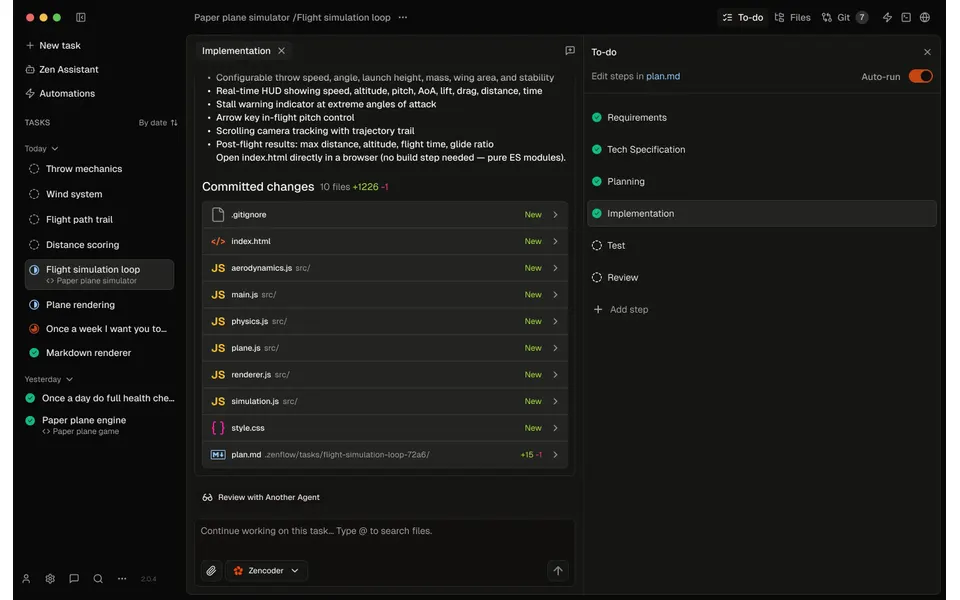
- Desktop app
- Mac, Windows and Linux
- Browser
- Yes
- Phone
- Not listed
- Command line
- Not listed
- Agents
- Claude Code, Codex and Gemini CLI
- Your subscription
- Works with your own plan
- Agents run
- On your computer and on your own server
- Laptop closed
- Keeps going
- Isolation
- Worktree
- Parallel agents
- Yes
- Scheduled runs
- Yes
- Coordinator agent
- Yes
- Built-in issues
- Yes
- Pull requests
- Yes
- Review screen
- Yes
- Team
- Roles and SSO
- Self-hosting
- Yes
- Licence
- Proprietary
- Price from
- Free
- How it charges
- Free plan, subscription, per seat, usage-based and bring your own key
- Paid plans from
- $41–100/month
Receipts
- Checked
- Findings
- 45 published · 30 cross-checked by a second agent · read them all
- Sources
- 43 public pages on 2 sites: docs.zencoder.ai, zencoder.ai
- Screenshot
- zencoder.ai, retrieved · first party marketing · shows appearance, not capability
- Data
- /products/zenflow.json · .md
- Method
- Same rules for all 103 researched ADEs. How we check · Report wrong data
What it does
Where you use it
Desktop macOS/Windows/Linux and user-hosted browser access; phone client not established.
Source and scope for Where you use itAgents it runs
Zenflow runs native ZenCLI, Claude Code, OpenAI Codex and Gemini CLI with per-step configuration.
Source and scope for Agents it runsAccounts and subscriptions
Claude native subscriptions or provider keys are supported; remote login is independent.
Source and scope for Accounts and subscriptionsWhere agents run
Full Zenflow runs locally or on user-managed Ubuntu host and continues after laptop disconnect.
Source and scope for Where agents runHow work is kept apart
Git worktrees separate code; MCP process controls and Codex sandbox settings are narrower scopes.
Source and scope for How work is kept apartParallel work
Parallel task worktrees and ZenCLI children support concurrency with harness limits.
Source and scope for Parallel workScheduled runs
Schedules and GitHub events start work unattended; remote host removes laptop dependence.
Source and scope for Scheduled runsGit and pull requests
Zenflow creates task branches/PRs, commits and syncs PR status.
Source and scope for Git and pull requestsLicence and source
The main service is proprietary software licensed for limited use.
Source and scope for Licence and sourcePrice
Recurring Free BYOK access and per-seat credit plans are public; model and own-host costs remain separate.
Source and scope for PriceTyped filters
Every value links to its receipt below. Read plan and surface restrictions before using a filter to decide.
| Filter | Value |
|---|---|
| Desktop OS: macOS | Yes cross-checked |
| Desktop OS: Windows | Yes cross-checked |
| Desktop OS: Linux | Yes cross-checked |
| Web client | Yes cross-checked |
| Phone access: Native iOS | No |
| Phone access: Native Android | No |
| Phone access: Phone browser | Unknown |
| CLI | Unknown |
| Coding agents: Claude Code | Yes cross-checked |
| Coding agents: Codex | Yes cross-checked |
| Coding agents: Cursor Agent | No |
| Coding agents: Gemini CLI | Yes cross-checked |
| Coding agents: OpenCode | No |
| Coding agents: Pi | No |
| Coding agents: Grok | No |
| Coding agents: Aider | No |
| Coding agents: Antigravity | No |
| Use my subscription | Yes cross-checked |
| Where agents run: On your computer | Yes cross-checked |
| Where agents run: On your own server | Yes cross-checked |
| Where agents run: In the vendor's cloud | No |
| Workspace isolation: Git worktree | Yes cross-checked |
| Workspace isolation: Container | Unknown |
| Workspace isolation: VM or microVM | Unknown |
| Parallel runs | Yes cross-checked |
| Coordinator | Yes |
| Native issue tracking | Yes cross-checked |
| Unattended triggers | Yes |
| Shared prompting | Unknown |
| Team roles | Yes cross-checked |
| SSO | Yes cross-checked |
| Pull request workflow | Yes cross-checked |
| Review interface | Yes cross-checked |
| Product license: Apache-2.0 | No. Proprietary cross-checked |
| Product license: MIT | No. Proprietary cross-checked |
| Product license: GPL-3.0 | No. Proprietary cross-checked |
| Product license: GPL-3.0-or-later | No. Proprietary cross-checked |
| Product license: AGPL-3.0 | No. Proprietary cross-checked |
| Product license: AGPL-3.0-or-later | No. Proprietary cross-checked |
| Product license: Elastic License 2.0 | No. Proprietary cross-checked |
| Product license: Custom terms | No. Proprietary cross-checked |
| Product license: Proprietary | Yes. Proprietary cross-checked |
| Self-hosting | Yes cross-checked |
| Telemetry opt-out | Unknown |
| Free access | Yes cross-checked |
| Starting price: Free | Yes. Free cross-checked |
| Starting price: Up to $20/month | No. Free cross-checked |
| Starting price: $21–40/month | No. Free cross-checked |
| Starting price: $41–100/month | No. Free cross-checked |
| Starting price: Over $100/month | No. Free cross-checked |
| Starting price: Contact for pricing | No. Free cross-checked |
| Pricing model: Free, no paid plan | No |
| Pricing model: Free plan | Yes cross-checked |
| Pricing model: Subscription | Yes |
| Pricing model: Per seat | Yes cross-checked |
| Pricing model: Usage-based | Yes cross-checked |
| Pricing model: Per machine or compute | No |
| Pricing model: Bring your own key | Yes cross-checked |
| Pricing model: One-time purchase | No |
| Paid plans from: No paid plan | No. $41–100/month |
| Paid plans from: $10 or less/month | No. $41–100/month |
| Paid plans from: $11–20/month | No. $41–100/month |
| Paid plans from: $21–40/month | No. $41–100/month |
| Paid plans from: $41–100/month | Yes. $41–100/month |
| Paid plans from: Over $100/month | No. $41–100/month |
| Paid plans from: Contact sales | No. $41–100/month |
| Lifecycle status: Active | Unknown |
| Lifecycle status: Sunsetting | Unknown |
| Keeps going with laptop closed | Yes cross-checked |
| Open-source license | No. Proprietary cross-checked |
| Any desktop app | Yes cross-checked |
| Paid plan up to $20/month | No. $41–100/month |
| Paid plan up to $40/month | No. $41–100/month |
| Any phone client | Unknown |
Filter receipts
Desktop OS: macOS: Yes cross-checked
Desktop OS: macOS
Typed value: Yes.
Desktop macOS/Windows/Linux and user-hosted browser access; phone client not established.
- Desktop os: macOS Apple Silicon/Intel; Windows x64; Linux x64 deb/rpm downloads.
- Browser: Complete user VPS instance accessible at installed HTTPS URL after login.
- Task actions: Create/edit/run/duplicate/archive/delete tasks; inspect plans, files, diffs, chat and terminal.
- Notifications: Configurable desktop task notifications and completion sound.
- Cross device continuity: Remote desktop/SSH client can connect to the same host; subscription credentials must exist on that host.
- Documentation establishes only the named atomic answers; remaining questions and hands-on behavior are unverified.
-
Finding: Standalone macOS/Windows/Linux desktop app; Zencoder sign-in required.
-
Finding: Repository/Task/Subtask-chat hierarchy, task plan steps and chats, durable states, local/blank/clone repositories, no-repository Work tasks, per-task terminals and artifacts.
-
Finding: Notification/auto-archive preferences, agent/model/permission presets and configured auto-commit/push.
-
Finding: Complete Zenflow on user Ubuntu24.04 VPS with browser login and Zencoder API key; user chooses/pays compute.
-
Download | Zencoder – The AI Coding Agent
Finding: macOS ARM64/x64, Windows x64 and Linux x64 deb/rpm desktop installers.
Desktop OS: Windows: Yes cross-checked
Desktop OS: Windows
Typed value: Yes.
Desktop macOS/Windows/Linux and user-hosted browser access; phone client not established.
- Desktop os: macOS Apple Silicon/Intel; Windows x64; Linux x64 deb/rpm downloads.
- Browser: Complete user VPS instance accessible at installed HTTPS URL after login.
- Task actions: Create/edit/run/duplicate/archive/delete tasks; inspect plans, files, diffs, chat and terminal.
- Notifications: Configurable desktop task notifications and completion sound.
- Cross device continuity: Remote desktop/SSH client can connect to the same host; subscription credentials must exist on that host.
- Documentation establishes only the named atomic answers; remaining questions and hands-on behavior are unverified.
-
Finding: Standalone macOS/Windows/Linux desktop app; Zencoder sign-in required.
-
Finding: Repository/Task/Subtask-chat hierarchy, task plan steps and chats, durable states, local/blank/clone repositories, no-repository Work tasks, per-task terminals and artifacts.
-
Finding: Notification/auto-archive preferences, agent/model/permission presets and configured auto-commit/push.
-
Finding: Complete Zenflow on user Ubuntu24.04 VPS with browser login and Zencoder API key; user chooses/pays compute.
-
Download | Zencoder – The AI Coding Agent
Finding: macOS ARM64/x64, Windows x64 and Linux x64 deb/rpm desktop installers.
Desktop OS: Linux: Yes cross-checked
Desktop OS: Linux
Typed value: Yes.
Desktop macOS/Windows/Linux and user-hosted browser access; phone client not established.
- Desktop os: macOS Apple Silicon/Intel; Windows x64; Linux x64 deb/rpm downloads.
- Browser: Complete user VPS instance accessible at installed HTTPS URL after login.
- Task actions: Create/edit/run/duplicate/archive/delete tasks; inspect plans, files, diffs, chat and terminal.
- Notifications: Configurable desktop task notifications and completion sound.
- Cross device continuity: Remote desktop/SSH client can connect to the same host; subscription credentials must exist on that host.
- Documentation establishes only the named atomic answers; remaining questions and hands-on behavior are unverified.
-
Finding: Standalone macOS/Windows/Linux desktop app; Zencoder sign-in required.
-
Finding: Repository/Task/Subtask-chat hierarchy, task plan steps and chats, durable states, local/blank/clone repositories, no-repository Work tasks, per-task terminals and artifacts.
-
Finding: Notification/auto-archive preferences, agent/model/permission presets and configured auto-commit/push.
-
Finding: Complete Zenflow on user Ubuntu24.04 VPS with browser login and Zencoder API key; user chooses/pays compute.
-
Download | Zencoder – The AI Coding Agent
Finding: macOS ARM64/x64, Windows x64 and Linux x64 deb/rpm desktop installers.
Web client: Yes cross-checked
Web client
Typed value: Yes.
Desktop macOS/Windows/Linux and user-hosted browser access; phone client not established.
- Desktop os: macOS Apple Silicon/Intel; Windows x64; Linux x64 deb/rpm downloads.
- Browser: Complete user VPS instance accessible at installed HTTPS URL after login.
- Task actions: Create/edit/run/duplicate/archive/delete tasks; inspect plans, files, diffs, chat and terminal.
- Notifications: Configurable desktop task notifications and completion sound.
- Cross device continuity: Remote desktop/SSH client can connect to the same host; subscription credentials must exist on that host.
- Documentation establishes only the named atomic answers; remaining questions and hands-on behavior are unverified.
-
Finding: Standalone macOS/Windows/Linux desktop app; Zencoder sign-in required.
-
Finding: Repository/Task/Subtask-chat hierarchy, task plan steps and chats, durable states, local/blank/clone repositories, no-repository Work tasks, per-task terminals and artifacts.
-
Finding: Notification/auto-archive preferences, agent/model/permission presets and configured auto-commit/push.
-
Finding: Complete Zenflow on user Ubuntu24.04 VPS with browser login and Zencoder API key; user chooses/pays compute.
-
Download | Zencoder – The AI Coding Agent
Finding: macOS ARM64/x64, Windows x64 and Linux x64 deb/rpm desktop installers.
Phone access: Native iOS: No
Phone access: Native iOS
Typed value: No.
Desktop macOS/Windows/Linux and user-hosted browser access; phone client not established.
- Desktop os: macOS Apple Silicon/Intel; Windows x64; Linux x64 deb/rpm downloads.
- Browser: Complete user VPS instance accessible at installed HTTPS URL after login.
- Task actions: Create/edit/run/duplicate/archive/delete tasks; inspect plans, files, diffs, chat and terminal.
- Notifications: Configurable desktop task notifications and completion sound.
- Cross device continuity: Remote desktop/SSH client can connect to the same host; subscription credentials must exist on that host.
- Documentation establishes only the named atomic answers; remaining questions and hands-on behavior are unverified.
-
Download | Zencoder – The AI Coding Agent
Finding: macOS ARM64/x64, Windows x64 and Linux x64 deb/rpm desktop installers.
Phone access: Native Android: No
Phone access: Native Android
Typed value: No.
Desktop macOS/Windows/Linux and user-hosted browser access; phone client not established.
- Desktop os: macOS Apple Silicon/Intel; Windows x64; Linux x64 deb/rpm downloads.
- Browser: Complete user VPS instance accessible at installed HTTPS URL after login.
- Task actions: Create/edit/run/duplicate/archive/delete tasks; inspect plans, files, diffs, chat and terminal.
- Notifications: Configurable desktop task notifications and completion sound.
- Cross device continuity: Remote desktop/SSH client can connect to the same host; subscription credentials must exist on that host.
- Documentation establishes only the named atomic answers; remaining questions and hands-on behavior are unverified.
-
Download | Zencoder – The AI Coding Agent
Finding: macOS ARM64/x64, Windows x64 and Linux x64 deb/rpm desktop installers.
Coding agents: Claude Code: Yes cross-checked
Coding agents: Claude Code
Typed value: Yes.
Zenflow runs native ZenCLI, Claude Code, OpenAI Codex and Gemini CLI with per-step configuration.
- Harnesses: Zencoder/ZenCLI, Claude Code, Codex and Gemini; selected as coding agent presets.
- Model providers: Zencoder-managed and custom provider models; separate Claude/Codex/Gemini runtime models.
- Session integration: Agent executes task in selected local or remote host; no import of existing terminal session established.
- Mixed harness operation: Workflow steps bind different runtime/model presets; subagents can use different CLIs.
- Documentation establishes only the named atomic answers; remaining questions and hands-on behavior are unverified.
-
Finding: Choose ZenCLI/Claude/Codex/Gemini, validate installation/login, select repository/workflow and run verification.
-
Finding: Named runtime/model/permission presets bind to workflow steps using comments; settings defaults and sequential reviews.
-
Finding: Sequential presets and parallel isolated subprocesses; chat-time model changes do not rewrite workflow.
-
Finding: Claude Code supports API key or native Claude Pro/Max subscription and skip-permissions control.
-
Finding: Codex runtime documented with API key, sandbox modes and reasoning effort.
-
Finding: Gemini CLI runtime with provider authentication and image input support.
Coding agents: Codex: Yes cross-checked
Coding agents: Codex
Typed value: Yes.
Zenflow runs native ZenCLI, Claude Code, OpenAI Codex and Gemini CLI with per-step configuration.
- Harnesses: Zencoder/ZenCLI, Claude Code, Codex and Gemini; selected as coding agent presets.
- Model providers: Zencoder-managed and custom provider models; separate Claude/Codex/Gemini runtime models.
- Session integration: Agent executes task in selected local or remote host; no import of existing terminal session established.
- Mixed harness operation: Workflow steps bind different runtime/model presets; subagents can use different CLIs.
- Documentation establishes only the named atomic answers; remaining questions and hands-on behavior are unverified.
-
Finding: Choose ZenCLI/Claude/Codex/Gemini, validate installation/login, select repository/workflow and run verification.
-
Finding: Named runtime/model/permission presets bind to workflow steps using comments; settings defaults and sequential reviews.
-
Finding: Sequential presets and parallel isolated subprocesses; chat-time model changes do not rewrite workflow.
-
Finding: Claude Code supports API key or native Claude Pro/Max subscription and skip-permissions control.
-
Finding: Codex runtime documented with API key, sandbox modes and reasoning effort.
-
Finding: Gemini CLI runtime with provider authentication and image input support.
Coding agents: Cursor Agent: No
Coding agents: Cursor Agent
Typed value: No.
Zenflow runs native ZenCLI, Claude Code, OpenAI Codex and Gemini CLI with per-step configuration.
- Harnesses: Zencoder/ZenCLI, Claude Code, Codex and Gemini; selected as coding agent presets.
- Model providers: Zencoder-managed and custom provider models; separate Claude/Codex/Gemini runtime models.
- Session integration: Agent executes task in selected local or remote host; no import of existing terminal session established.
- Mixed harness operation: Workflow steps bind different runtime/model presets; subagents can use different CLIs.
- Documentation establishes only the named atomic answers; remaining questions and hands-on behavior are unverified.
-
Finding: Choose ZenCLI/Claude/Codex/Gemini, validate installation/login, select repository/workflow and run verification.
-
Finding: Named runtime/model/permission presets bind to workflow steps using comments; settings defaults and sequential reviews.
Coding agents: Gemini CLI: Yes cross-checked
Coding agents: Gemini CLI
Typed value: Yes.
Zenflow runs native ZenCLI, Claude Code, OpenAI Codex and Gemini CLI with per-step configuration.
- Harnesses: Zencoder/ZenCLI, Claude Code, Codex and Gemini; selected as coding agent presets.
- Model providers: Zencoder-managed and custom provider models; separate Claude/Codex/Gemini runtime models.
- Session integration: Agent executes task in selected local or remote host; no import of existing terminal session established.
- Mixed harness operation: Workflow steps bind different runtime/model presets; subagents can use different CLIs.
- Documentation establishes only the named atomic answers; remaining questions and hands-on behavior are unverified.
-
Finding: Choose ZenCLI/Claude/Codex/Gemini, validate installation/login, select repository/workflow and run verification.
-
Finding: Named runtime/model/permission presets bind to workflow steps using comments; settings defaults and sequential reviews.
-
Finding: Sequential presets and parallel isolated subprocesses; chat-time model changes do not rewrite workflow.
-
Finding: Claude Code supports API key or native Claude Pro/Max subscription and skip-permissions control.
-
Finding: Codex runtime documented with API key, sandbox modes and reasoning effort.
-
Finding: Gemini CLI runtime with provider authentication and image input support.
Coding agents: OpenCode: No
Coding agents: OpenCode
Typed value: No.
Zenflow runs native ZenCLI, Claude Code, OpenAI Codex and Gemini CLI with per-step configuration.
- Harnesses: Zencoder/ZenCLI, Claude Code, Codex and Gemini; selected as coding agent presets.
- Model providers: Zencoder-managed and custom provider models; separate Claude/Codex/Gemini runtime models.
- Session integration: Agent executes task in selected local or remote host; no import of existing terminal session established.
- Mixed harness operation: Workflow steps bind different runtime/model presets; subagents can use different CLIs.
- Documentation establishes only the named atomic answers; remaining questions and hands-on behavior are unverified.
-
Finding: Choose ZenCLI/Claude/Codex/Gemini, validate installation/login, select repository/workflow and run verification.
-
Finding: Named runtime/model/permission presets bind to workflow steps using comments; settings defaults and sequential reviews.
Coding agents: Pi: No
Coding agents: Pi
Typed value: No.
Zenflow runs native ZenCLI, Claude Code, OpenAI Codex and Gemini CLI with per-step configuration.
- Harnesses: Zencoder/ZenCLI, Claude Code, Codex and Gemini; selected as coding agent presets.
- Model providers: Zencoder-managed and custom provider models; separate Claude/Codex/Gemini runtime models.
- Session integration: Agent executes task in selected local or remote host; no import of existing terminal session established.
- Mixed harness operation: Workflow steps bind different runtime/model presets; subagents can use different CLIs.
- Documentation establishes only the named atomic answers; remaining questions and hands-on behavior are unverified.
-
Finding: Choose ZenCLI/Claude/Codex/Gemini, validate installation/login, select repository/workflow and run verification.
-
Finding: Named runtime/model/permission presets bind to workflow steps using comments; settings defaults and sequential reviews.
Coding agents: Grok: No
Coding agents: Grok
Typed value: No.
Zenflow runs native ZenCLI, Claude Code, OpenAI Codex and Gemini CLI with per-step configuration.
- Harnesses: Zencoder/ZenCLI, Claude Code, Codex and Gemini; selected as coding agent presets.
- Model providers: Zencoder-managed and custom provider models; separate Claude/Codex/Gemini runtime models.
- Session integration: Agent executes task in selected local or remote host; no import of existing terminal session established.
- Mixed harness operation: Workflow steps bind different runtime/model presets; subagents can use different CLIs.
- Documentation establishes only the named atomic answers; remaining questions and hands-on behavior are unverified.
-
Finding: Choose ZenCLI/Claude/Codex/Gemini, validate installation/login, select repository/workflow and run verification.
-
Finding: Named runtime/model/permission presets bind to workflow steps using comments; settings defaults and sequential reviews.
Coding agents: Aider: No
Coding agents: Aider
Typed value: No.
Zenflow runs native ZenCLI, Claude Code, OpenAI Codex and Gemini CLI with per-step configuration.
- Harnesses: Zencoder/ZenCLI, Claude Code, Codex and Gemini; selected as coding agent presets.
- Model providers: Zencoder-managed and custom provider models; separate Claude/Codex/Gemini runtime models.
- Session integration: Agent executes task in selected local or remote host; no import of existing terminal session established.
- Mixed harness operation: Workflow steps bind different runtime/model presets; subagents can use different CLIs.
- Documentation establishes only the named atomic answers; remaining questions and hands-on behavior are unverified.
-
Finding: Choose ZenCLI/Claude/Codex/Gemini, validate installation/login, select repository/workflow and run verification.
-
Finding: Named runtime/model/permission presets bind to workflow steps using comments; settings defaults and sequential reviews.
Coding agents: Antigravity: No
Coding agents: Antigravity
Typed value: No.
Zenflow runs native ZenCLI, Claude Code, OpenAI Codex and Gemini CLI with per-step configuration.
- Harnesses: Zencoder/ZenCLI, Claude Code, Codex and Gemini; selected as coding agent presets.
- Model providers: Zencoder-managed and custom provider models; separate Claude/Codex/Gemini runtime models.
- Session integration: Agent executes task in selected local or remote host; no import of existing terminal session established.
- Mixed harness operation: Workflow steps bind different runtime/model presets; subagents can use different CLIs.
- Documentation establishes only the named atomic answers; remaining questions and hands-on behavior are unverified.
-
Finding: Choose ZenCLI/Claude/Codex/Gemini, validate installation/login, select repository/workflow and run verification.
-
Finding: Named runtime/model/permission presets bind to workflow steps using comments; settings defaults and sequential reviews.
Use my subscription: Yes cross-checked
Use my subscription
Typed value: Yes.
Claude native subscriptions or provider keys are supported; remote login is independent.
- Agent subscriptions: Claude Pro/Max subscription via local Claude Code authentication; Codex subscription reuse is not established by its Zenflow-specific page.
- Api accounts: All plans support BYOK; Anthropic/OpenAI key entry is documented. Pricing also names Gemini BYOK.
- Vendor credits: Paid seats include monthly credits; Free is BYOK-only after trial/top-ups.
- Local models: Custom endpoint configuration accepts local and VPC model runtimes.
- Account switching: Presets select agents/models; remote host requires separately installed/authenticated agents.
- Vendor account requirement: Zenflow desktop-app terms allow basic app use without a Zencoder account; additional features, the documented sign-in step and hosted Zencoder Services require one.
- Provider restrictions: Model access depends on plan/provider; provider terms govern direct-key calls.
- Source statements were checked; no hands-on scenario was run.
-
Finding: Recurring Free BYOK plan; monthly Pro $45/30K credits, Plus $95/80K, Max $195/180K per seat. Seven-day 5K-credit trial; caps, $20 minimum nonrefundable top-ups and no monthly rollover.
-
Finding: Provider/model choices and multipliers vary by entitlement; Anthropic/OpenAI BYOK UI, provider data terms apply separately.
-
Finding: Custom local/VPC/OpenAI-compatible model endpoints and managed-catalog disable control.
-
Finding: Proprietary limited service license; account required. Free content license permits training; paid/trial content training requires further consent. Usage metadata may be collected. This conflicts with the security page universal no-training wording.
-
Finding: Zenflow 2.5.1+ remote host uses loopback backend over SSH; tasks continue with laptop closed. Generally available but Settings marked experimental; remote agents must be installed/logged in separately.
-
Finding: Claude Code supports API key or native Claude Pro/Max subscription and skip-permissions control.
-
Finding: Codex runtime documented with API key, sandbox modes and reasoning effort.
Where agents run: On your computer: Yes cross-checked
Where agents run: On your computer
Typed value: Yes.
Full Zenflow runs locally or on user-managed Ubuntu host and continues after laptop disconnect.
- Local: Local desktop agents in repository/worktree.
- Byo remote: Full Zenflow host on Ubuntu VM with desktop SSH or HTTPS browser client.
- Self hosted: Zenflow/backend and agent execution services installed on owned host.
- Hybrid: Local desktop connects securely to remote backend through SSH.
- Provisioning: Ubuntu24.04 VM, non-root sudo account, installer and services; user provisions infrastructure.
- Payer: User chooses VPS provider, machine and region and pays host/provider usage.
- Resources: VPS sizing depends on builds/task load; source provides example only.
- Region: User selects region when creating own VM.
- Client disconnect: Explicit remote-host promise: agents/tasks keep working after laptop closes.
- Other device continuation: Remote desktop or HTTPS browser accesses same host; remote login credentials stay on host.
- Documentation establishes only the named atomic answers; remaining questions and hands-on behavior are unverified.
-
Finding: Repository/Task/Subtask-chat hierarchy, task plan steps and chats, durable states, local/blank/clone repositories, no-repository Work tasks, per-task terminals and artifacts.
-
Finding: Zenflow 2.5.1+ remote host uses loopback backend over SSH; tasks continue with laptop closed. Generally available but Settings marked experimental; remote agents must be installed/logged in separately.
-
Finding: Complete Zenflow on user Ubuntu24.04 VPS with browser login and Zencoder API key; user chooses/pays compute.
Where agents run: On your own server: Yes cross-checked
Where agents run: On your own server
Typed value: Yes.
Full Zenflow runs locally or on user-managed Ubuntu host and continues after laptop disconnect.
- Local: Local desktop agents in repository/worktree.
- Byo remote: Full Zenflow host on Ubuntu VM with desktop SSH or HTTPS browser client.
- Self hosted: Zenflow/backend and agent execution services installed on owned host.
- Hybrid: Local desktop connects securely to remote backend through SSH.
- Provisioning: Ubuntu24.04 VM, non-root sudo account, installer and services; user provisions infrastructure.
- Payer: User chooses VPS provider, machine and region and pays host/provider usage.
- Resources: VPS sizing depends on builds/task load; source provides example only.
- Region: User selects region when creating own VM.
- Client disconnect: Explicit remote-host promise: agents/tasks keep working after laptop closes.
- Other device continuation: Remote desktop or HTTPS browser accesses same host; remote login credentials stay on host.
- Documentation establishes only the named atomic answers; remaining questions and hands-on behavior are unverified.
-
Finding: Repository/Task/Subtask-chat hierarchy, task plan steps and chats, durable states, local/blank/clone repositories, no-repository Work tasks, per-task terminals and artifacts.
-
Finding: Zenflow 2.5.1+ remote host uses loopback backend over SSH; tasks continue with laptop closed. Generally available but Settings marked experimental; remote agents must be installed/logged in separately.
-
Finding: Complete Zenflow on user Ubuntu24.04 VPS with browser login and Zencoder API key; user chooses/pays compute.
Where agents run: In the vendor's cloud: No
Where agents run: In the vendor's cloud
Typed value: No.
Full Zenflow runs locally or on user-managed Ubuntu host and continues after laptop disconnect.
- Local: Local desktop agents in repository/worktree.
- Byo remote: Full Zenflow host on Ubuntu VM with desktop SSH or HTTPS browser client.
- Self hosted: Zenflow/backend and agent execution services installed on owned host.
- Hybrid: Local desktop connects securely to remote backend through SSH.
- Provisioning: Ubuntu24.04 VM, non-root sudo account, installer and services; user provisions infrastructure.
- Payer: User chooses VPS provider, machine and region and pays host/provider usage.
- Resources: VPS sizing depends on builds/task load; source provides example only.
- Region: User selects region when creating own VM.
- Client disconnect: Explicit remote-host promise: agents/tasks keep working after laptop closes.
- Other device continuation: Remote desktop or HTTPS browser accesses same host; remote login credentials stay on host.
- Documentation establishes only the named atomic answers; remaining questions and hands-on behavior are unverified.
-
Finding: Zenflow 2.5.1+ remote host uses loopback backend over SSH; tasks continue with laptop closed. Generally available but Settings marked experimental; remote agents must be installed/logged in separately.
-
Finding: Complete Zenflow on user Ubuntu24.04 VPS with browser login and Zencoder API key; user chooses/pays compute.
Workspace isolation: Git worktree: Yes cross-checked
Workspace isolation: Git worktree
Typed value: Yes.
Git worktrees separate code; MCP process controls and Codex sandbox settings are narrower scopes.
- Branch: Dedicated branch per Code worktree task.
- Worktree: Task worktree path .zenflow/worktrees/{task_id}.
- Filesystem: Distinct task working directories; shared Git refs/config.
- Process: MCP tools use separate subprocesses, not a task-wide OS isolation claim.
- Network: MCP docs describe available network restrictions; no complete task-wide network boundary established.
- Secrets: copy_files can copy .env/local secrets into worktrees; not automatic secret isolation.
- Code separation: Tasks edit separate checked-out files until changes are merged.
- Security boundary: Worktree isolation is not a proven security boundary; runtime permission/sandbox differs by agent.
- Documentation establishes only the named atomic answers; remaining questions and hands-on behavior are unverified.
-
Finding: Repository/Task/Subtask-chat hierarchy, task plan steps and chats, durable states, local/blank/clone repositories, no-repository Work tasks, per-task terminals and artifacts.
-
Finding: Dedicated branch/worktree separates files; refs/config shared; paused worktree retained, archive cleanup.
-
Finding: MCP tools configured in UI/env; read-only/read-write/approval/disabled levels. Separate MCP processes with optional resource/network limits do not prove task-wide sandbox.
-
Finding: Codex runtime documented with API key, sandbox modes and reasoning effort.
Parallel runs: Yes cross-checked
Parallel runs
Typed value: Yes.
Parallel task worktrees and ZenCLI children support concurrency with harness limits.
- Concurrent sessions: Separate task agents can execute concurrently.
- Concurrent tasks: Create and Run additional tasks while earlier tasks run.
- Quotas: As many tasks as system resources permit; Claude parallel subagents not yet supported.
- Status visibility: Kanban/task list show running states; task chat streams tool activity.
- Documentation establishes only the named atomic answers; remaining questions and hands-on behavior are unverified.
-
Finding: ZenCLI master delegates isolated subprocesses through MCP, receives results and can select different model/CLI; Claude Code parallel subagents not yet supported.
-
Finding: Multiple tasks work concurrently and show states in board/list; concurrency depends on system resources, with manual staggering advice.
Coordinator: Yes
Coordinator
Typed value: Yes.
Product-owned master delegates isolated subagents and collects their results.
- Roles: Planner, implementer, review orchestrator and workers; isolated contexts.
- Model harness effort: Per-child model/CLI plus preset permission mode; Codex reasoning effort configurable.
- Messages: Master supplies downstream task/context.
- Results return: MCP tool returns child result; orchestrator synthesizes reviewer outputs.
- Cross harness: ZenCLI adapter supports configured Claude/Codex child runtimes; Claude parallel children not yet supported.
- Orchestration owner: ZenCLI SubAgent runtime and Zenflow pipeline orchestration.
- Activation: Explicit prompt, skill or automatic native system/skill use.
- Authentication: External runtime must be installed/authenticated on execution host.
- Retained results: Planner/implementation report/review JSON and final review Markdown in task artifacts.
- Invocation: Native SubAgent MCP tool call.
- Documentation establishes only the named atomic answers; remaining questions and hands-on behavior are unverified.
-
Finding: ZenCLI master delegates isolated subprocesses through MCP, receives results and can select different model/CLI; Claude Code parallel subagents not yet supported.
-
Finding: Sequential presets and parallel isolated subprocesses; chat-time model changes do not rewrite workflow.
-
Finding: Master can spawn parallel reviewers and synthesize results; explicit example human checkpoint and retained plan/review artifacts.
Native issue tracking: Yes cross-checked
Native issue tracking
Typed value: Yes.
Zenflow has native persistent task records and states, distinct from per-task chat tabs.
- Create: Create Code or Work task, optionally start immediately.
- Edit: Task menu Edit and manual step addition.
- Discuss: Multiple chat tabs within one task for steps/follow-ups.
- Search: Archived task history can be searched; file search in active task.
- Filter: Archived view filter; board/list status views.
- Archive: Individual or selected bulk tasks can be archived.
- Reopen: Restore archive recreates worktree if branch still exists.
- Project epic views: Repository task board/list; explicit epics not established.
- Explicit dispatch: Start/Create and Run chosen separately in documented task flow.
- Task session separation: Task record has states, artifacts and multiple chat tabs.
- Metadata: Task name/description/workflow/preset and repository.
- Durable states: To Do, In Progress, In Review, Done and Cancelled; archive retains record.
- External tracker requirement: Blank/local repository and Work folder tasks can be created without external tracker integration.
- Documentation establishes only the named atomic answers; remaining questions and hands-on behavior are unverified.
-
Finding: Repository/Task/Subtask-chat hierarchy, task plan steps and chats, durable states, local/blank/clone repositories, no-repository Work tasks, per-task terminals and artifacts.
-
Finding: Archiving deletes worktree but preserves task record/chat/artifacts; restore requires branch; branch deletion optional.
-
Finding: Multiple tasks work concurrently and show states in board/list; concurrency depends on system resources, with manual staggering advice.
Unattended triggers: Yes
Unattended triggers
Typed value: Yes.
Schedules and GitHub events start work unattended; remote host removes laptop dependence.
- Schedules: Workspace schedules create new tasks; in-task schedules add sessions to same task.
- Events: GitHub issue, PR-comment and review-request integrations.
- Recurring tasks: Configure interval/day/time; August adds custom cron expressions.
- Client independence: Remote-host doc explicitly says tasks/agents continue after closing laptop.
- Documentation establishes only the named atomic answers; remaining questions and hands-on behavior are unverified.
-
Finding: Zenflow 2.5.1+ remote host uses loopback backend over SSH; tasks continue with laptop closed. Generally available but Settings marked experimental; remote agents must be installed/logged in separately.
-
Finding: Recurring new task instances or sessions inside same task; edit/toggle/test schedule and inspect next-run time.
-
Finding: Native GitHub clone/PR creation and event tasks; OAuth/PAT or Enterprise App. PR status sync and branch protection apply.
-
Finding: August cron automation, log export, retry/recovery and installer rollback; May Claude auto-approve and usage-based billing.
Team roles: Yes cross-checked
Team roles
Typed value: Yes.
Zenflow uses Zencoder account membership and paid organization SSO; same-task edit permissions not established.
- Organization roles: Zencoder account Owner/Manager/Member administration, not proof of local task collaboration ACLs.
- Project roles: Indexed repository access can be restricted to specified members; no project-role hierarchy is established.
- Membership: Zenflow Profile exposes workspace membership/access; account members managed through Zencoder admin.
- Sso: Account SAML/OIDC on Pro Plus/Max/Enterprise.
- Provisioning: Security docs describe automatic user provisioning/deprovisioning.
- Revocation: Admins can remove members; security docs describe deprovisioning.
- Plan scope: Account-level governance only; task-specific roles unverified.
- Documentation establishes only the named atomic answers; remaining questions and hands-on behavior are unverified.
-
Finding: Vendor documents encryption, ephemeral active code, stored indexes/chats, role-based administration, SSO, audit logs and named certifications; no audit documents inspected.
-
Finding: Owner/Manager/Member permissions; invite/remove seats, SAML/OIDC and exported audit logs on Pro Plus and higher.
-
Finding: Pro Plus/Max indexes GitHub/GitLab/Bitbucket with read token and enabled indexing; refresh at least daily; default org access or per-email restriction.
SSO: Yes cross-checked
SSO
Typed value: Yes.
Zenflow uses Zencoder account membership and paid organization SSO; same-task edit permissions not established.
- Organization roles: Zencoder account Owner/Manager/Member administration, not proof of local task collaboration ACLs.
- Project roles: Indexed repository access can be restricted to specified members; no project-role hierarchy is established.
- Membership: Zenflow Profile exposes workspace membership/access; account members managed through Zencoder admin.
- Sso: Account SAML/OIDC on Pro Plus/Max/Enterprise.
- Provisioning: Security docs describe automatic user provisioning/deprovisioning.
- Revocation: Admins can remove members; security docs describe deprovisioning.
- Plan scope: Account-level governance only; task-specific roles unverified.
- Documentation establishes only the named atomic answers; remaining questions and hands-on behavior are unverified.
-
Finding: Vendor documents encryption, ephemeral active code, stored indexes/chats, role-based administration, SSO, audit logs and named certifications; no audit documents inspected.
-
Finding: Owner/Manager/Member permissions; invite/remove seats, SAML/OIDC and exported audit logs on Pro Plus and higher.
-
Finding: Pro Plus/Max indexes GitHub/GitLab/Bitbucket with read token and enabled indexing; refresh at least daily; default org access or per-email restriction.
Pull request workflow: Yes cross-checked
Pull request workflow
Typed value: Yes.
Zenflow creates task branches/PRs, commits and syncs PR status.
- Branches: Dedicated task branch; source/base branch visible.
- Worktrees: Managed dedicated worktree option; auto-push only applies there.
- Commits: Automatic after agent execution or agent-decided mode; manual commits supported.
- Pull requests: Create PR pushes branch and opens GitHub PR with pre-filled title/description.
- Comments: GitHub PR comments can trigger new work; not proof of arbitrary native review-comment editor.
- Ci response: Task verification output documented; no CI failure auto-repair guarantee.
- Product state: PR Open→Review, Merged→Completed, Closed→optional Archive.
- Documentation establishes only the named atomic answers; remaining questions and hands-on behavior are unverified.
-
Finding: Dedicated branch/worktree separates files; refs/config shared; paused worktree retained, archive cleanup.
-
Finding: Diffs, history, commit/discard manual edits, checkpoint rollback and file/hunk selection. Auto-commit/push applies only dedicated worktree tasks.
-
Finding: Native GitHub clone/PR creation and event tasks; OAuth/PAT or Enterprise App. PR status sync and branch protection apply.
Review interface: Yes cross-checked
Review interface
Typed value: Yes.
Diff, verification and configurable multi-model review provide review context.
- Change understanding: Changes panel file tree, line diffs, checkpoint history and uncommitted manual edits.
- Evidence navigation: Task artifacts and verification output beside changes.
- Request changes: Follow-up prompts or checkpoint rollback, then rerun with guidance.
- Shipping guidance: Review rubric classifies merge-ready/small-followup/substantial-rework as configured prompt guidance.
- Context switching: Built-in browser, terminal, chat and Git tabs in task workspace.
- Roles: Independent reviewer presets or parallel subagent reviewers.
- Retained context: Plan/implementation/review artifacts and archived chat remain referenceable.
- Documentation establishes only the named atomic answers; remaining questions and hands-on behavior are unverified.
-
Finding: Diffs, history, commit/discard manual edits, checkpoint rollback and file/hunk selection. Auto-commit/push applies only dedicated worktree tasks.
-
Finding: Master can spawn parallel reviewers and synthesize results; explicit example human checkpoint and retained plan/review artifacts.
-
Finding: Configurable semantic/contract/regression/scope criteria are pasted into review step; not an independently proven enforced gate.
-
Finding: Embedded browser supports localhost previews and manual verification alongside task chat/terminal.
Product license: Apache-2.0: No. Proprietary cross-checked
Product license: Apache-2.0
Typed value: No. Proprietary.
The main service is proprietary software licensed for limited use.
- Client license: Zenflow desktop-app terms grant a limited, personal, non-exclusive, non-transferable, non-sublicensable, revocable license with no source-code rights; hosted Zencoder Services use a similar limited license and the vendor retains IP.
- Documentation establishes only the named atomic answers; remaining questions and hands-on behavior are unverified.
-
Finding: Desktop-app terms (last updated 2026-06-15) grant a limited, personal, non-exclusive, non-transferable, non-sublicensable, revocable license with no source-code rights; the app can be used with or without a Zencoder account, with basic features available without authentication and additional features requiring one; local content stays on the device except requests sent to the selected AI provider; usage telemetry is collected whether or not an account exists.
Product license: MIT: No. Proprietary cross-checked
Product license: MIT
Typed value: No. Proprietary.
The main service is proprietary software licensed for limited use.
- Client license: Zenflow desktop-app terms grant a limited, personal, non-exclusive, non-transferable, non-sublicensable, revocable license with no source-code rights; hosted Zencoder Services use a similar limited license and the vendor retains IP.
- Documentation establishes only the named atomic answers; remaining questions and hands-on behavior are unverified.
-
Finding: Desktop-app terms (last updated 2026-06-15) grant a limited, personal, non-exclusive, non-transferable, non-sublicensable, revocable license with no source-code rights; the app can be used with or without a Zencoder account, with basic features available without authentication and additional features requiring one; local content stays on the device except requests sent to the selected AI provider; usage telemetry is collected whether or not an account exists.
Product license: GPL-3.0: No. Proprietary cross-checked
Product license: GPL-3.0
Typed value: No. Proprietary.
The main service is proprietary software licensed for limited use.
- Client license: Zenflow desktop-app terms grant a limited, personal, non-exclusive, non-transferable, non-sublicensable, revocable license with no source-code rights; hosted Zencoder Services use a similar limited license and the vendor retains IP.
- Documentation establishes only the named atomic answers; remaining questions and hands-on behavior are unverified.
-
Finding: Desktop-app terms (last updated 2026-06-15) grant a limited, personal, non-exclusive, non-transferable, non-sublicensable, revocable license with no source-code rights; the app can be used with or without a Zencoder account, with basic features available without authentication and additional features requiring one; local content stays on the device except requests sent to the selected AI provider; usage telemetry is collected whether or not an account exists.
Product license: GPL-3.0-or-later: No. Proprietary cross-checked
Product license: GPL-3.0-or-later
Typed value: No. Proprietary.
The main service is proprietary software licensed for limited use.
- Client license: Zenflow desktop-app terms grant a limited, personal, non-exclusive, non-transferable, non-sublicensable, revocable license with no source-code rights; hosted Zencoder Services use a similar limited license and the vendor retains IP.
- Documentation establishes only the named atomic answers; remaining questions and hands-on behavior are unverified.
-
Finding: Desktop-app terms (last updated 2026-06-15) grant a limited, personal, non-exclusive, non-transferable, non-sublicensable, revocable license with no source-code rights; the app can be used with or without a Zencoder account, with basic features available without authentication and additional features requiring one; local content stays on the device except requests sent to the selected AI provider; usage telemetry is collected whether or not an account exists.
Product license: AGPL-3.0: No. Proprietary cross-checked
Product license: AGPL-3.0
Typed value: No. Proprietary.
The main service is proprietary software licensed for limited use.
- Client license: Zenflow desktop-app terms grant a limited, personal, non-exclusive, non-transferable, non-sublicensable, revocable license with no source-code rights; hosted Zencoder Services use a similar limited license and the vendor retains IP.
- Documentation establishes only the named atomic answers; remaining questions and hands-on behavior are unverified.
-
Finding: Desktop-app terms (last updated 2026-06-15) grant a limited, personal, non-exclusive, non-transferable, non-sublicensable, revocable license with no source-code rights; the app can be used with or without a Zencoder account, with basic features available without authentication and additional features requiring one; local content stays on the device except requests sent to the selected AI provider; usage telemetry is collected whether or not an account exists.
Product license: AGPL-3.0-or-later: No. Proprietary cross-checked
Product license: AGPL-3.0-or-later
Typed value: No. Proprietary.
The main service is proprietary software licensed for limited use.
- Client license: Zenflow desktop-app terms grant a limited, personal, non-exclusive, non-transferable, non-sublicensable, revocable license with no source-code rights; hosted Zencoder Services use a similar limited license and the vendor retains IP.
- Documentation establishes only the named atomic answers; remaining questions and hands-on behavior are unverified.
-
Finding: Desktop-app terms (last updated 2026-06-15) grant a limited, personal, non-exclusive, non-transferable, non-sublicensable, revocable license with no source-code rights; the app can be used with or without a Zencoder account, with basic features available without authentication and additional features requiring one; local content stays on the device except requests sent to the selected AI provider; usage telemetry is collected whether or not an account exists.
Product license: Elastic License 2.0: No. Proprietary cross-checked
Product license: Elastic License 2.0
Typed value: No. Proprietary.
The main service is proprietary software licensed for limited use.
- Client license: Zenflow desktop-app terms grant a limited, personal, non-exclusive, non-transferable, non-sublicensable, revocable license with no source-code rights; hosted Zencoder Services use a similar limited license and the vendor retains IP.
- Documentation establishes only the named atomic answers; remaining questions and hands-on behavior are unverified.
-
Finding: Desktop-app terms (last updated 2026-06-15) grant a limited, personal, non-exclusive, non-transferable, non-sublicensable, revocable license with no source-code rights; the app can be used with or without a Zencoder account, with basic features available without authentication and additional features requiring one; local content stays on the device except requests sent to the selected AI provider; usage telemetry is collected whether or not an account exists.
Product license: Custom terms: No. Proprietary cross-checked
Product license: Custom terms
Typed value: No. Proprietary.
The main service is proprietary software licensed for limited use.
- Client license: Zenflow desktop-app terms grant a limited, personal, non-exclusive, non-transferable, non-sublicensable, revocable license with no source-code rights; hosted Zencoder Services use a similar limited license and the vendor retains IP.
- Documentation establishes only the named atomic answers; remaining questions and hands-on behavior are unverified.
-
Finding: Desktop-app terms (last updated 2026-06-15) grant a limited, personal, non-exclusive, non-transferable, non-sublicensable, revocable license with no source-code rights; the app can be used with or without a Zencoder account, with basic features available without authentication and additional features requiring one; local content stays on the device except requests sent to the selected AI provider; usage telemetry is collected whether or not an account exists.
Product license: Proprietary: Yes. Proprietary cross-checked
Product license: Proprietary
Typed value: Yes. Proprietary.
The main service is proprietary software licensed for limited use.
- Client license: Zenflow desktop-app terms grant a limited, personal, non-exclusive, non-transferable, non-sublicensable, revocable license with no source-code rights; hosted Zencoder Services use a similar limited license and the vendor retains IP.
- Documentation establishes only the named atomic answers; remaining questions and hands-on behavior are unverified.
-
Finding: Desktop-app terms (last updated 2026-06-15) grant a limited, personal, non-exclusive, non-transferable, non-sublicensable, revocable license with no source-code rights; the app can be used with or without a Zencoder account, with basic features available without authentication and additional features requiring one; local content stays on the device except requests sent to the selected AI provider; usage telemetry is collected whether or not an account exists.
Self-hosting: Yes cross-checked
Self-hosting
Typed value: Yes.
Core Zenflow is installable on user infrastructure; data/history retention is documented.
- Self hosting: Full backend/UI/agent services on user Ubuntu VM, accessed through desktop SSH or browser.
- Vendor dependencies: Setup docs direct Zencoder sign-in or an API key, and selected agents must be installed and authenticated on the host; app terms allow basic features without an account.
- History portability: Task archive retains chat/artifacts; no portable migration format established.
- Documentation establishes only the named atomic answers; remaining questions and hands-on behavior are unverified.
-
Finding: Zenflow 2.5.1+ remote host uses loopback backend over SSH; tasks continue with laptop closed. Generally available but Settings marked experimental; remote agents must be installed/logged in separately.
-
Finding: Complete Zenflow on user Ubuntu24.04 VPS with browser login and Zencoder API key; user chooses/pays compute.
Free access: Yes cross-checked
Free access
Typed value: Yes.
Free is recurring BYOK access, distinct from the seven-day bundled-credit trial.
- Ongoing free: Free plan is $0/month and BYOK-only after trial/top-ups.
- Trial: Seven-day trial with 5K credits; upgrade required for recurring bundled credits.
- Credits trial: 5K credits; no carryover of trial leftovers.
- Paid only: The plan table explicitly lists recurring Free access.
- Free scenarios: Bring your own provider key and pay that provider for usage.
- Usage caps: Free bundled-credit allowance is absent after trial; paid org caps and model/provider limits apply.
- Documentation establishes only the named atomic answers; remaining questions and hands-on behavior are unverified.
-
Finding: Recurring Free BYOK plan; monthly Pro $45/30K credits, Plus $95/80K, Max $195/180K per seat. Seven-day 5K-credit trial; caps, $20 minimum nonrefundable top-ups and no monthly rollover.
Starting price: Free: Yes. Free cross-checked
Starting price: Free
Typed value: Yes. Free.
Recurring Free BYOK access and per-seat credit plans are public; model and own-host costs remain separate.
- Currency: USD.
- Interval: Monthly or annual billing; monthly seat prices used here.
- Seats: Pro $45, Plus $95, Max $195 per seat/month; annual equivalents $40/$85/$175.
- Included usage: Monthly 30K/80K/180K credits for Pro/Plus/Max.
- Credits: Monthly allowance expires; purchased top-ups follow the credit consumption order.
- Trial: 5,000 credits for seven days; leftover trial credits do not carry to paid plan.
- Overages: Nonrefundable top-ups, minimum $20; direct-key usage is charged by the provider.
- Model cost: Models have published credit multipliers; calls using BYOK do not consume credits.
- Compute cost: No compute-inclusive price or user VPS cost established.
- Documentation establishes only the named atomic answers; remaining questions and hands-on behavior are unverified.
-
Finding: Recurring Free BYOK plan; monthly Pro $45/30K credits, Plus $95/80K, Max $195/180K per seat. Seven-day 5K-credit trial; caps, $20 minimum nonrefundable top-ups and no monthly rollover.
Starting price: Up to $20/month: No. Free cross-checked
Starting price: Up to $20/month
Typed value: No. Free.
Recurring Free BYOK access and per-seat credit plans are public; model and own-host costs remain separate.
- Currency: USD.
- Interval: Monthly or annual billing; monthly seat prices used here.
- Seats: Pro $45, Plus $95, Max $195 per seat/month; annual equivalents $40/$85/$175.
- Included usage: Monthly 30K/80K/180K credits for Pro/Plus/Max.
- Credits: Monthly allowance expires; purchased top-ups follow the credit consumption order.
- Trial: 5,000 credits for seven days; leftover trial credits do not carry to paid plan.
- Overages: Nonrefundable top-ups, minimum $20; direct-key usage is charged by the provider.
- Model cost: Models have published credit multipliers; calls using BYOK do not consume credits.
- Compute cost: No compute-inclusive price or user VPS cost established.
- Documentation establishes only the named atomic answers; remaining questions and hands-on behavior are unverified.
-
Finding: Recurring Free BYOK plan; monthly Pro $45/30K credits, Plus $95/80K, Max $195/180K per seat. Seven-day 5K-credit trial; caps, $20 minimum nonrefundable top-ups and no monthly rollover.
Starting price: $21–40/month: No. Free cross-checked
Starting price: $21–40/month
Typed value: No. Free.
Recurring Free BYOK access and per-seat credit plans are public; model and own-host costs remain separate.
- Currency: USD.
- Interval: Monthly or annual billing; monthly seat prices used here.
- Seats: Pro $45, Plus $95, Max $195 per seat/month; annual equivalents $40/$85/$175.
- Included usage: Monthly 30K/80K/180K credits for Pro/Plus/Max.
- Credits: Monthly allowance expires; purchased top-ups follow the credit consumption order.
- Trial: 5,000 credits for seven days; leftover trial credits do not carry to paid plan.
- Overages: Nonrefundable top-ups, minimum $20; direct-key usage is charged by the provider.
- Model cost: Models have published credit multipliers; calls using BYOK do not consume credits.
- Compute cost: No compute-inclusive price or user VPS cost established.
- Documentation establishes only the named atomic answers; remaining questions and hands-on behavior are unverified.
-
Finding: Recurring Free BYOK plan; monthly Pro $45/30K credits, Plus $95/80K, Max $195/180K per seat. Seven-day 5K-credit trial; caps, $20 minimum nonrefundable top-ups and no monthly rollover.
Starting price: $41–100/month: No. Free cross-checked
Starting price: $41–100/month
Typed value: No. Free.
Recurring Free BYOK access and per-seat credit plans are public; model and own-host costs remain separate.
- Currency: USD.
- Interval: Monthly or annual billing; monthly seat prices used here.
- Seats: Pro $45, Plus $95, Max $195 per seat/month; annual equivalents $40/$85/$175.
- Included usage: Monthly 30K/80K/180K credits for Pro/Plus/Max.
- Credits: Monthly allowance expires; purchased top-ups follow the credit consumption order.
- Trial: 5,000 credits for seven days; leftover trial credits do not carry to paid plan.
- Overages: Nonrefundable top-ups, minimum $20; direct-key usage is charged by the provider.
- Model cost: Models have published credit multipliers; calls using BYOK do not consume credits.
- Compute cost: No compute-inclusive price or user VPS cost established.
- Documentation establishes only the named atomic answers; remaining questions and hands-on behavior are unverified.
-
Finding: Recurring Free BYOK plan; monthly Pro $45/30K credits, Plus $95/80K, Max $195/180K per seat. Seven-day 5K-credit trial; caps, $20 minimum nonrefundable top-ups and no monthly rollover.
Starting price: Over $100/month: No. Free cross-checked
Starting price: Over $100/month
Typed value: No. Free.
Recurring Free BYOK access and per-seat credit plans are public; model and own-host costs remain separate.
- Currency: USD.
- Interval: Monthly or annual billing; monthly seat prices used here.
- Seats: Pro $45, Plus $95, Max $195 per seat/month; annual equivalents $40/$85/$175.
- Included usage: Monthly 30K/80K/180K credits for Pro/Plus/Max.
- Credits: Monthly allowance expires; purchased top-ups follow the credit consumption order.
- Trial: 5,000 credits for seven days; leftover trial credits do not carry to paid plan.
- Overages: Nonrefundable top-ups, minimum $20; direct-key usage is charged by the provider.
- Model cost: Models have published credit multipliers; calls using BYOK do not consume credits.
- Compute cost: No compute-inclusive price or user VPS cost established.
- Documentation establishes only the named atomic answers; remaining questions and hands-on behavior are unverified.
-
Finding: Recurring Free BYOK plan; monthly Pro $45/30K credits, Plus $95/80K, Max $195/180K per seat. Seven-day 5K-credit trial; caps, $20 minimum nonrefundable top-ups and no monthly rollover.
Starting price: Contact for pricing: No. Free cross-checked
Starting price: Contact for pricing
Typed value: No. Free.
Recurring Free BYOK access and per-seat credit plans are public; model and own-host costs remain separate.
- Currency: USD.
- Interval: Monthly or annual billing; monthly seat prices used here.
- Seats: Pro $45, Plus $95, Max $195 per seat/month; annual equivalents $40/$85/$175.
- Included usage: Monthly 30K/80K/180K credits for Pro/Plus/Max.
- Credits: Monthly allowance expires; purchased top-ups follow the credit consumption order.
- Trial: 5,000 credits for seven days; leftover trial credits do not carry to paid plan.
- Overages: Nonrefundable top-ups, minimum $20; direct-key usage is charged by the provider.
- Model cost: Models have published credit multipliers; calls using BYOK do not consume credits.
- Compute cost: No compute-inclusive price or user VPS cost established.
- Documentation establishes only the named atomic answers; remaining questions and hands-on behavior are unverified.
-
Finding: Recurring Free BYOK plan; monthly Pro $45/30K credits, Plus $95/80K, Max $195/180K per seat. Seven-day 5K-credit trial; caps, $20 minimum nonrefundable top-ups and no monthly rollover.
Pricing model: Free, no paid plan: No
Pricing model: Free, no paid plan
Typed value: No.
Recurring Free BYOK access and per-seat credit plans are public; model and own-host costs remain separate.
- Currency: USD.
- Interval: Monthly or annual billing; monthly seat prices used here.
- Seats: Pro $45, Plus $95, Max $195 per seat/month; annual equivalents $40/$85/$175.
- Included usage: Monthly 30K/80K/180K credits for Pro/Plus/Max.
- Credits: Monthly allowance expires; purchased top-ups follow the credit consumption order.
- Trial: 5,000 credits for seven days; leftover trial credits do not carry to paid plan.
- Overages: Nonrefundable top-ups, minimum $20; direct-key usage is charged by the provider.
- Model cost: Models have published credit multipliers; calls using BYOK do not consume credits.
- Compute cost: No compute-inclusive price or user VPS cost established.
- Documentation establishes only the named atomic answers; remaining questions and hands-on behavior are unverified.
-
Finding: Recurring Free BYOK plan; monthly Pro $45/30K credits, Plus $95/80K, Max $195/180K per seat. Seven-day 5K-credit trial; caps, $20 minimum nonrefundable top-ups and no monthly rollover.
Pricing model: Free plan: Yes cross-checked
Pricing model: Free plan
Typed value: Yes.
Recurring Free BYOK access and per-seat credit plans are public; model and own-host costs remain separate.
- Currency: USD.
- Interval: Monthly or annual billing; monthly seat prices used here.
- Seats: Pro $45, Plus $95, Max $195 per seat/month; annual equivalents $40/$85/$175.
- Included usage: Monthly 30K/80K/180K credits for Pro/Plus/Max.
- Credits: Monthly allowance expires; purchased top-ups follow the credit consumption order.
- Trial: 5,000 credits for seven days; leftover trial credits do not carry to paid plan.
- Overages: Nonrefundable top-ups, minimum $20; direct-key usage is charged by the provider.
- Model cost: Models have published credit multipliers; calls using BYOK do not consume credits.
- Compute cost: No compute-inclusive price or user VPS cost established.
- Documentation establishes only the named atomic answers; remaining questions and hands-on behavior are unverified.
-
Finding: Recurring Free BYOK plan; monthly Pro $45/30K credits, Plus $95/80K, Max $195/180K per seat. Seven-day 5K-credit trial; caps, $20 minimum nonrefundable top-ups and no monthly rollover.
Pricing model: Subscription: Yes
Pricing model: Subscription
Typed value: Yes.
Recurring Free BYOK access and per-seat credit plans are public; model and own-host costs remain separate.
- Currency: USD.
- Interval: Monthly or annual billing; monthly seat prices used here.
- Seats: Pro $45, Plus $95, Max $195 per seat/month; annual equivalents $40/$85/$175.
- Included usage: Monthly 30K/80K/180K credits for Pro/Plus/Max.
- Credits: Monthly allowance expires; purchased top-ups follow the credit consumption order.
- Trial: 5,000 credits for seven days; leftover trial credits do not carry to paid plan.
- Overages: Nonrefundable top-ups, minimum $20; direct-key usage is charged by the provider.
- Model cost: Models have published credit multipliers; calls using BYOK do not consume credits.
- Compute cost: No compute-inclusive price or user VPS cost established.
- Documentation establishes only the named atomic answers; remaining questions and hands-on behavior are unverified.
-
Finding: Recurring Free BYOK plan; monthly Pro $45/30K credits, Plus $95/80K, Max $195/180K per seat. Seven-day 5K-credit trial; caps, $20 minimum nonrefundable top-ups and no monthly rollover.
Pricing model: Per seat: Yes cross-checked
Pricing model: Per seat
Typed value: Yes.
Recurring Free BYOK access and per-seat credit plans are public; model and own-host costs remain separate.
- Currency: USD.
- Interval: Monthly or annual billing; monthly seat prices used here.
- Seats: Pro $45, Plus $95, Max $195 per seat/month; annual equivalents $40/$85/$175.
- Included usage: Monthly 30K/80K/180K credits for Pro/Plus/Max.
- Credits: Monthly allowance expires; purchased top-ups follow the credit consumption order.
- Trial: 5,000 credits for seven days; leftover trial credits do not carry to paid plan.
- Overages: Nonrefundable top-ups, minimum $20; direct-key usage is charged by the provider.
- Model cost: Models have published credit multipliers; calls using BYOK do not consume credits.
- Compute cost: No compute-inclusive price or user VPS cost established.
- Documentation establishes only the named atomic answers; remaining questions and hands-on behavior are unverified.
-
Finding: Recurring Free BYOK plan; monthly Pro $45/30K credits, Plus $95/80K, Max $195/180K per seat. Seven-day 5K-credit trial; caps, $20 minimum nonrefundable top-ups and no monthly rollover.
Pricing model: Usage-based: Yes cross-checked
Pricing model: Usage-based
Typed value: Yes.
Recurring Free BYOK access and per-seat credit plans are public; model and own-host costs remain separate.
- Currency: USD.
- Interval: Monthly or annual billing; monthly seat prices used here.
- Seats: Pro $45, Plus $95, Max $195 per seat/month; annual equivalents $40/$85/$175.
- Included usage: Monthly 30K/80K/180K credits for Pro/Plus/Max.
- Credits: Monthly allowance expires; purchased top-ups follow the credit consumption order.
- Trial: 5,000 credits for seven days; leftover trial credits do not carry to paid plan.
- Overages: Nonrefundable top-ups, minimum $20; direct-key usage is charged by the provider.
- Model cost: Models have published credit multipliers; calls using BYOK do not consume credits.
- Compute cost: No compute-inclusive price or user VPS cost established.
- Documentation establishes only the named atomic answers; remaining questions and hands-on behavior are unverified.
-
Finding: Recurring Free BYOK plan; monthly Pro $45/30K credits, Plus $95/80K, Max $195/180K per seat. Seven-day 5K-credit trial; caps, $20 minimum nonrefundable top-ups and no monthly rollover.
Pricing model: Per machine or compute: No
Pricing model: Per machine or compute
Typed value: No.
Recurring Free BYOK access and per-seat credit plans are public; model and own-host costs remain separate.
- Currency: USD.
- Interval: Monthly or annual billing; monthly seat prices used here.
- Seats: Pro $45, Plus $95, Max $195 per seat/month; annual equivalents $40/$85/$175.
- Included usage: Monthly 30K/80K/180K credits for Pro/Plus/Max.
- Credits: Monthly allowance expires; purchased top-ups follow the credit consumption order.
- Trial: 5,000 credits for seven days; leftover trial credits do not carry to paid plan.
- Overages: Nonrefundable top-ups, minimum $20; direct-key usage is charged by the provider.
- Model cost: Models have published credit multipliers; calls using BYOK do not consume credits.
- Compute cost: No compute-inclusive price or user VPS cost established.
- Documentation establishes only the named atomic answers; remaining questions and hands-on behavior are unverified.
-
Finding: Recurring Free BYOK plan; monthly Pro $45/30K credits, Plus $95/80K, Max $195/180K per seat. Seven-day 5K-credit trial; caps, $20 minimum nonrefundable top-ups and no monthly rollover.
Pricing model: Bring your own key: Yes cross-checked
Pricing model: Bring your own key
Typed value: Yes.
Recurring Free BYOK access and per-seat credit plans are public; model and own-host costs remain separate.
- Currency: USD.
- Interval: Monthly or annual billing; monthly seat prices used here.
- Seats: Pro $45, Plus $95, Max $195 per seat/month; annual equivalents $40/$85/$175.
- Included usage: Monthly 30K/80K/180K credits for Pro/Plus/Max.
- Credits: Monthly allowance expires; purchased top-ups follow the credit consumption order.
- Trial: 5,000 credits for seven days; leftover trial credits do not carry to paid plan.
- Overages: Nonrefundable top-ups, minimum $20; direct-key usage is charged by the provider.
- Model cost: Models have published credit multipliers; calls using BYOK do not consume credits.
- Compute cost: No compute-inclusive price or user VPS cost established.
- Documentation establishes only the named atomic answers; remaining questions and hands-on behavior are unverified.
-
Finding: Recurring Free BYOK plan; monthly Pro $45/30K credits, Plus $95/80K, Max $195/180K per seat. Seven-day 5K-credit trial; caps, $20 minimum nonrefundable top-ups and no monthly rollover.
Pricing model: One-time purchase: No
Pricing model: One-time purchase
Typed value: No.
Recurring Free BYOK access and per-seat credit plans are public; model and own-host costs remain separate.
- Currency: USD.
- Interval: Monthly or annual billing; monthly seat prices used here.
- Seats: Pro $45, Plus $95, Max $195 per seat/month; annual equivalents $40/$85/$175.
- Included usage: Monthly 30K/80K/180K credits for Pro/Plus/Max.
- Credits: Monthly allowance expires; purchased top-ups follow the credit consumption order.
- Trial: 5,000 credits for seven days; leftover trial credits do not carry to paid plan.
- Overages: Nonrefundable top-ups, minimum $20; direct-key usage is charged by the provider.
- Model cost: Models have published credit multipliers; calls using BYOK do not consume credits.
- Compute cost: No compute-inclusive price or user VPS cost established.
- Documentation establishes only the named atomic answers; remaining questions and hands-on behavior are unverified.
-
Finding: Recurring Free BYOK plan; monthly Pro $45/30K credits, Plus $95/80K, Max $195/180K per seat. Seven-day 5K-credit trial; caps, $20 minimum nonrefundable top-ups and no monthly rollover.
Paid plans from: No paid plan: No. $41–100/month
Paid plans from: No paid plan
Typed value: No. $41–100/month.
Recurring Free BYOK access and per-seat credit plans are public; model and own-host costs remain separate.
- Currency: USD.
- Interval: Monthly or annual billing; monthly seat prices used here.
- Seats: Pro $45, Plus $95, Max $195 per seat/month; annual equivalents $40/$85/$175.
- Included usage: Monthly 30K/80K/180K credits for Pro/Plus/Max.
- Credits: Monthly allowance expires; purchased top-ups follow the credit consumption order.
- Trial: 5,000 credits for seven days; leftover trial credits do not carry to paid plan.
- Overages: Nonrefundable top-ups, minimum $20; direct-key usage is charged by the provider.
- Model cost: Models have published credit multipliers; calls using BYOK do not consume credits.
- Compute cost: No compute-inclusive price or user VPS cost established.
- Documentation establishes only the named atomic answers; remaining questions and hands-on behavior are unverified.
-
Finding: Recurring Free BYOK plan; monthly Pro $45/30K credits, Plus $95/80K, Max $195/180K per seat. Seven-day 5K-credit trial; caps, $20 minimum nonrefundable top-ups and no monthly rollover.
Paid plans from: $10 or less/month: No. $41–100/month
Paid plans from: $10 or less/month
Typed value: No. $41–100/month.
Recurring Free BYOK access and per-seat credit plans are public; model and own-host costs remain separate.
- Currency: USD.
- Interval: Monthly or annual billing; monthly seat prices used here.
- Seats: Pro $45, Plus $95, Max $195 per seat/month; annual equivalents $40/$85/$175.
- Included usage: Monthly 30K/80K/180K credits for Pro/Plus/Max.
- Credits: Monthly allowance expires; purchased top-ups follow the credit consumption order.
- Trial: 5,000 credits for seven days; leftover trial credits do not carry to paid plan.
- Overages: Nonrefundable top-ups, minimum $20; direct-key usage is charged by the provider.
- Model cost: Models have published credit multipliers; calls using BYOK do not consume credits.
- Compute cost: No compute-inclusive price or user VPS cost established.
- Documentation establishes only the named atomic answers; remaining questions and hands-on behavior are unverified.
-
Finding: Recurring Free BYOK plan; monthly Pro $45/30K credits, Plus $95/80K, Max $195/180K per seat. Seven-day 5K-credit trial; caps, $20 minimum nonrefundable top-ups and no monthly rollover.
Paid plans from: $11–20/month: No. $41–100/month
Paid plans from: $11–20/month
Typed value: No. $41–100/month.
Recurring Free BYOK access and per-seat credit plans are public; model and own-host costs remain separate.
- Currency: USD.
- Interval: Monthly or annual billing; monthly seat prices used here.
- Seats: Pro $45, Plus $95, Max $195 per seat/month; annual equivalents $40/$85/$175.
- Included usage: Monthly 30K/80K/180K credits for Pro/Plus/Max.
- Credits: Monthly allowance expires; purchased top-ups follow the credit consumption order.
- Trial: 5,000 credits for seven days; leftover trial credits do not carry to paid plan.
- Overages: Nonrefundable top-ups, minimum $20; direct-key usage is charged by the provider.
- Model cost: Models have published credit multipliers; calls using BYOK do not consume credits.
- Compute cost: No compute-inclusive price or user VPS cost established.
- Documentation establishes only the named atomic answers; remaining questions and hands-on behavior are unverified.
-
Finding: Recurring Free BYOK plan; monthly Pro $45/30K credits, Plus $95/80K, Max $195/180K per seat. Seven-day 5K-credit trial; caps, $20 minimum nonrefundable top-ups and no monthly rollover.
Paid plans from: $21–40/month: No. $41–100/month
Paid plans from: $21–40/month
Typed value: No. $41–100/month.
Recurring Free BYOK access and per-seat credit plans are public; model and own-host costs remain separate.
- Currency: USD.
- Interval: Monthly or annual billing; monthly seat prices used here.
- Seats: Pro $45, Plus $95, Max $195 per seat/month; annual equivalents $40/$85/$175.
- Included usage: Monthly 30K/80K/180K credits for Pro/Plus/Max.
- Credits: Monthly allowance expires; purchased top-ups follow the credit consumption order.
- Trial: 5,000 credits for seven days; leftover trial credits do not carry to paid plan.
- Overages: Nonrefundable top-ups, minimum $20; direct-key usage is charged by the provider.
- Model cost: Models have published credit multipliers; calls using BYOK do not consume credits.
- Compute cost: No compute-inclusive price or user VPS cost established.
- Documentation establishes only the named atomic answers; remaining questions and hands-on behavior are unverified.
-
Finding: Recurring Free BYOK plan; monthly Pro $45/30K credits, Plus $95/80K, Max $195/180K per seat. Seven-day 5K-credit trial; caps, $20 minimum nonrefundable top-ups and no monthly rollover.
Paid plans from: $41–100/month: Yes. $41–100/month
Paid plans from: $41–100/month
Typed value: Yes. $41–100/month.
Recurring Free BYOK access and per-seat credit plans are public; model and own-host costs remain separate.
- Currency: USD.
- Interval: Monthly or annual billing; monthly seat prices used here.
- Seats: Pro $45, Plus $95, Max $195 per seat/month; annual equivalents $40/$85/$175.
- Included usage: Monthly 30K/80K/180K credits for Pro/Plus/Max.
- Credits: Monthly allowance expires; purchased top-ups follow the credit consumption order.
- Trial: 5,000 credits for seven days; leftover trial credits do not carry to paid plan.
- Overages: Nonrefundable top-ups, minimum $20; direct-key usage is charged by the provider.
- Model cost: Models have published credit multipliers; calls using BYOK do not consume credits.
- Compute cost: No compute-inclusive price or user VPS cost established.
- Documentation establishes only the named atomic answers; remaining questions and hands-on behavior are unverified.
-
Finding: Recurring Free BYOK plan; monthly Pro $45/30K credits, Plus $95/80K, Max $195/180K per seat. Seven-day 5K-credit trial; caps, $20 minimum nonrefundable top-ups and no monthly rollover.
Paid plans from: Over $100/month: No. $41–100/month
Paid plans from: Over $100/month
Typed value: No. $41–100/month.
Recurring Free BYOK access and per-seat credit plans are public; model and own-host costs remain separate.
- Currency: USD.
- Interval: Monthly or annual billing; monthly seat prices used here.
- Seats: Pro $45, Plus $95, Max $195 per seat/month; annual equivalents $40/$85/$175.
- Included usage: Monthly 30K/80K/180K credits for Pro/Plus/Max.
- Credits: Monthly allowance expires; purchased top-ups follow the credit consumption order.
- Trial: 5,000 credits for seven days; leftover trial credits do not carry to paid plan.
- Overages: Nonrefundable top-ups, minimum $20; direct-key usage is charged by the provider.
- Model cost: Models have published credit multipliers; calls using BYOK do not consume credits.
- Compute cost: No compute-inclusive price or user VPS cost established.
- Documentation establishes only the named atomic answers; remaining questions and hands-on behavior are unverified.
-
Finding: Recurring Free BYOK plan; monthly Pro $45/30K credits, Plus $95/80K, Max $195/180K per seat. Seven-day 5K-credit trial; caps, $20 minimum nonrefundable top-ups and no monthly rollover.
Paid plans from: Contact sales: No. $41–100/month
Paid plans from: Contact sales
Typed value: No. $41–100/month.
Recurring Free BYOK access and per-seat credit plans are public; model and own-host costs remain separate.
- Currency: USD.
- Interval: Monthly or annual billing; monthly seat prices used here.
- Seats: Pro $45, Plus $95, Max $195 per seat/month; annual equivalents $40/$85/$175.
- Included usage: Monthly 30K/80K/180K credits for Pro/Plus/Max.
- Credits: Monthly allowance expires; purchased top-ups follow the credit consumption order.
- Trial: 5,000 credits for seven days; leftover trial credits do not carry to paid plan.
- Overages: Nonrefundable top-ups, minimum $20; direct-key usage is charged by the provider.
- Model cost: Models have published credit multipliers; calls using BYOK do not consume credits.
- Compute cost: No compute-inclusive price or user VPS cost established.
- Documentation establishes only the named atomic answers; remaining questions and hands-on behavior are unverified.
-
Finding: Recurring Free BYOK plan; monthly Pro $45/30K credits, Plus $95/80K, Max $195/180K per seat. Seven-day 5K-credit trial; caps, $20 minimum nonrefundable top-ups and no monthly rollover.
Keeps going with laptop closed: Yes cross-checked
Keeps going with laptop closed
Typed value: Yes.
Full Zenflow runs locally or on user-managed Ubuntu host and continues after laptop disconnect.
- Local: Local desktop agents in repository/worktree.
- Byo remote: Full Zenflow host on Ubuntu VM with desktop SSH or HTTPS browser client.
- Self hosted: Zenflow/backend and agent execution services installed on owned host.
- Hybrid: Local desktop connects securely to remote backend through SSH.
- Provisioning: Ubuntu24.04 VM, non-root sudo account, installer and services; user provisions infrastructure.
- Payer: User chooses VPS provider, machine and region and pays host/provider usage.
- Resources: VPS sizing depends on builds/task load; source provides example only.
- Region: User selects region when creating own VM.
- Client disconnect: Explicit remote-host promise: agents/tasks keep working after laptop closes.
- Other device continuation: Remote desktop or HTTPS browser accesses same host; remote login credentials stay on host.
- Documentation establishes only the named atomic answers; remaining questions and hands-on behavior are unverified.
-
Finding: Repository/Task/Subtask-chat hierarchy, task plan steps and chats, durable states, local/blank/clone repositories, no-repository Work tasks, per-task terminals and artifacts.
-
Finding: Zenflow 2.5.1+ remote host uses loopback backend over SSH; tasks continue with laptop closed. Generally available but Settings marked experimental; remote agents must be installed/logged in separately.
-
Finding: Complete Zenflow on user Ubuntu24.04 VPS with browser login and Zencoder API key; user chooses/pays compute.
Open-source license: No. Proprietary cross-checked
Open-source license
Typed value: No. Proprietary.
The main service is proprietary software licensed for limited use.
- Client license: Zenflow desktop-app terms grant a limited, personal, non-exclusive, non-transferable, non-sublicensable, revocable license with no source-code rights; hosted Zencoder Services use a similar limited license and the vendor retains IP.
- Documentation establishes only the named atomic answers; remaining questions and hands-on behavior are unverified.
-
Finding: Desktop-app terms (last updated 2026-06-15) grant a limited, personal, non-exclusive, non-transferable, non-sublicensable, revocable license with no source-code rights; the app can be used with or without a Zencoder account, with basic features available without authentication and additional features requiring one; local content stays on the device except requests sent to the selected AI provider; usage telemetry is collected whether or not an account exists.
Any desktop app: Yes cross-checked
Any desktop app
Typed value: Yes.
Desktop macOS/Windows/Linux and user-hosted browser access; phone client not established.
- Desktop os: macOS Apple Silicon/Intel; Windows x64; Linux x64 deb/rpm downloads.
- Browser: Complete user VPS instance accessible at installed HTTPS URL after login.
- Task actions: Create/edit/run/duplicate/archive/delete tasks; inspect plans, files, diffs, chat and terminal.
- Notifications: Configurable desktop task notifications and completion sound.
- Cross device continuity: Remote desktop/SSH client can connect to the same host; subscription credentials must exist on that host.
- Documentation establishes only the named atomic answers; remaining questions and hands-on behavior are unverified.
-
Finding: Standalone macOS/Windows/Linux desktop app; Zencoder sign-in required.
-
Finding: Repository/Task/Subtask-chat hierarchy, task plan steps and chats, durable states, local/blank/clone repositories, no-repository Work tasks, per-task terminals and artifacts.
-
Finding: Notification/auto-archive preferences, agent/model/permission presets and configured auto-commit/push.
-
Finding: Complete Zenflow on user Ubuntu24.04 VPS with browser login and Zencoder API key; user chooses/pays compute.
-
Download | Zencoder – The AI Coding Agent
Finding: macOS ARM64/x64, Windows x64 and Linux x64 deb/rpm desktop installers.
Paid plan up to $20/month: No. $41–100/month
Paid plan up to $20/month
Typed value: No. $41–100/month.
Recurring Free BYOK access and per-seat credit plans are public; model and own-host costs remain separate.
- Currency: USD.
- Interval: Monthly or annual billing; monthly seat prices used here.
- Seats: Pro $45, Plus $95, Max $195 per seat/month; annual equivalents $40/$85/$175.
- Included usage: Monthly 30K/80K/180K credits for Pro/Plus/Max.
- Credits: Monthly allowance expires; purchased top-ups follow the credit consumption order.
- Trial: 5,000 credits for seven days; leftover trial credits do not carry to paid plan.
- Overages: Nonrefundable top-ups, minimum $20; direct-key usage is charged by the provider.
- Model cost: Models have published credit multipliers; calls using BYOK do not consume credits.
- Compute cost: No compute-inclusive price or user VPS cost established.
- Documentation establishes only the named atomic answers; remaining questions and hands-on behavior are unverified.
-
Finding: Recurring Free BYOK plan; monthly Pro $45/30K credits, Plus $95/80K, Max $195/180K per seat. Seven-day 5K-credit trial; caps, $20 minimum nonrefundable top-ups and no monthly rollover.
Paid plan up to $40/month: No. $41–100/month
Paid plan up to $40/month
Typed value: No. $41–100/month.
Recurring Free BYOK access and per-seat credit plans are public; model and own-host costs remain separate.
- Currency: USD.
- Interval: Monthly or annual billing; monthly seat prices used here.
- Seats: Pro $45, Plus $95, Max $195 per seat/month; annual equivalents $40/$85/$175.
- Included usage: Monthly 30K/80K/180K credits for Pro/Plus/Max.
- Credits: Monthly allowance expires; purchased top-ups follow the credit consumption order.
- Trial: 5,000 credits for seven days; leftover trial credits do not carry to paid plan.
- Overages: Nonrefundable top-ups, minimum $20; direct-key usage is charged by the provider.
- Model cost: Models have published credit multipliers; calls using BYOK do not consume credits.
- Compute cost: No compute-inclusive price or user VPS cost established.
- Documentation establishes only the named atomic answers; remaining questions and hands-on behavior are unverified.
-
Finding: Recurring Free BYOK plan; monthly Pro $45/30K credits, Plus $95/80K, Max $195/180K per seat. Seven-day 5K-credit trial; caps, $20 minimum nonrefundable top-ups and no monthly rollover.
All public findings
Findings may summarize a source. They are not presented as verbatim statements.
zenflow:ACC-01: Desktop macOS/Windows/Linux and user-hosted browser access; phone client not established. cross-checked
zenflow:ACC-01
Desktop macOS/Windows/Linux and user-hosted browser access; phone client not established.
- Documentation establishes only the named atomic answers; remaining questions and hands-on behavior are unverified.
-
Finding: Standalone macOS/Windows/Linux desktop app; Zencoder sign-in required.
-
Finding: Repository/Task/Subtask-chat hierarchy, task plan steps and chats, durable states, local/blank/clone repositories, no-repository Work tasks, per-task terminals and artifacts.
-
Finding: Notification/auto-archive preferences, agent/model/permission presets and configured auto-commit/push.
-
Finding: Zenflow 2.5.1+ remote host uses loopback backend over SSH; tasks continue with laptop closed. Generally available but Settings marked experimental; remote agents must be installed/logged in separately.
-
Finding: Complete Zenflow on user Ubuntu24.04 VPS with browser login and Zencoder API key; user chooses/pays compute.
-
Download | Zencoder – The AI Coding Agent
Finding: macOS ARM64/x64, Windows x64 and Linux x64 deb/rpm desktop installers.
zenflow:ACC-02: Zenflow runs native ZenCLI, Claude Code, OpenAI Codex and Gemini CLI with per-step configuration. cross-checked
zenflow:ACC-02
Zenflow runs native ZenCLI, Claude Code, OpenAI Codex and Gemini CLI with per-step configuration.
- Documentation establishes only the named atomic answers; remaining questions and hands-on behavior are unverified.
-
Finding: Custom local/VPC/OpenAI-compatible model endpoints and managed-catalog disable control.
-
Finding: Choose ZenCLI/Claude/Codex/Gemini, validate installation/login, select repository/workflow and run verification.
-
Finding: Zenflow 2.5.1+ remote host uses loopback backend over SSH; tasks continue with laptop closed. Generally available but Settings marked experimental; remote agents must be installed/logged in separately.
-
Finding: Named runtime/model/permission presets bind to workflow steps using comments; settings defaults and sequential reviews.
-
Finding: Sequential presets and parallel isolated subprocesses; chat-time model changes do not rewrite workflow.
-
Finding: Claude Code supports API key or native Claude Pro/Max subscription and skip-permissions control.
-
Finding: Codex runtime documented with API key, sandbox modes and reasoning effort.
-
Finding: Gemini CLI runtime with provider authentication and image input support.
zenflow:ACC-03: Claude native subscriptions or provider keys are supported; remote login is independent. cross-checked
zenflow:ACC-03
Claude native subscriptions or provider keys are supported; remote login is independent.
- Source statements were checked; no hands-on scenario was run.
-
Finding: Recurring Free BYOK plan; monthly Pro $45/30K credits, Plus $95/80K, Max $195/180K per seat. Seven-day 5K-credit trial; caps, $20 minimum nonrefundable top-ups and no monthly rollover.
-
Finding: Provider/model choices and multipliers vary by entitlement; Anthropic/OpenAI BYOK UI, provider data terms apply separately.
-
Finding: Custom local/VPC/OpenAI-compatible model endpoints and managed-catalog disable control.
-
Finding: Proprietary limited service license; account required. Free content license permits training; paid/trial content training requires further consent. Usage metadata may be collected. This conflicts with the security page universal no-training wording.
-
Finding: Standalone macOS/Windows/Linux desktop app; Zencoder sign-in required.
-
Finding: Zenflow 2.5.1+ remote host uses loopback backend over SSH; tasks continue with laptop closed. Generally available but Settings marked experimental; remote agents must be installed/logged in separately.
-
Finding: Claude Code supports API key or native Claude Pro/Max subscription and skip-permissions control.
-
Finding: Codex runtime documented with API key, sandbox modes and reasoning effort.
-
Finding: Desktop-app terms (last updated 2026-06-15) grant a limited, personal, non-exclusive, non-transferable, non-sublicensable, revocable license with no source-code rights; the app can be used with or without a Zencoder account, with basic features available without authentication and additional features requiring one; local content stays on the device except requests sent to the selected AI provider; usage telemetry is collected whether or not an account exists.
zenflow:ACC-04: Guided agent setup; code repositories and folder-based Work tasks have separate prerequisites. cross-checked
zenflow:ACC-04
Guided agent setup; code repositories and folder-based Work tasks have separate prerequisites.
- Documentation establishes only the named atomic answers; remaining questions and hands-on behavior are unverified.
-
Finding: Choose ZenCLI/Claude/Codex/Gemini, validate installation/login, select repository/workflow and run verification.
-
Finding: Repository/Task/Subtask-chat hierarchy, task plan steps and chats, durable states, local/blank/clone repositories, no-repository Work tasks, per-task terminals and artifacts.
-
Finding: Zenflow 2.5.1+ remote host uses loopback backend over SSH; tasks continue with laptop closed. Generally available but Settings marked experimental; remote agents must be installed/logged in separately.
-
Finding: Complete Zenflow on user Ubuntu24.04 VPS with browser login and Zencoder API key; user chooses/pays compute.
zenflow:ACC-06: Zenflow is an MCP client with configurable tools and repository rules.
zenflow:ACC-06
Zenflow is an MCP client with configurable tools and repository rules.
- Documentation establishes only the named atomic answers; remaining questions and hands-on behavior are unverified.
-
Finding: Repository/Task/Subtask-chat hierarchy, task plan steps and chats, durable states, local/blank/clone repositories, no-repository Work tasks, per-task terminals and artifacts.
-
Finding: Notification/auto-archive preferences, agent/model/permission presets and configured auto-commit/push.
-
Finding: MCP tools configured in UI/env; read-only/read-write/approval/disabled levels. Separate MCP processes with optional resource/network limits do not prove task-wide sandbox.
-
Finding: Native GitHub clone/PR creation and event tasks; OAuth/PAT or Enterprise App. PR status sync and branch protection apply.
zenflow:PLAN-01: Native tasks accept prompts, imported Linear context and configured GitHub events. cross-checked
zenflow:PLAN-01
Native tasks accept prompts, imported Linear context and configured GitHub events.
- Documentation establishes only the named atomic answers; remaining questions and hands-on behavior are unverified.
-
Finding: Repository/Task/Subtask-chat hierarchy, task plan steps and chats, durable states, local/blank/clone repositories, no-repository Work tasks, per-task terminals and artifacts.
-
Finding: Recurring new task instances or sessions inside same task; edit/toggle/test schedule and inspect next-run time.
-
Finding: Native GitHub clone/PR creation and event tasks; OAuth/PAT or Enterprise App. PR status sync and branch protection apply.
-
Finding: Native Linear OAuth imports issue context, syncs task status and adds branch/PR links.
zenflow:PLAN-02: Durable Markdown plans and workflow steps support edits and checkpoints.
zenflow:PLAN-02
Durable Markdown plans and workflow steps support edits and checkpoints.
- Documentation establishes only the named atomic answers; remaining questions and hands-on behavior are unverified.
-
Finding: Repository/Task/Subtask-chat hierarchy, task plan steps and chats, durable states, local/blank/clone repositories, no-repository Work tasks, per-task terminals and artifacts.
-
Finding: Archiving deletes worktree but preserves task record/chat/artifacts; restore requires branch; branch deletion optional.
-
Finding: Auto/Bug/Spec/Requirements/Multi-model/Custom workflows; can change after creation.
-
Finding: Repository Markdown workflow templates define named steps, artifact path and preset bindings.
-
Finding: Requirements/spec/plan artifacts with acceptance criteria; staged verifiers and configurable human review pauses.
zenflow:PLAN-03: Organization/repository/task/subtask-chat structure and ordered steps are documented; dependency graph is not. cross-checked
zenflow:PLAN-03
Organization/repository/task/subtask-chat structure and ordered steps are documented; dependency graph is not.
- Documentation establishes only the named atomic answers; remaining questions and hands-on behavior are unverified.
-
Finding: Repository/Task/Subtask-chat hierarchy, task plan steps and chats, durable states, local/blank/clone repositories, no-repository Work tasks, per-task terminals and artifacts.
-
Finding: Multiple tasks work concurrently and show states in board/list; concurrency depends on system resources, with manual staggering advice.
-
Finding: Repository Markdown workflow templates define named steps, artifact path and preset bindings.
zenflow:PLAN-04: Rules, skills and task artifacts provide retained context. cross-checked
zenflow:PLAN-04
Rules, skills and task artifacts provide retained context.
- Documentation establishes only the named atomic answers; remaining questions and hands-on behavior are unverified.
-
Finding: Active-file/cursor context, files/folders/URLs/Jira, tool retrieval, skills and image attachments; Chrome extension discontinued.
-
Finding: Versioned SKILL.md instruction packages in .agents/skills are selected by task and path context.
-
Finding: Repository/Task/Subtask-chat hierarchy, task plan steps and chats, durable states, local/blank/clone repositories, no-repository Work tasks, per-task terminals and artifacts.
-
Finding: Notification/auto-archive preferences, agent/model/permission presets and configured auto-commit/push.
-
Finding: Archiving deletes worktree but preserves task record/chat/artifacts; restore requires branch; branch deletion optional.
zenflow:PLAN-05: Agents retrieve code, external docs and images, with a separately configured multi-repository index.
zenflow:PLAN-05
Agents retrieve code, external docs and images, with a separately configured multi-repository index.
- Documentation establishes only the named atomic answers; remaining questions and hands-on behavior are unverified.
-
Finding: Active-file/cursor context, files/folders/URLs/Jira, tool retrieval, skills and image attachments; Chrome extension discontinued.
-
Finding: Pro Plus/Max indexes GitHub/GitLab/Bitbucket with read token and enabled indexing; refresh at least daily; default org access or per-email restriction.
-
Finding: Repository/Task/Subtask-chat hierarchy, task plan steps and chats, durable states, local/blank/clone repositories, no-repository Work tasks, per-task terminals and artifacts.
zenflow:PLAN-06: Zenflow has native persistent task records and states, distinct from per-task chat tabs. cross-checked
zenflow:PLAN-06
Zenflow has native persistent task records and states, distinct from per-task chat tabs.
- Documentation establishes only the named atomic answers; remaining questions and hands-on behavior are unverified.
-
Finding: Repository/Task/Subtask-chat hierarchy, task plan steps and chats, durable states, local/blank/clone repositories, no-repository Work tasks, per-task terminals and artifacts.
-
Finding: Archiving deletes worktree but preserves task record/chat/artifacts; restore requires branch; branch deletion optional.
-
Finding: Multiple tasks work concurrently and show states in board/list; concurrency depends on system resources, with manual staggering advice.
zenflow:PLAN-08: PRD/spec/plan artifacts persist and can be reviewed before implementation.
zenflow:PLAN-08
PRD/spec/plan artifacts persist and can be reviewed before implementation.
- Documentation establishes only the named atomic answers; remaining questions and hands-on behavior are unverified.
-
Finding: Repository/Task/Subtask-chat hierarchy, task plan steps and chats, durable states, local/blank/clone repositories, no-repository Work tasks, per-task terminals and artifacts.
-
Finding: Diffs, history, commit/discard manual edits, checkpoint rollback and file/hunk selection. Auto-commit/push applies only dedicated worktree tasks.
-
Finding: Master can spawn parallel reviewers and synthesize results; explicit example human checkpoint and retained plan/review artifacts.
-
Finding: Requirements/spec/plan artifacts with acceptance criteria; staged verifiers and configurable human review pauses.
zenflow:COORD-01: Parallel task worktrees and ZenCLI children support concurrency with harness limits. cross-checked
zenflow:COORD-01
Parallel task worktrees and ZenCLI children support concurrency with harness limits.
- Documentation establishes only the named atomic answers; remaining questions and hands-on behavior are unverified.
-
Finding: ZenCLI master delegates isolated subprocesses through MCP, receives results and can select different model/CLI; Claude Code parallel subagents not yet supported.
-
Finding: Multiple tasks work concurrently and show states in board/list; concurrency depends on system resources, with manual staggering advice.
zenflow:COORD-02: Humans dispatch tasks/presets and the native master delegates subprocess work. cross-checked
zenflow:COORD-02
Humans dispatch tasks/presets and the native master delegates subprocess work.
- Documentation establishes only the named atomic answers; remaining questions and hands-on behavior are unverified.
-
Finding: ZenCLI master delegates isolated subprocesses through MCP, receives results and can select different model/CLI; Claude Code parallel subagents not yet supported.
-
Finding: Repository/Task/Subtask-chat hierarchy, task plan steps and chats, durable states, local/blank/clone repositories, no-repository Work tasks, per-task terminals and artifacts.
-
Finding: Named runtime/model/permission presets bind to workflow steps using comments; settings defaults and sequential reviews.
zenflow:COORD-03: Product-owned master delegates isolated subagents and collects their results.
zenflow:COORD-03
Product-owned master delegates isolated subagents and collects their results.
- Documentation establishes only the named atomic answers; remaining questions and hands-on behavior are unverified.
-
Finding: ZenCLI master delegates isolated subprocesses through MCP, receives results and can select different model/CLI; Claude Code parallel subagents not yet supported.
-
Finding: Zenflow 2.5.1+ remote host uses loopback backend over SSH; tasks continue with laptop closed. Generally available but Settings marked experimental; remote agents must be installed/logged in separately.
-
Finding: Named runtime/model/permission presets bind to workflow steps using comments; settings defaults and sequential reviews.
-
Finding: Sequential presets and parallel isolated subprocesses; chat-time model changes do not rewrite workflow.
-
Finding: Master can spawn parallel reviewers and synthesize results; explicit example human checkpoint and retained plan/review artifacts.
-
Finding: Codex runtime documented with API key, sandbox modes and reasoning effort.
zenflow:COORD-04: Schedules and GitHub events start work unattended; remote host removes laptop dependence.
zenflow:COORD-04
Schedules and GitHub events start work unattended; remote host removes laptop dependence.
- Documentation establishes only the named atomic answers; remaining questions and hands-on behavior are unverified.
-
Finding: Zenflow 2.5.1+ remote host uses loopback backend over SSH; tasks continue with laptop closed. Generally available but Settings marked experimental; remote agents must be installed/logged in separately.
-
Finding: Recurring new task instances or sessions inside same task; edit/toggle/test schedule and inspect next-run time.
-
Finding: Native GitHub clone/PR creation and event tasks; OAuth/PAT or Enterprise App. PR status sync and branch protection apply.
-
Finding: August cron automation, log export, retry/recovery and installer rollback; May Claude auto-approve and usage-based billing.
zenflow:COORD-05: Live chat/terminal activity, checkpoint pauses and notifications support intervention.
zenflow:COORD-05
Live chat/terminal activity, checkpoint pauses and notifications support intervention.
- Documentation establishes only the named atomic answers; remaining questions and hands-on behavior are unverified.
-
Finding: Repository/Task/Subtask-chat hierarchy, task plan steps and chats, durable states, local/blank/clone repositories, no-repository Work tasks, per-task terminals and artifacts.
-
Finding: Notification/auto-archive preferences, agent/model/permission presets and configured auto-commit/push.
-
Finding: Archiving deletes worktree but preserves task record/chat/artifacts; restore requires branch; branch deletion optional.
-
Finding: Task/agent failure guidance, local-only automatic logs, debug mode and support export. Manual restart/cancel/retry paths remain.
-
Finding: August cron automation, log export, retry/recovery and installer rollback; May Claude auto-approve and usage-based billing.
zenflow:COORD-06: Repository board/list offers source-documented fleet status; no scenario fixture executed.
zenflow:COORD-06
Repository board/list offers source-documented fleet status; no scenario fixture executed.
- Documentation establishes only the named atomic answers; remaining questions and hands-on behavior are unverified.
-
Finding: Repository/Task/Subtask-chat hierarchy, task plan steps and chats, durable states, local/blank/clone repositories, no-repository Work tasks, per-task terminals and artifacts.
-
Finding: Notification/auto-archive preferences, agent/model/permission presets and configured auto-commit/push.
-
Finding: Archiving deletes worktree but preserves task record/chat/artifacts; restore requires branch; branch deletion optional.
-
Finding: Multiple tasks work concurrently and show states in board/list; concurrency depends on system resources, with manual staggering advice.
zenflow:COORD-07: Quick Auto tasks can move into editable multi-step workflows and agent presets.
zenflow:COORD-07
Quick Auto tasks can move into editable multi-step workflows and agent presets.
- Documentation establishes only the named atomic answers; remaining questions and hands-on behavior are unverified.
-
Finding: Choose ZenCLI/Claude/Codex/Gemini, validate installation/login, select repository/workflow and run verification.
-
Finding: Repository/Task/Subtask-chat hierarchy, task plan steps and chats, durable states, local/blank/clone repositories, no-repository Work tasks, per-task terminals and artifacts.
-
Finding: Zenflow 2.5.1+ remote host uses loopback backend over SSH; tasks continue with laptop closed. Generally available but Settings marked experimental; remote agents must be installed/logged in separately.
-
Finding: Named runtime/model/permission presets bind to workflow steps using comments; settings defaults and sequential reviews.
-
Finding: Sequential presets and parallel isolated subprocesses; chat-time model changes do not rewrite workflow.
-
Finding: Auto/Bug/Spec/Requirements/Multi-model/Custom workflows; can change after creation.
-
Finding: Repository Markdown workflow templates define named steps, artifact path and preset bindings.
zenflow:RUN-01: Full Zenflow runs locally or on user-managed Ubuntu host and continues after laptop disconnect. cross-checked
zenflow:RUN-01
Full Zenflow runs locally or on user-managed Ubuntu host and continues after laptop disconnect.
- Documentation establishes only the named atomic answers; remaining questions and hands-on behavior are unverified.
-
Finding: Repository/Task/Subtask-chat hierarchy, task plan steps and chats, durable states, local/blank/clone repositories, no-repository Work tasks, per-task terminals and artifacts.
-
Finding: Zenflow 2.5.1+ remote host uses loopback backend over SSH; tasks continue with laptop closed. Generally available but Settings marked experimental; remote agents must be installed/logged in separately.
-
Finding: Complete Zenflow on user Ubuntu24.04 VPS with browser login and Zencoder API key; user chooses/pays compute.
zenflow:RUN-02: Git worktrees separate code; MCP process controls and Codex sandbox settings are narrower scopes. cross-checked
zenflow:RUN-02
Git worktrees separate code; MCP process controls and Codex sandbox settings are narrower scopes.
- Documentation establishes only the named atomic answers; remaining questions and hands-on behavior are unverified.
-
Finding: Repository/Task/Subtask-chat hierarchy, task plan steps and chats, durable states, local/blank/clone repositories, no-repository Work tasks, per-task terminals and artifacts.
-
Finding: Dedicated branch/worktree separates files; refs/config shared; paused worktree retained, archive cleanup.
-
Finding: MCP tools configured in UI/env; read-only/read-write/approval/disabled levels. Separate MCP processes with optional resource/network limits do not prove task-wide sandbox.
-
Finding: Codex runtime documented with API key, sandbox modes and reasoning effort.
zenflow:RUN-03: Remote persistence, archival restoration and documented recovery differ from guaranteed crash resume.
zenflow:RUN-03
Remote persistence, archival restoration and documented recovery differ from guaranteed crash resume.
- Documentation establishes only the named atomic answers; remaining questions and hands-on behavior are unverified.
-
Finding: Dedicated branch/worktree separates files; refs/config shared; paused worktree retained, archive cleanup.
-
Finding: Archiving deletes worktree but preserves task record/chat/artifacts; restore requires branch; branch deletion optional.
-
Finding: Zenflow 2.5.1+ remote host uses loopback backend over SSH; tasks continue with laptop closed. Generally available but Settings marked experimental; remote agents must be installed/logged in separately.
-
Finding: Task/agent failure guidance, local-only automatic logs, debug mode and support export. Manual restart/cancel/retry paths remain.
-
Finding: August cron automation, log export, retry/recovery and installer rollback; May Claude auto-approve and usage-based billing.
zenflow:RUN-04: Repository scripts set up dependencies and copy local secret files; remote installs provide service/update controls.
zenflow:RUN-04
Repository scripts set up dependencies and copy local secret files; remote installs provide service/update controls.
- Documentation establishes only the named atomic answers; remaining questions and hands-on behavior are unverified.
-
Finding: Repository/Task/Subtask-chat hierarchy, task plan steps and chats, durable states, local/blank/clone repositories, no-repository Work tasks, per-task terminals and artifacts.
-
Finding: Zenflow 2.5.1+ remote host uses loopback backend over SSH; tasks continue with laptop closed. Generally available but Settings marked experimental; remote agents must be installed/logged in separately.
-
Finding: Complete Zenflow on user Ubuntu24.04 VPS with browser login and Zencoder API key; user chooses/pays compute.
-
Finding: Task/agent failure guidance, local-only automatic logs, debug mode and support export. Manual restart/cancel/retry paths remain.
-
Finding: August cron automation, log export, retry/recovery and installer rollback; May Claude auto-approve and usage-based billing.
zenflow:RUN-05: Agent errors and stuck runs have visible/manual retry paths.
zenflow:RUN-05
Agent errors and stuck runs have visible/manual retry paths.
- Documentation establishes only the named atomic answers; remaining questions and hands-on behavior are unverified.
-
Finding: Recurring Free BYOK plan; monthly Pro $45/30K credits, Plus $95/80K, Max $195/180K per seat. Seven-day 5K-credit trial; caps, $20 minimum nonrefundable top-ups and no monthly rollover.
-
Finding: Provider/model choices and multipliers vary by entitlement; Anthropic/OpenAI BYOK UI, provider data terms apply separately.
-
Finding: Owner/Manager/Member permissions; invite/remove seats, SAML/OIDC and exported audit logs on Pro Plus and higher.
-
Finding: Task/agent failure guidance, local-only automatic logs, debug mode and support export. Manual restart/cancel/retry paths remain.
-
Finding: August cron automation, log export, retry/recovery and installer rollback; May Claude auto-approve and usage-based billing.
zenflow:RUN-06: Task logs/tool streaming and verification states explain execution; analytics are account-level. cross-checked
zenflow:RUN-06
Task logs/tool streaming and verification states explain execution; analytics are account-level.
- Documentation establishes only the named atomic answers; remaining questions and hands-on behavior are unverified.
-
Finding: Pro Plus+ Owner/Manager usage dashboard reports daily active users, per-member activity, IDEs/languages and CSV export.
-
Finding: Authenticated REST usage API for Pro Plus+ Owners/Managers; supports day or 7/30/90-day windows, not task-control operations.
-
Finding: Repository/Task/Subtask-chat hierarchy, task plan steps and chats, durable states, local/blank/clone repositories, no-repository Work tasks, per-task terminals and artifacts.
-
Finding: Diffs, history, commit/discard manual edits, checkpoint rollback and file/hunk selection. Auto-commit/push applies only dedicated worktree tasks.
-
Finding: Task/agent failure guidance, local-only automatic logs, debug mode and support export. Manual restart/cancel/retry paths remain.
-
Finding: August cron automation, log export, retry/recovery and installer rollback; May Claude auto-approve and usage-based billing.
zenflow:RUN-07: Credits are provider/model-dependent; direct-key usage is paid to the provider. cross-checked
zenflow:RUN-07
Credits are provider/model-dependent; direct-key usage is paid to the provider.
- Documentation establishes only the named atomic answers; remaining questions and hands-on behavior are unverified.
-
Finding: Recurring Free BYOK plan; monthly Pro $45/30K credits, Plus $95/80K, Max $195/180K per seat. Seven-day 5K-credit trial; caps, $20 minimum nonrefundable top-ups and no monthly rollover.
-
Finding: Provider/model choices and multipliers vary by entitlement; Anthropic/OpenAI BYOK UI, provider data terms apply separately.
zenflow:RUN-08: Parallelism is limited by host resources; docs recommend manual staggering and expose MCP-specific limits. cross-checked
zenflow:RUN-08
Parallelism is limited by host resources; docs recommend manual staggering and expose MCP-specific limits.
- Documentation establishes only the named atomic answers; remaining questions and hands-on behavior are unverified.
-
Finding: Zenflow 2.5.1+ remote host uses loopback backend over SSH; tasks continue with laptop closed. Generally available but Settings marked experimental; remote agents must be installed/logged in separately.
-
Finding: Multiple tasks work concurrently and show states in board/list; concurrency depends on system resources, with manual staggering advice.
-
Finding: MCP tools configured in UI/env; read-only/read-write/approval/disabled levels. Separate MCP processes with optional resource/network limits do not prove task-wide sandbox.
zenflow:TEAM-02: Zenflow uses Zencoder account membership and paid organization SSO; same-task edit permissions not established. cross-checked
zenflow:TEAM-02
Zenflow uses Zencoder account membership and paid organization SSO; same-task edit permissions not established.
- Documentation establishes only the named atomic answers; remaining questions and hands-on behavior are unverified.
-
Finding: Vendor documents encryption, ephemeral active code, stored indexes/chats, role-based administration, SSO, audit logs and named certifications; no audit documents inspected.
-
Finding: Owner/Manager/Member permissions; invite/remove seats, SAML/OIDC and exported audit logs on Pro Plus and higher.
-
Finding: Pro Plus/Max indexes GitHub/GitLab/Bitbucket with read token and enabled indexing; refresh at least daily; default org access or per-email restriction.
-
Finding: Notification/auto-archive preferences, agent/model/permission presets and configured auto-commit/push.
zenflow:TEAM-03: MCP approvals and runtime-specific execution modes can be configured. cross-checked
zenflow:TEAM-03
MCP approvals and runtime-specific execution modes can be configured.
- Documentation establishes only the named atomic answers; remaining questions and hands-on behavior are unverified.
-
Finding: Named runtime/model/permission presets bind to workflow steps using comments; settings defaults and sequential reviews.
-
Finding: MCP tools configured in UI/env; read-only/read-write/approval/disabled levels. Separate MCP processes with optional resource/network limits do not prove task-wide sandbox.
-
Finding: Claude Code supports API key or native Claude Pro/Max subscription and skip-permissions control.
-
Finding: Codex runtime documented with API key, sandbox modes and reasoning effort.
zenflow:TEAM-04: Git checkpoints and retained task history coexist with account audit logs.
zenflow:TEAM-04
Git checkpoints and retained task history coexist with account audit logs.
- Documentation establishes only the named atomic answers; remaining questions and hands-on behavior are unverified.
-
Finding: Vendor documents encryption, ephemeral active code, stored indexes/chats, role-based administration, SSO, audit logs and named certifications; no audit documents inspected.
-
Finding: Owner/Manager/Member permissions; invite/remove seats, SAML/OIDC and exported audit logs on Pro Plus and higher.
-
Finding: Diffs, history, commit/discard manual edits, checkpoint rollback and file/hunk selection. Auto-commit/push applies only dedicated worktree tasks.
-
Finding: Archiving deletes worktree but preserves task record/chat/artifacts; restore requires branch; branch deletion optional.
zenflow:TEAM-05: Diff, verification and configurable multi-model review provide review context. cross-checked
zenflow:TEAM-05
Diff, verification and configurable multi-model review provide review context.
- Documentation establishes only the named atomic answers; remaining questions and hands-on behavior are unverified.
-
Finding: Diffs, history, commit/discard manual edits, checkpoint rollback and file/hunk selection. Auto-commit/push applies only dedicated worktree tasks.
-
Finding: Archiving deletes worktree but preserves task record/chat/artifacts; restore requires branch; branch deletion optional.
-
Finding: Master can spawn parallel reviewers and synthesize results; explicit example human checkpoint and retained plan/review artifacts.
-
Finding: Configurable semantic/contract/regression/scope criteria are pasted into review step; not an independently proven enforced gate.
-
Finding: Embedded browser supports localhost previews and manual verification alongside task chat/terminal.
zenflow:SHIP-01: Task files retain plans/specs/reviews, diffs and verification context; archival differs from disk cleanup. cross-checked
zenflow:SHIP-01
Task files retain plans/specs/reviews, diffs and verification context; archival differs from disk cleanup.
- Documentation establishes only the named atomic answers; remaining questions and hands-on behavior are unverified.
-
Finding: Repository/Task/Subtask-chat hierarchy, task plan steps and chats, durable states, local/blank/clone repositories, no-repository Work tasks, per-task terminals and artifacts.
-
Finding: Diffs, history, commit/discard manual edits, checkpoint rollback and file/hunk selection. Auto-commit/push applies only dedicated worktree tasks.
-
Finding: Archiving deletes worktree but preserves task record/chat/artifacts; restore requires branch; branch deletion optional.
-
Finding: Master can spawn parallel reviewers and synthesize results; explicit example human checkpoint and retained plan/review artifacts.
-
Finding: Embedded browser supports localhost previews and manual verification alongside task chat/terminal.
zenflow:SHIP-02: Configured scripts and staged reviewers verify changes; hard authority enforcement is unverified. cross-checked
zenflow:SHIP-02
Configured scripts and staged reviewers verify changes; hard authority enforcement is unverified.
- Documentation establishes only the named atomic answers; remaining questions and hands-on behavior are unverified.
-
Finding: Repository/Task/Subtask-chat hierarchy, task plan steps and chats, durable states, local/blank/clone repositories, no-repository Work tasks, per-task terminals and artifacts.
-
Finding: Master can spawn parallel reviewers and synthesize results; explicit example human checkpoint and retained plan/review artifacts.
-
Finding: Configurable semantic/contract/regression/scope criteria are pasted into review step; not an independently proven enforced gate.
-
Finding: Requirements/spec/plan artifacts with acceptance criteria; staged verifiers and configurable human review pauses.
zenflow:SHIP-03: Zenflow creates task branches/PRs, commits and syncs PR status. cross-checked
zenflow:SHIP-03
Zenflow creates task branches/PRs, commits and syncs PR status.
- Documentation establishes only the named atomic answers; remaining questions and hands-on behavior are unverified.
-
Finding: Dedicated branch/worktree separates files; refs/config shared; paused worktree retained, archive cleanup.
-
Finding: Diffs, history, commit/discard manual edits, checkpoint rollback and file/hunk selection. Auto-commit/push applies only dedicated worktree tasks.
-
Finding: Native GitHub clone/PR creation and event tasks; OAuth/PAT or Enterprise App. PR status sync and branch protection apply.
zenflow:SHIP-04: Docs describe review/merge and configurable external tools; exact-revision authority gate unverified. cross-checked
zenflow:SHIP-04
Docs describe review/merge and configurable external tools; exact-revision authority gate unverified.
- Documentation establishes only the named atomic answers; remaining questions and hands-on behavior are unverified.
-
Finding: Desktop Git worktrees, multi-agent pipelines, review and browser preview; full VPS installation distinct from local execution.
-
Finding: MCP tools configured in UI/env; read-only/read-write/approval/disabled levels. Separate MCP processes with optional resource/network limits do not prove task-wide sandbox.
-
Finding: Native GitHub clone/PR creation and event tasks; OAuth/PAT or Enterprise App. PR status sync and branch protection apply.
zenflow:SHIP-05: Checkpoint rollback, PR links and retained review evidence support delivery traceability. cross-checked
zenflow:SHIP-05
Checkpoint rollback, PR links and retained review evidence support delivery traceability.
- Documentation establishes only the named atomic answers; remaining questions and hands-on behavior are unverified.
-
Finding: Diffs, history, commit/discard manual edits, checkpoint rollback and file/hunk selection. Auto-commit/push applies only dedicated worktree tasks.
-
Finding: Archiving deletes worktree but preserves task record/chat/artifacts; restore requires branch; branch deletion optional.
-
Finding: Native GitHub clone/PR creation and event tasks; OAuth/PAT or Enterprise App. PR status sync and branch protection apply.
-
Finding: Native Linear OAuth imports issue context, syncs task status and adds branch/PR links.
zenflow:SHIP-06: Multiple finished tasks can be reviewed before sequential merging; no enforced dependency queue established.
zenflow:SHIP-06
Multiple finished tasks can be reviewed before sequential merging; no enforced dependency queue established.
- Documentation establishes only the named atomic answers; remaining questions and hands-on behavior are unverified.
-
Finding: Repository/Task/Subtask-chat hierarchy, task plan steps and chats, durable states, local/blank/clone repositories, no-repository Work tasks, per-task terminals and artifacts.
-
Finding: Diffs, history, commit/discard manual edits, checkpoint rollback and file/hunk selection. Auto-commit/push applies only dedicated worktree tasks.
-
Finding: Master can spawn parallel reviewers and synthesize results; explicit example human checkpoint and retained plan/review artifacts.
-
Finding: Configurable semantic/contract/regression/scope criteria are pasted into review step; not an independently proven enforced gate.
-
Finding: Multiple tasks work concurrently and show states in board/list; concurrency depends on system resources, with manual staggering advice.
zenflow:OWN-01: The main service is proprietary software licensed for limited use. cross-checked
zenflow:OWN-01
The main service is proprietary software licensed for limited use.
- Documentation establishes only the named atomic answers; remaining questions and hands-on behavior are unverified.
-
Finding: Proprietary limited service license; account required. Free content license permits training; paid/trial content training requires further consent. Usage metadata may be collected. This conflicts with the security page universal no-training wording.
-
Finding: Desktop-app terms (last updated 2026-06-15) grant a limited, personal, non-exclusive, non-transferable, non-sublicensable, revocable license with no source-code rights; the app can be used with or without a Zencoder account, with basic features available without authentication and additional features requiring one; local content stays on the device except requests sent to the selected AI provider; usage telemetry is collected whether or not an account exists.
zenflow:OWN-02: Core Zenflow is installable on user infrastructure; data/history retention is documented. cross-checked
zenflow:OWN-02
Core Zenflow is installable on user infrastructure; data/history retention is documented.
- Documentation establishes only the named atomic answers; remaining questions and hands-on behavior are unverified.
-
Finding: Recurring Free BYOK plan; monthly Pro $45/30K credits, Plus $95/80K, Max $195/180K per seat. Seven-day 5K-credit trial; caps, $20 minimum nonrefundable top-ups and no monthly rollover.
-
Finding: Pro Plus+ Owner/Manager usage dashboard reports daily active users, per-member activity, IDEs/languages and CSV export.
-
Finding: Vendor describes agents, orchestration and inference on customer infrastructure, configured local/VPC endpoints and hidden managed catalog; additional controls remain in development.
-
Finding: Proprietary limited service license; account required. Free content license permits training; paid/trial content training requires further consent. Usage metadata may be collected. This conflicts with the security page universal no-training wording.
-
Finding: Archiving deletes worktree but preserves task record/chat/artifacts; restore requires branch; branch deletion optional.
-
Finding: Zenflow 2.5.1+ remote host uses loopback backend over SSH; tasks continue with laptop closed. Generally available but Settings marked experimental; remote agents must be installed/logged in separately.
-
Finding: Complete Zenflow on user Ubuntu24.04 VPS with browser login and Zencoder API key; user chooses/pays compute.
-
Finding: Desktop-app terms (last updated 2026-06-15) grant a limited, personal, non-exclusive, non-transferable, non-sublicensable, revocable license with no source-code rights; the app can be used with or without a Zencoder account, with basic features available without authentication and additional features requiring one; local content stays on the device except requests sent to the selected AI provider; usage telemetry is collected whether or not an account exists.
zenflow:OWN-04: Recurring Free BYOK access and per-seat credit plans are public; model and own-host costs remain separate. cross-checked
zenflow:OWN-04
Recurring Free BYOK access and per-seat credit plans are public; model and own-host costs remain separate.
- Documentation establishes only the named atomic answers; remaining questions and hands-on behavior are unverified.
-
Finding: Recurring Free BYOK plan; monthly Pro $45/30K credits, Plus $95/80K, Max $195/180K per seat. Seven-day 5K-credit trial; caps, $20 minimum nonrefundable top-ups and no monthly rollover.
zenflow:OWN-05: Seat-only arithmetic is possible; no measured end-to-end engineering fixture cost. cross-checked
zenflow:OWN-05
Seat-only arithmetic is possible; no measured end-to-end engineering fixture cost.
- Documentation establishes only the named atomic answers; remaining questions and hands-on behavior are unverified.
-
Finding: Recurring Free BYOK plan; monthly Pro $45/30K credits, Plus $95/80K, Max $195/180K per seat. Seven-day 5K-credit trial; caps, $20 minimum nonrefundable top-ups and no monthly rollover.
zenflow:OWN-06: Zenflow ships desktop/remote clients with stable and beta channels; some settings remain experimental.
zenflow:OWN-06
Zenflow ships desktop/remote clients with stable and beta channels; some settings remain experimental.
- Documentation establishes only the named atomic answers; remaining questions and hands-on behavior are unverified.
-
Finding: Standalone macOS/Windows/Linux desktop app; Zencoder sign-in required.
-
Finding: Zenflow 2.5.1+ remote host uses loopback backend over SSH; tasks continue with laptop closed. Generally available but Settings marked experimental; remote agents must be installed/logged in separately.
-
Finding: Task/agent failure guidance, local-only automatic logs, debug mode and support export. Manual restart/cancel/retry paths remain.
-
Finding: August cron automation, log export, retry/recovery and installer rollback; May Claude auto-approve and usage-based billing.
-
Finding: Desktop-app terms (last updated 2026-06-15) grant a limited, personal, non-exclusive, non-transferable, non-sublicensable, revocable license with no source-code rights; the app can be used with or without a Zencoder account, with basic features available without authentication and additional features requiring one; local content stays on the device except requests sent to the selected AI provider; usage telemetry is collected whether or not an account exists.
zenflow:OWN-07: Vendor claims SOC 2 Type II, ISO 27001 and ISO 42001; audit scope, issuer and validity are unverified. cross-checked
zenflow:OWN-07
Vendor claims SOC 2 Type II, ISO 27001 and ISO 42001; audit scope, issuer and validity are unverified.
- Documentation establishes only the named atomic answers; remaining questions and hands-on behavior are unverified.
-
Finding: Vendor documents encryption, ephemeral active code, stored indexes/chats, role-based administration, SSO, audit logs and named certifications; no audit documents inspected.
zenflow:OWN-08: Free is recurring BYOK access, distinct from the seven-day bundled-credit trial. cross-checked
zenflow:OWN-08
Free is recurring BYOK access, distinct from the seven-day bundled-credit trial.
- Documentation establishes only the named atomic answers; remaining questions and hands-on behavior are unverified.
-
Finding: Recurring Free BYOK plan; monthly Pro $45/30K credits, Plus $95/80K, Max $195/180K per seat. Seven-day 5K-credit trial; caps, $20 minimum nonrefundable top-ups and no monthly rollover.
zenflow:OWN-09: Seat fees, included credits, usage rules and cancellation are public; Enterprise remains custom-priced. cross-checked
zenflow:OWN-09
Seat fees, included credits, usage rules and cancellation are public; Enterprise remains custom-priced.
- Documentation establishes only the named atomic answers; remaining questions and hands-on behavior are unverified.
-
Finding: Recurring Free BYOK plan; monthly Pro $45/30K credits, Plus $95/80K, Max $195/180K per seat. Seven-day 5K-credit trial; caps, $20 minimum nonrefundable top-ups and no monthly rollover.